
Pulizia del ritratto di famiglia
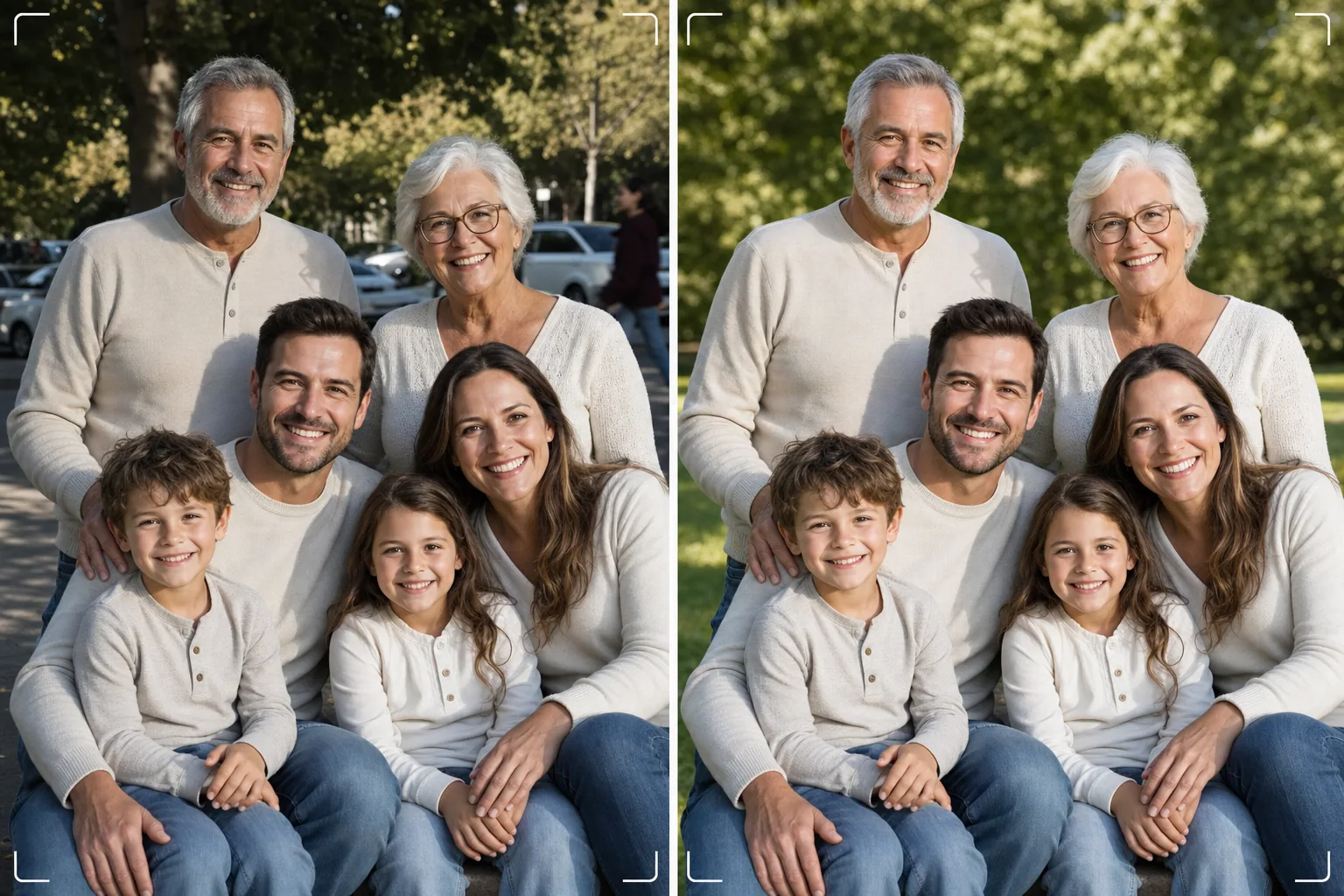
Ottieni la foto di famiglia perfetta senza bisogno di cento scatti. Questo modello rimuove le distrazioni dello sfondo, corregge l'illuminazione irregolare su tutto il gruppo, riduce in modo naturale le imperfezioni su ogni volto ed elimina i piccoli difetti che impediscono a una buona foto di gruppo di diventare eccezionale.
Prova gratis questo modelloPortrait template preview
Cosa fa questo modello
Risolve il problema universale delle foto di famiglia: far apparire tutti al meglio in una singola inquadratura. Magic Eraser rimuove gli intrusi, i bidoni della spazzatura, i cartelli di uscita, le linee elettriche, le auto parcheggiate e altre distrazioni che rovinano composizioni di gruppo altrimenti riuscite. AI Enhance corregge l'illuminazione irregolare che si verifica quando alcuni familiari sono all'ombra mentre altri sono in pieno sole, portando tutti a un'esposizione uniforme e gradevole. La levigatura naturale della pelle riduce imperfezioni, occhiaie e rossori su ogni volto senza far sembrare nessuno ritoccato artificialmente. Il risultato è il ritratto di famiglia che avevi immaginato quando hai riunito tutti.
Impostazioni del modello
| Pulizia dello sfondo | Rileva e rimuove automaticamente le distrazioni (persone, cartelli, oggetti) |
| Bilanciamento dell'esposizione | Illuminazione uniforme su tutti i soggetti (riempimento ombre + recupero alte luci) |
| Miglioramento della pelle | Riduzione naturale delle imperfezioni volto per volto (preserva i tratti unici) |
| Correzione del colore | Bilanciamento del bianco unificato nelle foto di gruppo a illuminazione mista |
| Nitidezza | Nitidezza consapevole del volto (dà priorità a occhi e sorrisi) |
| Risoluzione di output | Lato lungo da 6000px (stampa da parete a 300 DPI fino a 20×13 pollici) |
Come usare questo modello
Carica la foto di famiglia
Carica la foto di gruppo scattata durante una riunione di famiglia, una festa, un raduno o una sessione di ritratto. Il modello gestisce gruppi da due a trenta persone. Per risultati ottimali, scegli l'inquadratura in cui il maggior numero di volti guarda l'obiettivo con espressioni piacevoli: il modello corregge sfondo e illuminazione ma non può cambiare le espressioni facciali o gli occhi chiusi.
Rimuovi le distrazioni dello sfondo
Magic Eraser identifica e rimuove estranei, cartelli che distraggono, rifiuti, veicoli e altri elementi indesiderati dietro il gruppo familiare. L'IA ricostruisce lo sfondo in modo naturale, riempiendo erba, cielo, pareti o pavimento dietro gli oggetti rimossi.
Bilancia l'illuminazione e migliora i volti
AI Enhance corregge le differenze di esposizione tra i familiari: niente più metà del gruppo all'ombra e l'altra metà che strizza gli occhi al sole. Ogni volto riceve una riduzione individuale delle imperfezioni e un sottile schiarimento degli occhi, preservando i tratti unici e l'aspetto naturale di ogni persona.
Esporta per la stampa o la condivisione
Scarica a 6000px sul lato lungo per grandi stampe da parete, o a 2000px per i social media e i biglietti di auguri digitali. Il modello esporta in sRGB per la visualizzazione su schermo o in Adobe RGB per la stampa professionale. Sono disponibili più proporzioni di ritaglio (4:5, 5:7, 8:10) per le dimensioni di cornice comuni.
Consigli da professionisti per risultati ottimali
- ✓Scatta da tre a cinque foto in rapida successione. Scegli quella in cui il maggior numero di persone ha gli occhi aperti e un'espressione naturale: il modello gestisce tutto il resto, ma le espressioni e lo stato di occhi aperti non possono essere modificati a posteriori.
- ✓Posiziona la famiglia all'ombra aperta (sotto la chioma di un albero o sul lato in ombra di un edificio) anziché in una zona mista di sole e ombra. Questo dà al modello un punto di partenza illuminato in modo uniforme che produce il miglioramento più naturale.
- ✓Per i gruppi numerosi (dieci o più), disponi le persone in file sfalsate con i più alti dietro. Questa stratificazione naturale crea profondità e garantisce che ogni volto sia visibile. Il modello può schiarire i volti nelle file posteriori leggermente più scuri a causa della distanza dalla fonte di luce.
Strumenti
Domande frequenti
Può correggere occhi chiusi o espressioni sbagliate?
+
No. Il modello migliora l'illuminazione, rimuove le distrazioni e leviga la pelle, ma non può cambiare le espressioni facciali, aprire gli occhi chiusi o riposizionare le persone. Scegli l'inquadratura con la migliore espressione prima di caricare: il modello renderà quell'inquadratura il più bella possibile.
E i grandi gruppi di raduni?
+
Il modello gestisce gruppi fino a circa trenta persone. Per gruppi molto numerosi, il miglioramento individuale dei volti diventa più sottile a causa delle dimensioni ridotte dei volti nell'inquadratura, ma la pulizia dello sfondo e la correzione dell'illuminazione sono pienamente efficaci con qualsiasi dimensione del gruppo.
Posso rimuovere una persona dalla foto di famiglia?
+
Sì, Magic Eraser può rimuovere persone specifiche dal gruppo. Seleziona la persona che vuoi rimuovere e l'IA ricostruirà lo sfondo dietro di lei. Funziona meglio quando la persona si trova al bordo del gruppo anziché al centro tra le altre.
Il ritratto di famiglia perfetto è a una pulizia di distanza
Carica le tue foto di gruppo e ottieni ritratti di famiglia puliti, illuminati in modo uniforme e migliorati naturalmente, pronti per la parete.
Provalo gratisRelated templates
More portrait templates for your workflow.
Modello di ritocco di ritratti scolastici adatto all'età. Rimozione naturale delle imperfezioni, sfondi coerenti e output standard da annuario con elaborazione batch per intere classi.
Modello di ritratto di animale domestico di qualità studio. Gestisce i bordi della pelliccia, rimuove guinzagli e conduttori, sostituisce gli sfondi e affina gli occhi di cani, gatti e altri animali.
Modello naturale per il ritocco della pelle che rimuove le imperfezioni preservando i pori e la consistenza. Illuminazione uniforme, nessun aspetto plastico: solo una migliore pelle sulla fotocamera.
Migliora le foto di neonati e bambini con toni caldi e tenui, levigatura delicata della pelle, rimozione di oggetti di scena e distrazioni e dimensionamento pronto per la stampa per annunci e decorazioni da parete.
Ritocca le foto di maternità con un delicato effetto levigante della pelle, un'illuminazione soffusa, una semplificazione dello sfondo e una calda gradazione dei colori per un look da ritratto di gravidanza senza tempo.