
Ritocco di ritratti scolastici
Offri a ogni studente un ritratto di cui essere soddisfatto, mantenendo un aspetto naturale e adatto all'età. Questo modello affronta i problemi comuni della fotografia scolastica — imperfezioni temporanee, illuminazione irregolare nel corso di una sessione e sfondi incoerenti — e produce immagini pronte per l'annuario, con una qualità professionale uniforme per ogni studente di una classe.
Prova gratis questo modelloPortrait template preview
Cosa fa questo modello
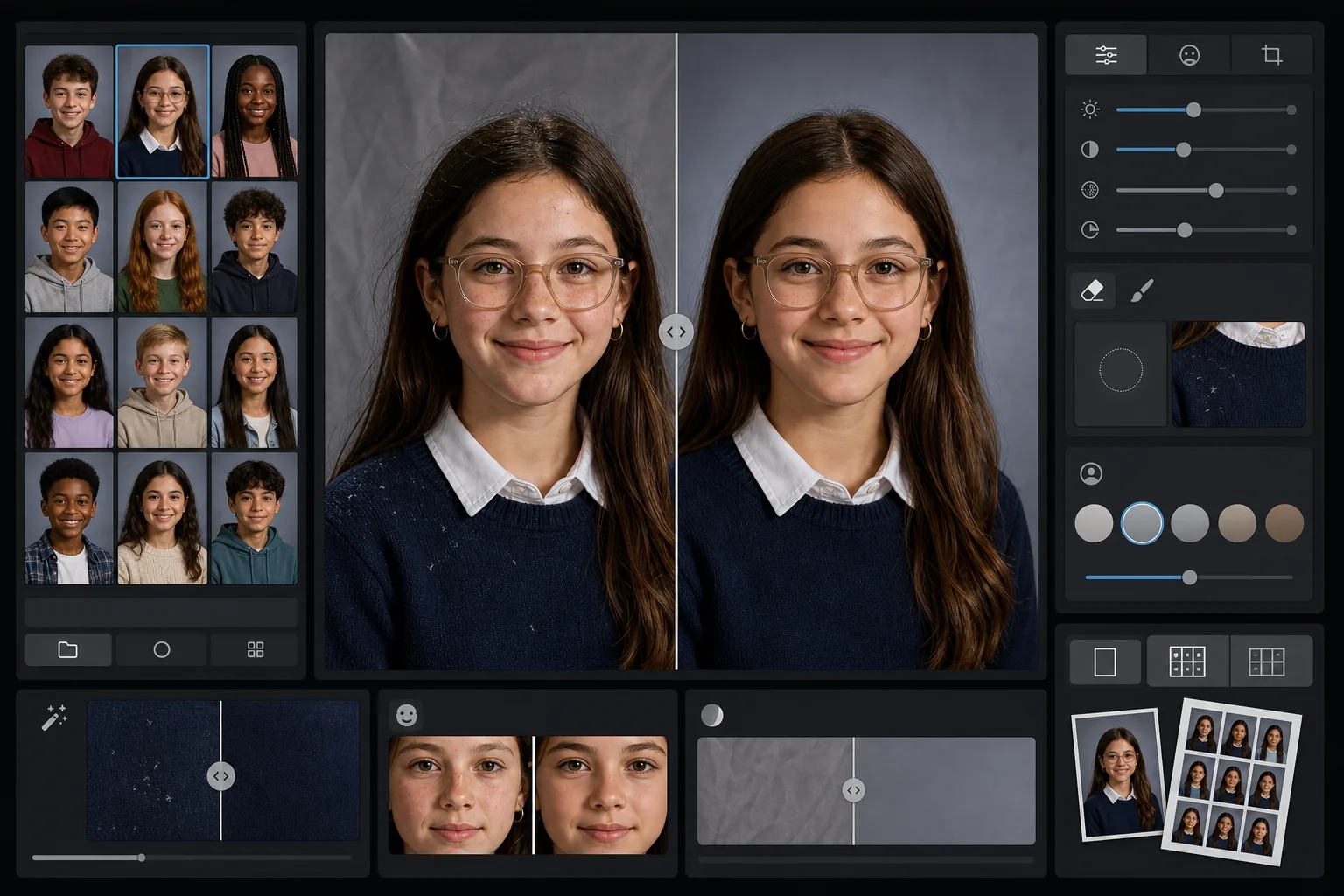
Applica ai ritratti scolastici un ritocco delicato e adatto all'età che attenua le imperfezioni temporanee preservando l'aspetto naturale di ogni studente. AI Enhance corregge l'esposizione irregolare e le variazioni di colore che si verificano fotografando decine di studenti con la stessa configurazione di luce nel corso di una sessione. Magic Eraser rimuove i capelli sparsi sugli abiti, i bordi del colletto storti e le pieghe dello sfondo sui fondali portatili.
Impostazioni del modello
| Livello di ritocco | Leggero — rimuove solo le imperfezioni temporanee, preserva lentiggini e tratti naturali |
| Dimensione di output | 1200×1500px (ritratto standard 4:5, 300 DPI in formato portafoglio) |
| Normalizzazione dello sfondo | Uniforma il tono del fondale su tutte le immagini di un lotto |
| Correzione dell'esposizione | Automatica — compensa le variazioni di luce nel corso di una sessione di scatto |
| Coerenza del colore | Bilanciamento del bianco uniforme su tutti i ritratti elaborati |
| Pulizia dei dettagli sparsi | Rimuove i capelli svolazzanti sulle spalle, la lanugine e le pieghe del fondale |
Come usare questo modello
Carica i ritratti della classe
Carica un singolo ritratto o un intero lotto della classe. Il modello gestisce immagini singole o gruppi, applicando lo stesso standard di ritocco a tutte le foto per una sezione dell'annuario coerente.
Applica un ritocco adatto all'età
AI Enhance attenua delicatamente le imperfezioni temporanee come un brufolo o un graffio mantenendo ogni studente con il proprio aspetto. Lentiggini, nei, apparecchi e occhiali vengono sempre preservati — l'obiettivo è una versione curata del loro aspetto reale.
Normalizza esposizione e sfondo
Le condizioni di luce cambiano nel corso di una sessione di ritratti man mano che la configurazione si sposta. Il modello corregge esposizione e bilanciamento del bianco affinché ogni studente appaia illuminato in modo uniforme, e il tono del fondale corrisponde su tutto il lotto.
Pulisci ed esporta
Magic Eraser rimuove le piccole distrazioni — un pelucco su un maglione scuro, un capello sparso sulla fronte, una piega nel fondale portatile. Esporta alla risoluzione standard dell'annuario per la stampa o in JPEG a risoluzione inferiore per la galleria online della scuola.
Consigli da professionisti per i migliori risultati
- ✓Elabora l'intero lotto della classe insieme anziché uno alla volta — il modello usa il gruppo per calibrare un'esposizione e un colore coerenti su tutti i ritratti.
- ✓Per gli studenti che portano gli occhiali, la foto originale dovrebbe ritrarre lo studente che abbassa leggermente il mento per ridurre i riflessi — il miglioramento con l'IA funziona meglio quando gli occhi sono visibili dietro le lenti.
- ✓Esegui un lotto di prova di 5-10 ritratti prima di elaborare un'intera scuola, per confermare che il livello di ritocco soddisfi gli standard del comitato dell'annuario.
- ✓Conserva i file originali non ritoccati accanto alle versioni elaborate — alcuni genitori preferiscono la foto completamente non modificata per uso personale.
Strumenti
Domande frequenti
Il ritocco è adatto a bambini e adolescenti?
+
Sì. Il modello è progettato specificamente per soggetti in età scolare. Rimuove solo imperfezioni temporanee come un brufolo il giorno della foto — non rimodella mai i tratti, non altera il tono della pelle né applica il tipo di levigatura usato nel ritocco beauty per adulti. Ogni studente resta sé stesso.
Posso elaborare un'intera classe o scuola in una volta?
+
Sì. Carica fino a centinaia di ritratti in un unico lotto. Il modello applica standard di ritocco identici e normalizza esposizione, colore e coerenza dello sfondo su ogni immagine, così la sezione dell'annuario appare uniforme.
Verranno rimossi apparecchi, occhiali o apparecchi acustici?
+
No. Il modello è progettato per preservare tutte le caratteristiche permanenti e semipermanenti, inclusi apparecchi, occhiali, apparecchi acustici e dispositivi medici. Affronta solo le imperfezioni superficiali temporanee e le distrazioni ambientali come la lanugine e le pieghe del fondale.
Consegna ritratti pronti per l'annuario in pochi minuti
Carica i ritratti scolastici singolarmente o per classe e ottieni immagini coerenti, ritoccate in modo naturale e pronte per la stampa. Ogni studente appare al meglio.
Provalo gratisRelated templates
More portrait templates for your workflow.
Modello di ritratto di animale domestico di qualità studio. Gestisce i bordi della pelliccia, rimuove guinzagli e conduttori, sostituisce gli sfondi e affina gli occhi di cani, gatti e altri animali.
Modello naturale per il ritocco della pelle che rimuove le imperfezioni preservando i pori e la consistenza. Illuminazione uniforme, nessun aspetto plastico: solo una migliore pelle sulla fotocamera.
Migliora le foto di neonati e bambini con toni caldi e tenui, levigatura delicata della pelle, rimozione di oggetti di scena e distrazioni e dimensionamento pronto per la stampa per annunci e decorazioni da parete.
Ritocca le foto di maternità con un delicato effetto levigante della pelle, un'illuminazione soffusa, una semplificazione dello sfondo e una calda gradazione dei colori per un look da ritratto di gravidanza senza tempo.
Pulisci i ritratti di famiglia rimuovendo le distrazioni dello sfondo, correggendo l'esposizione irregolare, levigando la pelle in modo naturale e assicurando che tutti appaiano al meglio nella stessa inquadratura.