
Design della scheda del menu
Crea grafiche professionali per la scheda del menu a partire dalle tue foto di piatti. Questo modello isola ogni singolo piatto dalle apparecchiature della tavola e dagli sfondi disordinati, uniforma l'aspetto di tutti gli articoli per un menu coerente ed esporta immagini pronte per il layout ottimizzate per schede di menu digitali, menu stampati e schede sulle piattaforme di consegna come DoorDash, Uber Eats e Grubhub.
Prova gratis questo modelloFood template preview
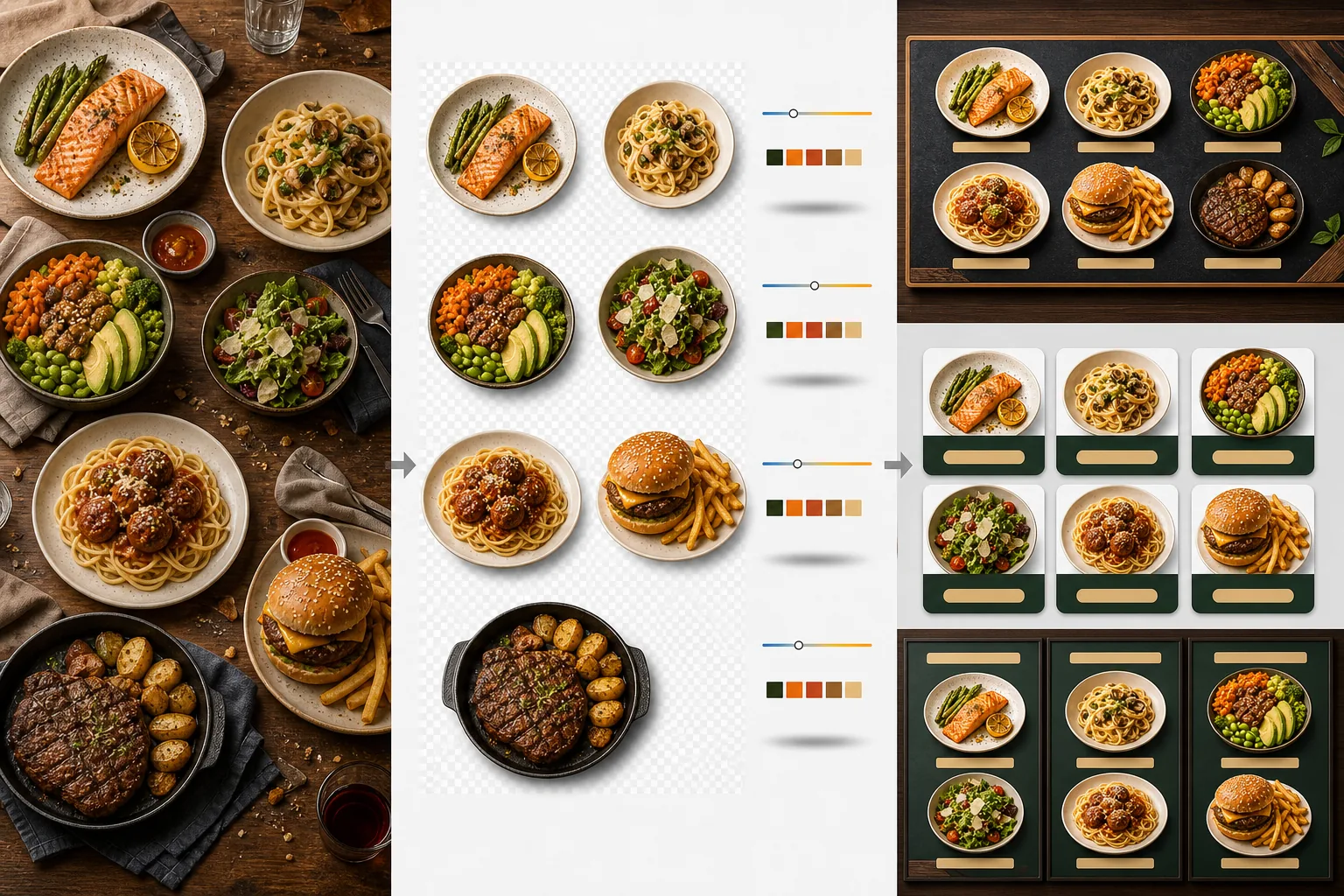
Cosa fa questo modello
Trasforma foto di piatti incoerenti scattate in momenti diversi, con luci diverse e su tavoli diversi in un insieme uniforme di immagini pronte per il menu. Background Eraser isola ogni piatto — piatto, ciotola o confezione — dalla sua apparecchiatura originale e sostituisce lo sfondo con un colore o una texture coerente che si abbina al branding del tuo ristorante. La temperatura colore viene normalizzata su tutti gli articoli, così le foto scattate sotto luce calda al tungsteno, pannelli LED freddi e luce naturale dalla finestra appaiono tutte coerenti. I colori del cibo vengono esaltati per renderli appetitosi senza sconfinare nell'irreale — i verdi sono vivaci, le carni calde e succose e le salse lucide. Il risultato è un insieme di immagini che funziona come un sistema visivo di menu unificato anziché come una raccolta casuale di foto scattate col telefono.
Impostazioni del modello
| Sfondo | Tinta unita (abbinata al marchio), texture legno, ardesia o trasparente |
| Normalizzazione della temperatura colore | Allinea tutti gli articoli a un bilanciamento del bianco luce diurna di 5000K |
| Esaltazione del colore del cibo | Boost appetitoso (proteine calde, verdi vivaci, salse lucide) |
| Stile dell'ombra | Ombra esterna delicata per dare profondità sugli sfondi a tinta unita |
| Dimensioni di output | 1200×1200px (piattaforme di consegna), 800×600px (schede di menu digitali), personalizzato |
Come usare questo modello
Carica le foto dei piatti
Carica le foto dei singoli articoli del menu. Le foto scattate col telefono durante il servizio, i servizi fotografici professionali di food photography e le foto delle schede sulle piattaforme di consegna funzionano tutte. Il modello elabora ogni piatto separatamente per ottenere risultati coerenti su tutto il tuo menu.
Isola i piatti dagli sfondi
Background Eraser separa ogni piatto dal suo tavolo, tovaglietta o piano del bancone. Il rilevamento dei bordi segue con precisione il bordo del piatto, il bordo della ciotola o il contorno della confezione. Guarnizioni e topping che si estendono oltre il bordo del piatto — un rametto di prezzemolo, un filo di salsa — vengono conservati.
Uniforma colore e stile
La temperatura colore viene normalizzata in modo che tutti i piatti appaiano sotto la stessa illuminazione coerente. I colori del cibo vengono esaltati per stuzzicare l'appetito. Sotto ogni piatto viene aggiunta un'ombra delicata per un aspetto stabile e tridimensionale sul nuovo sfondo.
Esporta per menu e piattaforme
Scarica a 1200×1200px per le schede di DoorDash, Uber Eats e Grubhub. Esporta a 800×600px per schede di menu digitali e display TV. Le esportazioni in PNG trasparente sono disponibili per i grafici che realizzano menu stampati e segnaletica personalizzati.
Consigli da professionisti per risultati ottimali
- ✓Fotografa i piatti direttamente dall'alto (flat lay) o con un'angolazione di 45 gradi. Queste due angolazioni producono la rimozione dello sfondo più pulita perché il contorno del piatto è completamente visibile e l'IA può separare il piatto dal tavolo con precisione.
- ✓Pulisci il bordo del piatto prima di fotografare. Le sbavature di salsa e le briciole sul bordo del piatto diventano parte dell'immagine isolata e appaiono disordinate sul nuovo sfondo pulito.
- ✓Elabora tutti gli articoli del menu in un unico lotto con le stesse impostazioni. La coerenza in ogni foto di piatto è ciò che fa sembrare un menu professionale — temperature colore e tonalità di sfondo non abbinate fanno sembrare amatoriale anche il cibo migliore.
Strumenti
Domande frequenti
Posso usarlo per le bevande?
+
Sì. Bicchieri, tazze, bottiglie e cocktail vengono isolati con la stessa precisione dei piatti impiattati. Le bevande trasparenti come acqua, vino e cocktail limpidi mantengono la loro trasparenza sul nuovo sfondo.
Il cibo sembrerà ritoccato artificialmente?
+
L'esaltazione del colore è calibrata per far apparire il cibo il più appetitoso possibile senza sconfinare nell'irreale. Pensalo come la differenza tra un cibo fotografato sotto una dura luce fluorescente e un cibo fotografato alla luce naturale del giorno — il modello fa sembrare ogni piatto come se fosse stato scattato in condizioni ideali.
Funziona per le foto di menu delle piattaforme di consegna?
+
Sì. L'output quadrato di 1200×1200px soddisfa i requisiti di immagine di DoorDash, Uber Eats, Grubhub e Postmates. I ristoranti con foto di menu dall'aspetto professionale sulle piattaforme di consegna ricevono costantemente tassi di ordine più alti rispetto a quelli con scatti col telefono non elaborati.
Crea un menu che rende ogni piatto irresistibile
Carica le foto dei piatti e ottieni immagini di menu coerenti e appetitose, pronte per schede digitali, menu stampati e piattaforme di consegna.
Provalo gratisRelated templates
More food templates for your workflow.
Crea appetitose foto di menu per la consegna di cibo con miglioramento della vivacità dei colori, sfondi puliti, effetti di vapore e freschezza e dimensioni ottimizzate per la piattaforma.
Migliora le foto di ricette per libri di cucina e blog di cucina con nitidezza della qualità di stampa, precisione del colore degli ingredienti, pulizia della scena con stile e output ad alta risoluzione.