
Foto del menu per la consegna
Fai sembrare i piatti del tuo menu di consegna appetitosi quanto il loro sapore. Questo modello esalta i colori dei cibi per il massimo appeal, rimuove gli sfondi disordinati della cucina, accentua il calore visivo e la freschezza dei piatti e genera immagini ottimizzate per DoorDash, Uber Eats, Grubhub e altre piattaforme di consegna.
Prova gratis questo modelloFood template preview
Cosa fa questo modello
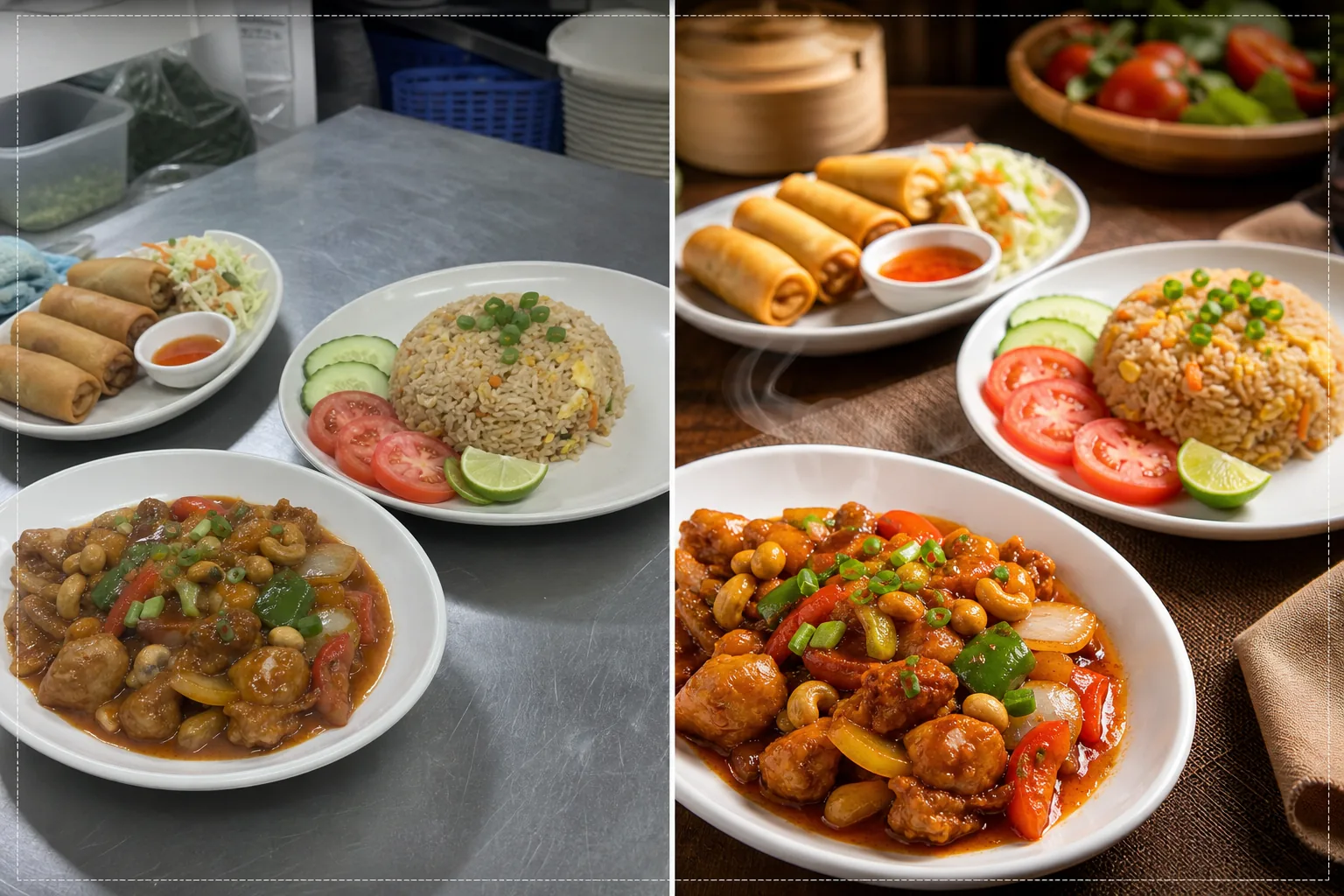
Trasforma le foto scattate al volo in cucina in immagini di qualità da menu che stimolano gli ordini sulle piattaforme di consegna di cibo. I ristoranti fotografano spesso i piatti in cucine affollate con illuminazione fluorescente che fa sembrare il cibo poco appetitoso: pollo con tonalità verdastre, riso marrone spento e salse slavate. Questo modello corregge la temperatura del colore verso tonalità calde e appetitose e aumenta la saturazione di ingredienti naturalmente vivaci come pomodori, verdure e peperoni. Background Eraser rimuove gli sfondi disordinati della cucina e li sostituisce con superfici pulite e adatte al cibo. AI Enhance accentua le texture dei cibi così che gli acquirenti possano vedere la croccantezza dei fritti, il vapore che si alza dai piatti caldi e la freschezza delle guarnizioni.
Impostazioni del modello
| Calore dei colori | Tonalità calde e appetitose (+15% di spostamento caldo, corregge il verde fluorescente) |
| Saturazione del cibo | Esaltazione selettiva di rossi, verdi e gialli (colori naturali degli alimenti) |
| Miglioramento texture | Accentuazione dei dettagli di croccantezza, umidità e lucentezza |
| Sfondo | Superficie del tavolo pulita, colore pieno o sfondo scuro e suggestivo |
| Dimensioni di output | 1200 × 800 px (ottimale per le piattaforme di consegna) e 1080 × 1080 px (social) |
Come usare questo modello
Carica la foto del tuo piatto
Fotografa il piatto impiattato direttamente dall'alto (flat lay) o con un'angolazione di 45 gradi: entrambe le composizioni funzionano bene per i menu di consegna. Usa la migliore luce naturale disponibile o posiziona il piatto vicino a una finestra. Carica direttamente dal telefono: non serve alcun allestimento da studio.
Correzione di colore e calore
Il modello corregge la dominante di colore dell'illuminazione fluorescente e LED della cucina, spostando le tonalità del cibo verso sfumature calde e appetitose. Le salse appaiono più ricche, le proteine più dorate e le verdure più fresche. La correzione esalta ciò che è naturalmente presente invece di far sembrare il cibo colorato artificialmente.
Miglioramento di sfondo e texture
Background Eraser sostituisce lo sfondo della cucina con una superficie pulita: tavolo di legno, marmo, ardesia o un semplice colore pieno. AI Enhance accentua le texture del cibo per esaltare la croccantezza dei fritti, la lucentezza delle salse e la freschezza dei prodotti. L'immagine nel complesso acquisisce una qualità da fotografia gastronomica professionale.
Esporta per le piattaforme di consegna
Scarica a 1200 × 800 px per gli elenchi dei menu delle piattaforme di consegna (DoorDash, Uber Eats, Grubhub) o a 1080 × 1080 px per i post gastronomici su Instagram. Il profilo di colore caldo garantisce che il piatto appaia appetitoso su tutti i dispositivi e i tipi di schermo.
Consigli da professionisti per risultati ottimali
- ✓Fotografa i piatti subito dopo l'impiattamento, mentre vapore, umidità e freschezza delle guarnizioni sono al massimo. La fotografia gastronomica ha una finestra di circa tre-cinque minuti prima che le salse si assestino, le guarnizioni appassiscano e il vapore si disperda. Il modello esalta questi segnali di freschezza ma non può crearli.
- ✓Usa un piatto bianco o di colore chiaro per le foto del menu. I piatti bianchi creano il contrasto più forte con il cibo, facendo risaltare i colori e permettendo all'IA di produrre bordi più puliti durante la rimozione dello sfondo. Anche i piatti scuri vanno bene, ma riducono il vantaggio del contrasto cromatico.
- ✓Per i menu combinati e gli ordini con più portate, disponi tutti gli elementi in un'unica inquadratura a leggera distanza. Il modello accentua ogni elemento del cibo singolarmente, e mostrare l'ordine completo dà ai clienti della consegna un'idea chiara di ciò che riceveranno.
Strumenti
Domande frequenti
Può correggere le foto scattate sotto le luci fluorescenti della cucina?
+
Sì. L'illuminazione fluorescente è il problema più comune nella fotografia gastronomica dei ristoranti, perché crea una dominante verde-gialla che fa sembrare il cibo poco appetitoso. Il modello corregge specificamente questo spostamento di colore e lo sostituisce con tonalità calde e appetitose che fanno apparire il cibo naturalmente delizioso.
Funziona per tutti i tipi di cucina?
+
Il modello gestisce tutti i tipi di cibo: americano, asiatico, messicano, italiano, indiano, mediorientale e altri. La correzione e il miglioramento del colore sono calibrati sui colori naturali del cibo di tutte le tradizioni culinarie, esaltando i rossi nei piatti a base di pomodoro, i verdi nelle insalate e le tonalità dorate nei fritti e negli alimenti al forno.
Posso elaborare l'intero menu in una sola volta?
+
Sì. Carica tutte le foto dei piatti del menu ed elaborale in batch. Il modello applica un trattamento del colore, uno sfondo e dimensioni uniformi all'intero menu per una galleria di menu omogenea e professionale sulle piattaforme di consegna.
Foto del menu che spingono i clienti a toccare ordina ora
Carica le foto dei piatti dalla tua cucina e ottieni immagini appetitose e pronte per le piattaforme che generano più ordini di consegna.
Provalo gratisRelated templates
More food templates for your workflow.
Migliora le foto di ricette per libri di cucina e blog di cucina con nitidezza della qualità di stampa, precisione del colore degli ingredienti, pulizia della scena con stile e output ad alta risoluzione.
Crea grafica per schede di menu con rimozione dello sfondo delle foto di cibo, stili coerenti ed esportazioni pronte per il layout per display digitali, menu stampati e piattaforme di consegna di terze parti.