
Foto di ricetta per libro di cucina
Eleva le foto di ricette fatte in casa agli standard di qualità di un libro di cucina. Questo modello migliora i colori degli ingredienti per la precisione di stampa, accentua le texture degli alimenti per una riproduzione ad alta risoluzione, rimuove gli elementi indesiderati dalle scene allestite e produce in risoluzione professionale per libri di cucina, blog di cucina e schede ricetta.
Prova gratis questo modelloFood template preview
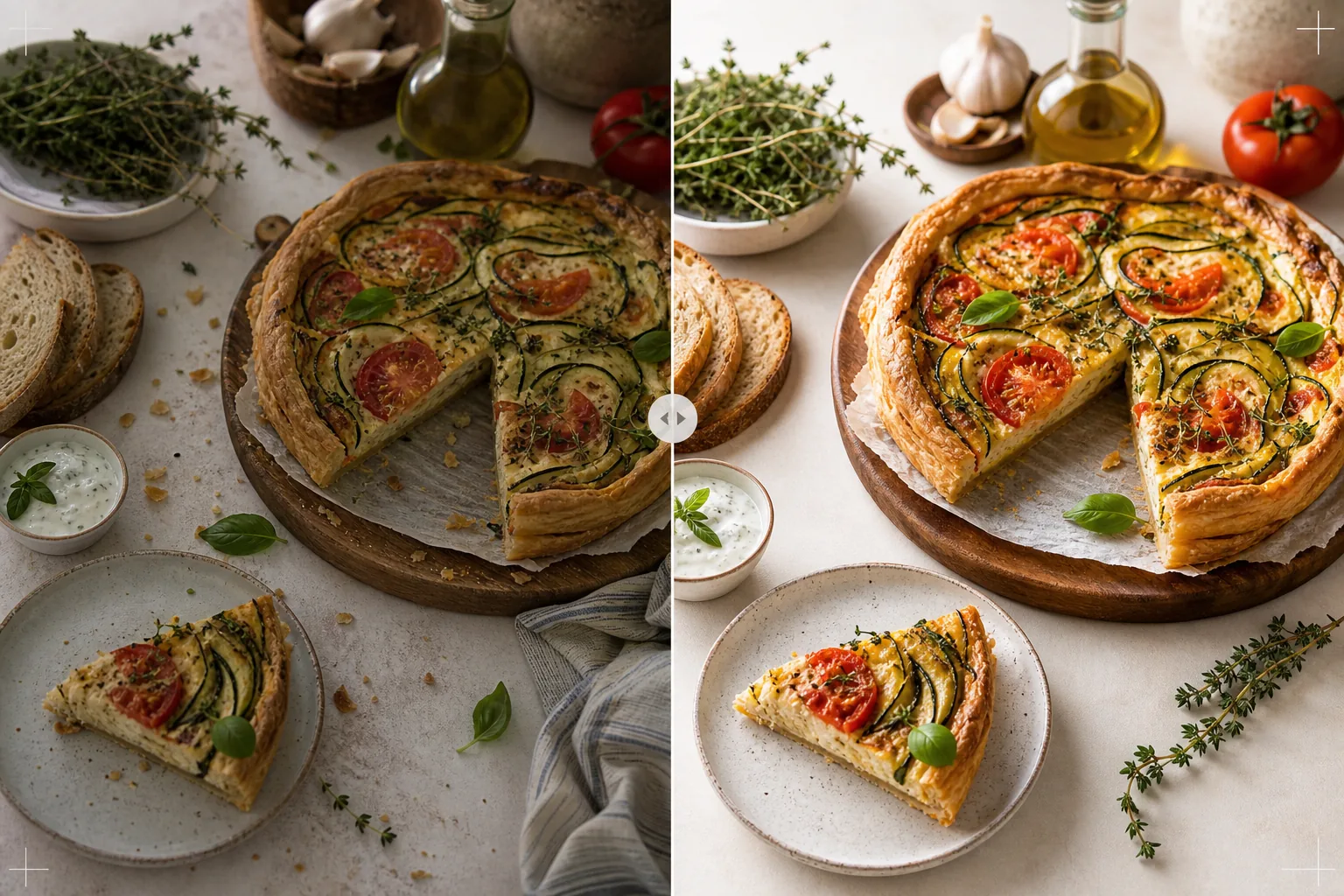
Cosa fa questo modello
Trasforma le foto di ricette scattate nella cucina di casa in immagini degne di libri di cucina pubblicati e blog di cucina professionali. La fotografia per libri di cucina richiede standard più elevati dei social media: i colori devono essere fedeli alla stampa (non solo accattivanti sullo schermo), le texture devono essere abbastanza nitide per la stampa a 300 DPI in grandi formati e le scene allestite devono apparire intenzionali, senza disordine visibile. AI Enhance applica una correzione del colore calibrata per la stampa che garantisce che i colori degli ingredienti vengano riprodotti fedelmente sulla carta, non solo sugli schermi. Magic Eraser rimuove il disordine sullo sfondo, gli utensili fuori posto, i piatti sporchi visibili nella scena e le imperfezioni dell'allestimento alimentare che diventano più evidenti alla risoluzione di stampa. Il risultato sembra scattato da un fotografo di libri di cucina con anni di esperienza nel food styling.
Impostazioni del modello
| Profilo colore | Adobe RGB per la stampa o sRGB per il digitale (selezionabile) |
| Texture degli alimenti | Accentuazione dei dettagli ad alta frequenza per croccantezza, mollica e glassa |
| Pulizia della scena | Rimuovere utensili fuori posto, briciole e disordine sullo sfondo |
| Precisione del colore | Calibrata per la stampa (verdi, rossi e marroni fedeli sulla carta) |
| Risoluzione di uscita | 6000px sul lato lungo (300 DPI per una doppia pagina intera di libro di cucina) |
Come usare questo modello
Carica la tua foto di ricetta
Carica lo scatto della ricetta allestita: vista dall'alto in piano, angolazione di 45 gradi o primo piano dettagliato del piatto finito. Includi oggetti di scena come ingredienti, utensili e tessuti che fanno parte della composizione prevista. Il modello rimuove gli elementi indesiderati preservando l'allestimento intenzionale.
Miglioramento di colore e texture
AI Enhance corregge la temperatura del colore per la precisione di stampa e accentua le texture degli alimenti: la croccantezza di una crosta di pane, la lucentezza di una ganache al cioccolato, gli strati distinti di una sezione trasversale. La calibrazione del colore garantisce che i verdi, i rossi e i marroni dorati che appaiono fedeli sullo schermo vengano riprodotti fedelmente anche una volta stampati su carta.
Rifinitura della scena
Magic Eraser rimuove gli elementi che non servono alla composizione: briciole sparse fuori dall'area prevista, l'angolo di uno strofinaccio che spunta dal bordo, disordine sullo sfondo visibile alla periferia dell'inquadratura o macchie su oggetti di scena e superfici. La scena allestita viene rifinita per apparire intenzionale e curata.
Esporta per la stampa o il digitale
Scarica a 6000px sul lato lungo in Adobe RGB per la stampa di libri di cucina a 300 DPI fino a una doppia pagina intera, o in sRGB per l'uso su blog di cucina e siti web di ricette. L'alta risoluzione conserva dettagli sufficienti affinché i lettori vedano ogni foglia di erba aromatica, le texture dei semi e la consistenza delle salse all'ingrandimento di stampa.
Consigli da professionista per i migliori risultati
- ✓Scatta con la luce naturale di una finestra proveniente da una sola direzione, con un riflettore bianco sul lato in ombra. Questo crea l'illuminazione direzionale morbida che caratterizza la fotografia di cibo professionale. Il modello può correggere l'illuminazione artificiale, ma la luce naturale produce fin da subito i colori degli alimenti più autentici.
- ✓Impiatta prima il piatto principale e fotografalo entro cinque minuti, mentre texture e colori sono al loro apice. Poi fotografa gli scatti del processo passo dopo passo. Il modello accentua gli indizi di freschezza come vapore e umidità, ma non può ripristinare un alimento rimasto a riposo per un periodo prolungato.
- ✓Usa un numero dispari di oggetti di scena (tre ingredienti, un utensile, un tessuto) per la composizione visivamente più equilibrata. Il modello pulisce la scena ma lavora all'interno della tua composizione esistente: un punto di partenza ben composto produce un'immagine finale più professionale.
- ✓Per gli scatti in sezione trasversale (torte tagliate, pane affettato, dolci spaccati), usa un coltello molto affilato e taglia subito prima di fotografare. Il modello accentua la definizione degli strati e la texture della mollica, ma non può correggere un taglio frastagliato che nasconde la struttura interna.
Strumenti
Domande frequenti
Può sostituire un fotografo di cibo professionista?
+
Il modello porta le foto di ricette scattate in casa a un livello adatto a libri di cucina autopubblicati, blog di cucina e schede ricetta. Per i libri di cucina dei grandi editori con rigorosi standard visivi, un fotografo e uno stylist professionisti producono risultati superiori, ma il modello è un'ottima opzione per autori indipendenti e creatori di contenuti.
E le foto del processo passo dopo passo?
+
Le foto di processo (mescolare, tritare, versare) beneficiano della stessa correzione del colore e pulizia. Il modello gestisce la sfocatura di movimento tipica degli scatti d'azione accentuando selettivamente il cibo mantenendo la sfocatura naturale di mani e utensili in movimento.
Come funziona la calibrazione del colore per la stampa?
+
L'uscita Adobe RGB contiene una gamma di colori più ampia rispetto a sRGB, preservando le sottili differenze di colore nei verdi e nei rossi che vanno perse nella conversione in sRGB. Stampati su una macchina da stampa calibrata, questi colori vengono riprodotti più fedelmente. Per la stampa domestica, l'uscita sRGB produce risultati migliori sulla maggior parte delle stampanti consumer.
Foto di ricette degne di un libro di cucina pubblicato
Carica le tue foto di cibo e ottieni immagini di qualità di stampa, fedeli nei colori, con texture nitide e composizioni rifinite.
Provalo gratisRelated templates
More food templates for your workflow.
Crea appetitose foto di menu per la consegna di cibo con miglioramento della vivacità dei colori, sfondi puliti, effetti di vapore e freschezza e dimensioni ottimizzate per la piattaforma.
Crea grafica per schede di menu con rimozione dello sfondo delle foto di cibo, stili coerenti ed esportazioni pronte per il layout per display digitali, menu stampati e piattaforme di consegna di terze parti.