
Miglioramento del sorriso dentale
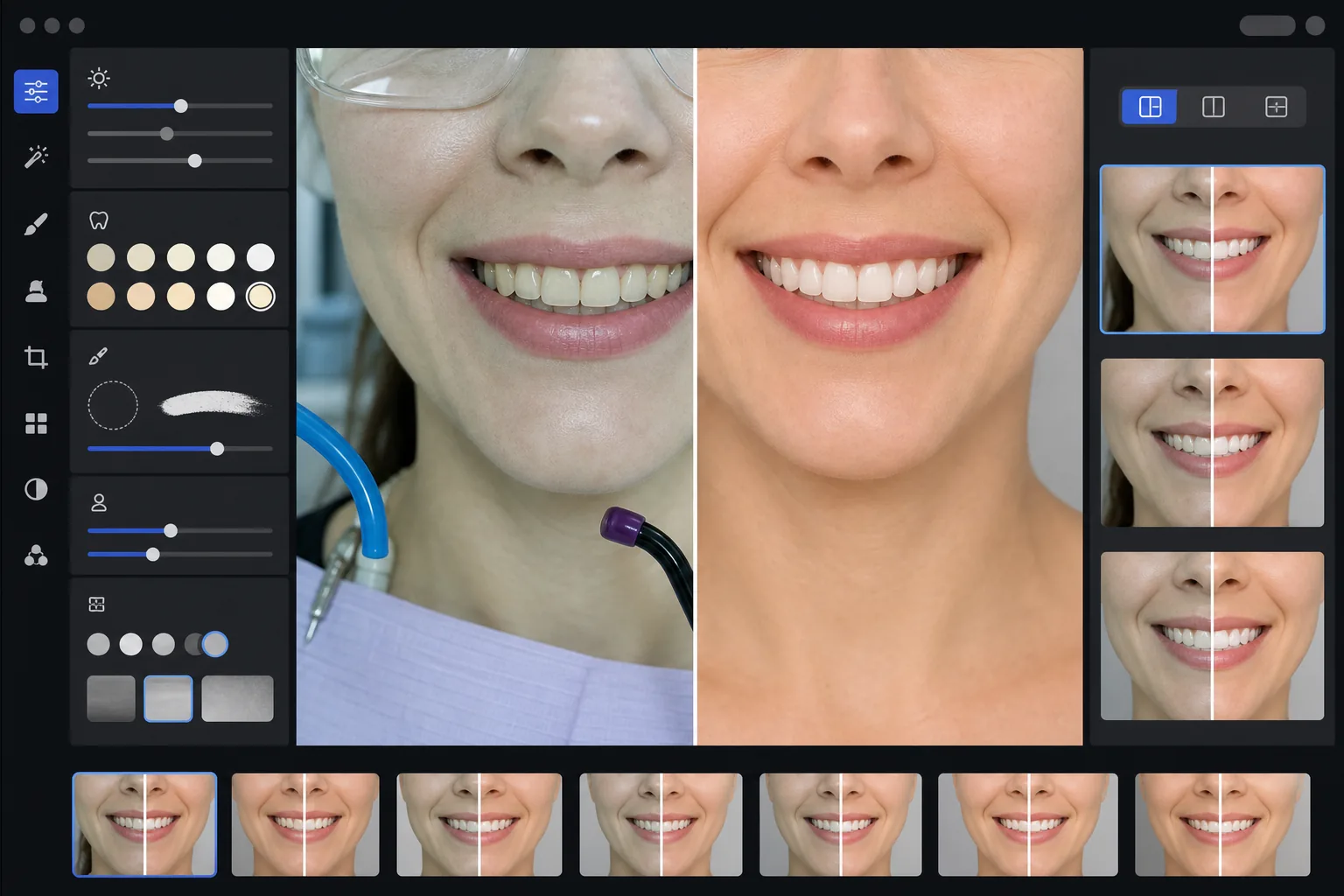
Crea immagini di marketing dentale prima-dopo professionali che mettono in mostra il lavoro del tuo studio. Questo modello applica uno sbiancamento dei denti dall'aspetto naturale, rimuove il disordine clinico sullo sfondo, uniforma gli sfondi dei ritratti dei pazienti e bilancia la dura illuminazione dall'alto comune nelle foto di sala operatoria.
Prova gratis questo modelloProfessional template preview
Cosa fa questo modello
Trasforma le foto dentali cliniche in immagini di marketing rifinite per siti web di studi, social media e materiali educativi per i pazienti. AI Enhance corregge la poco lusinghiera dominante verde-bianca dell'illuminazione della sala operatoria dentale e applica un sottile sbiancamento dei denti dall'aspetto naturale, schiarendo i denti di 2-3 tonalità senza farli sembrare artificiali. Magic Eraser rimuove gli elementi clinici sullo sfondo come tubi di aspirazione, lampade fotopolimerizzatrici, segni di carta da articolazione sulle labbra e occhiali protettivi. Gli sfondi dei ritratti dei pazienti vengono uniformati a uno sfondo pulito e coerente in tutta la galleria dei casi.
Impostazioni del modello
| Sbiancamento dei denti | Schiaritura naturale da +2 a +3 tonalità (preserva la traslucenza e la texture dello smalto) |
| Correzione dell'illuminazione | Bilanciamento luce diurna della sala operatoria dentale (rimuove la dominante clinica verde-bianca) |
| Sfondo | Sfondo grigio o bianco neutro e coerente con vignettatura morbida |
| Tono della pelle | Correzione del calore periorale (riduce il pallore dovuto all'illuminazione dentale) |
| Colore delle labbra | Recupero naturale della saturazione (contrasta l'illuminazione clinica slavata) |
Come usare questo modello
Carica le foto cliniche
Carica primi piani del sorriso, foto prima-dopo in stile ritratto o immagini intraorali scattate nella tua sala operatoria. Il modello funziona con foto di fotocamere specifiche per uso dentale, reflex con flash anulare e foto da smartphone scattate sotto le luci della sala operatoria.
Correggi l'illuminazione clinica
AI Enhance neutralizza la dominante verde-bianca delle lampade del riunito dentale dall'alto, riscalda i toni della pelle attorno alla bocca e recupera il colore naturale delle labbra. Il colore dei denti viene schiarito in modo sottile per mostrare il risultato al meglio pur rimanendo realistico e onesto.
Pulisci sfondi e distrazioni
Magic Eraser rimuove tubi visibili, punte di lampade fotopolimerizzatrici, clip per bavaglini, macchie di carta da articolazione sulle labbra e attrezzature cliniche sullo sfondo. Lo sfondo viene sostituito con uno sfondo neutro coerente che corrisponde in tutte le tue coppie prima-dopo.
Esporta per uso marketing
Scarica singole immagini migliorate o composizioni prima-dopo affiancate. L'output è dimensionato per gallerie di siti web, post di Instagram, Google Business Profile e brochure stampate per i pazienti, con una risoluzione adatta a stampe da 8x10 pollici.
Consigli da professionisti per risultati ottimali
- ✓Per le coppie prima-dopo, fotografa sia l'immagine pre-trattamento sia quella post-trattamento dalla stessa angolazione, distanza e posizione di illuminazione. Il modello può correggere le differenze di esposizione tra le due, ma mantenere l'angolazione originale della fotocamera produce il confronto più convincente.
- ✓Lo sbiancamento dei denti è volutamente prudente: schiarisce di 2-3 tonalità vita anziché rendere i denti bianco carta. Questo appare più naturale e credibile ai potenziali pazienti. Se il tuo risultato clinico reale è straordinario, una foto onesta con un leggero miglioramento è più persuasiva di un'immagine eccessivamente elaborata.
- ✓Usa un divaricatore per guance per gli scatti intraorali del sorriso per ottenere la visione più completa del lavoro dentale. Il modello gestisce l'aspetto leggermente clinico delle foto assistite da divaricatore riscaldando i toni della pelle e ritagliando per concentrarsi sulla zona del sorriso.
- ✓Elabora l'intera galleria dei casi in un unico lotto per garantire colore di sfondo, luminosità e calore coerenti in tutte le coppie prima-dopo. Un'illuminazione incoerente tra i casi sul tuo sito web compromette l'impressione di professionalità.
Strumenti
Domande frequenti
Questo è considerato pubblicità dentale ingannevole?
+
Il miglioramento dello sbiancamento è limitato a 2-3 tonalità vita e preserva la traslucenza naturale e la texture superficiale dello smalto. Questo rientra ampiamente in ciò che l'illuminazione fotografica professionale e il bilanciamento del bianco influenzano naturalmente. Il modello non altera la forma dei denti, l'allineamento o il contorno gengivale: corregge solo gli effetti di colore poco lusinghieri dell'illuminazione clinica che fanno apparire i risultati peggiori nelle foto rispetto a come sono di persona.
Può creare composizioni prima-dopo affiancate?
+
Sì. Il modello può produrre singole immagini migliorate o generare una composizione affiancata con un divisore centrale, sfondo coerente ed etichette prima/dopo. Entrambe le immagini della coppia ricevono lo stesso trattamento dello sfondo, così il confronto risulta visivamente pulito e professionale.
Funziona con le foto delle telecamere intraorali?
+
Sì. Le immagini delle telecamere intraorali hanno tipicamente un'illuminazione molto dura e diretta che cancella la texture superficiale. Il modello recupera i dettagli dello smalto, corregge la dominante bianca estrema e regola il contrasto per mostrare l'anatomia dentale in modo naturale. Il risultato è più dettagliato e dall'aspetto più naturale rispetto all'acquisizione intraorale grezza.
Mostra il tuo lavoro dentale con foto di marketing professionali
Carica le foto cliniche e ottieni immagini prima-dopo migliorate in modo naturale e con uno stile coerente, pronte per il tuo sito web, i social media e le brochure per i pazienti.
Provalo gratisRelated templates
More professional templates for your workflow.
Modello professionale per headshot LinkedIn. Sfondo pulito, miglioramento naturale della pelle e aspetto raffinato che consente di ottenere 14 volte più visualizzazioni del profilo.
Crea foto di passaporti e visti conformi a casa. Sfondo bianco, rapporto dimensione testa corretto, standard USA 2×2 pollici e output a 600 DPI che soddisfa i requisiti del Dipartimento di Stato.
Modello di headshot professionale per attori e modelli. Soddisfa gli standard dei direttori del casting con output 8×10 pronti per la stampa, ritocchi naturali e sfondi puliti per le proposte delle agenzie.