
Peningkatan Foto Pernikahan
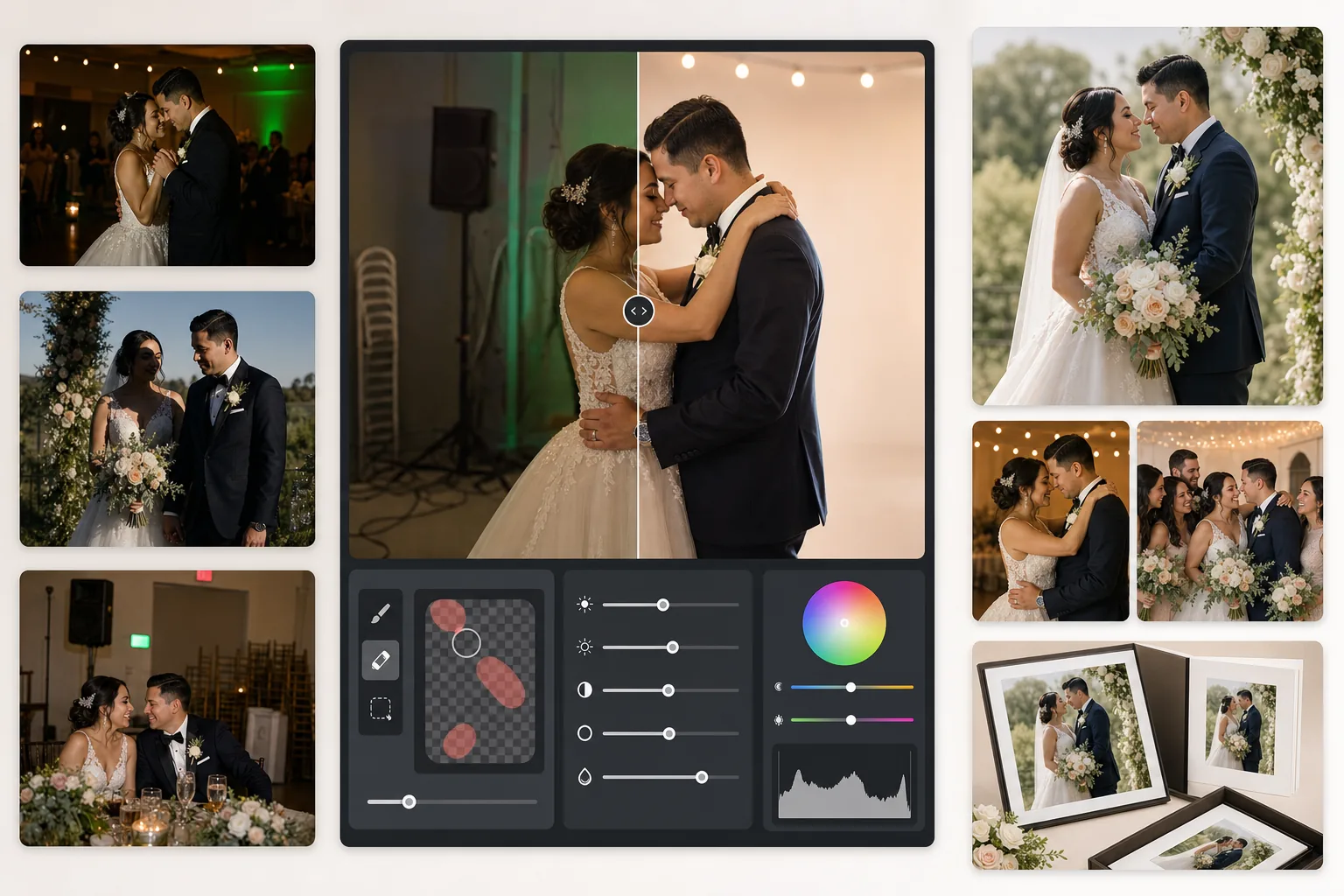
Selamatkan foto resepsi yang kurang cahaya, hapus latar belakang yang mengganggu, dan sempurnakan warna kulit untuk gambar pernikahan yang layak masuk album. Templat ini dirancang untuk kondisi pencahayaan yang menantang pada upacara dan resepsi — tempat yang remang-remang, semburat warna campuran dari lampu DJ, dan latar belakang berantakan yang mengalihkan perhatian dari pasangan pengantin.
Coba templat ini gratisEvents template preview
Apa yang dilakukan templat ini
Memperbaiki masalah paling umum dalam fotografi pernikahan: foto resepsi yang kurang pencahayaan, semburat oranye dari lampu tungsten atau hijau dari lampu neon, bayangan flash yang keras, serta elemen latar belakang yang mengganggu seperti tanda keluar, kursi yang ditumpuk, dan peralatan katering. AI Enhance memulihkan detail dari foto lantai dansa yang gelap dan menyeimbangkan pencahayaan campuran, sementara Magic Eraser menghapus objek yang tidak diinginkan tanpa meninggalkan jejak. Warna kulit disempurnakan agar tampak alami dan hangat tanpa penghalusan berlebihan.
Pengaturan templat
| Pemulihan eksposur | Pengangkatan bayangan +1,5 EV dengan pemeliharaan sorotan |
| Keseimbangan putih | Koreksi cahaya campuran otomatis (tungsten/neon/cahaya siang) |
| Mode warna kulit | Kehangatan alami (+5 kehangatan, +3 penghalusan, detail dipertahankan) |
| Resolusi keluaran | Sisi panjang 4000px (siap cetak pada 300 DPI hingga 13×19) |
| Profil warna | Adobe RGB (gamut lebih luas untuk pencetakan profesional) |
| Pengurangan derau | Adaptif ISO tinggi (mempertahankan detail pada bayangan yang diangkat) |
Cara menggunakan templat ini
Unggah foto pernikahan Anda
Unggah foto resepsi, gambar upacara, atau foto yang diambil tamu dengan smartphone. Templat ini menangani segalanya, dari JPEG yang diekspor dari RAW kamera DSLR profesional hingga foto ponsel terkompresi — AI menyesuaikan kekuatan peningkatan berdasarkan kualitas sumbernya.
Koreksi pencahayaan dan warna
AI Enhance mengangkat adegan resepsi yang gelap, menetralkan semburat warna oranye-hijau dari pencahayaan campuran tempat acara, dan menyeimbangkan latar depan yang diterangi flash dengan latar belakang yang diterangi cahaya sekitar. Warna kulit digeser ke arah kehangatan alami tanpa memengaruhi putihnya gaun atau warna dekorasi.
Hapus gangguan
Magic Eraser menghapus tanda keluar, alat pemadam api, kursi yang ditumpuk, troli katering, kabel listrik di lantai, dan tamu yang tidak sengaja masuk ke latar belakang. AI merekonstruksi pola latar belakang secara alami di belakang objek yang dihapus.
Ekspor untuk album dan cetakan
Unduh pada sisi panjang 4000px dalam Adobe RGB untuk pencetakan di lab foto profesional, atau dalam sRGB untuk berbagi digital dan galeri daring. Keluaran berukuran untuk cetakan hingga 13×19 inci pada 300 DPI.
Tips profesional untuk hasil terbaik
- ✓Untuk foto lantai dansa resepsi yang gelap, templat dapat memulihkan sekitar 1,5 stop detail bayangan. Jika foto asli hampir sepenuhnya hitam, peningkatan dapat menimbulkan derau — mulailah dengan foto yang setidaknya masih dapat memperlihatkan subjek secara samar.
- ✓Koreksi warna kulit dikalibrasi untuk kehangatan fotografi pernikahan — sedikit lebih hangat dari netral, yang menonjolkan sebagian besar warna kulit di bawah pencahayaan campuran. Untuk foto upacara luar ruang yang sudah memiliki cahaya alami yang baik, koreksinya halus.
- ✓Saat menghapus objek latar belakang, kerjakan satu area dalam satu waktu untuk hasil yang paling alami. Tanda keluar, kepala sprinkler, dan stopkontak dinding cukup kecil untuk penghapusan bersih dalam sekali jalan. Objek yang lebih besar seperti kursi yang ditumpuk akan lebih baik dihapus per bagian.
- ✓Proses potret pasangan pengantin terlebih dahulu, lalu foto kelompok, kemudian foto kandid. Ini memungkinkan Anda menetapkan dasar penilaian warna yang konsisten pada foto-foto terpenting sebelum beralih ke gambar sekunder.
Pertanyaan umum
Bisakah ini memperbaiki foto resepsi yang buram?
+
AI Enhance dapat menajamkan kelembutan ringan akibat kecepatan rana yang lambat dan memulihkan detail bayangan secara signifikan, tetapi tidak dapat memperbaiki buram gerakan parah di mana subjek tampak jelas memanjang. Foto dengan buram ringan akibat goyangan tangan atau sedikit kelembutan fokus akan meningkat secara substansial.
Apakah gaun putih pengantin akan kehilangan detail?
+
Algoritme pemetaan nada secara khusus melindungi detail sorotan pada warna putih. Tekstur gaun, pola renda, dan lipatan kain tetap terjaga bahkan saat mengangkat bayangan dalam gambar yang sama. Hasilnya mempertahankan rentang penuh dari putih cerah hingga bayangan pekat.
Apakah ini cukup baik untuk album cetak?
+
Ya. Keluaran 4000px pada 300 DPI mendukung cetakan hingga 13×19 inci. Profil warna Adobe RGB mempertahankan gamut lebih luas yang digunakan lab foto profesional. Untuk halaman album standar 8×10, resolusinya jauh melebihi yang dibutuhkan untuk cetakan yang tajam.
Ubah setiap foto pernikahan menjadi gambar yang layak masuk album
Unggah foto resepsi dan upacara, lalu dapatkan gambar yang ditingkatkan secara profesional dan siap cetak dalam hitungan detik. Bekerja pada foto kamera profesional maupun smartphone.
Coba gratisRelated templates
More events templates for your workflow.