
Restorasi Foto Vintage
Hidupkan kembali foto-foto lama yang berharga. Templat ini memperbaiki kerusakan yang ditimbulkan oleh waktu puluhan tahun pada foto cetak — menghapus goresan, lipatan, dan noda, memulihkan warna dari cetakan yang pudar, dan bahkan mengubah foto asli sepia atau hitam-putih menjadi warna penuh yang realistis sambil mempertahankan karakter gambar yang sesuai dengan zamannya.
Coba templat ini gratisRestoration template preview
Apa yang dilakukan templat ini
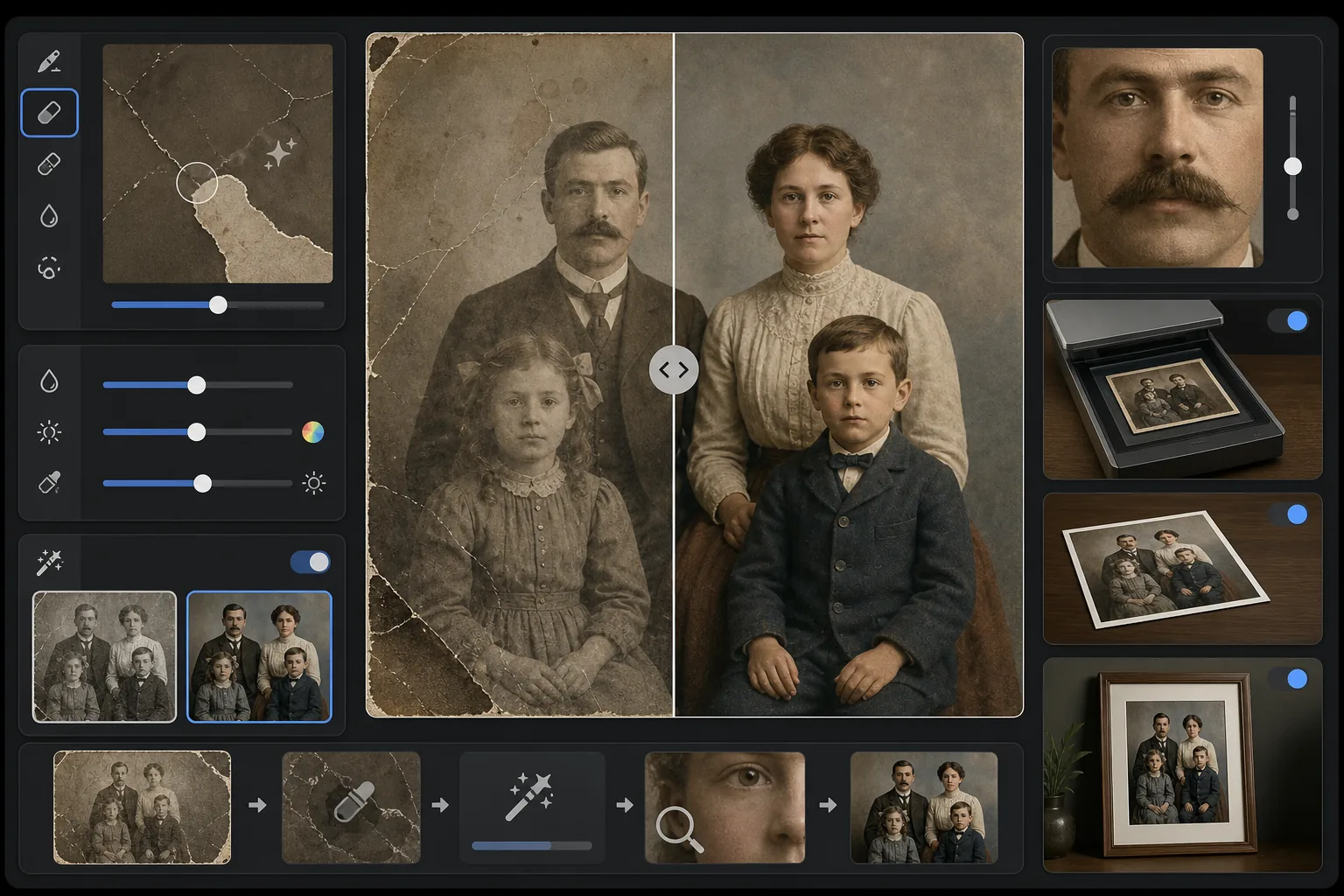
Memperbaiki kerusakan fisik dan efek penuaan pada foto vintage yang dipindai. Magic Eraser menghapus goresan, lipatan, noda air, bercak jamur, dan tepi yang robek dengan merekonstruksi konten gambar yang hilang dari konteks sekitarnya. AI Enhance memulihkan warna yang telah bergeser atau pudar selama puluhan tahun, mempertajam detail yang melembut karena usia, dan dapat mewarnai foto hitam-putih atau sepia dengan warna akurat sesuai zaman yang menghormati era gambar aslinya.
Pengaturan templat
| Perbaikan kerusakan | Agresif — menghapus goresan, lipatan, noda, dan tepi yang robek |
| Pemulihan warna | Spektrum penuh — memulihkan pigmen yang pudar ke kecerahan aslinya |
| Mode pewarnaan | Nonaktif, Halus, atau Penuh (untuk foto asli hitam-putih dan sepia) |
| Pemulihan detail | Merekonstruksi wajah dan detail halus yang melembut karena usia dan resolusi pindai yang rendah |
| Ukuran keluaran | Sesuai dengan dimensi pindai asli dengan opsi pembesaran 2× |
| Pelestarian zaman | Mempertahankan tekstur butir dan kualitas tonal yang sesuai dengan zamannya |
Cara menggunakan templat ini
Pindai atau foto aslinya
Pindai foto vintage pada 600 DPI atau lebih tinggi untuk detail paling dapat dipulihkan. Jika pemindaian tidak tersedia, foto cetakan di permukaan datar dengan cahaya yang merata dan menyebar — hindari lampu kilat, yang menciptakan bintik silau pada cetakan mengkilap.
Perbaiki kerusakan fisik
Magic Eraser mengidentifikasi dan menghapus goresan, lipatan, kerusakan air, bercak jamur, dan sisa selotip. AI merekonstruksi area yang hilang dengan menganalisis konten gambar di sekitarnya — mengisi sudut yang robek, menyambung retakan di seluruh wajah, dan menghapus perubahan warna noda.
Pulihkan atau tambahkan warna
Untuk cetakan berwarna yang pudar, AI Enhance memulihkan palet warna asli dengan membalikkan cara spesifik berbagai lapisan pewarna terdegradasi seiring waktu. Untuk foto asli hitam-putih atau sepia, pewarnaan opsional menambahkan warna realistis berdasarkan petunjuk kontekstual seperti rona kulit, dedaunan, langit, dan pola kain.
Pertajam dan ekspor
Pemulihan detail mempertajam fitur wajah, teks, dan detail halus yang dilembutkan oleh penuaan selama puluhan tahun. Ekspor pada resolusi pindai asli atau perbesar hingga 2× untuk mencetak dalam ukuran yang lebih besar dari aslinya.
Kiat profesional untuk hasil terbaik
- ✓Pindai pada resolusi tertinggi yang didukung pemindai Anda — minimal 600 DPI, sebaiknya 1200 DPI. Semakin banyak detail yang ditangkap, semakin banyak materi yang dimiliki AI untuk merekonstruksi area yang rusak.
- ✓Jika foto terjepit dalam bingkai atau album, foto di tempat daripada berisiko merobeknya — templat dapat menghapus tepi bingkai dan artefak halaman album.
- ✓Untuk pewarnaan foto bersejarah, berikan konteks tentang zaman (dekade) dan lokasi jika memungkinkan — warna pakaian, warna mobil, dan bahan bangunan sangat bervariasi menurut periode waktu dan wilayah.
- ✓Proses area foto yang paling rusak terlebih dahulu sebagai uji coba sebelum menjalankan restorasi penuh — ini memungkinkan Anda memastikan kualitas rekonstruksi memenuhi harapan Anda.
Pertanyaan umum
Bisakah memperbaiki foto dengan bagian yang hilang seperti sudut yang robek?
+
Ya. AI merekonstruksi area yang hilang menggunakan konteks dari gambar di sekitarnya. Untuk latar belakang seperti langit, dinding, dan dedaunan, hasilnya mulus. Untuk bagian wajah atau detail penting yang hilang, rekonstruksinya mengesankan tetapi mungkin memerlukan penyesuaian manual kecil untuk fitur penting.
Seberapa akurat pewarnaan foto hitam-putih?
+
Pewarnaan menggunakan analisis kontekstual untuk menetapkan warna realistis — rona kulit, biru langit, hijau dedaunan, dan warna kain umum sangat akurat. Warna spesifik objek yang tidak dapat ditentukan AI dari konteks (seperti corak persis sebuah gaun) akan masuk akal alih-alih dijamin akurat.
Apakah restorasi akan menghilangkan karakter vintage foto?
+
Tidak. Pengaturan pelestarian zaman mempertahankan tekstur butir dan kualitas tonal yang sesuai dengan zamannya yang memberi foto vintage karakternya. Kerusakan fisik seperti goresan dan noda dihapus, tetapi kualitas fotografis era aslinya dihormati — foto tahun 1940-an tetap terlihat seperti foto tahun 1940-an, hanya saja tidak rusak.
Selamatkan kenangan keluarga Anda
Unggah pindaian foto apa pun yang rusak, pudar, atau menua dan saksikan keausan selama puluhan tahun menghilang. Goresan hilang, warna dipulihkan, kenangan terjaga.
Coba gratis