
Yemek Fotoğrafçılığı Şekillendirme
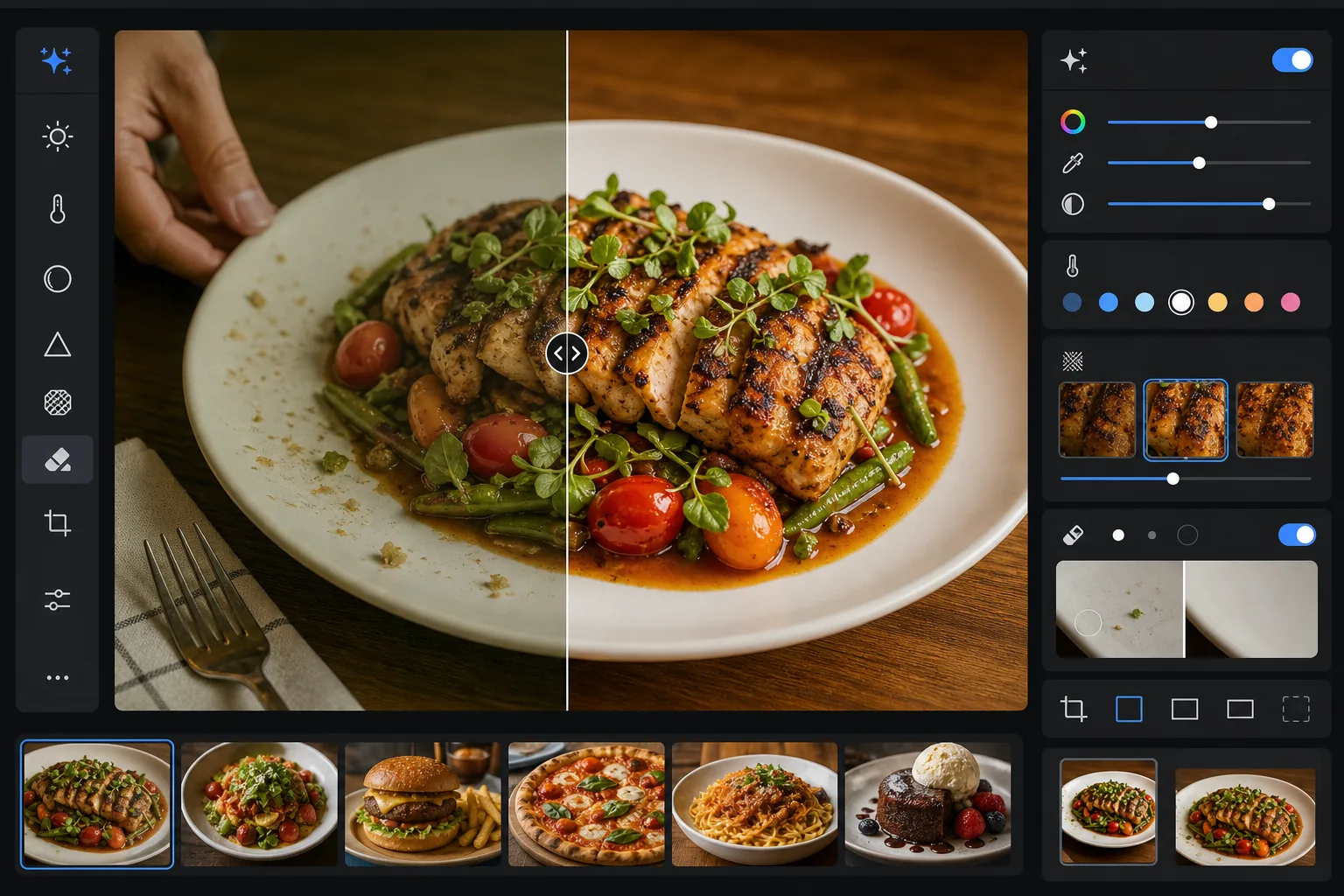
Yemeklerin fotoğraflarda tabakta göründükleri kadar iştah açıcı görünmesini sağlayın. Bu şablon, soslar, yeşillikler ve proteinler için renk canlılığını artırır, başıboş mutfak aletlerini, tabaklardaki parmak izlerini ve görünen elleri kaldırır, kabuk ve süslemedeki dokuları keskinleştirir ve görüntüyü Instagram ile menü panolarında iyi performans gösteren sıcak, davetkâr tonlarla derecelendirir.
Bu şablonu ücretsiz deneyinFood & Beverage template preview
Bu şablon ne yapar
Yemeğin gerçekte nasıl göründüğü ile fotoğrafta nasıl çıktığı arasındaki boşluğu kapatır. Restoran ve tepeden aydınlatma genellikle taze malzemeleri donuk gösteren sarı veya yeşil tonlar yansıtır. AI Enhance, beyaz dengesini düzeltir; yeşilleri canlı, kırmızıları zengin ve beyazları temiz hale getirir, yapay görünecek kadar aşırı doygunluk yaratmadan. Magic Eraser dikkat dağıtan öğeleri kaldırır — karede unutulmuş bir çatal, kenardaki bir garsonun eli, tabak kenarındaki su lekeleri, masa yüzeyindeki kırıntılar. Seçici keskinleştirme, ızgara yüzeylerin, çıtır kabukların ve yemek fotoğraflarına dokunsal bir his veren taze otların dokusunu ortaya çıkarır.
Şablon ayarları
| Renk canlılığı | +15 canlılık, +8 doygunluk (kırmızı, yeşil, sarıda seçici) |
| Beyaz dengesi | Yemek için optimize edilmiş nötr (sarı tonu kaldırır, sıcak tonları korur) |
| Doku keskinleştirme | Ayrıntı duyarlı (kabuk, ızgara izleri, ot ayrıntısını güçlendirir) |
| Tabak temizliği | Tabak kenarındaki lekeleri, damlamaları ve parmak izlerini otomatik algılama |
| Sıcaklık derecesi | Altın saat tarzı ton eğrisiyle +5 sıcaklık |
| Çıktı | 1080×1080px (Instagram), 2400×1600px (menü/web sitesi) ikili dışa aktarma |
Bu şablon nasıl kullanılır
Yemek fotoğrafınızı yükleyin
Tabağa konmuş yemeğin tepeden, 45 derecelik açıyla veya doğrudan önden çekilmiş bir fotoğrafını yükleyin. Doğal pencere ışığı en iyi başlangıç noktasını sağlar, ancak şablon restoranların floresan aydınlatmasını ve sıcak tungsten masa lambalarını da işler.
Rengi ve dokuyu güçlendirin
AI Enhance renk sapmasını düzeltir, canlılığı seçici biçimde artırarak yeşil, kırmızı ve altın tonların neon gibi görünmeden öne çıkmasını sağlar ve ızgara yanığı, şeker sırı ve taze ot yaprakları gibi yüzey dokularını keskinleştirir. Sıcaklık derecesi davetkâr bir altın saat hissi ekler.
Kareyi temizleyin
Magic Eraser başıboş mutfak aletlerini, peçete köşelerini, görünen elleri, tabak kenarındaki parmak izleri ve sos damlamalarını, masadaki kırıntıları ve kompozisyonu karmaşıklaştıran her türlü aksesuarı kaldırır. Yapay zekâ, temizlenen alanları çevredeki masa veya tabak yüzeyiyle doldurur.
Platformunuz için dışa aktarın
Bir veya her iki formatta indirin: Instagram ve sosyal medya için 1080x1080px kare ya da restoran web siteleri, dijital menü panoları ve teslimat uygulaması listelemeleri için 2400x1600px yatay. Her ikisi de sRGB'de ekran gösterimi için renk açısından optimize edilmiştir.
En iyi sonuçlar için profesyonel ipuçları
- ✓Tabağa koyduktan sonraki ilk 90 saniye içinde çekim yapın. Marul solar, soslar üzerinde tabaka oluşur, buz erir ve buhar hızla yükselmeyi bırakır. Anı kaçırdıysanız, şablon rengi ve dokuyu güçlendirebilir ancak solmuş bir salatayı ya da erimiş bir dondurmayı geri getiremez.
- ✓Tepeden flat lay çekimlerde, ışık kaynağınızın doğrudan üstte değil bir yanda olmasına dikkat edin. Yan ışık, keskinleştirme algoritmasının güçlendirdiği mikro gölgeleri yemek dokuları üzerinde oluşturur — doğrudan tepe ışığı ise bu gölgeleri düzleştirir ve yemeği daha az boyutlu gösterir.
- ✓Yemeğin üzerine binen bir çatal veya aleti kaldırırken, yapay zekâ arkasındaki yemek dokusunu yeniden oluşturur. En temiz sonuçlar için, aletin yemeğin içine gömülü olmak yerine tabak kenarı veya masa örtüsü gibi sade bir alanda durduğundan emin olun.
- ✓Restoran menüleri için, tüm yemek fotoğraflarını tek bir grupta işleyerek menünün tamamında tutarlı renk derecelendirmesi ve sıcaklık sağlayın. Fotoğraflar arasında tutarsız renk sıcaklığı, her bir fotoğraf tek başına güzel görünse bile menüyü amatörce gösterir.
Sık sorulan sorular
Bu, yemeğimi yapay biçimde aşırı doygun gösterir mi?
+
Renk geliştirme özellikle yemek fotoğrafçılığı için kalibre edilmiştir — yemeğin doğal olarak düştüğü doygunluk aralıklarını (otların yeşili, domates ve etlerin kırmızısı, ekmek ve kızartmaların altın tonları) hedeflerken diğer renkleri daha az etkiler. Sonuç, neon veya plastik görünümlü bölgeye geçmeden iştah açıcı ve canlı görünür.
Bunu teslimat uygulaması listelemeleri için kullanabilir miyim?
+
Evet. 2400x1600px çıktı, DoorDash, Uber Eats, Grubhub ve diğer teslimat platformlarının görüntü gereksinimlerini aşar. Renk derecelendirme ve keskinleştirme, yemek fotoğraflarının küçük resim boyutunda anında dikkat çekmesi gereken küçük ekran görüntülemesi için optimize edilmiştir.
Bu, içecekler ve kokteyller için çalışır mı?
+
Evet. Şablon sıvıları, cam eşyaları ve süslemeleri iyi işler. Renk canlılığı geliştirme, meyve süslemeleri ve katmanlı renkler içeren kokteyllerde özellikle iyi çalışır. Temizleme, cam yüzeylerdeki parmak izlerini, su halkalarını ve karede unutulmuş bar aletlerini kaldırır.
Her yemek fotoğrafını profesyonelce şekillendirilmiş gösterin
Telefonunuzdan veya kameranızdan yemek fotoğrafları yükleyin ve izleyenlerin iştahını kabartan canlı, temiz, Instagram'a hazır görüntüler elde edin.
Ücretsiz deneyinRelated templates
More food & beverage templates for your workflow.