
Foto Menu Pesan Antar
Buat hidangan menu pesan-antar Anda terlihat semenggugah selera rasanya. Templat ini menyempurnakan warna makanan untuk daya tarik selera maksimal, menghapus latar belakang dapur yang berantakan, meningkatkan kehangatan dan kesegaran visual hidangan, serta menghasilkan gambar yang dioptimalkan untuk DoorDash, Uber Eats, Grubhub, dan platform pesan-antar lainnya.
Coba templat ini gratisFood template preview
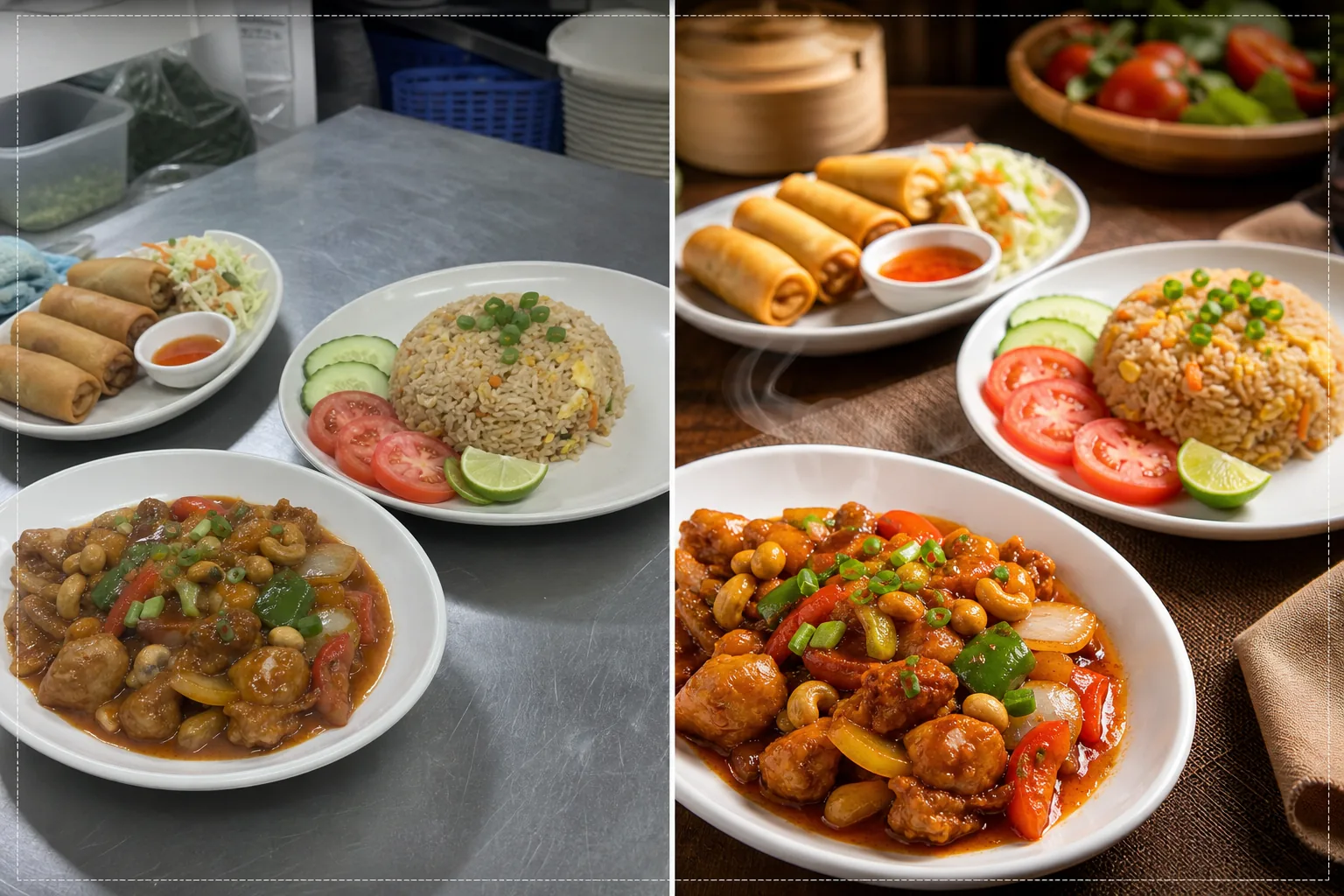
Apa yang dilakukan templat ini
Mengubah foto dapur yang diambil cepat menjadi gambar berkualitas menu yang mendorong pesanan di platform pesan-antar makanan. Restoran sering memotret hidangan menu di dapur yang sibuk dengan pencahayaan neon yang membuat makanan terlihat kurang menggugah selera — ayam berwarna kehijauan, nasi cokelat kusam, dan saus yang pudar. Templat ini mengoreksi suhu warna menjadi nada hangat dan menggugah selera serta meningkatkan saturasi bahan-bahan yang secara alami cerah seperti tomat, sayuran hijau, dan cabai. Background Eraser menghapus latar belakang dapur yang berantakan dan menggantinya dengan permukaan bersih yang sesuai untuk makanan. AI Enhance mempertajam tekstur makanan sehingga pembeli dapat melihat kerenyahan gorengan, uap yang mengepul dari hidangan panas, dan kesegaran hiasan.
Pengaturan templat
| Kehangatan warna | Nada hangat menggugah selera (+15% pergeseran hangat, mengoreksi hijau neon) |
| Saturasi makanan | Peningkatan selektif pada merah, hijau, dan kuning (warna alami makanan) |
| Peningkatan tekstur | Penajaman detail kerenyahan, kelembapan, dan kilau |
| Latar belakang | Permukaan meja bersih, warna solid, atau latar gelap bernuansa |
| Dimensi keluaran | 1200 × 800 px (optimal untuk platform pesan-antar) dan 1080 × 1080 px (media sosial) |
Cara menggunakan templat ini
Unggah foto hidangan Anda
Potret hidangan yang sudah ditata langsung dari atas (flat lay) atau pada sudut 45 derajat — kedua komposisi cocok untuk menu pesan-antar. Gunakan cahaya alami terbaik yang tersedia atau letakkan hidangan dekat jendela. Unggah langsung dari ponsel Anda — tidak perlu menyiapkan studio.
Koreksi warna dan kehangatan
Templat ini mengoreksi semburat warna dari pencahayaan neon dan LED dapur, menggeser nada makanan ke rona hangat yang menggugah selera. Saus terlihat lebih kaya, protein terlihat kecokelatan keemasan, dan sayuran terlihat segar. Koreksi ini menonjolkan apa yang ada secara alami alih-alih membuat makanan terlihat diwarnai secara buatan.
Peningkatan latar belakang dan tekstur
Background Eraser mengganti latar belakang dapur dengan permukaan bersih — meja kayu, marmer, batu tulis, atau warna solid sederhana. AI Enhance mempertajam tekstur makanan untuk menonjolkan kerenyahan gorengan, kilau saus, dan kesegaran bahan. Gambar secara keseluruhan memperoleh kualitas fotografi makanan profesional.
Ekspor untuk platform pesan-antar
Unduh pada 1200 × 800 px untuk daftar menu platform pesan-antar (DoorDash, Uber Eats, Grubhub) atau pada 1080 × 1080 px untuk postingan makanan Instagram. Profil warna hangat memastikan hidangan terlihat menggugah selera di semua perangkat dan jenis layar.
Tips pro untuk hasil terbaik
- ✓Potret hidangan segera setelah ditata selagi uap, kelembapan, dan kesegaran hiasan berada di puncaknya. Fotografi makanan memiliki jendela sekitar tiga hingga lima menit sebelum saus mengendap, hiasan layu, dan uap menghilang. Templat ini menonjolkan isyarat kesegaran ini tetapi tidak dapat menciptakannya.
- ✓Gunakan piring putih atau berwarna terang untuk foto menu. Piring putih menciptakan kontras terkuat dengan makanan, membuat warna menonjol dan memungkinkan AI menghasilkan tepi yang lebih bersih saat menghapus latar belakang. Piring gelap juga bisa tetapi mengurangi keunggulan kontras warna.
- ✓Untuk paket kombo dan pesanan multi-item, atur semua item dalam satu bingkai dengan sedikit jarak. Templat ini mempertajam setiap elemen makanan secara individual, dan menampilkan pesanan lengkap memberi pelanggan pesan-antar gambaran jelas tentang apa yang akan mereka terima.
Pertanyaan umum
Bisakah ini memperbaiki foto yang diambil di bawah lampu neon dapur?
+
Ya. Pencahayaan neon adalah masalah paling umum dalam fotografi makanan restoran, menciptakan semburat hijau-kuning yang membuat makanan terlihat kurang menggugah selera. Templat ini secara khusus mengoreksi pergeseran warna ini dan menggantinya dengan nada hangat menggugah selera yang membuat makanan terlihat lezat secara alami.
Apakah ini bekerja untuk semua jenis masakan?
+
Templat ini menangani semua jenis makanan — Amerika, Asia, Meksiko, Italia, India, Timur Tengah, dan lainnya. Koreksi dan peningkatan warna dikalibrasi untuk warna alami makanan di semua tradisi kuliner, menonjolkan merah pada hidangan berbahan dasar tomat, hijau pada salad, dan nada keemasan pada gorengan dan makanan panggang.
Bisakah saya memproses seluruh menu sekaligus?
+
Ya. Unggah semua foto item menu dan proses secara batch. Templat ini menerapkan perlakuan warna, latar belakang, dan dimensi yang konsisten di seluruh menu Anda untuk galeri menu yang seragam dan profesional di platform pesan-antar.
Foto menu yang membuat pelanggan langsung menekan pesan sekarang
Unggah foto hidangan dari dapur Anda dan dapatkan gambar menggugah selera yang siap untuk platform yang mendorong lebih banyak pesanan pesan-antar.
Coba gratisRelated templates
More food templates for your workflow.
Sempurnakan foto resep untuk buku masak dan blog makanan dengan penajaman kualitas cetak, akurasi warna bahan, pembersihan pemandangan bergaya, dan keluaran resolusi tinggi.
Buat grafik papan menu dengan penghapusan latar belakang foto makanan, gaya yang konsisten, dan ekspor siap tata letak untuk tampilan digital, menu cetak, dan platform pengiriman pihak ketiga.