
Penggeser Sebelum & Sesudah
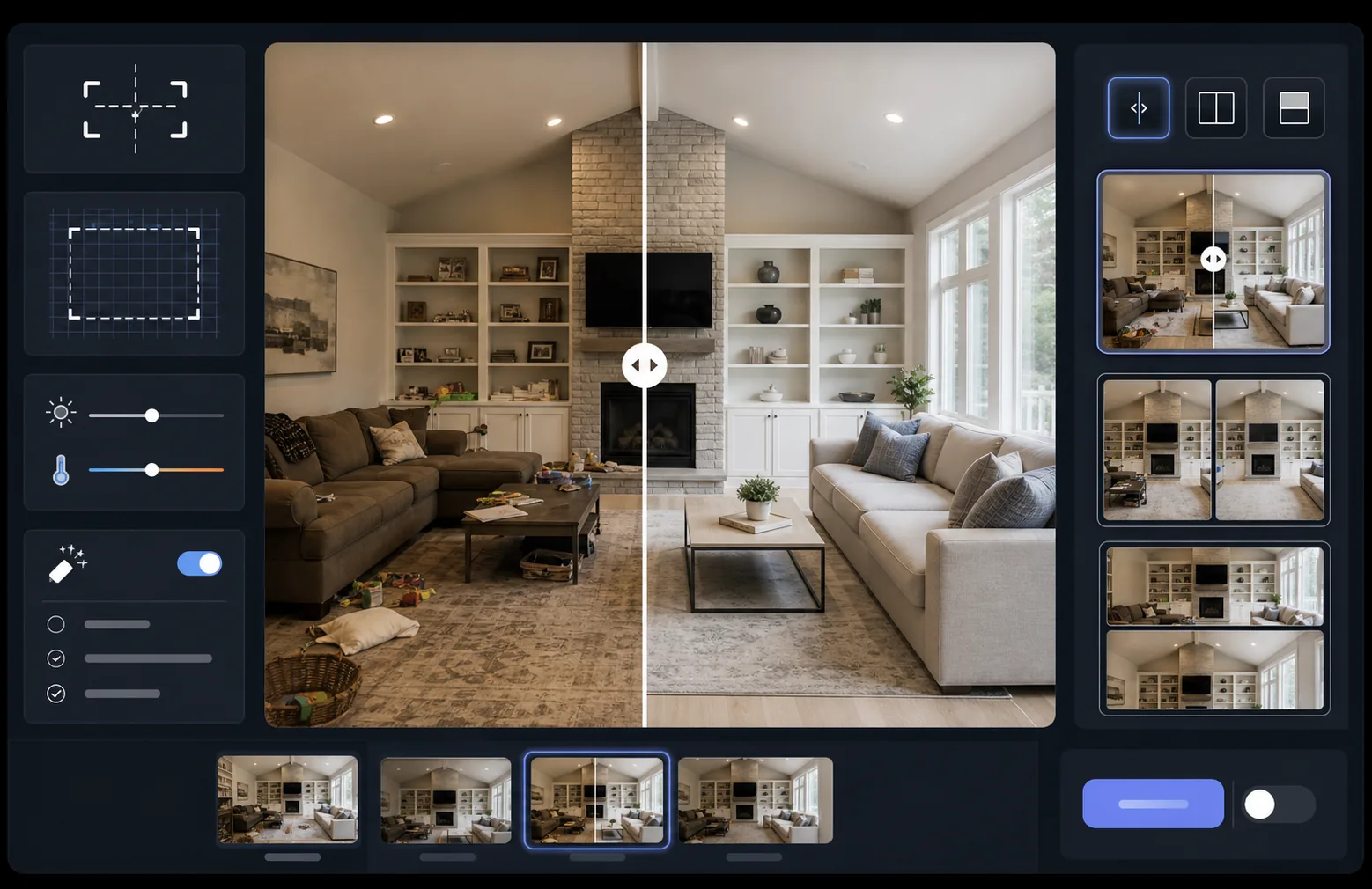
Tunjukkan dampak pekerjaan Anda dengan gambar perbandingan sebelum dan sesudah yang selaras dengan sempurna. Templat ini membuat pasangan siap demonstrasi yang mempertahankan pembingkaian, keseimbangan pencahayaan, dan dimensi yang konsisten — ideal untuk portofolio, studi kasus, bukti sosial, dan pemasaran produk di mana transformasi visual menceritakan kisahnya.
Coba templat ini gratisMarketing template preview
Apa yang dilakukan templat ini
Memproses dua gambar — sebuah sebelum dan sebuah sesudah — menjadi pasangan perbandingan yang selaras dengan sempurna, siap untuk widget penggeser, tata letak berdampingan, atau pengungkapan beranimasi. AI Enhance menormalkan pencahayaan dan keseimbangan putih di antara kedua bingkai sehingga transformasi terlihat jelas tanpa perbedaan pencahayaan mengaburkan perbandingan. Magic Eraser dapat membersihkan gangguan insidental di salah satu bingkai yang bukan merupakan bagian dari transformasi yang dimaksud.
Pengaturan templat
| Tata letak | Pasangan siap penggeser, berdampingan, atau ditumpuk vertikal (dapat dipilih) |
| Ukuran keluaran | 1600×1200px per bingkai (dimensi yang cocok) |
| Penyelarasan | Registrasi otomatis — mencocokkan perspektif dan pembingkaian antar bidikan |
| Normalisasi pencahayaan | Menyeimbangkan pencahayaan dan keseimbangan putih di seluruh pasangan |
| Hamparan label | Label 'Before' / 'After' opsional dengan posisi yang dapat disesuaikan |
| Batas | Pembagi abu-abu netral 1px atau tepi mulus (dapat dipilih) |
Cara menggunakan templat ini
Unggah gambar sebelum Anda
Unggah foto asli yang tidak dimodifikasi yang menunjukkan keadaan awal. Ini bisa berupa ruangan sebelum renovasi, produk sebelum penyempurnaan, kulit sebelum perawatan, atau transformasi visual apa pun yang ingin Anda tunjukkan.
Unggah gambar sesudah Anda
Unggah foto hasil yang menunjukkan transformasi yang telah selesai. Cobalah memotret dari sudut dan jarak yang sama dengan bidikan sebelum. Templat akan secara otomatis menyelaraskan perbedaan kecil dalam pembingkaian dan perspektif.
Normalkan dan selaraskan
Templat secara otomatis meregistrasi kedua gambar sehingga elemen yang bersesuaian selaras piksel demi piksel. Pencahayaan dan keseimbangan putih dinormalkan sehingga perbedaan pencahayaan antar sesi pemotretan tidak mengalihkan perhatian dari transformasi yang sebenarnya.
Ekspor perbandingan
Pilih format keluaran Anda — pasangan yang cocok untuk widget penggeser, komposit berdampingan untuk media sosial, atau tumpukan vertikal untuk pemasaran email. Tambahkan label Before/After opsional dan ekspor pada resolusi yang dioptimalkan untuk web atau berkualitas cetak.
Kiat profesional untuk hasil terbaik
- ✓Potret sebelum dan sesudah dari posisi yang persis sama jika memungkinkan — tandai penempatan tripod Anda atau berdiri di tempat yang sama. Semakin sedikit AI perlu mengoreksi penyelarasan, semakin tajam perbandingannya.
- ✓Gunakan panjang fokus yang sama untuk kedua bidikan guna menghindari perbedaan distorsi perspektif yang membuat perbandingan yang selaras terasa sedikit meleset.
- ✓Hapus perubahan yang tidak relevan antara sebelum dan sesudah menggunakan Magic Eraser — jika sebuah tanaman bergeser atau objek baru muncul, hapuslah agar pemirsa fokus pada transformasi yang dimaksud.
- ✓Untuk penyematan penggeser web, ekspor kedua gambar dengan dimensi identik dan gunakan PNG tanpa kehilangan untuk mencegah artefak kompresi di sepanjang garis pembagi penggeser.
Pertanyaan umum
Bagaimana jika foto sebelum dan sesudah diambil dari sudut yang sedikit berbeda?
+
Sistem registrasi otomatis menangani perbedaan moderat dalam sudut kamera, jarak, dan pembingkaian. Sistem mengidentifikasi titik referensi yang bersesuaian di kedua gambar dan mentransformasikannya agar cocok. Untuk hasil terbaik, perbedaan sudut sebaiknya di bawah 15 derajat.
Bisakah saya menggunakannya untuk thumbnail video yang menunjukkan transformasi?
+
Ya. Keluaran komposit berdampingan ideal untuk thumbnail video YouTube dan media sosial. Tata letak layar terbagi dengan label langsung menyampaikan kisah transformasi yang mendorong klik.
Apakah normalisasi pencahayaan mengubah hasil sebenarnya yang ditampilkan?
+
Tidak. Normalisasi pencahayaan hanya menyesuaikan pencahayaan keseluruhan dan keseimbangan putih sehingga kedua bingkai tampak seperti diambil dalam kondisi yang sama. Transformasi yang sebenarnya — perubahan pada subjek — dipertahankan persis seperti saat difoto.
Tunjukkan hasil Anda, berdampingan
Unggah foto sebelum dan sesudah Anda dan dapatkan gambar perbandingan yang selaras sempurna dan disajikan secara profesional dalam hitungan detik. Biarkan transformasi berbicara dengan sendirinya.
Coba gratis