
Cara menghilangkan mata merah pada foto
Fotografi flash di ruangan redup mengubah pupil menjadi cakram merah menyala – tanda cahaya dipantulkan dari pembuluh darah retina. Baik itu foto makan malam keluarga atau foto grup pesta ulang tahun, mata merah membuat semua orang terlihat tidak wajar. Magic Eraser AI Enhance mendeteksi dan mengoreksi mata merah sekaligus mengembalikan warna iris dan detail pupil yang realistis.
Last updated
Perbaiki mata merah sekarang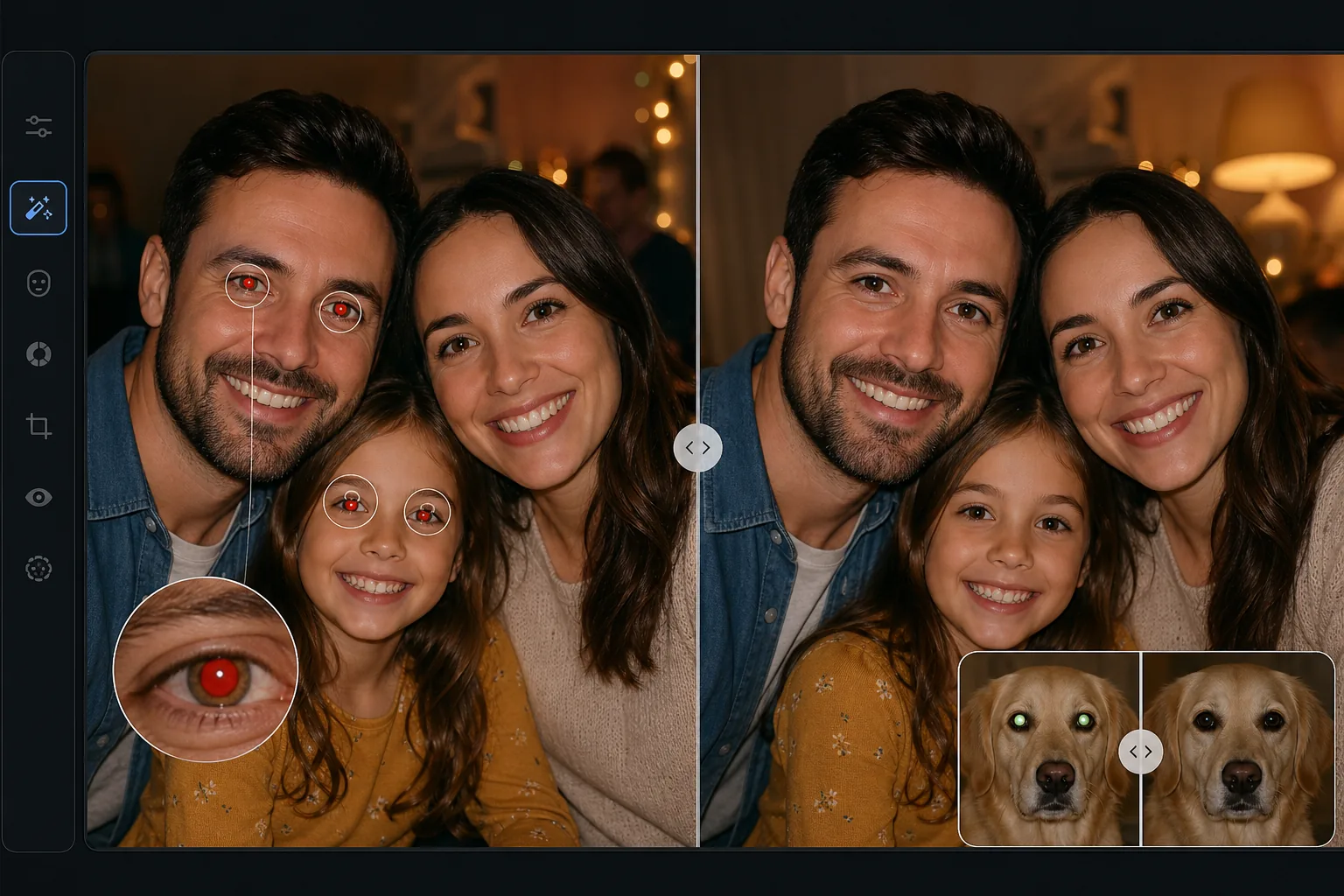
Mengapa mata merah sangat sulit diatasi dengan baik
Untuk menghilangkan mata merah dari foto, buka Magic Eraser di web, iOS, atau Android, unggah fotonya, pilih AI Enhance dengan koreksi mata merah, lalu biarkan AI yang memperbaikinya — AI mendeteksi setiap mata yang terkena, mengganti pendar merah dengan pupil gelap yang alami, serta mempertahankan warna iris dan kilau cahaya agar mata tampak hidup, bukan hitam datar. Gratis, tanpa perlu daftar. AI mengoreksi setiap wajah dalam foto grup sekaligus dalam satu proses, dan juga mengatasi pendar mata hewan peliharaan (hijau pada kucing, kuning pada anjing). Bandingkan hasil sebelum dan sesudahnya, dan jika fotonya juga buram, pertajam dulu agar deteksi mata lebih akurat. Mata merah terlihat sederhana — cukup desaturasi warna merahnya, bukan? Dalam praktiknya, koreksi mata merah yang naif mengubah mata menjadi cakram hitam pekat yang terlihat tidak bernyawa dan tidak alami. Cahaya merah menggantikan detail alami pupil: pantulan cahaya halus (catchlight) yang memberikan kehidupan pada mata, transisi warna iris, dan batas pupil-iris. Koreksi mata merah yang baik harus menghilangkan corak warna merah, mengembalikan pupil gelap alami, mempertahankan atau merekonstruksi cahaya tangkapan, dan mempertahankan warna dan tekstur iris di sekitar pupil. Peralatan telepon dasar sering kali melakukan koreksi berlebihan, menghilangkan semua kehangatan dari area mata dan menghasilkan tampilan mata mati. AI Enhance Magic Eraser memahami anatomi mata, hanya menghilangkan artefak mata merah, dan merekonstruksi mata yang tampak alami dengan detail pupil yang tepat dan cahaya tangkapan yang realistis.
Before you start
Perbaiki mata merah dalam tiga langkah
Start with unggah fotonya. The result preview above and tips below use this guide's existing content; no separate before-and-after proof is assumed.
- 1
Unggah fotonya
Buka Magic Eraser di web, iOS, atau Android dan unggah foto dengan mata merah. Alat AI Enhance berfungsi pada potret, foto grup, dan bahkan foto hewan peliharaan dengan cahaya mata hijau atau kuning dari lampu kilat. JPEG, PNG, HEIC, dan WebP didukung pada resolusi apa pun.
- 2
Terapkan AI Enhance
Pilih alat AI Enhance dan aktifkan koreksi mata merah. AI secara otomatis mendeteksi semua wajah dan mata dalam gambar, mengidentifikasi mata mana yang memiliki artefak mata merah, dan menerapkan koreksi satu per satu pada setiap mata yang terkena. Untuk foto grup dengan puluhan orang, AI memproses setiap wajah dalam satu kali proses tanpa pemilihan manual.
- 3
Tinjau dan ekspor
Periksa setiap mata yang dikoreksi untuk melihat tampilan alaminya — pupil akan terlihat gelap dengan cahaya tangkapan yang halus, dan warna iris tidak akan berubah. Gunakan tombol sebelum/sesudah untuk membandingkan. Jika ada mata yang memerlukan penyesuaian, perbesar dan sempurnakan secara manual. Ekspor foto yang dikoreksi dengan resolusi penuh.
Terbaik untuk
- Fotografi pesta dan acara yang menggunakan lampu kilat di ruangan redup menyebabkan mata merah meluas
- Potret keluarga dan foto liburan diambil dengan flash langsung pada kamera saku
- Foto grup yang menampilkan beberapa orang dengan tingkat mata merah yang berbeda-beda
- Fotografi hewan peliharaan dengan lampu kilat menghasilkan cahaya mata berwarna hijau atau kuning, bukan merah
Kiat untuk hasil terbaik
AI Enhance berfungsi paling baik pada mata yang jernih dan fokus — jika foto juga buram, gunakan alat penajaman AI terlebih dahulu untuk deteksi mata yang lebih baik. Untuk foto grup, perbesar untuk memverifikasi koreksi setiap orang karena mata merah sebagian (satu mata merah, satu normal) terkadang dapat membingungkan alat dasar. Cahaya mata hewan peliharaan (hijau pada kucing, kuning-hijau pada anjing) menggunakan parameter koreksi yang berbeda dengan mata merah manusia, dan AI Enhance menangani keduanya secara otomatis. Jika warna iris asli terlihat sedikit bergeser setelah koreksi, ini biasanya berarti cahaya mata merah sangat kuat sehingga mengontaminasi area iris — tindakan kedua biasanya dapat mengatasi hal ini. Untuk pencegahan pada waktu pengambilan, aktifkan mode pra-flash pengurangan mata merah pada kamera atau pantulkan blitz dari langit-langit alih-alih memotret secara langsung.
Pertanyaan yang sering diajukan
- Apakah ini berfungsi pada semua warna mata?
- Ya. AI mendeteksi mata merah terlepas dari warna alami iris mata seseorang — biru, coklat, hijau, cokelat, atau abu-abu. Ini hanya menghilangkan artefak mata merah dan mempertahankan warna dan pola iris asli. Mata coklat tua terkadang menunjukkan mata merah yang kurang jelas, namun AI tetap mendeteksi dan memperbaikinya.
- Bisakah itu memperbaiki kilau mata hewan peliharaan juga?
- Ya. Mata hewan memantulkan kilatan cahaya dengan cara yang berbeda-beda — kucing menghasilkan cahaya hijau, anjing menghasilkan cahaya kuning-hijau, dan hewan lainnya berbeda-beda. AI Enhance mengenali pola kilau mata hewan peliharaan dan menerapkan koreksi yang sesuai untuk mengembalikan mata hewan yang tampak alami tanpa cakram hitam pekat yang dihasilkan alat dasar.
- Apakah menghilangkan mata merah gratis?
- Ya. Koreksi mata merah AI Enhance termasuk dalam tingkat gratis Magic Eraser dengan batas penggunaan harian. Unggah, koreksi otomatis, dan ekspor. Premium menghilangkan batasan dan membuka pemrosesan batch untuk galeri acara besar dengan ratusan foto.
- Bagaimana cara menghilangkan mata merah dari foto di Android atau iPhone?
- Buka Magic Eraser di browser ponsel mana pun atau lewat aplikasi iOS maupun Android, muat foto dari galeri Anda, lalu pilih AI Enhance dengan koreksi mata merah. AI akan menemukan mata yang terkena dan memperbaikinya langsung di ponsel Anda, kemudian menyimpan kembali foto yang sudah diperbaiki ke galeri. Cara kerjanya sama seperti versi desktop, tanpa perlu memasang aplikasi jika Anda memakai browser, dan AI mengoreksi semua orang dalam foto grup hanya dengan satu ketukan.
- Bisakah AI memperbaiki mata merah semua orang dalam foto grup sekaligus?
- Bisa. AI mendeteksi setiap wajah dalam gambar dan mengoreksi setiap mata yang terkena dalam satu proses, jadi Anda tidak perlu mengetuk tiap orang satu per satu — sangat berguna untuk foto pesta dan acara di mana lampu kilat membuat seluruh ruangan terkena mata merah. Mata yang sudah normal tidak akan diutak-atik. Setelah selesai diproses, perbesar untuk memeriksa orang yang wajahnya kecil atau menghadap ke samping, karena mata yang hanya terlihat sebagian paling mungkin perlu sedikit sentuhan manual.