
Cara membuat foto menjadi hitam putih
Fotografi hitam putih menghilangkan gangguan warna untuk mengungkap bentuk, tekstur, cahaya, dan emosi. AI Magic Eraser mengubah foto menjadi monokrom dengan pemetaan warna yang cerdas — tidak hanya desaturasi, tetapi juga pemrosesan hitam putih yang sesungguhnya.
Last updated
Konversikan ke Hitam dan Putih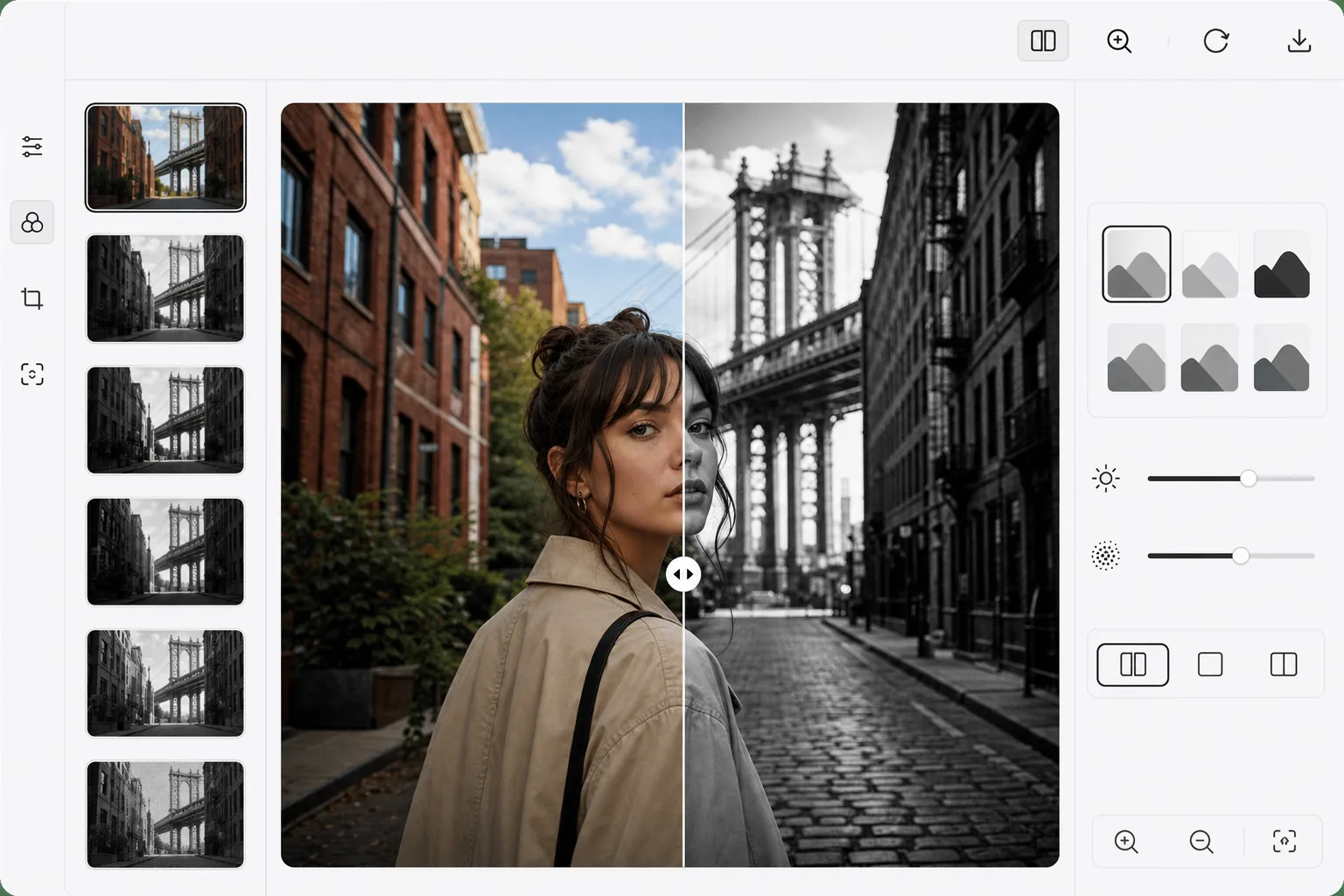
Cara mengubah foto menjadi hitam putih
Untuk mengubah foto menjadi hitam putih, buka Magic Eraser di web, iOS, atau Android, pilih AI Filter, unggah foto berwarna, pilih gaya monokrom, lalu ekspor. Gratis, tanpa perlu mendaftar. Ini bukan sekadar menghilangkan warna: AI memadukan kanal warna sehingga mawar merah dan daun hijau dengan tingkat kecerahan yang sama tetap terpisah menjadi nuansa abu-abu yang berbeda, memberi gambar kedalaman dan kontras alih-alih tampilan datar dan kusam. Pilih High Contrast untuk kesan dramatis, Soft untuk potret yang lembut, atau Film Noir untuk bayangan yang penuh suasana, dan tambahkan sedikit grain untuk nuansa ala film. Menghilangkan warna saja (desaturasi) akan menghasilkan gambar monokrom yang datar dan berlumpur karena semua warna diperlakukan sebagai gradasi abu-abu yang sama. Mawar merah dan daun hijau dengan pencahayaan yang sama menjadi tidak bisa dibedakan. Konversi hitam putih sebenarnya menggunakan pencampuran saluran: menyesuaikan seberapa besar kontribusi setiap warna terhadap nilai skala abu-abu akhir. Dalam fotografi kamar gelap, filter berwarna (merah, oranye, kuning, hijau) mengontrol pemetaan ini. Konversi yang didukung AI melangkah lebih jauh — ia menganalisis konten gambar dan menerapkan pemetaan warna cerdas yang memaksimalkan kontras, menjaga pemisahan warna, dan menciptakan kedalaman. Warna kulit dirawat dengan hati-hati untuk menghindari noda gradasi. Langit menjadi gelap secara dramatis karena dampak lanskap. Hasilnya memiliki kekayaan dan kesan monokrom yang diproses secara profesional.
Before you start
Ubah menjadi hitam putih dalam tiga langkah
Start with unggah foto anda. The result preview above and tips below use this guide's existing content; no separate before-and-after proof is assumed.
- 1
Unggah foto Anda
Buka Magic Eraser di web, iOS, atau Android dan pilih Filter AI. Unggah foto berwarna apa pun. Potret, lanskap, arsitektur, dan fotografi jalanan semuanya diubah dengan indah menjadi hitam putih.
- 2
Pilih gaya monokrom
Pilih dari gaya preset: Kontras Tinggi (hitam pekat, putih cerah), Lembut (gradien lembut, bayangan terangkat), Film Noir (bayangan dramatis, midtone murung), Dokumenter (nada natural, jangkauan penuh), atau Matte (highlight lembut, nuansa vintage). Setiap gaya menerapkan pemetaan nada berbeda yang dioptimalkan untuk estetikanya.
- 3
Sempurnakan dan ekspor
Sesuaikan intensitas keseluruhan, kontras, dan jumlah butiran. Penggeser sebelum/sesudah menunjukkan dampak konversi. Ekspor dalam format pilihan Anda — foto hitam putih seringkali berukuran lebih kecil karena tidak memiliki data saluran warna.
Terbaik untuk
- Fotografer potret menciptakan potret monokrom yang dramatis dan tak lekang oleh waktu
- Fotografer jalanan menekankan pada bentuk, bayangan, dan momen manusia
- Kreator Instagram menciptakan estetika hitam putih yang kohesif
- Fotografer seni rupa menyiapkan cetakan monokrom yang siap di galeri
- Fotografer pernikahan menawarkan versi B&W klasik bersama warna
Kiat untuk hasil terbaik
Foto dengan cahaya terarah yang kuat menghasilkan konversi terbaik — pencahayaan samping menciptakan bayangan dramatis yang menjadikan hitam putih menarik. Mendung, pencahayaan datar menghasilkan monokrom datar. Carilah gambar dengan rentang warna yang lebar: sorotan terang dan bayangan dalam dalam bingkai yang sama. Tekstur (bata, kain, kayu, air) menjadi lebih menonjol dalam warna hitam dan putih. Untuk potret, gaya Kontras Tinggi terlihat dramatis namun tidak menarik pada kulit yang lebih tua — gunakan Lembut untuk hasil yang lebih lembut. Tambahkan butiran halus pada foto hitam dan putih digital untuk meniru kualitas organik film.
Pertanyaan yang sering diajukan
- Apakah ini lebih baik daripada sekadar menggeser saturasi ke nol?
- Ya, secara signifikan. Desaturasi sederhana memperlakukan semua warna secara identik, menghilangkan pemisahan nada. Konversi AI menerapkan pencampuran saluran cerdas yang menghasilkan monokrom yang lebih kaya dan berdimensi dengan kontras dan kedalaman yang lebih baik.
- Bisakah saya mengubahnya kembali menjadi warna setelahnya?
- Tidak — Konversi Hitam dan Putih membuang informasi warna. Selalu simpan file warna asli Anda. Jika Anda ingin mewarnai foto hitam dan putih, gunakan fitur pewarnaan Magic Eraser untuk menambahkan warna yang dihasilkan AI.
- Apakah konversi hitam putih gratis?
- Ya. Fitur Filter AI termasuk konversi B&W tersedia di tingkat gratis dengan batas penggunaan harian. Premium menghilangkan batasan dan menambahkan pemrosesan batch.
- Bagaimana cara mengubah foto menjadi hitam putih di Android atau iPhone?
- Buka Magic Eraser di browser ponsel mana pun atau di aplikasi iOS maupun Android, muat foto berwarna dari galeri Anda, lalu pilih AI Filter. Tap salah satu gaya monokrom untuk melihat pratinjaunya, atur kontras dan grain sesuai selera, lalu ekspor — versi hitam putihnya langsung tersimpan kembali ke galeri Anda. Cara kerjanya sama seperti versi desktop, dan tanpa perlu memasang aplikasi jika Anda memakai browser. Simpan juga foto berwarna aslinya, karena proses konversi menghapus data warnanya.
- Gaya hitam putih mana yang sebaiknya saya pilih?
- Tergantung subjeknya. High Contrast — hitam pekat dan putih cerah — cocok untuk arsitektur, suasana jalanan, dan komposisi yang berani, tetapi bisa terlihat keras pada kulit. Soft, dengan bayangan yang diangkat dan gradasi yang lembut, membuat potret tampak lebih menawan. Film Noir menonjolkan bayangan dramatis untuk tampilan yang penuh suasana, Documentary mempertahankan rentang nada yang alami dan utuh, sedangkan Matte memberi kesan lembut ala vintage. Coba beberapa gaya pada foto yang sama dengan slider before/after — pencahayaan samping yang kuat dan rentang nada yang luas membuat gaya mana pun terlihat paling bagus.