
Cara mencela foto
Foto yang diambil dalam cahaya redup, ISO tinggi, atau dengan kamera lama sering kali memiliki noise yang terlihat — bintik-bintik berwarna, butiran, dan tekstur seperti amplas yang menurunkan kualitas gambar. Denoising AI menghilangkan kebisingan sambil mempertahankan detail asli di bawahnya.
Last updated
Tolak sekarang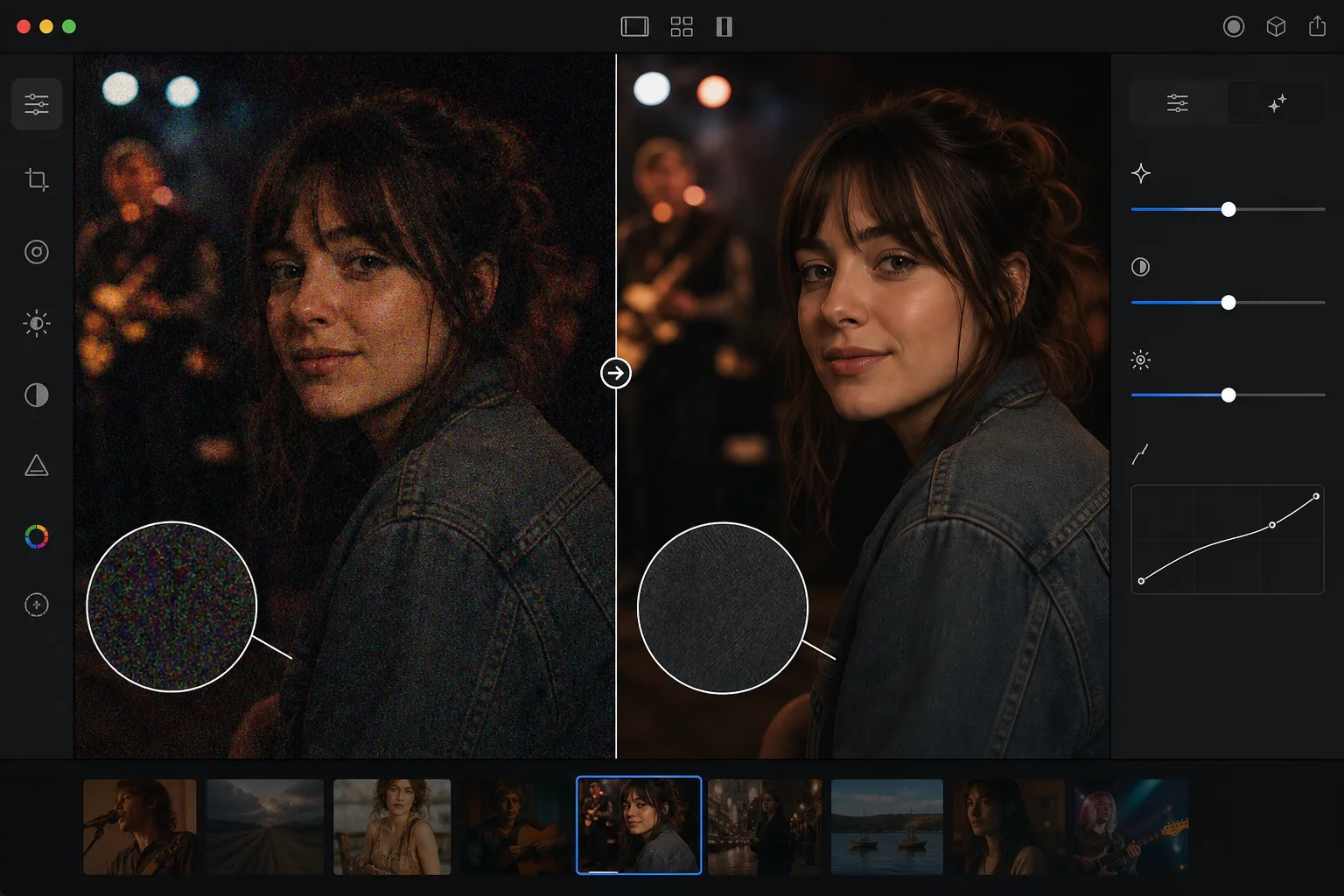
Apa yang menyebabkan noise pada foto dan mengapa menurunkan kualitas
Untuk menghilangkan noise dari foto, buka Magic Eraser di web, iOS, atau Android, pilih AI Enhance, unggah foto yang berbintik, dan biarkan AI membersihkannya — AI bisa membedakan bintik acak dari detail asli, jadi noise warna (chroma) dan noise berbutir (luminance) hilang sementara tepi, rambut, dan tekstur tetap utuh. Gratis, tanpa perlu daftar. Hasil terbaik pada noise sedang (sekitar ISO 1600–6400); foto yang sangat berbintik tetap membaik, tapi bisa terlihat sedikit kurang tajam. Hilangkan noise dulu sebelum melakukan penajaman atau penyesuaian kontras, karena keduanya justru memperkuat noise dan membuatnya makin sulit dipisahkan dari detail. Noise foto digital berasal dari sensor kamera yang memperkuat sinyal cahaya lemah. Dalam kondisi cahaya redup, sensor memerlukan amplifikasi yang lebih tinggi (ISO lebih tinggi) untuk menghasilkan gambar yang terlihat, dan amplifikasi tersebut juga menghilangkan derau elektronik acak. Hasilnya adalah bintik-bintik berwarna (derau kroma) dan tekstur kasar (derau luminansi) yang dihamparkan pada konten gambar sebenarnya. Kamera yang lebih tua dan sensor yang lebih kecil (kamera ponsel, kamera saku) menghasilkan lebih banyak noise pada pengaturan ISO yang setara. Fotografi malam hari, acara dalam ruangan, konser, dan situasi cahaya redup apa pun biasanya menghasilkan gambar yang bising. Denoising tradisional (Gaussian blur, median filter) mengurangi noise namun juga merusak detail halus — rambut, tekstur kain, bulu mata, teks semuanya menjadi lembut. Denoising AI membedakan antara noise dan detail, menghilangkan bintik-bintik acak sambil mempertahankan konten gambar asli.
Before you start
Tolak kebisingan dalam tiga langkah
Start with unggah foto berisik tersebut. The result preview above and tips below use this guide's existing content; no separate before-and-after proof is assumed.
- 1
Unggah foto berisik tersebut
Buka Magic Eraser di web, iOS, atau Android. Unggah gambar yang berisik — foto dengan cahaya redup, foto dengan ISO tinggi, gambar kamera lama, atau foto apa pun dengan butiran atau bintik yang terlihat. Mendukung JPEG, PNG, HEIC, dan WebP.
- 2
Terapkan penolakan AI
Pilih alat denoise atau peningkatan. AI menganalisis pola noise di seluruh gambar — mengidentifikasi variasi mana yang merupakan noise (bintik acak) dan mana yang merupakan detail asli (tekstur, tepi, fitur halus). Ini menghilangkan kebisingan sambil mempertahankan konten sebenarnya.
- 3
Tinjau dan ekspor
Periksa hasilnya pada zoom penuh — area halus (langit, dinding, kulit) harus bersih tanpa bintik, sedangkan area detail (rambut, kain, dedaunan) harus mempertahankan tekstur dan ketajamannya. Gambar keseluruhan akan terlihat lebih bersih dan profesional. Ekspor dengan resolusi penuh.
Terbaik untuk
- Fotografi acara dengan cahaya redup (konser, pernikahan, acara dalam ruangan) diambil pada ISO tinggi
- Fotografi malam dan astrofotografi di mana eksposur panjang atau ISO tinggi menghasilkan butiran
- Foto kamera ponsel diambil dalam kondisi redup dimana ukuran sensor membatasi kinerja cahaya rendah
- Foto kamera digital lama yang teknologi sensornya menghasilkan lebih banyak noise dibandingkan kamera modern
- Pengambilan bingkai video yang pada dasarnya lebih berisik dibandingkan foto diam khusus
Kiat untuk hasil terbaik
Denoising AI paling efektif pada kebisingan sedang. Gambar yang sangat berisik (ISO sangat tinggi, pencahayaan yang sangat rendah) mungkin kehilangan beberapa detail halus bahkan dengan penolakan AI karena kebisingan melebihi konten di bawahnya. Untuk hasil terbaik, terapkan denoising sebelum pemrosesan lainnya — pengurangan noise berfungsi paling baik pada gambar asli yang berisik, bukan setelah penajaman atau peningkatan kontras (yang memperkuat noise). Untuk foto dengan noise dan blur, hilangkan noise terlebih dahulu, lalu terapkan penajaman atau penyempurnaan. AI menangani derau kroma (bintik berwarna) dan derau luminansi (tekstur butiran). Noise Chroma lebih mudah dihilangkan karena pola warnanya sangat berbeda dengan konten gambar. Kebisingan pencahayaan lebih keras karena menyerupai tekstur asli — AI unggul dalam membedakan keduanya.
Pertanyaan yang sering diajukan
- Apakah denoising mengurangi ketajaman gambar?
- Dampak minimal. Denoising tradisional mengaburkan gambar untuk mengurangi noise. Penyangkalan AI lebih tepat — ia menargetkan pola kebisingan acak sambil mempertahankan tepian, tekstur, dan detail halus. Beberapa detail yang sangat halus mungkin sedikit diperhalus pada gambar yang sangat bising.
- Bisakah ini memperbaiki gambar yang sangat bising?
- Hal ini meningkatkan kualitasnya secara signifikan, namun gambar dengan noise yang sangat tinggi (ISO 12800+, underexposure yang parah) mungkin masih tetap lembut karena noise tersebut melebihi detail aslinya. Kebisingan sedang (ISO 1600-6400) memberikan hasil yang sangat baik.
- Haruskah saya menolak sebelum atau sesudah pengeditan lainnya?
- Sebelum. Denoising berfungsi paling baik pada gambar berisik asli. Menerapkan penajaman, kontras, atau pengeditan lainnya sebelum menghilangkan noise akan memperkuat noise dan mempersulit pemisahan dari detail sebenarnya.
- Apakah mencela itu gratis?
- Ya. Denoising AI tersedia melalui alat peningkatan pada tingkat gratis dengan batas penggunaan harian. Premium menghilangkan batasan untuk pemrosesan batch kumpulan foto yang berisik.
- Bagaimana cara menghilangkan noise foto di Android atau iPhone?
- Buka Magic Eraser di browser ponsel mana pun atau lewat aplikasi iOS maupun Android, muat foto berbintik dari galeri kamera, lalu pilih AI Enhance. AI mendeteksi noise dan membersihkannya langsung di ponselmu — tanpa perlu komputer — lalu menyimpan versi yang lebih jernih kembali ke galeri. Cara kerjanya sama seperti versi desktop, dan tidak perlu instal aplikasi kalau kamu pakai browser, jadi praktis untuk merapikan foto low-light atau hasil jepretan konser langsung dari ponsel.