
Cara membuat foto paspor di rumah
Layanan foto paspor mengenakan biaya $10-15 untuk sesuatu yang dapat Anda lakukan di rumah dalam 2 menit. Magic Eraser menghapus latar belakang, menggantinya dengan warna putih yang diperlukan, dan membantu Anda memotong ke dimensi yang benar — spesifikasi AS, Inggris, UE, atau negara mana pun.
Last updated
Buat foto paspor sekarang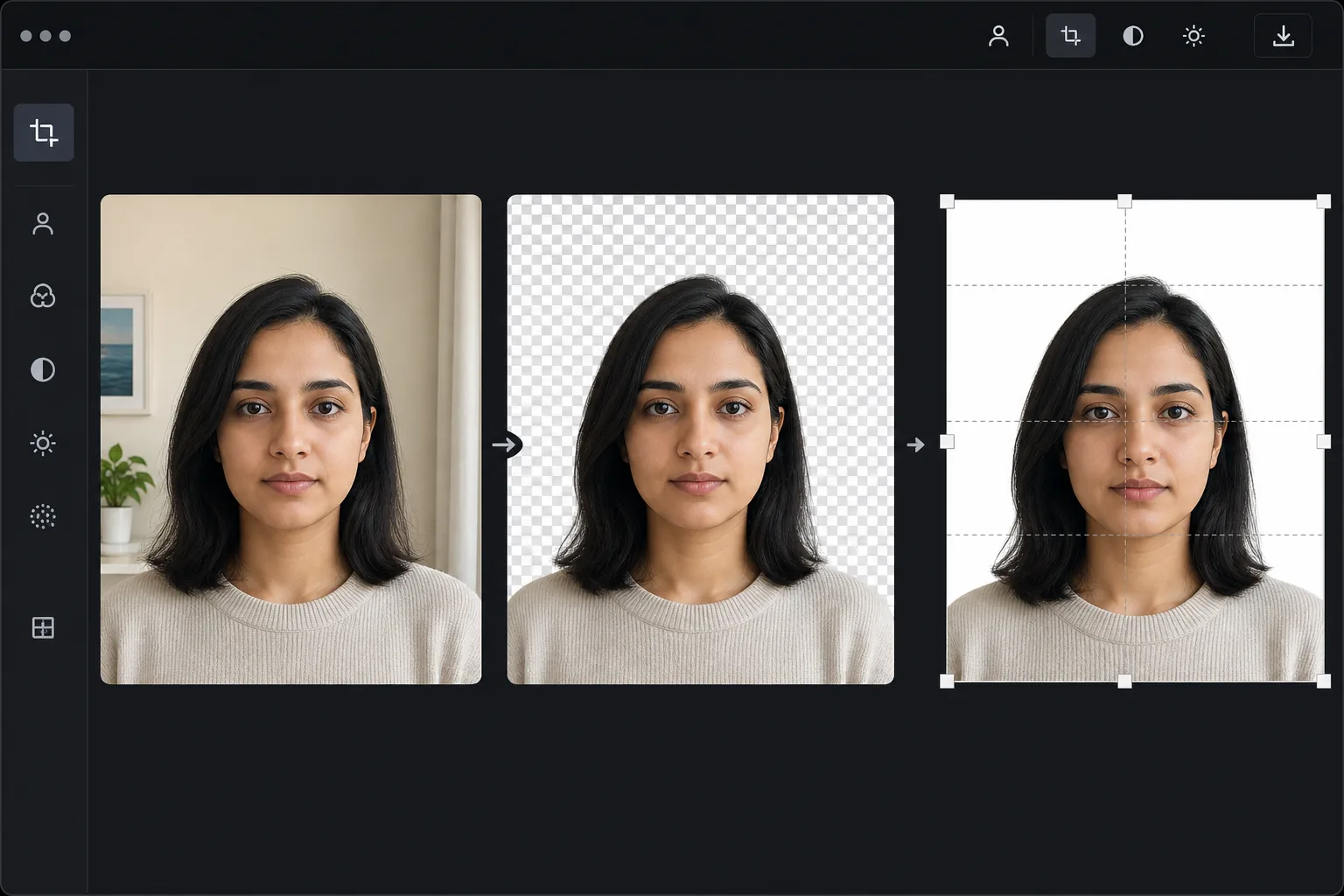
Persyaratan foto paspor lebih ketat dari yang Anda kira
Untuk memotong foto paspor, buka Magic Eraser di web, iOS, atau Android, unggah foto tampak depan dengan ekspresi netral, ganti latar belakang dengan warna polos yang diwajibkan (putih untuk AS), lalu potong sesuai ukuran dan rasio tinggi kepala yang persis berlaku di negara Anda — 2x2 inci dengan kepala 50-69% untuk AS, 35x45mm untuk Inggris dan sebagian besar Uni Eropa. Gratis, tanpa perlu daftar. Alat ini menangani latar belakang dan pemotongan; Anda tetap perlu memulai dari foto yang sesuai aturan (pencahayaan merata, tidak ada pantulan kacamata, pose netral), karena memotong tidak bisa memperbaiki kepala yang miring atau bayangan yang tajam. Selalu periksa ketentuan terbaru dari pemerintah Anda sebelum mengirim. Kantor paspor pemerintah menolak sebagian besar foto yang dikirimkan karena masalah yang dapat dihindari: warna latar belakang salah, dimensi salah, rasio ukuran kepala tidak tepat, bayangan pada wajah atau latar belakang, dan pantulan kacamata. Foto paspor AS memerlukan latar belakang putih, dimensi 2x2 inci, dan kepala harus menempati 50-69% dari tinggi gambar. Foto paspor Inggris memerlukan latar belakang abu-abu muda atau krem dengan ukuran 35x45mm. Setiap negara memiliki persyaratan khusus. Layanan foto paspor profesional di apotek dan kantor pos mengenakan biaya $10-15 per set dan terkadang masih memberikan hasil yang ditolak. Magic Eraser menangani koreksi utama: mengganti latar belakang apa pun dengan warna putih yang diperlukan dan memastikan pencahayaan yang bersih dan merata.
Before you start
Buat foto paspor dalam tiga langkah
Start with ambil fotonya. The result preview above and tips below use this guide's existing content; no separate before-and-after proof is assumed.
- 1
Ambil fotonya
Berdirilah di dinding atau latar belakang apa pun yang polos (AI akan menggantikannya). Gunakan cahaya alami dari jendela di depan Anda — tanpa lampu kilat. Pegang ponsel setinggi mata, dengan jarak 4-5 kaki. Tatap langsung ke kamera dengan ekspresi netral, mulut tertutup. Lepaskan kacamata jika memungkinkan (banyak negara sekarang mewajibkan foto tanpa kacamata).
- 2
Hapus dan ganti latar belakang
Unggah ke Magic Eraser. Gunakan penghapusan latar belakang untuk menghapus latar belakang yang ada, lalu ganti dengan warna putih murni (untuk AS, Schengen, sebagian besar negara) atau abu-abu muda (Inggris Raya, beberapa negara lainnya). Periksa apakah tidak ada bayangan dari latar belakang asli yang tersisa dan tepian rambut bersih terhadap warna putih.
- 3
Pangkas dan ekspor
Pangkas sesuai dimensi yang diperlukan negara Anda — 2x2 inci (AS), 35x45mm (UK/EU), atau ukuran spesifik untuk tujuan Anda. Pusatkan wajah dengan kepala menempati proporsi bingkai yang benar. Ekspor dengan minimum 300 DPI untuk pencetakan. Cetak di lab foto atau pada kertas foto glossy di rumah.
Terbaik untuk
- Foto paspor dan visa AS memerlukan latar belakang putih dan format 2x2 inci
- Foto paspor Inggris memerlukan latar belakang abu-abu terang dan format 35x45mm
- Foto visa Schengen UE dengan persyaratan khusus negara
- Foto ID untuk SIM, ID pelajar, dan lencana karyawan
- Foto paspor bayi dan anak yang pengalaman studionya sulit
Kiat untuk hasil terbaik
Pencahayaan adalah faktor terpenting — berdirilah menghadap jendela besar dengan cahaya alami menyinari wajah Anda secara merata. Hindari pencahayaan ruangan di atas kepala yang menciptakan bayangan di bawah mata dan hidung. Latar belakang tidak menjadi masalah (AI akan menggantikannya) tetapi pencahayaan wajah pun penting. Untuk bayi dan anak kecil, letakkan mereka di atas kertas putih dan foto langsung dari atas — ini adalah teknik yang diterima dan AI menangani konversi kertas menjadi latar belakang putih. Ambil beberapa foto dan pilih salah satu dengan ekspresi paling alami dan netral. Sebagian besar penolakan ditujukan untuk masalah ekspresi (tersenyum, menyipitkan mata) dan bayangan, bukan masalah latar belakang — AI menangani latar belakang dengan sempurna tetapi tidak dapat memperbaiki ekspresi yang buruk.
Pertanyaan yang sering diajukan
- Apakah kantor paspor akan menerima foto yang diedit AI?
- Ya. Kantor paspor mengevaluasi foto akhir berdasarkan persyaratannya — warna latar belakang, dimensi, ukuran kepala, ekspresi. Bagaimana latar belakang diproduksi (penghapusan studio vs. AI) tidak dievaluasi. Hasilnya harus memenuhi spesifikasi teknis.
- Warna latar belakang apa yang dibutuhkan AS?
- Putih atau putih pucat. Opsi latar belakang putih Magic Eraser menghasilkan warna putih murni (RGB 255.255.255), yang memenuhi persyaratan Departemen Luar Negeri AS.
- Bisakah saya menggunakan ponsel untuk mengambil foto?
- Ya. Kamera ponsel modern melebihi persyaratan resolusi minimum. Gunakan kamera belakang (bukan kamera selfie) untuk kualitas yang lebih baik, dipegang dalam jarak dekat atau oleh orang lain. Cahaya jendela alami memberikan hasil terbaik.
- Apakah pembuatan foto paspor gratis?
- Ya. Penghapusan latar belakang dan penggantian latar belakang putih tersedia di tingkat gratis. Ini saja menghemat $10-15 yang dibebankan oleh layanan foto paspor.
- Ukuran dan rasio kepala apa yang harus saya gunakan saat memotong, dan apakah berbeda di tiap negara?
- Ya, berbeda-beda tergantung negara. AS menggunakan 2x2 inci (51x51mm) dengan tinggi kepala 1 hingga 1-3/8 inci — kira-kira 50-69% dari bingkai. Inggris dan sebagian besar negara Uni Eropa menggunakan 35x45mm dengan tinggi kepala 29-34mm. India menggunakan 2x2 inci; Kanada menggunakan 50x70mm. Potong sesuai ketentuan persis negara tujuan Anda, jaga kepala tetap di tengah dan posisi mata pada ketinggian yang disyaratkan, lalu pastikan angkanya di halaman resmi pemerintah, karena persyaratan bisa berubah dan rasio yang salah adalah salah satu alasan penolakan yang paling umum.