
Supprimer les poubelles des photos
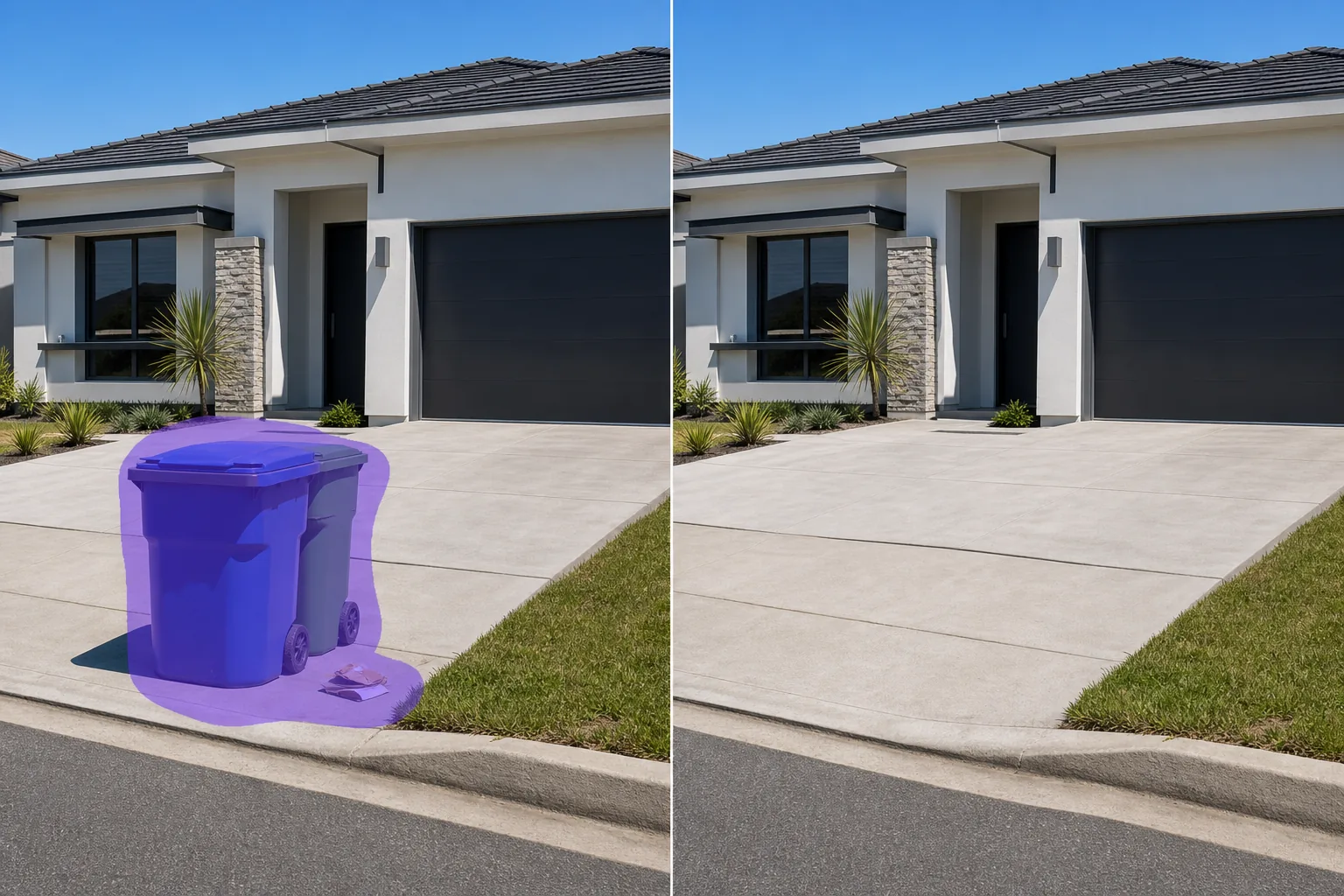
Effacez les poubelles, les bacs de recyclage, les bennes à ordures et les conteneurs à déchets des photos d'annonces immobilières, des photos de voyage, des images architecturales et des photographies d'événements. Magic Eraser supprime la pollution visuelle et reconstruit l'allée, le trottoir ou la cour derrière celle-ci - aucun clonage manuel ni sélection minutieuse n'est requis.
Dernière mise à jour
Pourquoi les poubelles ruinent l'immobilier et les photos de voyage
Une poubelle sur le trottoir est facile à ignorer en personne, mais impossible à manquer sur une photo. Dans les annonces immobilières, les poubelles visibles réduisent la valeur perçue de la propriété : les acheteurs se font une idée dans les 3 premières secondes suivant la visualisation d'une photo de l'annonce, et une benne à ordures dans l'allée signale une négligence, même si la propriété est impeccable. Dans la photographie de voyage, les poubelles brisent l’esthétique d’une scène de rue ou d’un monument pittoresque. Magic Eraser élimine ces horreurs en quelques secondes. L'IA identifie le bac, son ombre et tous les débris associés, puis reconstruit l'allée, le trottoir, l'herbe ou le trottoir derrière lui avec une texture et une perspective correspondantes. Pour les agents immobiliers traitant 20 à 40 photos d’annonces par propriété, cela permet de gagner un temps de retouche important par prise de vue.
Retirer les poubelles en trois étapes
- 1
Téléchargez votre photo
Ouvrez Magic Eraser sur le Web, iOS ou Android et téléchargez l'extérieur de l'immobilier, la photo de voyage ou la photo architecturale contenant la poubelle. Les formats JPEG, PNG, HEIC et WebP sont acceptés quelle que soit la résolution.
- 2
Brossez la poubelle
Peignez toute la poubelle, y compris son couvercle, ses roues, l'ombre au sol et tout débris visible à proximité. Pour les bennes à ordures, incluez l’enceinte complète et l’ombre qu’elle projette. Étendez le pinceau légèrement au-delà de l'objet pour donner le contexte IA à la surface d'arrière-plan.
- 3
Effacer et vérifier
Appuyez sur Effacer et l'IA supprime la poubelle tout en reconstruisant la surface derrière elle : béton d'allée, gazon, pavé en brique ou trottoir. Vérifiez que la surface reconstruite correspond à la zone environnante en termes de texture et de perspective. Exécutez une deuxième passe si la zone d’ombre doit être affinée. Exportez pour la liste MLS, le site Web immobilier ou le portefeuille.
Idéal pour
- Photos d'annonces immobilières où les poubelles en bordure de rue nuisent à l'attrait de la propriété
- Photos Airbnb et locations de vacances qui nécessitent un extérieur propre et accueillant
- Photographie d'architecture où les bennes à ordures ou les zones à déchets cassent l'esthétique
- Photographie de voyage et de rue avec des poubelles municipales disgracieuses
- Photos du lieu de mariage et de l'espace événementiel où les zones de service sont visibles
- Photos marketing d'hôtels et d'hôtellerie montrant des zones extérieures ou des piscines
- Photographie de paysage urbain où les poubelles encombrent une composition par ailleurs propre
- Présentations d'urbanisme et de développement qui nécessitent des paysages de rue idéalisés
Conseils pour vider proprement les poubelles
Les poubelles font partie des objets les plus faciles à retirer car elles reposent généralement sur des surfaces uniformes (allées, trottoirs, pelouses) que l’IA reconstruit bien. Deux situations nécessitent une attention particulière. Premièrement : lorsque la poubelle masque partiellement quelque chose d'important (une boîte aux lettres, un lit de jardin, une voiture garée), l'IA reconstruit en fonction du contexte environnant et peut ne pas recréer avec précision l'objet caché – inspectez le résultat et éventuellement effectuez un deuxième passage plus ciblé. Deuxièmement : les grandes bennes à ordures sur les photos d’immeubles commerciaux ou multifamiliaux projettent des ombres importantes. Incluez l'ombre complète dans votre sélection de pinceau ; laisser une ombre derrière après avoir supprimé l'objet est le signe le plus courant d'une modification de suppression. Pour les agents immobiliers qui utilisent régulièrement Magic Eraser, développez un flux de travail cohérent : retirez les poubelles, puis les boîtes utilitaires, puis tout autre encombrement en bordure de rue, en traitant toutes les photos extérieures en séquence.
Questions fréquemment posées
- Est-il gratuit de supprimer les poubelles des photos de la liste ?
- Oui. Le niveau gratuit de Magic Eraser gère le retrait des poubelles avec des limites quotidiennes. Les agents immobiliers traitant plusieurs annonces bénéficient de Premium (29,99 $/an) qui supprime les limites d'utilisation et permet des exportations à plus haute résolution pour les photos de qualité MLS.
- Est-ce que ça supprime aussi l'ombre ?
- Incluez l'ombre dans votre sélection de pinceau et Magic Eraser supprime à la fois la poubelle et son ombre, reconstruisant la surface en dessous. Si vous oubliez l'ombre, vous pouvez effectuer une seconde passe uniquement sur la zone d'ombre.
- Puis-je supprimer plusieurs corbeilles d’une même photo ?
- Oui. Brossez chaque bac individuellement ou sélectionnez tous les bacs d’un seul coup s’ils sont regroupés. L’IA gère chaque retrait indépendamment, reconstruisant la surface appropriée derrière chacun.
- Qu’en est-il des bacs de recyclage et des chariots à compost ?
- Tout type de conteneur à déchets fonctionne : poubelles standard, bacs de recyclage, chariots à compost, grandes bennes à ordures et enclos à déchets commerciaux. L'IA les traite tous comme des objets à supprimer et reconstruit l'arrière-plan derrière chacun.