
Supprimer les foules des photos
Débarrassez-vous de la foule dense d'étrangers devant le monument, du public remplissant les sièges du stade, des acheteurs dans les allées du marché, des spectateurs du défilé sur le trottoir. Magic Eraser élimine la foule et reconstruit le sol, la place ou la toile de fond en dessous, même pour des groupes de dizaines, voire de centaines de personnes. Gratuit sur le Web, iOS et Android.
Dernière mise à jour
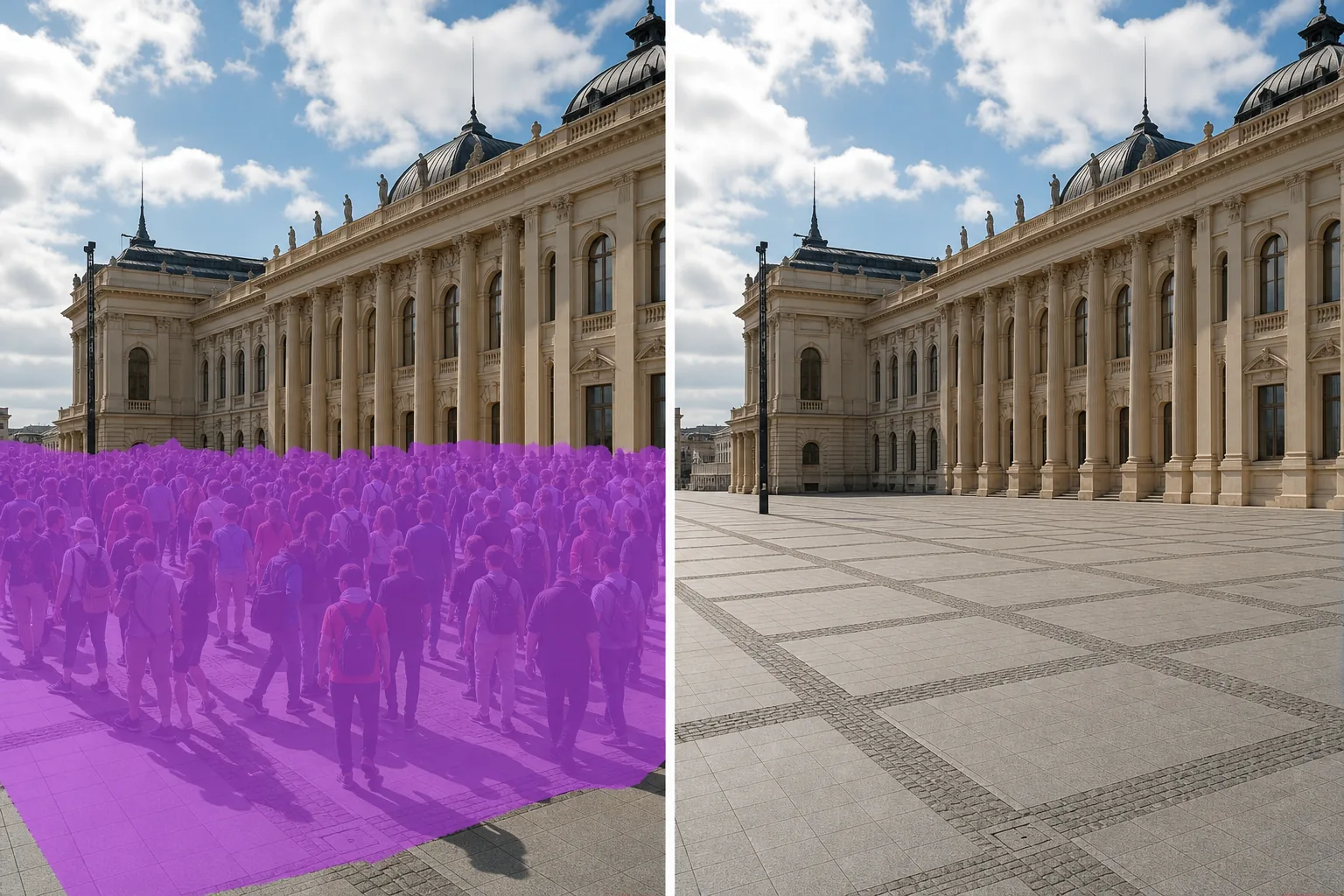
Pourquoi les foules denses sont différentes d'un seul étranger
Supprimer un seul inconnu d’une photo de touriste est un problème évident : un sujet, un arrière-plan à reconstruire, des bords bien définis. Les foules denses sont différentes : les sujets se chevauchent, les ombres se composent, le sol est en grande partie caché et l'œil perçoit la foule comme un motif texturé plutôt que comme des personnes individuelles. L'édition manuelle ici n'est pas pratique car vous cloneriez des centaines de correctifs et raisonneriez sur des centaines d'ombres. Magic Eraser gère la foule entière comme une région : brossez toute la masse et l'IA reconstruit la place, le sol du stade, l'allée du marché ou le trottoir en dessous en utilisant les marges visibles comme référence. Fonctionne aussi bien sur de petits groupes d'une douzaine de personnes que sur des stades remplis.
Supprimer une foule en trois étapes
- 1
Téléchargez votre photo
Ouvrez Magic Eraser sur le Web, iOS ou Android et déposez la photo du concert, du stade, du marché, du défilé, de la place publique ou du lieu de l'événement. JPEG, PNG, HEIC et WebP sont tous pris en charge.
- 2
Brossez la foule en tant que région
Peignez toute la masse de la foule – n'essayez pas de décrire des personnes individuelles. Un pinceau généreux sur l'ensemble du groupe donne à l'IA une région claire à reconstruire et est plus rapide que le traçage des bords. Incluez les ombres que la foule projette sur le sol ou dans la zone de votre pinceau ; laisser des ombres derrière rend le nettoyage évident. Pour les foules partielles (premier plan uniquement, en laissant l'arrière de la salle intact), brossez uniquement la masse du premier plan.
- 3
Appuyez sur Effacer et inspecter
Magic Eraser reconstruit le sol, la place, le stade ou la toile de fond du marché en quelques secondes. Numérisez avec un zoom de 100 % pour détecter les silhouettes résiduelles, effectuez une seconde passe sur tout artefact restant, puis exportez en pleine résolution pour le portfolio, la publication sur les réseaux sociaux, l'édition ou l'utilisation commerciale.
Idéal pour
- Photos de voyage dans des monuments célèbres (Tour Eiffel, Taj Mahal, Colisée) où la foule ruine la photo architecturale
- Photos de concerts et de festivals de musique où vous souhaitez que la scène, le système d'éclairage ou l'intérieur de la salle soient visibles
- Photos de stades sportifs où l'esthétique des lieux vides compte (portefeuilles architecturaux, annonces immobilières de complexes sportifs)
- Photos de marchés, de bazars et de souks où l'allée, la conception du stand ou la présentation des marchandises font l'objet
- Photos de défilés et de festivals de rue où les chars, les artistes ou le parcours lui-même sont le sujet
- Photos de places publiques (Tiananmen, Trafalgar, Times Square) où l'architecture est le sujet
- Extérieurs du lieu de mariage pendant la réception lorsque la foule remplit la cour ou la terrasse
- Photos de stands de salons professionnels dont vous souhaitez que le design du stand soit propre, sans autres participants
Cas Edge et conseils
L'élimination de la foule fonctionne mieux lorsque la foule se trouve devant un arrière-plan relativement continu : le sol d'une place, le terrain d'un stade, une allée de marché, une façade d'immeuble. Deux types de scènes sont plus difficiles. Premièrement : lorsque la foule est superposée à une architecture à perspective profonde (des rangées de piliers s'éloignant au loin, l'intérieur d'une longue halle de marché), l'IA peut aplatir la perspective lors de la reconstruction ; effectuez des passes plus petites pour chaque plan de profondeur (la foule au premier plan d'abord, puis au milieu du sol, puis les personnages de la dernière rangée) pour des repères spatiaux plus propres. Deuxièmement : lorsque la foule est le sujet de premier plan d’une composition franche (photographie de rue où la foule est le point central), leur effacement laisse une scène vide et gênante – la bonne réponse est généralement une nouvelle prise de vue à un moment différent plutôt qu’un effacement de la foule. Pour une utilisation commerciale, éditoriale et journalistique à enjeux élevés, divulguez des photos de foule nettoyées par l’IA conformément aux normes industrielles en vigueur – et soyez prudent avec les contextes d’actualité et de documentaire dans lesquels la suppression de personnes modifie sensiblement la vérité de la scène.
Questions fréquemment posées
- Est-il gratuit de supprimer une foule d’une photo ?
- Oui. Le niveau gratuit de Magic Eraser couvre la suppression des foules avec des limites d'utilisation quotidienne. La mise à niveau vers Premium (29,99 $/an) supprime les limites et débloque des exportations à plus haute résolution – utile pour les éditoriaux imprimés, les portefeuilles architecturaux et les licences commerciales.
- Puis-je supprimer une foule de milliers de personnes dans un stade ?
- Oui. Magic Eraser gère des foules denses à grande échelle : le modèle traite la foule comme une région texturée plutôt que comme des sujets individuels. Brossez toute la cuvette des sièges et l'IA reconstruit les sièges en dessous. Pour les très grandes foules, effectuez deux ou trois passes couvrant différentes sections (bol inférieur, pont supérieur, zones d'extrémité) pour des résultats plus propres qu'une zone masquée géante.
- Qu’en est-il des ombres de la foule au sol ?
- Incluez les ombres dans la région de votre pinceau. Laisser des ombres derrière soi est le signe le plus courant qu'une foule a été effacée : l'œil lit les ombres même lorsque les gens sont partis. Appliquez une marge généreuse autour de chaque ombre afin que l'IA ait une référence claire pour la texture du sol sans contamination par l'ombre.
- La place, le stade ou la rue nettoyée paraîtra-t-il visiblement modifié ?
- Sur la plupart des photos, non : l’IA fait correspondre la texture du sol, l’éclairage et la perspective des marges visibles. Les endroits qu'il peut montrer sont des scènes avec des motifs de sol très détaillés (pavés selon un angle spécifique, lignes de cour peintes sur un terrain de sport, carreaux de sol d'étals de marché selon un motif régulier) où la zone reconstruite peut légèrement adoucir le motif ; une passe de retouche avec un pinceau plus petit résout généralement ce problème.
- Dois-je divulguer la modification à des fins éditoriales ou commerciales ?
- Pour la photographie d’actualité et documentaire, la suppression des foules modifie le sens de la scène – la plupart des directives éditoriales (AP, Reuters, Code d’éthique de la NPPA) interdisent toute modification matérielle qui pourrait induire le spectateur en erreur. Pour la photographie de voyages, d'immobilier, d'architecture et de produits, les photos de foule nettoyées par l'IA sont largement acceptées et divulguées conformément aux normes industrielles pertinentes (FTC pour les textes publicitaires, article 12 du code d'éthique du NAR pour les utilisations immobilières).