
Supprimer la construction des photos
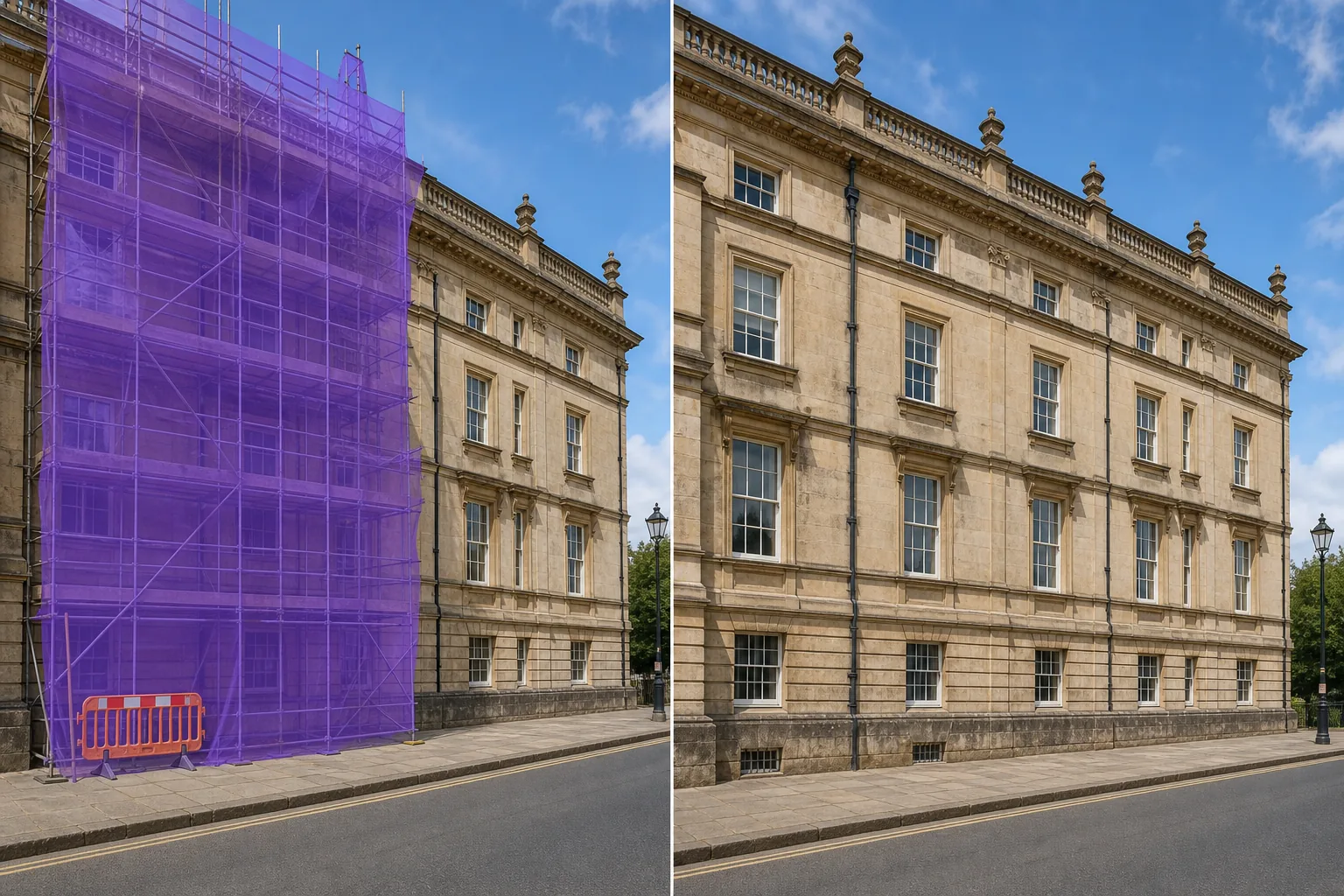
Effacez les échafaudages, les grues, les barrières de construction, les filets de sécurité, les clôtures temporaires et les équipements de chantier des photos architecturales, de monuments, de voyages et immobilières. Magic Eraser supprime l'encombrement de la construction et reconstruit la façade du bâtiment, l'horizon ou le paysage de rue derrière lui.
Dernière mise à jour
Pourquoi la construction détruit des photos de monuments et de propriétés
La construction est temporaire mais les photographies sont permanentes. Une photo de voyage du Colisée enveloppée d'échafaudages, un portfolio architectural gâché par une grue dans l'horizon, une annonce immobilière avec des barrières de construction sur le terrain voisin - ces perturbations visuelles dévalorisent des images par ailleurs excellentes. Attendre la fin de la construction est souvent peu pratique : les grands projets de restauration des dernières années, le développement urbain est continu et les annonces immobilières ne peuvent pas attendre que la rénovation d'un voisin soit terminée. Magic Eraser supprime les éléments de construction et reconstruit la façade du bâtiment, le ciel, la surface de la rue ou le paysage obscurci. L'IA gère la géométrie complexe des poteaux d'échafaudage, la transparence des filets et les silhouettes des grues, produisant des résultats qui montrent la scène telle qu'elle sera une fois la construction terminée.
Supprimer la construction en trois étapes
- 1
Téléchargez votre photo
Ouvrez Magic Eraser sur le Web, iOS ou Android et téléchargez la photo architecturale, de voyage, immobilière ou emblématique avec des éléments de construction. Tous les formats d'images standards sont acceptés.
- 2
Badigeonner les éléments de construction
Peignez sur des échafaudages, des grues, des barrières, des clôtures de construction, des filets de sécurité ou une signalisation temporaire. Pour les échafaudages recouvrant une façade de bâtiment, brossez toute la structure de l'échafaudage, y compris le filet. Pour les grues Skyline, tracez la silhouette complète de la grue, y compris le bras et les câbles.
- 3
Effacer et réviser
Appuyez sur Effacer et l'IA supprime la construction et reconstruit ce qui se cache derrière : les façades des bâtiments, le ciel, les surfaces des rues, l'aménagement paysager. Vérifiez que les lignes architecturales (grilles de fenêtres, corniches, lignes de toit) se poursuivent avec précision dans la zone reconstruite. Exécutez une deuxième passe sur tous les éléments manqués par la première passe. Exportez en pleine résolution.
Idéal pour
- Photographie de voyage où des bâtiments emblématiques sont recouverts d'échafaudages de restauration
- Prises de vue de portfolio architectural où la construction à proximité perturbe la composition
- Annonces immobilières où les propriétés voisines sont en construction
- Photographie de paysage urbain et d'horizon avec des grues dans le cadre
- Documentation sur les bâtiments historiques où une construction temporaire obscurcit la façade
- Photos de marketing hôtelier et touristique nécessitant des vues sans construction
- Présentations de développement urbain montrant des visions achevées de projets en cours
- Photographie d'archives où les éléments de construction limitent le potentiel de licence commerciale
Conseils pour supprimer efficacement les constructions
Les éléments de construction varient en complexité. Les barrières et clôtures simples sont faciles à supprimer car elles se trouvent sur des arrière-plans relativement simples. L'échafaudage sur une façade de bâtiment est plus difficile car l'IA doit reconstruire les détails architecturaux (fenêtres, maçonnerie, boiseries) recouverts par l'échafaudage. Pour de meilleurs résultats lors du retrait des échafaudages, vérifiez que les éléments architecturaux répétés (espacement des fenêtres, lignes de corniche) se prolongent correctement dans la zone reconstruite. Si un bâtiment possède un élément décoratif unique caché par un échafaudage, l’IA ne peut pas savoir qu’il existe – elle continuera le motif visible. Pour le retrait de la grue des horizons, incluez la silhouette complète de la grue et tous les câbles visibles. Le ciel derrière une grue est généralement suffisamment uniforme pour permettre une reconstruction sans faille. Le filet de sécurité (le maillage vert ou bleu qui enveloppe l'échafaudage) est semi-transparent et l'IA le gère bien, mais incluez la zone de filet complète dans votre sélection plutôt que d'essayer de la contourner.
Questions fréquemment posées
- Est-il gratuit de supprimer des constructions sur des photos ?
- Oui. Le niveau gratuit de Magic Eraser couvre le retrait des travaux avec des limites d'utilisation quotidienne. Premium (29,99 $/an) offre une utilisation illimitée pour les flux de travail photographiques professionnels.
- Peut-il reconstruire la façade du bâtiment derrière des échafaudages ?
- Oui. L'IA analyse les parties visibles du bâtiment et étend le motif architectural à travers la zone couverte par les échafaudages. Les résultats sont plus précis pour les bâtiments présentant des motifs répétitifs (grilles de fenêtres, rangées de briques) et peuvent nécessiter un examen manuel pour les éléments décoratifs uniques.
- Est-ce qu'il gère les grues dans l'horizon ?
- Oui. Brossez toute la structure de la grue, y compris le bras, la tour et tous les câbles. Le ciel derrière la grue est reconstitué de manière transparente. Pour les grues devant les bâtiments, la façade du bâtiment est également reconstruite à partir des parties visibles.
- Qu’en est-il des barrières de construction et des clôtures temporaires ?
- Ce sont parmi les éléments les plus faciles à retirer car ils reposent généralement sur des surfaces uniformes comme les trottoirs, les routes ou l’herbe. Brossez la barrière et sa base, et l'IA reconstruit la surface derrière elle.