
Comment éditer des photos immobilières avec l'IA
Les annonces immobilières avec des photos retouchées par des professionnels se vendent 32 % plus rapidement et à des prix plus élevés. L'IA de Magic Eraser gère les retouches de photos immobilières les plus percutantes : suppression de l'encombrement, remplacement des ciels ternes, correction de l'éclairage et nettoyage des photos intérieures et extérieures.
Last updated
Modifier les photos de l'annonce maintenant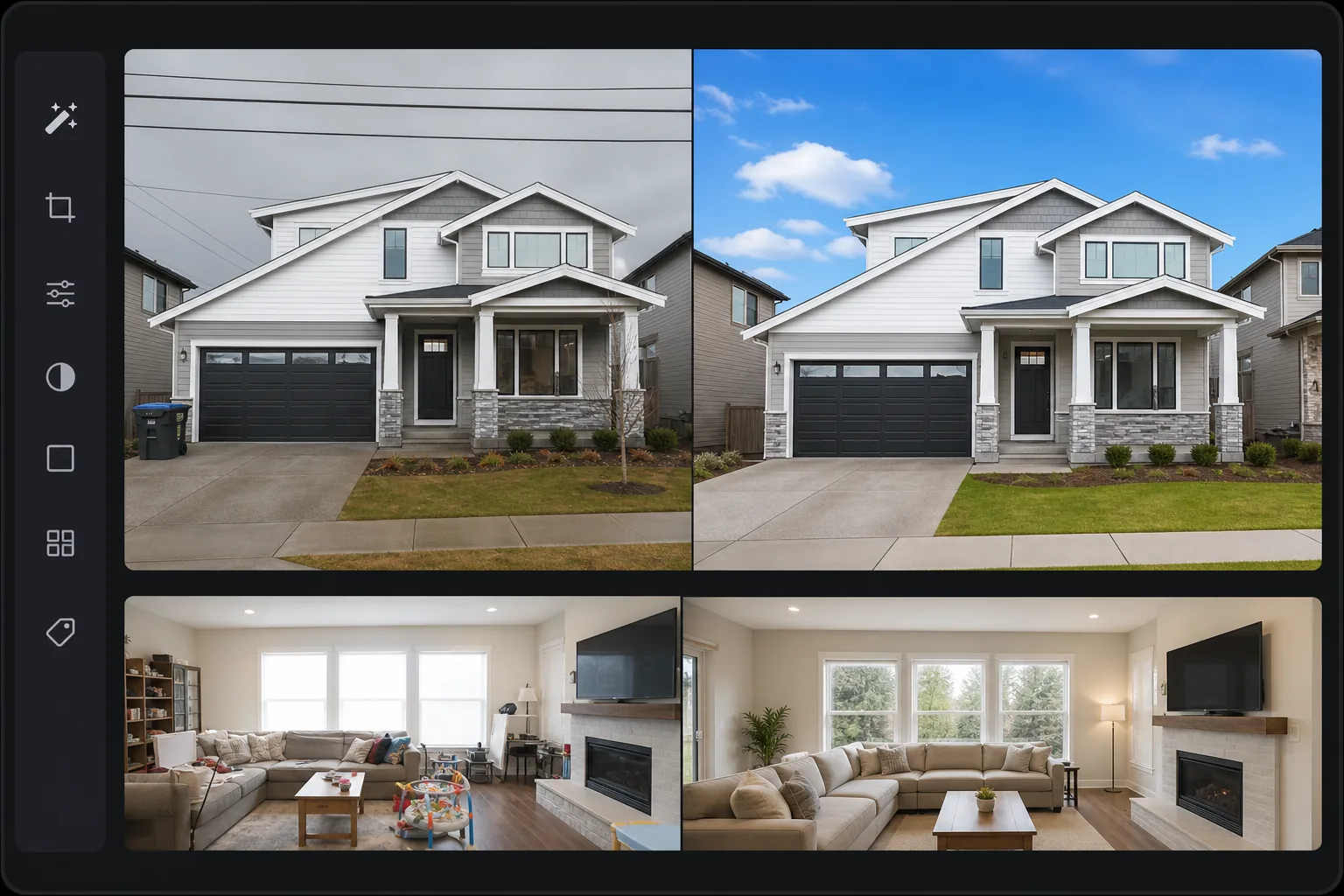
Pourquoi la retouche photo immobilière est importante pour les ventes
Pour retoucher des photos immobilières, ouvrez Magic Eraser sur le web, iOS ou Android, importez les photos de votre annonce et appliquez les retouches qui comptent vraiment pour les photos de biens : supprimez le désordre et les objets personnels, remplacez un ciel terne ou couvert, et corrigez la luminosité pour que les intérieurs comme les fenêtres restent bien lisibles. C'est gratuit, sans inscription. Restez sur des améliorations conformes aux standards du secteur : ces retouches changent l'apparence du bien, pas sa nature. Ajouter des pièces, masquer des défauts ou modifier l'état réel relève de la tromperie, alors gardez des retouches cosmétiques et honnêtes. La National Association of Realtors rapporte que 97 % des acheteurs effectuent d'abord une recherche en ligne, et les photos de la liste sont le principal facteur déterminant s'ils cliquent ou défilent. L'édition professionnelle de photos immobilières transforme la façon dont une propriété est perçue : en supprimant les objets personnels qui empêchent les acheteurs de se visualiser dans l'espace, en remplaçant le ciel couvert par un ciel bleu qui rend les extérieurs invitants, en corrigeant l'éclatement des fenêtres pour que l'intérieur et l'extérieur soient visibles, et en améliorant la luminosité et la chaleur globales. Les services d'édition professionnels facturent entre 5 et 15 $ par photo, ce qui s'additionne rapidement sur 30 à 50 photos par annonce. Magic Eraser fournit les mêmes modifications de base (suppression de l'encombrement, remplacement du ciel, correction de l'éclairage, amélioration) sans frais par photo.
Before you start
Retouchez des photos immobilières en trois étapes
Start with téléchargez les photos de l'annonce. The result preview above and tips below use this guide's existing content; no separate before-and-after proof is assumed.
- 1
Téléchargez les photos de l'annonce
Ouvrez Magic Eraser sur le Web, iOS ou Android. Téléchargez les photos de la propriété – intérieurs, extérieurs, antennes. Traitez d'abord l'image du héros (généralement l'extérieur de la façade), car elle détermine si les acheteurs cliquent sur l'annonce.
- 2
Appliquer des modifications ciblées
Pour l'extérieur : remplacez le ciel couvert par un ciel bleu, supprimez les lignes électriques et les poubelles, améliorez l'attrait extérieur avec la luminosité/Color correction. Pour les intérieurs : retirer les objets personnels (photos de famille, articles de toilette, objets pour animaux de compagnie), corriger l'éclatement des fenêtres, améliorer la luminosité et la chaleur de la pièce. Pour chaque photo, identifiez une ou deux modifications qui ont le plus grand impact.
- 3
Améliorer et exporter
Appliquez AI Enhancement à l'ensemble complet pour une qualité constante : l'IA améliore l'éclairage, la balance des couleurs et la netteté de toutes les photos pour une présentation de liste cohérente. Exportez en pleine résolution pour le téléchargement MLS. La plupart des systèmes MLS acceptent les formats JPEG de 2 048 px ou plus sur le côté long.
Idéal pour
- Agents immobiliers éditant leurs propres photos d'annonces sans sous-traiter à des services d'édition
- Photographes immobiliers qui souhaitent accélérer leur flux de travail de post-traitement
- Airbnb et les hôtes de location de vacances créent des images d'annonces attrayantes
- Les sociétés de gestion immobilière maintiennent une qualité de photo constante dans tous les portefeuilles
- Vendeurs FSBO qui ont besoin de photos d'annonces d'aspect professionnel sans photographe professionnel
Conseils pour de meilleurs résultats
Hiérarchisez les modifications par impact : le remplacement du ciel sur la façade extérieure est la modification à l'impact le plus élevé pour la plupart des annonces. La suppression de l’encombrement intérieur vient en deuxième position : concentrez-vous sur la suppression des objets personnels qui empêchent les acheteurs d’imaginer l’espace comme le leur. L’éclatement des fenêtres (rectangles blancs brillants où les fenêtres doivent montrer la vue extérieure) est un problème courant dans les photos immobilières intérieures – l’IA peut aider à équilibrer l’exposition intérieure et extérieure. Par souci de cohérence dans l'ensemble de la liste, appliquez les mêmes paramètres d'amélioration à toutes les photos intérieures afin que la luminosité de la pièce et la température de couleur correspondent d'une photo à l'autre. Modifiez d'abord l'image du héros et utilisez-la pour définir la norme de qualité pour le reste de l'ensemble.
Questions fréquemment posées
- Quelles retouches de photos immobilières font la plus grande différence ?
- Remplacement du ciel sur l'image extérieure du héros, suppression de l'encombrement des intérieurs et amélioration/correction globale de la luminosité. Ces trois modifications répondent aux plaintes les plus courantes concernant la liste des photos.
- Puis-je traiter par lots les photos d’une liste ?
- Oui. Les modifications d’amélioration et d’arrière-plan peuvent être traitées par lots. La suppression d'objets (encombrement, objets personnels) se fait par photo puisque chaque image comporte des éléments différents à supprimer.
- Est-il éthique de retoucher des photos immobilières ?
- Les modifications conformes aux normes de l'industrie (amélioration du ciel, correction de l'éclairage, suppression d'objets personnels) sont une pratique acceptée et ne dénaturent pas la propriété. La suppression de défauts structurels, l'ajout de fonctionnalités qui n'existent pas ou la modification de l'état réel de la propriété constituent une fausse déclaration.
- La retouche photo immobilière est-elle gratuite ?
- Oui. Chaque outil d'édition est disponible sur le niveau gratuit avec des limites d'utilisation quotidiennes. Premium supprime les limites de traitement des ensembles complets de 30 à 50 photos.
- Puis-je l'utiliser pour du home staging virtuel, et dois-je signaler les retouches ?
- Magic Eraser excelle dans le désencombrement et le nettoyage — supprimer les meubles existants et les objets personnels — plutôt que dans l'ajout de meubles photoréalistes dans une pièce vide, ce que des outils dédiés au home staging virtuel gèrent mieux. Quel que soit l'outil, les règles de divulgation s'appliquent : de nombreuses réglementations MLS et locales exigent que les images mises en scène ou substantiellement modifiées soient signalées (par exemple « mise en scène virtuelle »), et vous ne devez jamais effacer un défaut connu. En cas de doute, signalez la retouche et conservez un original non modifié — une présentation honnête protège à la fois la vente et vous-même.