
Foto de producto de reloj
Muestre los relojes con la precisión que merecen. Esta plantilla afina los detalles de la esfera y los índices, controla los reflejos del cristal, realza las texturas metálicas de la pulsera y la caja, elimina el polvo y las huellas de las superficies pulidas, y prepara la imagen para fichas de comercio electrónico de lujo y uso en catálogo.
Prueba esta plantilla gratisE-commerce template preview
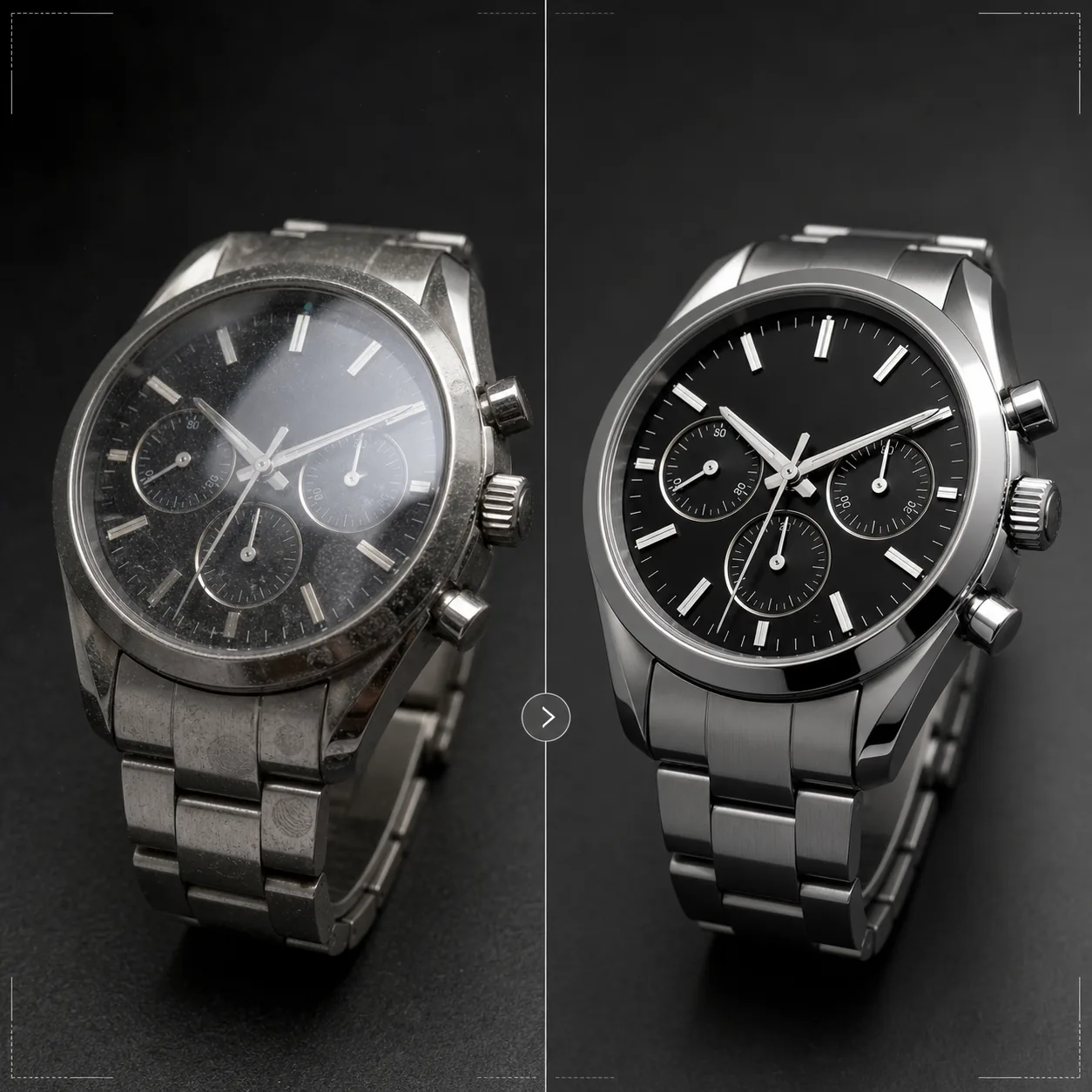
Qué hace esta plantilla
Aborda los desafíos específicos de la fotografía de relojes, donde los detalles más pequeños importan enormemente a los compradores. Las esferas de los relojes contienen detalles intrincados —índices, subesferas, ventanillas de fecha, texto impreso— que deben ser nítidos como una navaja para que la imagen transmita calidad. Esta plantilla usa AI Enhance para afinar de forma selectiva los elementos de la esfera manteniendo natural la imagen en su conjunto. Magic Eraser elimina partículas de polvo, huellas en las cajas pulidas y pequeños arañazos en los cristales que aparecen a gran aumento. Los reflejos del cristal se reducen para que la esfera de debajo se vea con claridad, y las texturas metálicas de cajas y pulseras se realzan para mostrar el acabado cepillado frente al pulido que los compradores de relojes evalúan con detenimiento.
Ajustes de la plantilla
| Nitidez de la esfera | Realce selectivo de microdetalles (índices, agujas, texto) |
| Reflejo del cristal | Reducir el brillo y los reflejos en cristal de zafiro/mineral |
| Textura metálica | Realzar la diferenciación entre superficies cepilladas y pulidas |
| Limpieza de superficie | Eliminar polvo, huellas y pequeños arañazos |
| Resolución de salida | 4000 × 4000 px (detalle macro para visualización ampliada) |
| Fondo | Blanco puro, oscuro sólido o degradado (estándar de producto de lujo) |
Cómo usar esta plantilla
Sube la foto de tu reloj
Sube una foto de producto del reloj: en la muñeca, en plano cenital o en montaje de estudio sobre un cojín o soporte. También se admiten primeros planos macro de la esfera y vistas laterales de la caja. Para obtener los mejores resultados, fotografía el reloj con las agujas en la posición de las 10:10, el estándar del sector que encuadra el logotipo y crea una composición equilibrada y simétrica.
Realce de la esfera y los detalles
AI Enhance afina de forma selectiva la esfera: los índices horarios, las agujas, las subesferas, la ventanilla de fecha y el texto impreso se vuelven nítidos y legibles. Los puntos luminiscentes de los índices se aclaran ligeramente para mostrar su presencia. El realce respeta la profundidad de campo de tu toma original, manteniendo suaves las zonas desenfocadas a propósito.
Limpieza de superficie y control de reflejos
Magic Eraser elimina las partículas de polvo de la esfera, las huellas de la caja y la pulsera, y los pequeños arañazos de la superficie del cristal. Los reflejos del cristal se reducen para revelar la esfera completa de debajo, manteniendo a la vez reflejo suficiente para transmitir la presencia del vidrio: eliminar por completo los reflejos hace que el reloj parezca irrealmente plano.
Exporta para ficha o catálogo
Descarga a 4000 × 4000 px para fichas de comercio electrónico con zoom, o a resolución de impresión para catálogos y anuncios. Las opciones de fondo incluyen blanco puro para fichas de marketplace, oscuro sólido para la estética de marcas de lujo y degradados para uso editorial.
Consejos profesionales para mejores resultados
- ✓Fotografía el reloj con las agujas en las 10:10 o las 10:08: esta posición encuadra el logotipo de la marca entre las agujas, muestra con claridad tanto la ventanilla de fecha como las subesferas, y crea una composición visualmente equilibrada que se usa en todo el sector relojero.
- ✓Usa un objetivo macro o el modo de primer plano para captar el máximo detalle de la esfera. La plantilla puede afinar el detalle existente, pero no puede crear detalle que no se haya captado: una imagen de origen de mayor resolución con más detalle de esfera ofrece resultados notablemente mejores.
- ✓En relojes con pulsera metálica, orienta la luz para mostrar la diferencia entre superficies cepilladas y pulidas. La plantilla realza este contraste, pero partir de una diferenciación de superficie visible produce el resultado más impactante.
- ✓Limpia el reloj con un paño de microfibra justo antes de fotografiarlo. Aunque Magic Eraser elimina el polvo y las huellas, partir de una superficie limpia implica menos reconstrucción por IA y una preservación más fiel de la textura metálica en las zonas limpiadas.
Herramientas
E-commerce workflow
Product photo hub
Use this template with the full ecommerce product photo workflow for marketplace backgrounds, cleanup, compression, resizing, and listing-ready exports.
View ecommerce product photo workflowPreguntas frecuentes
¿Puede corregir fotos en las que la esfera queda oculta por un reflejo?
+
Los reflejos moderados pueden reducirse para revelar el detalle de la esfera de debajo. Sin embargo, si el reflejo es tan intenso que en la foto original no se ve ningún detalle de la esfera, la IA no puede crear un detalle que nunca se captó. Para obtener los mejores resultados, fotografía con la fuente de luz colocada de forma que se minimice el reflejo directo sobre el cristal.
¿Funciona con relojes inteligentes?
+
Sí. Las pantallas de los relojes inteligentes se realzan con elementos de interfaz afinados y huellas reducidas en el cristal. La plantilla reconoce tanto las esferas analógicas tradicionales como las pantallas digitales y ajusta su enfoque de nitidez en consecuencia.
¿Y las correas y pulseras del reloj?
+
Las correas de cuero reciben un realce de textura que muestra el grano y el detalle de las costuras. Las correas NATO y de tela reciben una sutil nitidez de textura. Las pulseras metálicas reciben el realce de superficie cepillada/pulida. El reloj completo —caja, cristal, esfera y correa— se trata como un producto íntegro.
Cada detalle cuenta al vender un reloj
Sube fotos de relojes y obtén detalles de esfera nítidos como el cristal, reflejos controlados y calidad de imagen de nivel joyería para tus fichas.
Pruébalo gratisRelated templates
More e-commerce templates for your workflow.
Plantilla de fondo blanco puro para fotografías de productos. Amazon, Shopify y configuraciones listas para el mercado para imágenes de productos limpias y profesionales que convierten.
Plantilla de fotografía de anuncio optimizada para Etsy. Convierte fotografías de estilo de vida en fondos blancos limpios a 2000 px, mejora los detalles de los productos hechos a mano y cumple con las pautas de imágenes de Etsy.
Plantilla de fotografía de listado optimizada para eBay. Fondo blanco para imágenes de galería, mejora de la documentación de condiciones y diseños de múltiples ángulos que cumplen con los estándares de imágenes de eBay.
Plantilla de fotografía de joyería profesional para anillos, collares y relojes. Controla los reflejos, mejora el brillo de las piedras preciosas y ofrece imágenes listas para el mercado sobre fondos limpios.
Plantilla de fotografía de muebles profesional para listados de mercado. Elimine el desorden de la habitación, muestre las dimensiones reales y presente piezas sobre fondos limpios o en contextos de habitación con estilo.
Limpie las fotografías planas de la ropa con eliminación de arrugas, limpieza de pelusas, fondos de color blanco puro y colores precisos de la tela. Listo para Shopify, Amazon y tiendas boutique.