
의류 플랫레이 정리
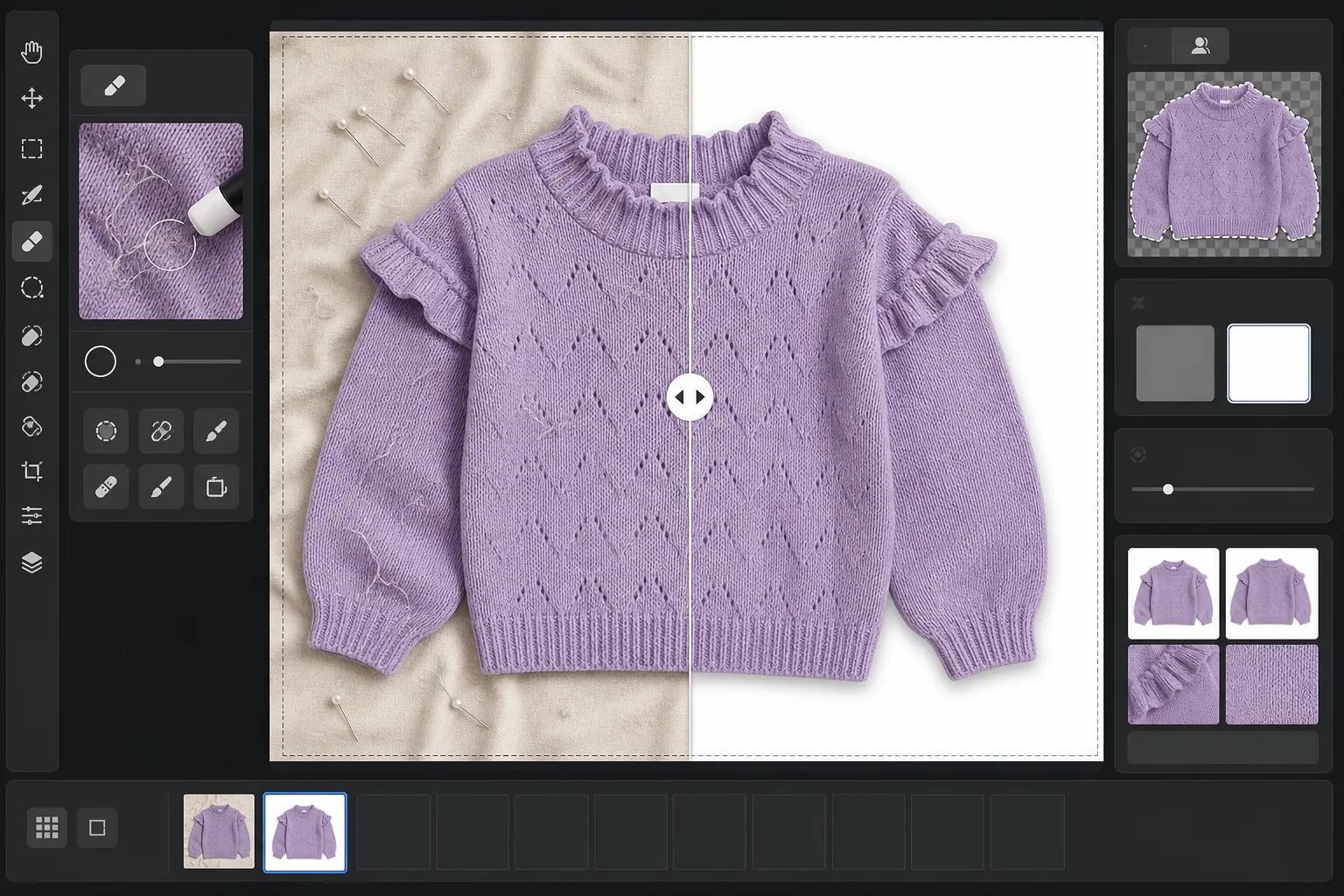
가공되지 않은 플랫레이 의류 사진을 마켓플레이스에 바로 올릴 수 있는 제품 이미지로 바꿉니다. 이 템플릿은 주름, 보푸라기, 반려동물 털, 삐져나온 실밥을 제거하고, 지저분한 배경을 순백색으로 교체하며, 직물 색상을 보정하여 고객이 화면에서 보는 것이 배송받는 제품과 일치하도록 합니다.
이 템플릿 무료로 사용해 보기E-commerce template preview
이 템플릿의 기능
의류 플랫레이 촬영에서 가장 흔한 문제들을 해결합니다. 접거나 배송하면서 생기는 직물 주름, 눈으로는 놓치지만 카메라가 잡아내는 보푸라기와 반려동물 털, 침대 시트나 포스터 보드 이음새로 인한 고르지 않은 배경, 혼합 조명으로 인한 부정확한 직물 색상 등입니다. Magic Eraser는 표면의 이물질, 삐져나온 실밥, 목선에서 튀어나온 케어 라벨 태그를 제거합니다. Background Eraser는 의류를 분리해 깨끗한 흰색 배경에 배치합니다. AI Enhance는 색온도를 보정하여 모니터와 인쇄 카탈로그 전반에서 직물 염색 색상이 정확하게 표현되도록 합니다.
템플릿 설정
| 배경 | 순백색(#FFFFFF), 2px 부드러운 가장자리 페더 |
| 주름 감소 | 중간(배송 주름은 펴고 의도적인 주름은 유지) |
| 색상 정확도 | sRGB, 중성 그레이 카드 기준 자동 화이트 포인트 보정 |
| 보푸라기 제거 | 3px 이상의 섬유, 털, 먼지 자동 감지 |
| 그림자 | 은은한 드롭 섀도(4px 오프셋, 15% 불투명도)로 입체감 부여 |
| 출력 크기 | 10% 여백이 있는 2000×2000px 정사각형 자르기 |
이 템플릿 사용 방법
플랫레이 사진 업로드
침대, 테이블, 포스터 보드 등 깨끗한 표면 위에 의류를 평평하게 놓고 촬영하세요. 배경은 교체되므로 완벽하게 희거나 주름이 없을 필요는 없습니다. 창가의 자연광이 가장 정확한 직물 색상을 만들어 줍니다.
보푸라기, 실밥, 태그 제거
Magic Eraser는 목선이나 허리 밴드 위로 보이는 보푸라기, 반려동물 털, 삐져나온 실밥, 케어 라벨 태그를 자동으로 감지하여 제거합니다. 촬영에 남아 있는 옷걸이, 클립, 스타일링 핀을 수동으로 선택해 제거할 수도 있습니다.
배경 교체
Background Eraser는 어떤 표면에서 촬영했든 의류를 분리해 순백색 배경에 배치합니다. 가장자리 감지는 러플, 프린지, 레이스 디테일을 포함한 의류의 실제 윤곽을 따라가며 섬세한 부분을 잘라내지 않습니다.
색상 보정 및 내보내기
AI Enhance는 화이트 밸런스를 조정하여 화면상의 직물 색상이 실제 의류와 최대한 가깝게 보이도록 합니다. 최종 이미지를 2000x2000px 정사각형 JPEG로 다운로드하면 Shopify, Amazon, Etsy 또는 자체 스토어에 바로 사용할 수 있으며, 대부분의 마켓플레이스 이미지 요구 사항을 충족하는 크기입니다.
최상의 결과를 위한 전문가 팁
- ✓가능하면 촬영 전에 의류를 스팀하거나 다림질하세요. 주름 감소 기능은 가벼운 배송 주름은 잘 처리하지만, 장기 보관으로 깊게 밴 접힘 자국은 직물의 자연스러운 드레이프와 질감에 영향을 주지 않고 펴기가 더 어렵습니다.
- ✓프레임 가장자리(최종 자르기 영역 바깥)에 작은 그레이 카드나 화이트 밸런스 기준 카드를 포함하세요. 색상 정확도 알고리즘이 이를 사용해 화이트 포인트를 보정하여 자동 화이트 밸런스만 사용할 때보다 눈에 띄게 정확한 직물 색상을 만들어 냅니다.
- ✓흰색 배경의 어두운 직물의 경우, 원본 사진에서 의류 가장자리와 표면 사이에 충분한 대비가 있는지 확인하세요. 어두운 나무 위의 검은색 의류는 밝은 회색이나 흰색 시트 위의 검은색 의류보다 깔끔하게 추출하기 더 어렵습니다.
- ✓카탈로그 전반의 색상 일관성을 유지하려면 모든 의류를 동일한 조명 아래 같은 배치로 촬영하세요. 이 템플릿으로 함께 처리하면 전체 제품 라인에서 균일한 화이트 밸런스가 보장됩니다.
Herramientas
E-commerce workflow
Product photo hub
Use this template with the full ecommerce product photo workflow for marketplace backgrounds, cleanup, compression, resizing, and listing-ready exports.
View ecommerce product photo workflow자주 묻는 질문
주름 제거가 직물을 인위적으로 매끄럽게 보이게 하나요?
+
주름 감소 기능은 직물의 자연스러운 질감을 유지하면서 접거나 배송하며 생긴 주름을 제거하도록 보정되어 있습니다 — 린넨 짜임, 데님 능직, 코튼 골지, 니트 패턴이 모두 유지됩니다. 결과물은 갓 스팀한 의류처럼 보이며, 디지털로 칠한 표면처럼 보이지 않습니다.
사진과 실제 의류의 색상이 일치하나요?
+
색상 정확도는 원본 사진의 조명에 따라 달라집니다. 자연광이나 보정된 스튜디오 조명 아래에서는 색상 보정 알고리즘이 보정된 모니터에서 실제 의류와 delta-E 3 이내의 결과를 만들어 냅니다. 강한 형광등이나 텅스텐 조명 아래에서는 개선 효과가 상당하지만 정확한 일치를 위해서는 그레이 카드 기준이 필요합니다.
어떤 마켓플레이스가 이 크기를 허용하나요?
+
2000x2000px 정사각형 출력은 Amazon, Shopify, Etsy, eBay, Poshmark 및 대부분의 다른 전자상거래 플랫폼의 이미지 요구 사항을 충족합니다. Amazon은 확대 기능을 위해 가장 긴 변이 최소 1000px일 것을 권장하며, 2000px는 이를 충분히 넘어섭니다.
실물만큼 온라인에서도 멋져 보이는 의류를 등록하세요
플랫레이 사진을 업로드하면 보푸라기 없이, 주름이 펴지고, 흰색 배경의 제품 이미지를 받아 모든 전자상거래 플랫폼에 바로 사용할 수 있습니다.
무료로 사용해 보기Related templates
More e-commerce templates for your workflow.
Plantilla de fondo blanco puro para fotografías de productos. Amazon, Shopify y configuraciones listas para el mercado para imágenes de productos limpias y profesionales que convierten.
Plantilla de fotografía de anuncio optimizada para Etsy. Convierte fotografías de estilo de vida en fondos blancos limpios a 2000 px, mejora los detalles de los productos hechos a mano y cumple con las pautas de imágenes de Etsy.
Plantilla de fotografía de listado optimizada para eBay. Fondo blanco para imágenes de galería, mejora de la documentación de condiciones y diseños de múltiples ángulos que cumplen con los estándares de imágenes de eBay.
Plantilla de fotografía de joyería profesional para anillos, collares y relojes. Controla los reflejos, mejora el brillo de las piedras preciosas y ofrece imágenes listas para el mercado sobre fondos limpios.
Plantilla de fotografía de muebles profesional para listados de mercado. Elimine el desorden de la habitación, muestre las dimensiones reales y presente piezas sobre fondos limpios o en contextos de habitación con estilo.
Cree fotografías de productos compatibles con Amazon con fondos de color blanco puro, corrección de iluminación adecuada y dimensiones optimizadas para las imágenes de listado principal y secundario.