
Foto de producto de joyería
Convierte cualquier instantánea de joyería en una imagen de producto profesional digna de un catálogo de lujo. Esta plantilla aborda los retos específicos de fotografiar metales reflectantes y piedras preciosas translúcidas: controla los reflejos no deseados, realza el brillo y garantiza una reproducción fiel del color de las piedras.
Prueba esta plantilla gratisE-commerce template preview
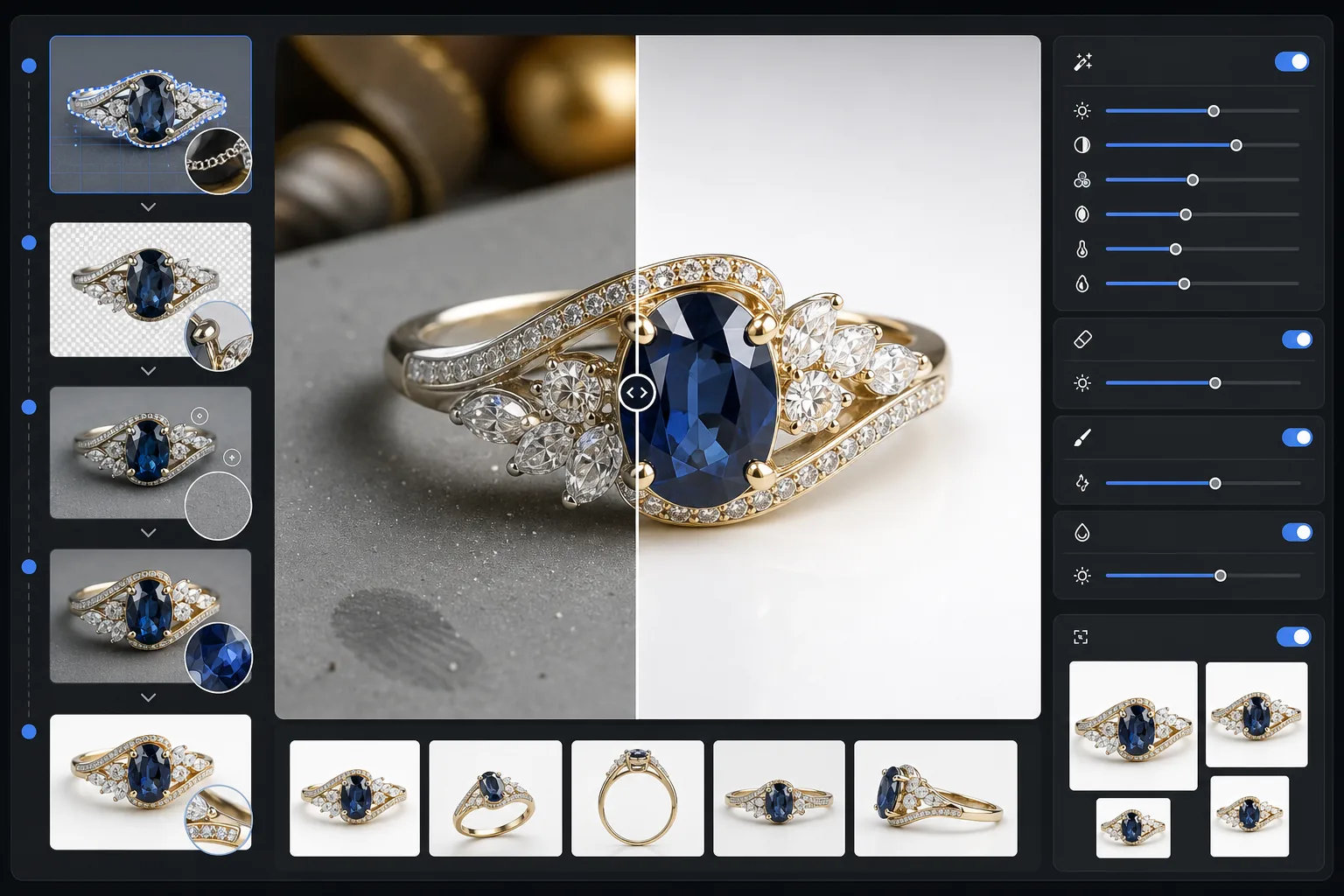
Qué hace esta plantilla
Elimina los fondos recargados de las fotos de joyería y los reemplaza por una superficie limpia y sin distracciones. La mejora con IA afina luego los detalles de las facetas, equilibra los brillos del metal sin sobreexponerlos y restaura el color verdadero de las piedras preciosas que la iluminación interior suele alterar. Magic Eraser elimina las motas de polvo, las huellas dactilares en el metal y los reflejos parásitos que son casi imposibles de evitar al fotografiar objetos pequeños y reflectantes.
Ajustes de la plantilla
| Fondo | Blanco puro o gris en degradado (seleccionable) |
| Tamaño de salida | 2400×2400px (zoom de alta resolución para detalles finos) |
| Realce del brillo | Medio (conserva el brillo natural sin destellos artificiales) |
| Control de reflejos | Suave — reduce los reflejos especulares intensos en el metal pulido |
| Precisión del color | sRGB calibrado para gemas (optimizado para esmeralda, rubí, zafiro, diamante) |
| Nitidez de los detalles | Nivel macro — realza facetas, garras y grabados |
Cómo usar esta plantilla
Fotografía tu pieza de joyería
Coloca la pieza sobre una superficie mate no reflectante. Usa luz natural difusa o una caja de luz para minimizar los reflejos intensos en el metal. Fotografía ligeramente desde arriba, en un ángulo de 30 a 45 grados, para captar la cara de las piedras preciosas.
Elimina el fondo
Background Eraser aísla la joya de cualquier superficie y resuelve los bordes complicados donde las garras finas, las cadenas delicadas y los broches pequeños se encuentran con el fondo, incluso en piezas muy reflectantes.
Mejora los detalles y el color
AI Enhance afina los bordes de las facetas y los grabados visibles al hacer zoom, corrige el color de las gemas alterado por la luz artificial y equilibra los brillos del metal para que el oro se vea cálido y la plata fría, sin zonas sobreexpuestas.
Limpia y exporta
Usa Magic Eraser para eliminar partículas de polvo, manchas de huellas dactilares o reflejos no deseados en la superficie del metal. Exporta a 2400px para que sea compatible con el zoom de los marketplaces y para una representación fiel de los detalles.
Consejos de experto para obtener los mejores resultados
- ✓Fotografía sobre una tarjeta gris medio en lugar de blanca: le da a la IA una separación de bordes más limpia en piezas de plata y oro blanco.
- ✓Para piezas de diamante y gemas transparentes, coloca un pequeño trozo de papel blanco debajo de la piedra para captar la transmisión de la luz y el fuego.
- ✓Fotografía los anillos de pie usando cera de museo o un soporte para anillos y luego borra el soporte con Magic Eraser para una presentación flotante.
- ✓Captura varios ángulos de cada pieza y procésalos por lotes con los mismos ajustes de plantilla para lograr un aspecto de catálogo coherente.
Herramientas
E-commerce workflow
Product photo hub
Use this template with the full ecommerce product photo workflow for marketplace backgrounds, cleanup, compression, resizing, and listing-ready exports.
View ecommerce product photo workflowPreguntas frecuentes
¿El brillo de mis diamantes se verá natural?
+
Sí. El realce del brillo amplifica los reflejos de luz ya captados en tu foto en lugar de añadir destellos artificiales. El resultado parece una toma de estudio con iluminación profesional y conserva el patrón de fuego natural de cada piedra.
¿Puede gestionar oro y platino pulidos muy reflectantes?
+
Por supuesto. El ajuste de control de reflejos reduce los reflejos intensos tipo espejo conservando a la vez el lustre característico de cada metal. El oro mantiene su brillo cálido y el platino su tono frío, sin zonas blancas sobreexpuestas.
¿Qué fondo funciona mejor para los anuncios de joyería de lujo?
+
El blanco puro cumple los requisitos de los marketplaces de Amazon y Etsy. Para tu propio sitio web o una marca de gama alta, la opción de gris en degradado aporta profundidad y una sensación premium. Ambas opciones están incluidas en esta plantilla.
Haz que tus fotos de joyería vendan
Sube una foto de cualquier anillo, collar, pulsera o reloj y obtén una imagen de producto con calidad de catálogo en segundos. Cada faceta, cada detalle, presentado a la perfección.
Pruébalo gratisRelated templates
More e-commerce templates for your workflow.
Plantilla de fondo blanco puro para fotografías de productos. Amazon, Shopify y configuraciones listas para el mercado para imágenes de productos limpias y profesionales que convierten.
Plantilla de fotografía de anuncio optimizada para Etsy. Convierte fotografías de estilo de vida en fondos blancos limpios a 2000 px, mejora los detalles de los productos hechos a mano y cumple con las pautas de imágenes de Etsy.
Plantilla de fotografía de listado optimizada para eBay. Fondo blanco para imágenes de galería, mejora de la documentación de condiciones y diseños de múltiples ángulos que cumplen con los estándares de imágenes de eBay.
Plantilla de fotografía de muebles profesional para listados de mercado. Elimine el desorden de la habitación, muestre las dimensiones reales y presente piezas sobre fondos limpios o en contextos de habitación con estilo.
Limpie las fotografías planas de la ropa con eliminación de arrugas, limpieza de pelusas, fondos de color blanco puro y colores precisos de la tela. Listo para Shopify, Amazon y tiendas boutique.
Cree fotografías de productos compatibles con Amazon con fondos de color blanco puro, corrección de iluminación adecuada y dimensiones optimizadas para las imágenes de listado principal y secundario.