
Foto de inventario de vehículos
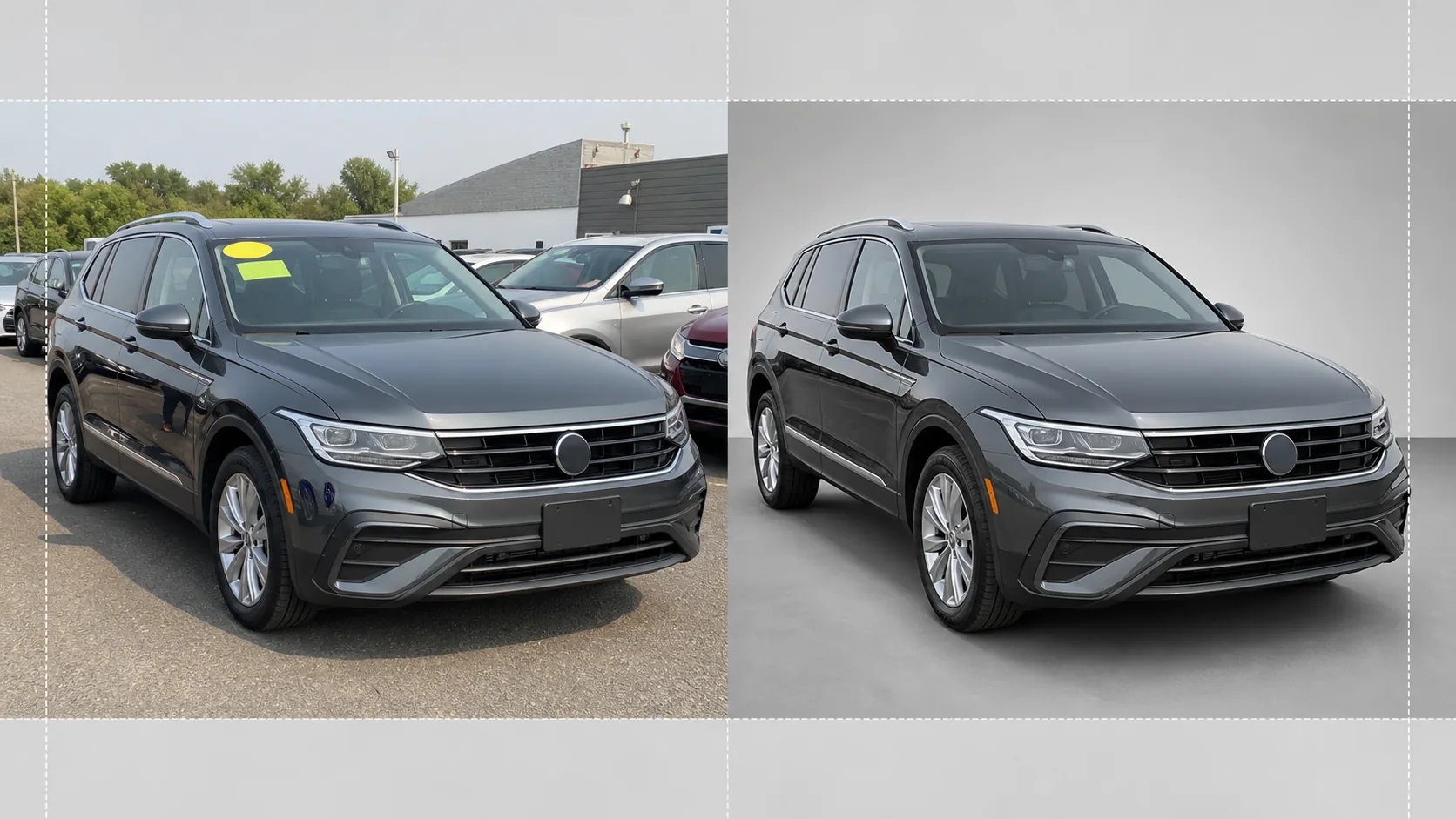
Convierta las fotos tomadas en el lote en imágenes de vehículos con calidad de sala de exposición para listados de inventario en línea. Esta plantilla elimina los fondos abarrotados del concesionario (otros autos, letreros, edificios) y los reemplaza con un fondo blanco, gris o de estilo estudio bien limpio. Magic Eraser limpia los reflejos del parabrisas, los detalles de la matrícula y las calcomanías del lote, mientras que la corrección de color garantiza que la pintura se vea fiel a la realidad bajo cualquier iluminación.
Probar esta plantilla gratisE-commerce template preview
Qué hace esta plantilla
Gestiona todo el flujo de trabajo de la fotografía de inventario de concesionarios. Background Eraser aísla el vehículo del entorno del lote y reemplaza el fondo con un fondo de estilo estudio bien limpio que centra toda la atención en el auto, la camioneta o el SUV. Magic Eraser elimina las calcomanías de precio del parabrisas, las etiquetas del lote, las matrículas (por privacidad) y los reflejos del fotógrafo o de los vehículos cercanos en la pintura brillante y el cristal. La corrección de color normaliza el color de la pintura para que las fotos tomadas bajo cielos nublados, luces de sodio del estacionamiento o un sol intenso del mediodía muestren todas el mismo tono de pintura preciso. La imagen final se recorta y se nivela para que el vehículo quede centrado y horizontal en todo su inventario.
Configuración de la plantilla
| Fondo | Blanco estudio, gris neutro o suelo de sala de exposición con degradado |
| Limpieza de reflejos | Elimina al fotógrafo, el desorden del lote y los autos adyacentes de los reflejos en la pintura y el cristal |
| Corrección del color de pintura | Normaliza al aspecto del código de pintura del fabricante bajo luz de día neutra |
| Censura de privacidad | Difumina o elimina automáticamente las matrículas |
| Recortar y nivelar | Centra automáticamente el vehículo, nivela el horizonte, relación de aspecto 16:9 |
| Resolución de salida | 3000×1688px (optimizada para AutoTrader, Cars.com y sitios web de concesionarios) |
Cómo usar esta plantilla
Suba la foto del lote
Suba una foto del vehículo tomada en el lote del concesionario. El ángulo frontal de tres cuartos es el ideal, pero los perfiles laterales y los ángulos traseros también funcionan. La plantilla se adapta por igual a teléfonos inteligentes, cámaras compactas y equipos profesionales.
Elimine el fondo y las distracciones
Background Eraser recorta el entorno del lote y lo reemplaza por un fondo limpio. Magic Eraser elimina las calcomanías del parabrisas, las etiquetas con el número de lote, las pegatinas de precio y el texto de la matrícula. Los reflejos de los autos vecinos y del fotógrafo en la pintura y las ventanillas se limpian automáticamente.
Corrija el color y la exposición
El color de la pintura se normaliza para coincidir con el tono previsto por el fabricante bajo luz de día neutra. Se recuperan las luces sobreexpuestas en el cromo y el cristal, y se realza el detalle de las sombras bajo los pasos de rueda y los parachoques para lograr un aspecto uniforme y de calidad de sala de exposición.
Exporte para el listado de inventario
Descargue la imagen final en 3000×1688px con relación de aspecto 16:9. El formato está optimizado para AutoTrader, Cars.com, CarGurus, Facebook Marketplace y su sistema de gestión de concesionario. El procesamiento por lotes está disponible para las sesiones de inventario de todo el lote.
Consejos profesionales para obtener los mejores resultados
- ✓Fotografíe el vehículo desde un ángulo frontal de tres cuartos a la altura del parachoques. Esto capta tanto el frontal como el perfil lateral en una sola toma y es el ángulo más clicado en los listados de inventario en línea.
- ✓Evite fotografiar bajo el sol directo cenital: crea sombras duras debajo del auto y luces quemadas en el techo y el capó. Los días nublados o las zonas con sombra del lote producen la iluminación más uniforme para que trabaje la IA.
- ✓Retire la calcomanía de precio del parabrisas antes de la toma si es posible. Aunque la IA puede borrarla digitalmente, las calcomanías grandes que cubren detalles del tablero a veces dejan un contorno tenue que requiere retoque manual.
- ✓Mantenga el vehículo limpio antes de fotografiarlo. La plantilla corrige la iluminación y el fondo, pero la suciedad, las manchas de agua y los excrementos de pájaros en la pintura se resuelven mejor con un lavado rápido que con retoque de IA.
Herramientas
E-commerce workflow
Product photo hub
Use this template with the full ecommerce product photo workflow for marketplace backgrounds, cleanup, compression, resizing, and listing-ready exports.
View ecommerce product photo workflowPreguntas frecuentes
¿Puedo procesar todo un inventario a la vez?
+
Sí. Suba varias fotos de vehículos y la plantilla aplica la misma configuración de fondo, corrección de color y limpieza a cada una. Esto garantiza la coherencia visual en todo su inventario en línea.
¿Será preciso el color de la pintura?
+
La corrección de color normaliza la pintura para que coincida con su aspecto bajo luz de día neutra (5500K). Si conoce el código de pintura del fabricante, la IA lo usa como referencia para que el color en pantalla se ajuste lo máximo posible al vehículo físico.
¿Funciona con motocicletas y barcos?
+
Sí. La eliminación del fondo y la limpieza de reflejos funcionan con cualquier tipo de vehículo, incluidas motocicletas, barcos, autocaravanas y camiones pesados. El centrado automático y la relación de recorte pueden necesitar un ajuste manual en proporciones de vehículo no estándar.
Haga que cada vehículo de su lote luzca listo para la sala de exposición
Suba las fotos del lote del concesionario y obtenga imágenes de inventario limpias, coherentes y profesionales en segundos.
Pruébelo gratisRelated templates
More e-commerce templates for your workflow.
Plantilla de fondo blanco puro para fotografías de productos. Amazon, Shopify y configuraciones listas para el mercado para imágenes de productos limpias y profesionales que convierten.
Plantilla de fotografía de anuncio optimizada para Etsy. Convierte fotografías de estilo de vida en fondos blancos limpios a 2000 px, mejora los detalles de los productos hechos a mano y cumple con las pautas de imágenes de Etsy.
Plantilla de fotografía de listado optimizada para eBay. Fondo blanco para imágenes de galería, mejora de la documentación de condiciones y diseños de múltiples ángulos que cumplen con los estándares de imágenes de eBay.
Plantilla de fotografía de joyería profesional para anillos, collares y relojes. Controla los reflejos, mejora el brillo de las piedras preciosas y ofrece imágenes listas para el mercado sobre fondos limpios.
Plantilla de fotografía de muebles profesional para listados de mercado. Elimine el desorden de la habitación, muestre las dimensiones reales y presente piezas sobre fondos limpios o en contextos de habitación con estilo.
Limpie las fotografías planas de la ropa con eliminación de arrugas, limpieza de pelusas, fondos de color blanco puro y colores precisos de la tela. Listo para Shopify, Amazon y tiendas boutique.