
Foto de producto de gafas de sol
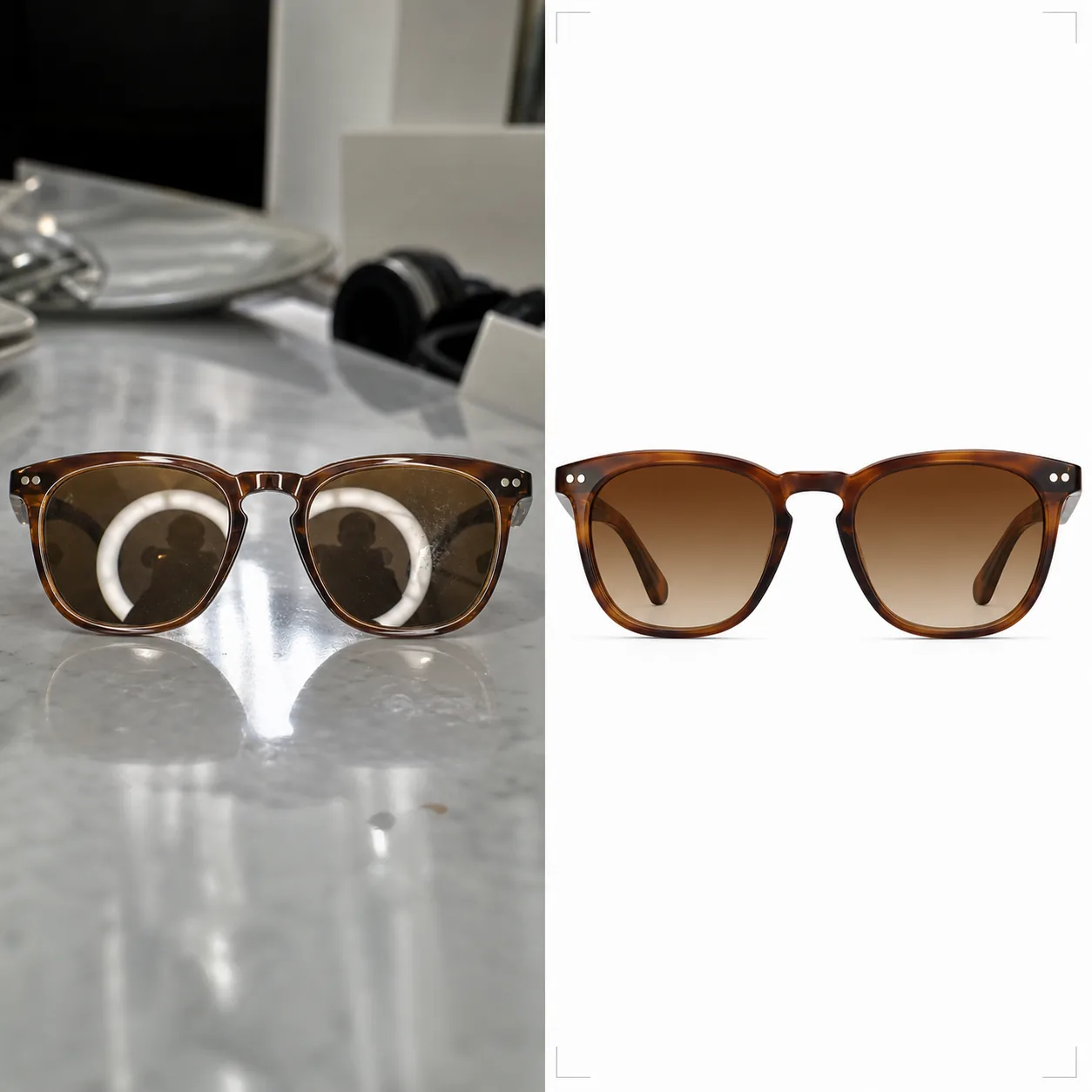
Produzca fotografías de gafas de sol listas para el comercio electrónico con fondos limpios, colores de tinte de lente precisos y superficies sin reflejos. Esta plantilla elimina los reflejos no deseados de las lentes y las monturas, reemplaza los fondos desordenados por blanco puro o superficies con estilo, y realza los detalles del material para que los clientes puedan ver claramente las texturas de la montura, la construcción de las bisagras y las transiciones de degradado de las lentes.
Prueba esta plantilla gratisE-commerce template preview
Qué hace esta plantilla
Aborda los desafíos únicos de fotografiar gafas para la venta minorista en línea. Las gafas de sol están entre los productos más difíciles de fotografiar porque cada superficie curva refleja el estudio, la cámara y al fotógrafo. Background Eraser aísla las gafas de sol de cualquier superficie y reemplaza el fondo por blanco puro (compatible con marketplaces), gris neutro o una superficie con estilo como mármol o madera. AI Enhance elimina los reflejos no deseados de las lentes y las monturas metálicas, preservando a la vez la reflectividad intencionada que hace atractivo el producto. Los colores del tinte de las lentes se corrigen para que coincidan con las especificaciones del fabricante, de modo que las lentes ámbar, verdes, grises y degradadas muestren su color real en pantalla. Las texturas de la montura — el grano del acetato, el cepillado del metal, el titanio mate — se afinan para dar a los clientes la confianza de una inspección en tienda.
Ajustes de la plantilla
| Fondo | Blanco puro (#FFFFFF), gris neutro o superficie con estilo (mármol, madera, tela) |
| Eliminación de reflejos | Eliminar los reflejos del estudio, la cámara y el fotógrafo de las lentes y las monturas |
| Corrección del tinte de la lente | Hacer coincidir el color de la lente con la especificación del fabricante (ámbar, gris, verde, degradado) |
| Mejora del detalle de la montura | Afinar el grano del acetato, el cepillado del metal, los herrajes de la bisagra y el logotipo de la patilla |
| Resolución de salida | 3000×3000px (cuadrado 1:1 para marketplaces, o 4:3 para catálogos de marca) |
Cómo usar esta plantilla
Sube tu foto de gafas de sol
Sube una foto de producto de las gafas de sol — en plano, en ángulo, plegadas o sobre el rostro de un modelo. La plantilla maneja todos los ángulos. Para una máxima precisión del tinte de las lentes, asegúrate de que la foto original se tomó con luz de día neutra o con iluminación de estudio de 5500K.
Limpia el fondo y los reflejos
Background Eraser aísla las gafas de sol y reemplaza el fondo. Los reflejos de las lentes que muestran el montaje del estudio, el aro de luz o al fotógrafo se eliminan, preservando a la vez los brillos especulares naturales que transmiten la calidad del material de la lente. Los reflejos en monturas de acetato brillante o metal pulido se limpian de igual manera.
Corrige el color y mejora el detalle
El tinte de la lente se corrige para mostrar el color exacto que los clientes verán en persona. AI Enhance afina la textura de la montura — el patrón del grano en el acetato, el acabado cepillado del titanio, la superficie pulida del acero inoxidable — para que los clientes puedan evaluar la calidad de fabricación solo con la foto.
Exporta para tus listados
Descarga en 3000×3000px para listados de Amazon, Shopify y marketplaces, o en proporción 4:3 para los diseños de catálogos de marca. La versión con fondo blanco cumple los requisitos de Amazon y Google Shopping para las imágenes principales de producto.
Consejos profesionales para obtener los mejores resultados
- ✓Fotografía las gafas de sol ligeramente abiertas (las patillas inclinadas unos 20 grados) en lugar de totalmente plegadas o totalmente abiertas. Este ángulo muestra la mayor cantidad de detalle de la montura — patillas, bisagras y la marca en el interior de la patilla — en una sola toma.
- ✓Coloca las gafas de sol sobre una superficie mate en lugar de una reflectante. Las mesas de cristal y los mostradores brillantes crean reflejos dobles que complican la limpieza de las lentes. Una lámina de cartón pluma blanco funciona perfectamente como superficie de fotografía.
- ✓Fotografía desde varios ángulos: de frente, en tres cuartos, de perfil y plegadas. La plantilla procesa cada imagen de forma coherente, y los listados de marketplace con cuatro o más ángulos convierten notablemente mejor que los listados de una sola imagen.
Herramientas
E-commerce workflow
Product photo hub
Use this template with the full ecommerce product photo workflow for marketplace backgrounds, cleanup, compression, resizing, and listing-ready exports.
View ecommerce product photo workflowPreguntas frecuentes
¿El tinte de la lente se verá preciso en pantalla?
+
La plantilla corrige el tinte de la lente para que coincida con el color especificado por el fabricante bajo luz de día neutra (iluminante D65). En las lentes degradadas, la transición de oscuro a claro se preserva con un posicionamiento preciso. La calibración del monitor en el lado del espectador es la variable restante, pero el archivo en sí tiene un color preciso en sRGB.
¿Puedo mostrar las gafas de sol sobre el rostro de un modelo?
+
Sí. Cuando la plantilla detecta una toma sobre el rostro, conserva la piel y los rasgos faciales del modelo, limpiando solo los reflejos de las lentes y mejorando el detalle de la montura. El reemplazo de fondo sigue funcionando detrás del modelo.
¿Funciona también para gafas graduadas?
+
Sí. Las lentes graduadas transparentes tienen los mismos desafíos de reflejos que las gafas de sol tintadas. La plantilla elimina los reflejos de las lentes transparentes preservando a la vez la visibilidad del borde de la lente, que muestra a los clientes el grosor y la calidad del corte de la lente.
Muestra cada montura en su versión más nítida y precisa
Sube fotos de gafas de sol y obtén imágenes de producto sin reflejos y con color preciso, listas para marketplaces y catálogos de marca.
Pruébalo gratisRelated templates
More e-commerce templates for your workflow.
Plantilla de fondo blanco puro para fotografías de productos. Amazon, Shopify y configuraciones listas para el mercado para imágenes de productos limpias y profesionales que convierten.
Plantilla de fotografía de anuncio optimizada para Etsy. Convierte fotografías de estilo de vida en fondos blancos limpios a 2000 px, mejora los detalles de los productos hechos a mano y cumple con las pautas de imágenes de Etsy.
Plantilla de fotografía de listado optimizada para eBay. Fondo blanco para imágenes de galería, mejora de la documentación de condiciones y diseños de múltiples ángulos que cumplen con los estándares de imágenes de eBay.
Plantilla de fotografía de joyería profesional para anillos, collares y relojes. Controla los reflejos, mejora el brillo de las piedras preciosas y ofrece imágenes listas para el mercado sobre fondos limpios.
Plantilla de fotografía de muebles profesional para listados de mercado. Elimine el desorden de la habitación, muestre las dimensiones reales y presente piezas sobre fondos limpios o en contextos de habitación con estilo.
Limpie las fotografías planas de la ropa con eliminación de arrugas, limpieza de pelusas, fondos de color blanco puro y colores precisos de la tela. Listo para Shopify, Amazon y tiendas boutique.