
Preparación de fotos de stock
Logra que las agencias de stock acepten tus fotos en el primer envío. Esta plantilla elimina marcas registradas, logotipos y elementos de marca que provocan el rechazo, corrige imperfecciones técnicas que no superan la revisión de calidad y exporta los archivos con las especificaciones exactas que exigen Shutterstock, Adobe Stock, Getty e iStock, eliminando los motivos más comunes por los que las fotos se rechazan en las bibliotecas de stock.
Probar esta plantilla gratisDesign template preview
Qué hace esta plantilla
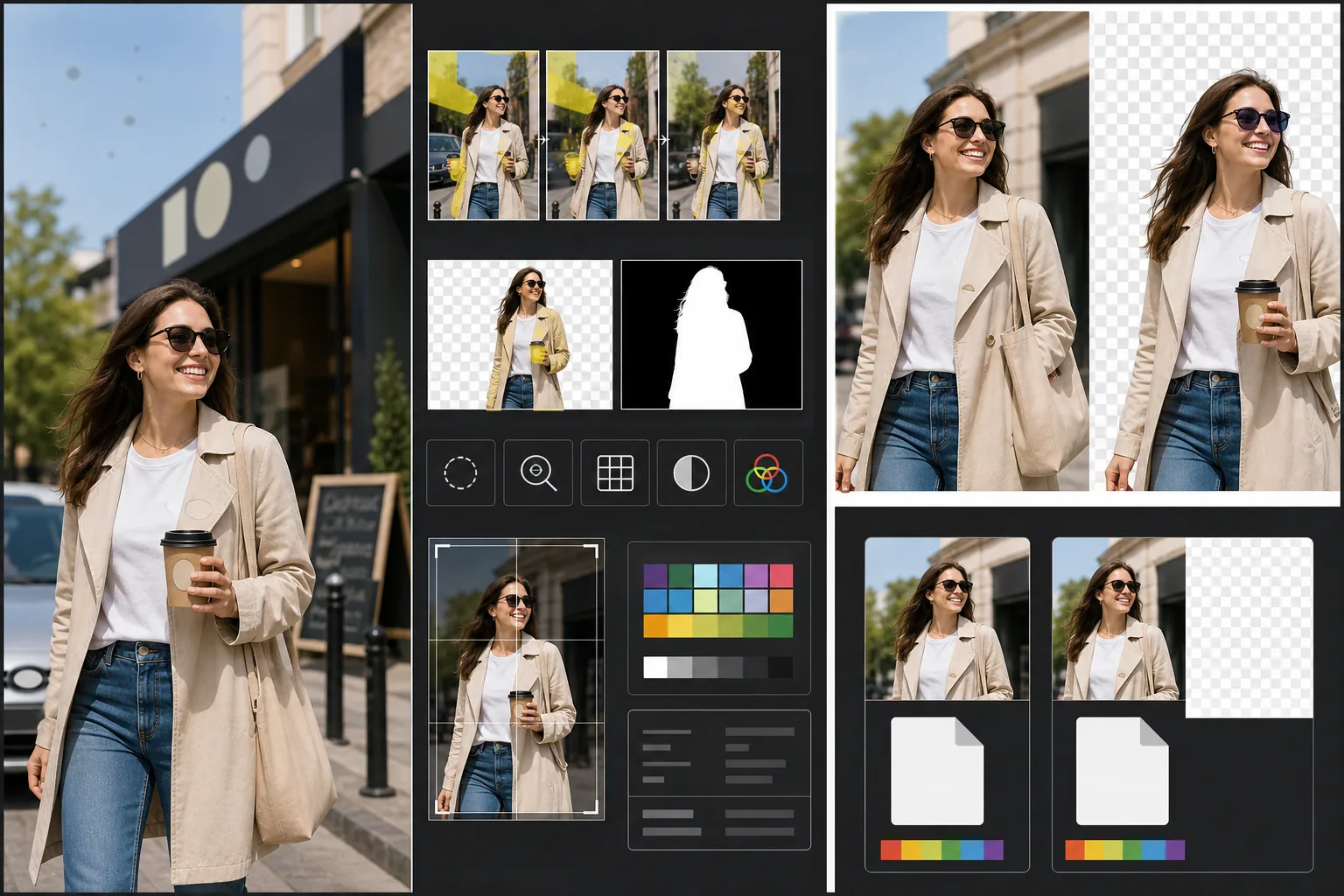
Aborda los requisitos técnicos y legales específicos que causan el rechazo de las fotos de stock. Magic Eraser detecta y elimina marcas registradas, logotipos de marca, etiquetas de producto y rótulos de marca visibles que requerirían autorizaciones de propiedad o provocarían un rechazo directo. Esto incluye logotipos en la ropa, emblemas de automóviles, rótulos de tiendas y nombres de marca en los envases. Background Eraser ofrece un recorte limpio para imágenes destinadas a usarse recortadas, generando tanto la imagen RGB como una máscara alfa independiente que exigen las agencias de stock. Los controles de calidad técnica verifican los niveles de ruido, la nitidez, la aberración cromática y las manchas de polvo del sensor, todos motivos comunes de rechazo, y la IA corrige lo que puede a la vez que señala los problemas que requieren volver a fotografiar. La exportación final se ajusta a las especificaciones de la agencia en cuanto a formato de archivo, perfil de color, resolución e incrustación de metadatos.
Ajustes de la plantilla
| Detección de marcas | Detecta y elimina automáticamente logotipos, nombres de marca y etiquetas de producto visibles |
| Control de calidad técnica | Verifica el ruido, la nitidez, la aberración cromática y el polvo del sensor |
| Máscara de recorte | Genera un canal alfa para imágenes recortadas (PNG con transparencia) |
| Perfil de color | sRGB (exigido por la mayoría de las agencias de stock) |
| Metadatos | Incrusta campos IPTC para título, descripción y palabras clave |
| Formato de salida | JPEG con calidad máxima (nivel 12) o TIFF (sin pérdida, preferido por Getty) |
Cómo usar esta plantilla
Sube tu foto
Sube la foto que quieras enviar a las agencias de stock. La plantilla acepta archivos RAW, JPEG, TIFF y PNG. Sube la versión de mayor calidad disponible: las agencias de stock evalúan la calidad técnica a resolución completa y rechazan las imágenes que muestran artefactos de compresión por guardarse repetidamente.
Elimina marcas y logotipos
Magic Eraser analiza la imagen en busca de marcas registradas, logotipos, nombres de marca y etiquetas de producto visibles. Los elementos detectados se resaltan para su revisión. Las eliminaciones aprobadas se ejecutan con la IA reconstruyendo la superficie detrás de cada marca: el tejido de la tela bajo un logotipo de ropa, la carrocería bajo un emblema, la superficie de la pared bajo un rótulo de tienda.
Ejecuta el control de calidad técnica
La plantilla analiza la imagen en busca de problemas técnicos que suelen causar el rechazo de las agencias de stock: ruido en las zonas de sombra, nitidez insuficiente, aberración cromática en los bordes de alto contraste, manchas de polvo del sensor y errores de balance de blancos. Los problemas corregibles se arreglan automáticamente. Los problemas no corregibles (como un desenfoque de movimiento intenso) se señalan para que lo sepas antes de enviar.
Exporta con los metadatos de la agencia
Selecciona tu agencia de destino y la plantilla exporta en el formato y las especificaciones que prefiere esa agencia. Los campos de metadatos IPTC para título, descripción y palabras clave pueden incrustarse antes de exportar. El archivo está listo para subirse directamente a los portales de colaboradores de Shutterstock, Adobe Stock, Getty/iStock o Alamy.
Consejos profesionales para mejores resultados
- ✓Piensa en las marcas desde el principio al fotografiar. Aunque la IA elimina los logotipos de forma eficaz, las escenas con menos elementos de marca requieren menos retoque y se ven más naturales. Gira las etiquetas de la ropa hacia adentro, elige accesorios sin marca y coloca la cámara para excluir los rótulos de tiendas cuando sea posible.
- ✓Envía a la mayor resolución que produzca tu cámara. Las agencias de stock clasifican los resultados de búsqueda en parte por la resolución: una imagen de 50 megapíxeles aparece por encima de una de 12 megapíxeles para la misma consulta, porque los compradores prefieren archivos más grandes para un recorte flexible y un uso en gran formato.
- ✓Incluye personas en tus fotos de stock cuando sea posible. Las imágenes con sujetos humanos reconocibles (con autorizaciones de modelo) generan sistemáticamente más ingresos que escenas similares sin personas. El retoque de piel de la plantilla está calibrado para ser mínimo, lo que las agencias de stock prefieren frente a una piel muy editada.
Herramientas
Preguntas frecuentes
¿Quedará natural al eliminar el emblema de un coche?
+
Sí. La IA reconstruye la carrocería detrás del emblema, igualando el color de la pintura, el reflejo y la curvatura de la superficie. Para las ubicaciones comunes de emblemas (parrilla delantera, maletero, centros de las ruedas), la reconstrucción es muy limpia. Las ubicaciones inusuales o los emblemas muy grandes pueden requerir un rápido retoque manual en los bordes.
¿Puede generar palabras clave para mi envío?
+
La plantilla incrusta campos de metadatos IPTC donde puedes introducir título, descripción y palabras clave. No genera palabras clave automáticamente: la optimización de palabras clave de stock es una habilidad especializada que depende de tu comprensión de cómo buscan los compradores, y las palabras clave generadas automáticamente suelen pasar por alto los conceptos comerciales que impulsan las ventas.
¿Qué agencias admite?
+
Los ajustes de exportación cubren Shutterstock, Adobe Stock, Getty Images, iStock, Alamy, Dreamstime y 500px. Cada ajuste configura el formato de archivo correcto, el perfil de color, el tamaño máximo de archivo y la incrustación de metadatos para los requisitos de envío específicos de esa agencia.
Logra que acepten tus fotos en el primer envío
Sube fotos y obtén archivos listos para las agencias de stock, con las marcas eliminadas, la calidad verificada y los requisitos de formato cumplidos.
Pruébalo gratisRelated templates
More design templates for your workflow.
Cree logotipos PNG transparentes con bordes limpios y exportación de varios tamaños para web, impresión, redes sociales e íconos de aplicaciones. Trabaja en fotografías de logotipos impresos y archivos digitales.
Genere maquetas de portadas de libros realistas con perspectiva 3D, representación de sombras y fondos de estilo de vida para el marketing de autores y promociones de editoriales.
Diseñe portadas de podcasts que cumplan con las especificaciones de Apple Podcasts y Spotify con reemplazo de fondo, aislamiento del retrato del host y diseños listos para tipografía.
Prepare fotografías y arte digital para impresión de gran formato con mejora de IA, expansión de lienzo, pruebas de colores precisos y exportación de archivos listos para imprimir.