
Maqueta de portada de libro
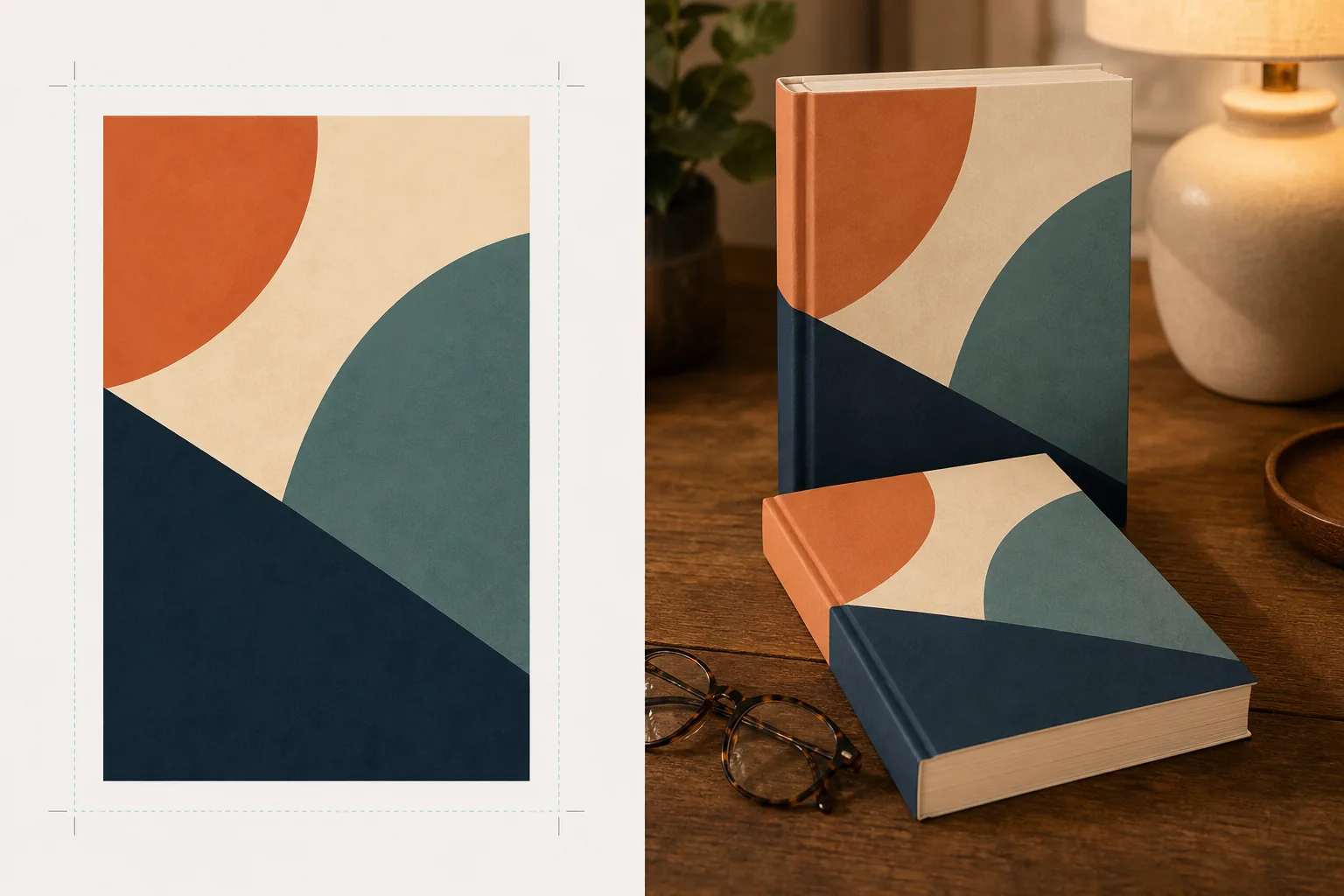
Cree maquetas fotorrealistas de la portada de su libro colocada en escenas de estilo de vida, en estanterías o presentada como una representación 3D independiente con sombras naturales. Esta plantilla toma la ilustración plana de su portada y la transforma en imágenes promocionales para anuncios en redes sociales, sitios web de autores, contenido de Amazon A+ y kits de prensa, sin necesidad de software 3D.
Probar esta plantilla gratisDesign template preview
Qué hace esta plantilla
Convierte diseños planos de portadas de libros en imágenes de maqueta promocionales que parecen fotografía de producto profesional. Suba la ilustración de su portada como un JPEG o PNG plano y la plantilla la proyecta sobre una forma de libro realista con la perspectiva, el grosor de las páginas y la curvatura del lomo correctos. Luego, la maqueta se coloca en escenas de estilo de vida — una mesa de café con gafas de lectura, una estantería de librería, una mesita de noche con la cálida luz de una lámpara — o se representa como un producto independiente sobre un fondo limpio con una sombra natural. Para series o promociones de varios libros, se pueden disponer varias portadas en fila o apiladas con una perspectiva coherente. La dirección de la luz y la sombra coincide con el entorno de la escena para que el libro parezca físicamente presente en lugar de un montaje.
Ajustes de la plantilla
| Formato del libro | Tapa blanda, tapa dura o tapa dura con sobrecubierta |
| Apariencia del número de páginas | Delgado (100 pp.), medio (250 pp.), grueso (400+ pp.) — afecta al ancho del lomo y del borde de las páginas |
| Tipo de escena | Independiente con sombra, mesa de café, estantería, mesita de noche o sostenido en la mano |
| Ángulo de perspectiva | De frente, en tres cuartos o con una ligera inclinación cenital |
| Resolución de salida | 3000×3000px (1:1 para redes sociales) o 2400×1600px (banner 16:10) |
Cómo usar esta plantilla
Suba la ilustración de su portada
Suba la portada de su libro como una imagen plana — la cubierta delantera como mínimo. Para maquetas de tapa dura con sobrecubierta, también puede subir el lomo y la contraportada. La plantilla acepta archivos JPEG, PNG y PDF. Las dimensiones de la portada se detectan automáticamente y las proporciones del libro se escalan en consecuencia.
Seleccione el formato del libro y la escena
Elija entre los formatos de tapa blanda, tapa dura o sobrecubierta. Seleccione el rango de número de páginas para que el ancho del lomo y del borde de las páginas coincida con su libro real. Luego elija una escena: independiente con sombra, entorno de estilo de vida o color de fondo personalizado.
Ajuste la perspectiva y renderice
Elija el ángulo de visión — de frente para la nitidez de las miniaturas, en tres cuartos para profundidad visual o inclinación cenital para publicaciones planas en redes sociales. La plantilla renderiza la maqueta con la iluminación adecuada, la textura del borde de las páginas y una dirección de sombra que coincide con la escena seleccionada.
Descargue las imágenes promocionales
Exporte en 1:1 para Instagram, en 16:9 para encabezados de Twitter/Facebook o en dimensiones personalizadas para la sección hero de su sitio web. Cada exportación incluye la maqueta del libro con la opción de fondo transparente para que pueda colocarla en sus propios diseños personalizados.
Consejos profesionales para obtener los mejores resultados
- ✓Suba su portada en la resolución más alta disponible. La transformación de perspectiva 3D reduce la resolución aparente en la cara que se aleja del libro, por lo que comenzar con una fuente de alta resolución garantiza que el texto del lomo y la portada siga siendo legible.
- ✓Para el contenido de Amazon A+, use la maqueta independiente sobre fondo blanco. Esto le da al libro un aspecto de fotografía de producto premium que lo distingue de la imagen plana de la portada que ya se muestra en la página del producto.
- ✓Cree una composición de serie subiendo todas las portadas de una serie. La plantilla las dispone en fila con perspectiva y espaciado coherentes, lo que resulta mucho más impactante visualmente para promocionar una serie que mostrar las portadas de forma individual.
Herramientas
Preguntas frecuentes
¿Puedo crear una maqueta de un lector electrónico o tableta que muestre mi portada?
+
La plantilla se centra en maquetas de libros físicos — formatos de tapa blanda y tapa dura. Para maquetas que muestren un lector electrónico o tableta, compondría la portada plana sobre la foto de un dispositivo por separado.
¿Será legible el texto del lomo?
+
Sí, siempre que el archivo de portada de origen incluya la ilustración del lomo. La plantilla envuelve la ilustración del lomo alrededor del borde del libro con una perspectiva que coincide con el ángulo de la portada. En libros delgados (menos de 150 páginas), el lomo es estrecho y el texto pequeño puede volverse difícil de leer en tamaños de visualización reducidos.
¿Puedo usar esto para promocionar un audiolibro o un pódcast?
+
Sí. El formato de portada cuadrado que se usa para audiolibros y pódcasts puede representarse como una maqueta estilo caja de CD o como un cuadrado independiente con sombra dimensional, dándole una presencia física de la que carece la ilustración de portada plana.
Convierta la ilustración de su portada en impresionantes imágenes promocionales
Suba una ilustración de portada plana y obtenga maquetas de libros fotorrealistas para redes sociales, sitios web de autores y campañas de marketing.
Pruébelo gratisRelated templates
More design templates for your workflow.
Cree logotipos PNG transparentes con bordes limpios y exportación de varios tamaños para web, impresión, redes sociales e íconos de aplicaciones. Trabaja en fotografías de logotipos impresos y archivos digitales.
Diseñe portadas de podcasts que cumplan con las especificaciones de Apple Podcasts y Spotify con reemplazo de fondo, aislamiento del retrato del host y diseños listos para tipografía.
Prepare fotografías y arte digital para impresión de gran formato con mejora de IA, expansión de lienzo, pruebas de colores precisos y exportación de archivos listos para imprimir.
Prepare fotografías para enviarlas a la agencia de stock con eliminación de marcas registradas, edición de cumplimiento de la autorización del modelo, controles de calidad técnica y requisitos de formato específicos de la agencia.