
Preparación de impresión artística
Prepara obras de arte digitales, fotografías e ilustraciones para impresiones de galería de gran formato, lienzos envueltos en bastidor y producción de pósteres. Esta plantilla utiliza AI Enhance para ampliar las imágenes a resoluciones listas para imprimir sin pérdida de calidad, y AI Expand para extender los bordes del lienzo y crear márgenes de envoltura — todo ello manteniendo la precisión del color para la impresión profesional.
Prueba esta plantilla gratisDesign template preview
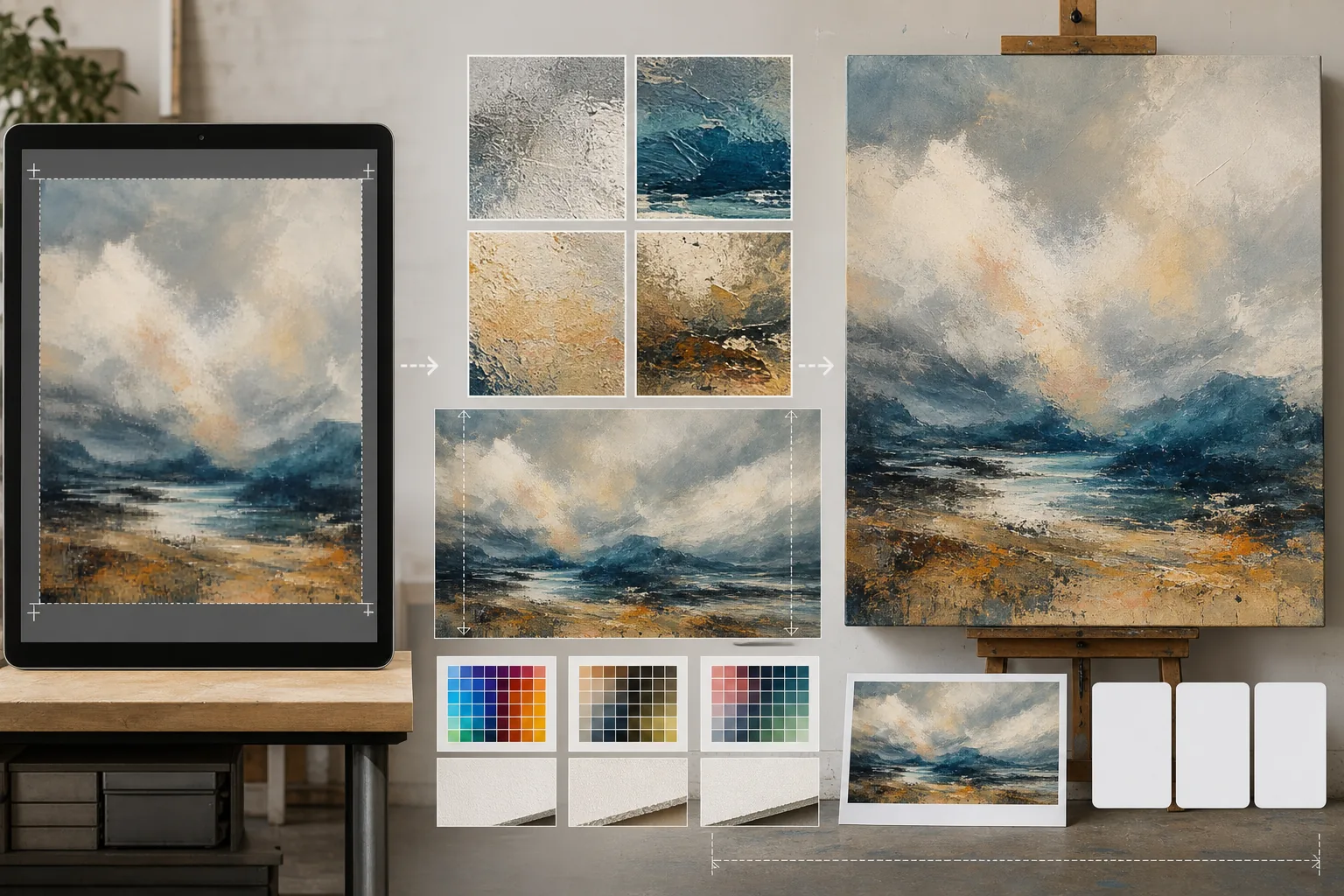
Qué hace esta plantilla
Cierra la brecha entre los archivos digitales en resolución de pantalla y los exigentes requisitos de resolución de la producción de impresión física. AI Enhance amplía las imágenes de 2x a 4x conservando los detalles finos — las pinceladas de las pinturas, la estructura de grano de las fotografías, el trazo de las ilustraciones — sin introducir la borrosidad ni los artefactos típicos de una simple interpolación. AI Expand extiende los bordes del lienzo generando continuaciones perfectas de la obra, aportando el margen adicional necesario para los lienzos de galería envueltos en bastidor, donde la imagen se pliega alrededor del marco. Los perfiles de color se convierten a CMYK o Adobe RGB con una prueba en pantalla que muestra cómo se verá la impresión final sobre papel, lienzo o soportes metálicos.
Configuración de la plantilla
| Factor de ampliación | 2x, 3x o 4x (hasta 16000px en el lado largo para impresiones de gran formato) |
| Expansión del lienzo | Margen de 1,5 pulgadas, 2 pulgadas o personalizado para el sangrado de la envoltura en bastidor |
| Conservación del detalle | Adaptativa: pincelada para pinturas, grano para fotos, trazo para ilustraciones |
| Perfil de color | sRGB (pantalla), Adobe RGB (impresión fotográfica) o CMYK (imprenta comercial) |
| Formato de salida | TIFF (impresión sin pérdida), PNG (transparencia) o JPEG (vista previa web) |
Cómo usar esta plantilla
Sube tu obra de arte
Sube el archivo digital — pintura, fotografía, ilustración o técnica mixta. La plantilla acepta archivos JPEG, PNG, TIFF y PSD. Para obtener los mejores resultados de ampliación, comienza con la versión de mayor resolución que tengas, aunque esté por debajo de los requisitos de impresión.
Amplía a la resolución de impresión
Selecciona el factor de ampliación según el tamaño de impresión deseado. Para una impresión de 24×36 pulgadas a 300 DPI, necesitas 7200×10800 píxeles. La IA amplía conservando el carácter del original — las pinceladas siguen siendo pinceladas, el grano de la película sigue siendo grano, el pixel art mantiene su encanto cuadriculado.
Expande el lienzo para el envoltorio en bastidor
Si imprimes sobre lienzo con envoltura en bastidor, AI Expand genera extensiones perfectas de la obra alrededor de los cuatro bordes. El margen ampliado coincide con el estilo, la paleta de colores y la textura del original, de modo que los bordes envueltos parezcan intencionados en lugar de estirados o reflejados.
Prueba y exporta
Revisa la prueba en pantalla que muestra cómo se reproducirá la imagen en tu perfil de color de destino — CMYK para impresión offset o giclée, Adobe RGB para inyección de tinta de bellas artes. Exporta como TIFF para la imprenta o como PNG para seguir editando. El archivo incluye datos de perfil ICC integrados para una reproducción precisa del color.
Consejos profesionales para obtener los mejores resultados
- ✓Comienza siempre con el archivo original en su resolución nativa. Ampliar un archivo que ya ha sido comprimido y reducido para su visualización en la web introduce artefactos que se acumulan con cada generación de procesamiento.
- ✓Para las impresiones en lienzo envuelto en bastidor, solicita un margen de expansión de 2 pulgadas aunque el bastidor tenga 1,5 pulgadas de profundidad. La media pulgada adicional ofrece tolerancia durante el proceso de tensado del lienzo, donde un ligero desplazamiento al estirar puede dejar al descubierto el borde de la imagen.
- ✓Solicita una prueba física impresa en un tamaño más pequeño antes de comprometerte con la producción de gran formato. Las pantallas y las impresiones en papel reproducen el color de forma diferente, y una prueba de 5×7 cuesta una fracción de un lienzo de 30×40 pero revela cualquier desviación de color que deba corregirse.
Herramientas
Preguntas frecuentes
¿Qué tan grande puedo imprimir a partir de una foto de móvil?
+
Una foto típica de móvil de 12 megapíxeles (4000×3000px) se imprime bien a 13×10 pulgadas a 300 DPI. Con una ampliación con IA de 2x, eso se duplica a 26×20 pulgadas. Con una ampliación de 4x, una foto de móvil puede producir una impresión nítida de 40×30 pulgadas — adecuada para la exposición en galería.
¿La ampliación cambiará el aspecto de mi obra?
+
La IA adapta su método de ampliación al tipo de contenido. Las pinturas conservan sus pinceladas y su textura visibles. Las fotografías mantienen su estructura de grano y su carácter de nitidez. Las ilustraciones preservan la coherencia del grosor del trazo. El objetivo es una versión más grande que se parezca al original, no una reinterpretación.
¿Puedo expandir solo un lado del lienzo?
+
Sí. Puedes especificar qué bordes expandir y en qué medida. Esto resulta útil cuando quieres desplazar la composición dentro de una impresión — por ejemplo, añadir cielo sobre un paisaje para dejar espacio para un título, o añadir primer plano para equilibrar una composición muy cargada hacia el horizonte.
Imprime tu arte en cualquier tamaño sin pérdida de calidad
Sube tu obra digital y obtén archivos listos para imprimir con ampliación por IA, expansión del lienzo y pruebas con color preciso.
Pruébalo gratisRelated templates
More design templates for your workflow.
Cree logotipos PNG transparentes con bordes limpios y exportación de varios tamaños para web, impresión, redes sociales e íconos de aplicaciones. Trabaja en fotografías de logotipos impresos y archivos digitales.
Genere maquetas de portadas de libros realistas con perspectiva 3D, representación de sombras y fondos de estilo de vida para el marketing de autores y promociones de editoriales.
Diseñe portadas de podcasts que cumplan con las especificaciones de Apple Podcasts y Spotify con reemplazo de fondo, aislamiento del retrato del host y diseños listos para tipografía.
Prepare fotografías para enviarlas a la agencia de stock con eliminación de marcas registradas, edición de cumplimiento de la autorización del modelo, controles de calidad técnica y requisitos de formato específicos de la agencia.