
Spinner de producto 360
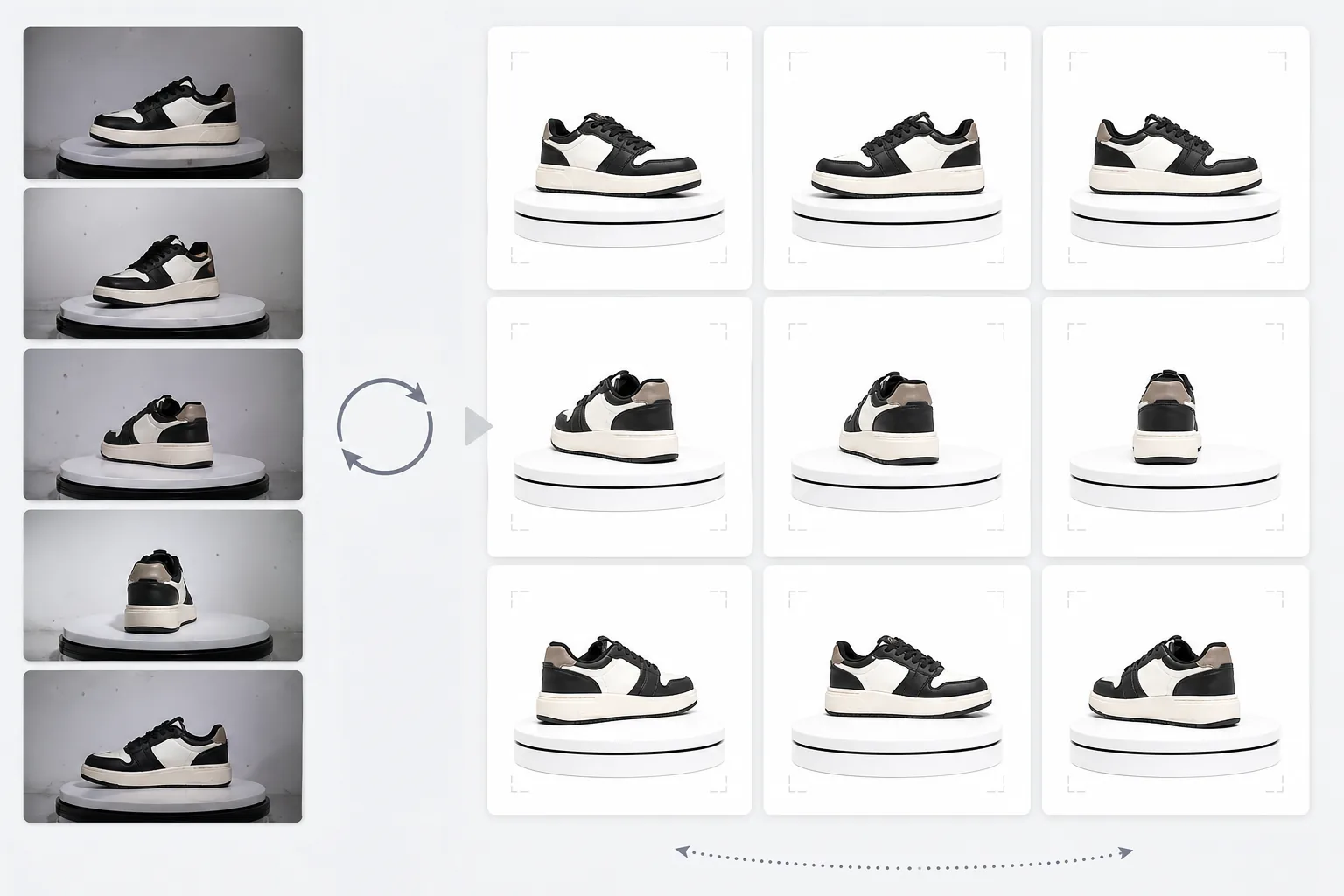
Cree vistas giratorias de producto de 360 grados de calidad profesional a partir de fotos tomadas en una mesa giratoria. Esta plantilla elimina el fondo desde cada ángulo de rotación, garantiza una iluminación y un color uniformes en todos los fotogramas, elimina el polvo y las imperfecciones de la superficie, y genera un conjunto de imágenes uniforme listo para los visores 360 interactivos de sus páginas de producto.
Pruebe esta plantilla gratisE-commerce template preview
Qué hace esta plantilla
Procesa fotos de producto desde múltiples ángulos en un conjunto uniforme adecuado para visores giratorios interactivos de 360 grados en sitios de comercio electrónico. Cuando fotografía un producto sobre una mesa giratoria desde 24 o 36 ángulos, las pequeñas incoherencias de fondo, iluminación y sombra se acumulan y crean una experiencia de giro entrecortada y poco profesional. Esta plantilla utiliza Background Eraser para aislar el producto desde cada ángulo con un tratamiento de bordes uniforme, normaliza la iluminación y la temperatura de color en todos los fotogramas para que el producto no parpadee entre tonos cálidos y fríos mientras gira, y utiliza Magic Eraser para eliminar el polvo, las huellas dactilares y las imperfecciones de la superficie que resultan molestas cuando aparecen en un fotograma pero no en el siguiente.
Configuración de la plantilla
| Fondo | Blanco puro (#FFFFFF) — uniforme en todos los fotogramas de rotación |
| Normalización de la iluminación | Coherencia entre fotogramas (elimina el parpadeo entre ángulos) |
| Limpieza de superficie | Elimina polvo, huellas dactilares y reflejos en cada fotograma |
| Centrado del producto | Centra automáticamente el producto en cada fotograma para un eje de rotación fluido |
| Dimensiones de salida | 1500 × 1500 px por fotograma (optimizado para visores 360 web) |
| Número de fotogramas | Admite secuencias de 12, 24 o 36 fotogramas |
Cómo usar esta plantilla
Suba sus fotos de la mesa giratoria
Suba el conjunto completo de fotos de rotación (12, 24 o 36 fotogramas) tomadas en una mesa giratoria con intervalos uniformes. Nombre los archivos de forma secuencial (001.jpg a 036.jpg) para que la plantilla los procese en el orden de rotación correcto. La plantilla admite fotos con cualquier fondo: barrido blanco, gris o de color.
Eliminación del fondo y coherencia
Background Eraser elimina el fondo de cada fotograma utilizando la misma configuración de detección de bordes, lo que garantiza que el contorno del producto sea uniforme en todos los ángulos. El producto se centra automáticamente en cada fotograma para que el eje de rotación se mantenga estable y el giro no se tambalee.
Normalización entre fotogramas
La iluminación, la temperatura de color y la exposición se normalizan en todos los fotogramas. Esto elimina las sutiles fluctuaciones de brillo y color que se producen cuando la iluminación de la mesa giratoria no es perfectamente uniforme desde cada ángulo. Las imperfecciones de superficie visibles en algunos ángulos se limpian para mantener la coherencia.
Exportar la secuencia de fotogramas
Descargue la secuencia completa de fotogramas a 1500 × 1500 px por fotograma en formato JPEG. Los archivos están numerados de forma secuencial y listos para importarse directamente en complementos de visor 360 como Magic 360, Sirv o Webrotate 360. El tamaño total de los archivos está optimizado para una carga web rápida.
Consejos profesionales para obtener los mejores resultados
- ✓Use una mesa giratoria manual con marcas de grados en lugar de una rotación a mano alzada. Los intervalos uniformes de 10 grados (36 fotogramas) producen el giro más fluido. La plantilla puede gestionar ligeras incoherencias de rotación, pero un espaciado uniforme produce un resultado notablemente más fluido.
- ✓Fije la cámara en un trípode y use ajustes de exposición manual para todos los fotogramas. La exposición automática hace que la cámara ajuste el brillo de forma diferente en cada ángulo, creando el efecto de parpadeo que la plantilla debe corregir después. Los ajustes manuales ofrecen a la plantilla un punto de partida más limpio.
- ✓Limpie bien el producto antes de fotografiarlo: el polvo y las huellas dactilares son más visibles y molestos en un giro de 360 grados que en una sola foto estática, ya que aparecen y desaparecen a medida que el producto gira. La plantilla los elimina, pero empezar con una superficie limpia produce mejores resultados.
Herramientas
E-commerce workflow
Product photo hub
Use this template with the full ecommerce product photo workflow for marketplace backgrounds, cleanup, compression, resizing, and listing-ready exports.
View ecommerce product photo workflowPreguntas frecuentes
¿Cuántos fotogramas necesito?
+
36 fotogramas (intervalos de 10 grados) producen el giro más fluido para la mayoría de los productos. 24 fotogramas (intervalos de 15 grados) son aceptables para productos sin detalles finos. 12 fotogramas (intervalos de 30 grados) es el mínimo para un giro reconocible, pero resultará entrecortado en productos detallados como relojes o productos electrónicos.
¿Puedo procesar fotogramas de un vídeo?
+
Sí, si extrae los fotogramas de un vídeo de mesa giratoria a intervalos uniformes. Exporte los fotogramas a la máxima resolución disponible y asegúrese de una distribución angular uniforme a lo largo de los 360 grados completos. Los fotogramas de vídeo pueden tener menor calidad que las fotos fijas dedicadas debido al desenfoque de movimiento y a la compresión de vídeo.
¿Qué complementos de visor 360 son compatibles?
+
La salida JPEG secuencial es compatible con todas las principales soluciones de visor 360, incluidas Magic 360, Sirv 360, Webrotate 360, jQuery Reel e implementaciones personalizadas. Las dimensiones uniformes y la convención de nombres simplifican la importación.
Ofrezca a los compradores la vista de producto 360 que esperan
Suba fotos de la mesa giratoria y obtenga una secuencia de fotogramas limpia y uniforme, lista para los visores giratorios 360 interactivos de sus páginas de producto.
Pruébelo gratisRelated templates
More e-commerce templates for your workflow.
Plantilla de fondo blanco puro para fotografías de productos. Amazon, Shopify y configuraciones listas para el mercado para imágenes de productos limpias y profesionales que convierten.
Plantilla de fotografía de anuncio optimizada para Etsy. Convierte fotografías de estilo de vida en fondos blancos limpios a 2000 px, mejora los detalles de los productos hechos a mano y cumple con las pautas de imágenes de Etsy.
Plantilla de fotografía de listado optimizada para eBay. Fondo blanco para imágenes de galería, mejora de la documentación de condiciones y diseños de múltiples ángulos que cumplen con los estándares de imágenes de eBay.
Plantilla de fotografía de joyería profesional para anillos, collares y relojes. Controla los reflejos, mejora el brillo de las piedras preciosas y ofrece imágenes listas para el mercado sobre fondos limpios.
Plantilla de fotografía de muebles profesional para listados de mercado. Elimine el desorden de la habitación, muestre las dimensiones reales y presente piezas sobre fondos limpios o en contextos de habitación con estilo.
Limpie las fotografías planas de la ropa con eliminación de arrugas, limpieza de pelusas, fondos de color blanco puro y colores precisos de la tela. Listo para Shopify, Amazon y tiendas boutique.