
Diseño de tablero de menú
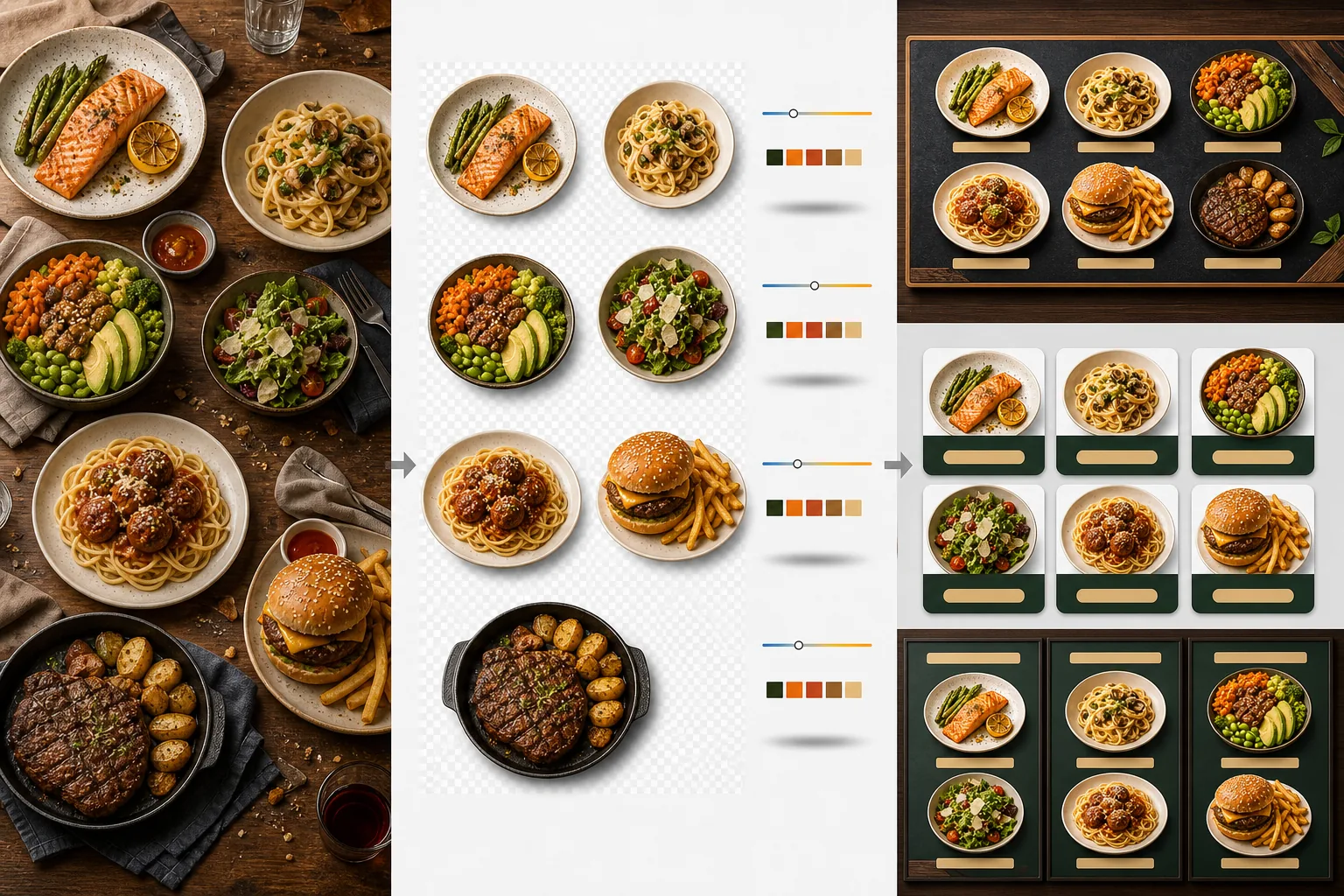
Cree gráficos profesionales de tablero de menú a partir de sus propias fotografías de platos. Esta plantilla aísla cada plato individual de las mesas y los fondos recargados, uniformiza el aspecto de todos los artículos para lograr un menú coherente, y exporta imágenes listas para el diseño optimizadas para tableros de menú digitales, menús impresos y fichas en plataformas de entrega como DoorDash, Uber Eats y Grubhub.
Prueba esta plantilla gratisFood template preview
Qué hace esta plantilla
Transforma fotos de platos inconsistentes tomadas en distintos momentos, con distinta iluminación y sobre distintas mesas en un conjunto unificado de imágenes listas para el menú. Background Eraser aísla cada plato — plato, cuenco o envase — de su mesa original y reemplaza el fondo por un color o textura coherente que coincide con la identidad de marca de su restaurante. La temperatura de color se normaliza en todos los artículos para que las fotos tomadas bajo luz cálida de tungsteno, paneles LED fríos y luz natural de ventana se vean todas coherentes. Los colores de los alimentos se realzan para que luzcan apetitosos sin caer en lo irreal — los verdes son vibrantes, las carnes cálidas y jugosas, y las salsas brillantes. El resultado es un conjunto de imágenes que funciona como un sistema visual de menú unificado en lugar de una colección aleatoria de fotos de teléfono.
Configuración de la plantilla
| Fondo | Color sólido (a juego con la marca), textura de madera, pizarra o transparente |
| Normalización de la temperatura de color | Igualar todos los artículos a un balance de blancos de luz diurna de 5000K |
| Realce del color de los alimentos | Realce apetitoso (proteínas cálidas, verdes vibrantes, salsas brillantes) |
| Estilo de sombra | Sombra paralela sutil para dar profundidad sobre fondos sólidos |
| Tamaños de salida | 1200×1200px (plataformas de entrega), 800×600px (tableros de menú digitales), personalizado |
Cómo usar esta plantilla
Sube las fotos de los platos
Sube fotos de cada artículo del menú. Las fotos de teléfono tomadas durante el servicio, las sesiones de fotografía gastronómica profesional y las fotos de las fichas en plataformas de entrega funcionan todas. La plantilla procesa cada plato por separado para obtener resultados coherentes en todo tu menú.
Aísla los platos de los fondos
Background Eraser separa cada plato de su mesa, mantel individual o superficie de mostrador. La detección de bordes sigue con precisión el borde del plato, el borde del cuenco o el contorno del envase. Las guarniciones y los aderezos que sobresalen del borde del plato — una ramita de perejil, un hilo de salsa — se conservan.
Uniformiza el color y el estilo
La temperatura de color se normaliza para que todos los platos aparezcan bajo la misma iluminación coherente. Los colores de los alimentos se realzan para resultar apetitosos. Se añade una sombra sutil debajo de cada plato para lograr un aspecto asentado y tridimensional sobre el nuevo fondo.
Exporta para menús y plataformas
Descarga en 1200×1200px para las fichas de DoorDash, Uber Eats y Grubhub. Exporta en 800×600px para tableros de menú digitales y pantallas de TV. Las exportaciones en PNG transparente están disponibles para diseñadores gráficos que crean menús impresos y señalización personalizados.
Consejos de pro para mejores resultados
- ✓Fotografía los platos directamente desde arriba (plano cenital) o en un ángulo de 45 grados. Estos dos ángulos producen la eliminación de fondo más limpia porque el contorno del plato es totalmente visible y la IA puede separar el plato de la mesa con precisión.
- ✓Limpia el borde del plato antes de fotografiar. Las manchas de salsa y las migas en el borde del plato pasan a formar parte de la imagen aislada y lucen desprolijas sobre el nuevo fondo limpio.
- ✓Procesa todos los artículos del menú en un solo lote con la misma configuración. La coherencia en cada foto de plato es lo que hace que un menú luzca profesional — temperaturas de color y tonos de fondo dispares hacen que incluso la mejor comida luzca amateur.
Herramientas
Preguntas frecuentes
¿Puedo usar esto para bebidas?
+
Sí. Los vasos, las tazas, las botellas y los cócteles se aíslan con la misma precisión que los platos servidos. Las bebidas transparentes como el agua, el vino y los cócteles claros conservan su transparencia sobre el nuevo fondo.
¿La comida se verá realzada artificialmente?
+
El realce del color está calibrado para que la comida luzca lo más apetitosa posible sin caer en lo irreal. Piénsalo como la diferencia entre comida fotografiada bajo luz fluorescente dura y comida fotografiada con luz natural de día — la plantilla hace que cada plato luzca como si se hubiera fotografiado en condiciones ideales.
¿Funciona para las fotos de menú de las plataformas de entrega?
+
Sí. La salida cuadrada de 1200×1200px cumple los requisitos de imagen de DoorDash, Uber Eats, Grubhub y Postmates. Los restaurantes con fotos de menú de aspecto profesional en las plataformas de entrega reciben de forma constante tasas de pedido más altas que aquellos con instantáneas de teléfono sin procesar.
Crea un menú que haga que cada plato luzca irresistible
Sube fotos de platos y obtén imágenes de menú coherentes y apetitosas, listas para tableros digitales, menús impresos y plataformas de entrega.
Pruébalo gratisRelated templates
More food templates for your workflow.
Cree apetitosas fotografías de menús de entrega de comida a domicilio con realce de la intensidad del color, fondos limpios, efectos de vapor y frescura, y dimensiones optimizadas para la plataforma.
Mejore las fotografías de recetas para libros de cocina y blogs de comida con nitidez con calidad de impresión, precisión del color de los ingredientes, limpieza de escenas con estilo y resultados de alta resolución.