
Foto de receta de libro de cocina
Eleve las fotos de recetas caseras a los estándares de calidad de un libro de cocina. Esta plantilla mejora los colores de los ingredientes para una precisión de impresión, realza las texturas de los alimentos para una reproducción de alta resolución, elimina elementos no deseados de las escenas con estilo y produce una salida en resolución profesional para libros de cocina, blogs de comida y fichas de recetas.
Prueba esta plantilla gratisFood template preview
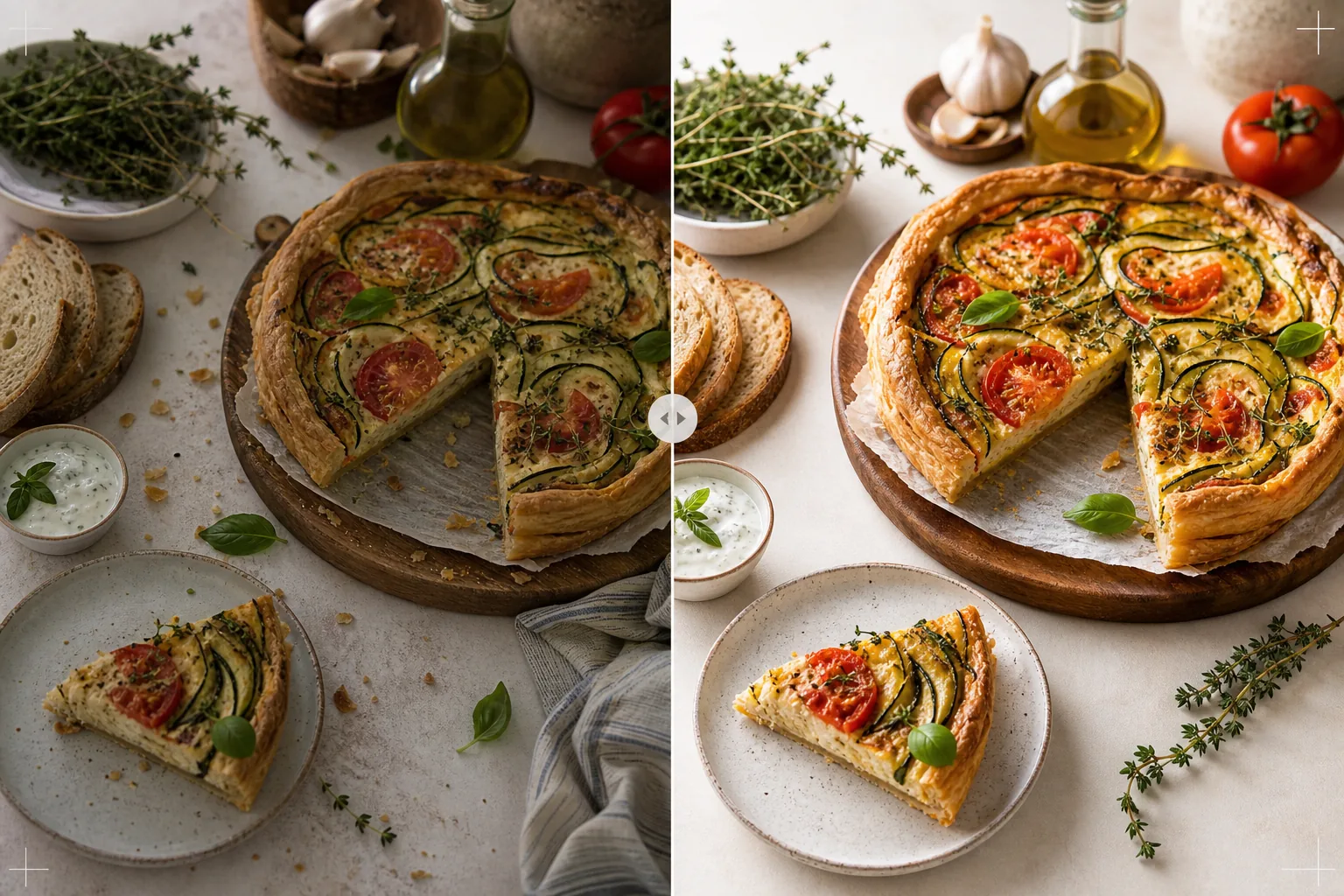
Qué hace esta plantilla
Transforma las fotos de recetas tomadas en la cocina de casa en imágenes dignas de libros de cocina publicados y blogs de comida profesionales. La fotografía de libros de cocina exige estándares más altos que las redes sociales: los colores deben ser fieles a la impresión (no solo atractivos en pantalla), las texturas deben ser lo bastante nítidas para imprimir a 300 DPI en tamaños grandes, y las escenas con estilo deben parecer intencionadas, sin desorden visible. AI Enhance aplica una corrección de color calibrada para impresión que garantiza que los colores de los ingredientes se reproduzcan con precisión en el papel, no solo en las pantallas. Magic Eraser elimina el desorden del fondo, los utensilios extraviados, los platos sucios visibles en la escena y las imperfecciones del montaje de los alimentos que se hacen más evidentes a resolución de impresión. El resultado parece tomado por un fotógrafo de libros de cocina con años de experiencia en estilismo culinario.
Configuración de la plantilla
| Perfil de color | Adobe RGB para impresión o sRGB para digital (seleccionable) |
| Textura de los alimentos | Realce de detalle de alta frecuencia para crujiente, miga y glaseado |
| Limpieza de la escena | Eliminar utensilios extraviados, migas y desorden del fondo |
| Precisión del color | Calibrado para impresión (verdes, rojos y marrones fieles en el papel) |
| Resolución de salida | 6000px en el lado largo (300 DPI para una doble página completa de libro de cocina) |
Cómo usar esta plantilla
Sube tu foto de receta
Sube la toma de receta con estilo: vista cenital plana, ángulo de 45 grados o primer plano detallado del plato terminado. Incluye accesorios como ingredientes, utensilios y textiles que formen parte de la composición prevista. La plantilla elimina elementos no deseados mientras conserva el estilismo intencionado.
Mejora de color y textura
AI Enhance corrige la temperatura de color para una precisión de impresión y realza las texturas de los alimentos: el crujido de una corteza de pan, el brillo de una ganache de chocolate, las capas diferenciadas de un corte transversal. La calibración del color garantiza que los verdes, rojos y marrones dorados que se ven fieles en pantalla también se reproduzcan con precisión al imprimirse en papel.
Refinamiento de la escena
Magic Eraser elimina elementos que no aportan a la composición: migas dispersas fuera del área prevista, la esquina de un paño de cocina asomando por el borde, desorden del fondo visible en la periferia del encuadre o manchas en accesorios y superficies. La escena con estilo se refina para que parezca intencionada y pulida.
Exporta para impresión o digital
Descarga a 6000px en el lado largo en Adobe RGB para impresión de libros de cocina a 300 DPI hasta una doble página completa, o en sRGB para uso en blogs de comida y sitios web de recetas. La alta resolución conserva suficiente detalle para que los lectores vean cada hoja de hierba, las texturas de las semillas y la consistencia de las salsas a la ampliación de impresión.
Consejos de profesional para mejores resultados
- ✓Fotografía con luz natural de ventana desde una sola dirección, con un reflector blanco en el lado de la sombra. Esto crea la iluminación direccional suave que caracteriza a la fotografía de comida profesional. La plantilla puede corregir la iluminación artificial, pero la luz natural produce desde el principio los colores de los alimentos más auténticos.
- ✓Empata primero el plato principal y fotografíalo en los cinco minutos siguientes, mientras las texturas y los colores están en su punto máximo. Luego fotografía las tomas del proceso paso a paso. La plantilla realza las señales de frescura como el vapor y la humedad, pero no puede restaurar alimentos que han estado reposando durante un periodo prolongado.
- ✓Usa números impares de accesorios (tres ingredientes, un utensilio, un textil) para la composición visualmente más equilibrada. La plantilla limpia la escena pero trabaja dentro de tu composición existente: un punto de partida bien compuesto produce una imagen final más profesional.
- ✓Para las tomas de corte transversal (pasteles cortados, panes rebanados, repostería partida), usa un cuchillo muy afilado y corta justo antes de fotografiar. La plantilla realza la definición de las capas y la textura de la miga, pero no puede arreglar un corte irregular que oculte la estructura interna.
Herramientas
Preguntas frecuentes
¿Puede esto reemplazar a un fotógrafo de comida profesional?
+
La plantilla lleva las fotos de recetas tomadas en casa a un nivel adecuado para libros de cocina autopublicados, blogs de comida y fichas de recetas. Para libros de cocina de grandes editoriales con estándares visuales estrictos, un fotógrafo y un estilista profesionales producen mejores resultados, pero la plantilla es una excelente opción para autores independientes y creadores de contenido.
¿Qué pasa con las fotos del proceso paso a paso?
+
Las fotos de proceso (mezclar, picar, verter) se benefician de la misma corrección de color y limpieza. La plantilla gestiona el desenfoque de movimiento típico de las tomas de acción realzando selectivamente los alimentos mientras mantiene el desenfoque natural de las manos y los utensilios en movimiento.
¿Cómo funciona la calibración de color para impresión?
+
La salida Adobe RGB contiene una gama de colores más amplia que sRGB, preservando sutiles diferencias de color en verdes y rojos que se pierden en la conversión a sRGB. Al imprimirse en una prensa calibrada, estos colores se reproducen con mayor precisión. Para la impresión doméstica, la salida sRGB produce mejores resultados en la mayoría de las impresoras de consumo.
Fotos de recetas dignas de un libro de cocina publicado
Sube tu fotografía de comida y obtén imágenes de calidad de impresión, fieles en color, con texturas nítidas y composiciones refinadas.
Pruébalo gratisRelated templates
More food templates for your workflow.
Cree apetitosas fotografías de menús de entrega de comida a domicilio con realce de la intensidad del color, fondos limpios, efectos de vapor y frescura, y dimensiones optimizadas para la plataforma.
Cree gráficos de tableros de menú con eliminación del fondo de fotografías de alimentos, estilo consistente y exportaciones listas para el diseño para pantallas digitales, menús impresos y plataformas de entrega de terceros.