
Foto de menú de comida a domicilio
Haga que los platos de su menú de entrega se vean tan apetitosos como saben. Esta plantilla realza los colores de la comida para lograr el máximo atractivo, elimina los fondos de cocina desordenados, potencia la calidez y la frescura visual de los platos y genera imágenes optimizadas para DoorDash, Uber Eats, Grubhub y otras plataformas de entrega.
Prueba esta plantilla gratisFood template preview
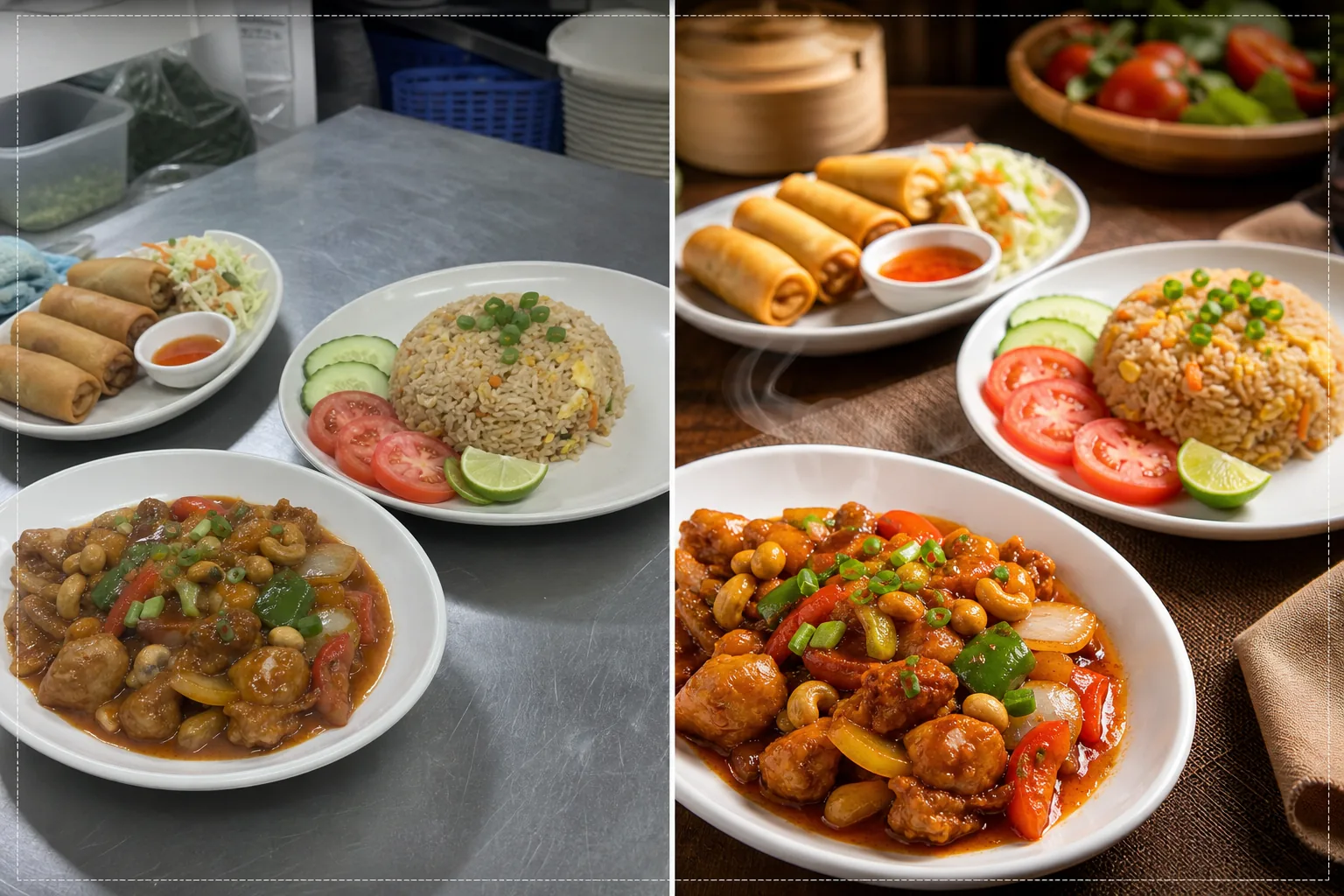
Qué hace esta plantilla
Convierte fotos rápidas de cocina en imágenes de calidad de menú que impulsan los pedidos en las plataformas de entrega de comida. Los restaurantes suelen fotografiar sus platos en cocinas concurridas con iluminación fluorescente que hace que la comida se vea poco apetitosa: pollo con tono verdoso, arroz marrón apagado y salsas deslavadas. Esta plantilla corrige la temperatura del color hacia tonos cálidos y apetitosos y potencia la saturación de ingredientes naturalmente vibrantes como tomates, verduras y pimientos. Background Eraser elimina los fondos de cocina desordenados y los reemplaza por superficies limpias y apropiadas para la comida. AI Enhance afina las texturas de los alimentos para que los compradores vean lo crujiente de los fritos, el vapor que se eleva de los platos calientes y la frescura de las guarniciones.
Ajustes de la plantilla
| Calidez del color | Tonos cálidos y apetitosos (+15 % de desplazamiento cálido, corrige el verde fluorescente) |
| Saturación de la comida | Realce selectivo en rojos, verdes y amarillos (colores naturales de los alimentos) |
| Mejora de textura | Afinado de detalles de textura crujiente, humedad y brillo |
| Fondo | Superficie de mesa limpia, color sólido o fondo oscuro y ambiental |
| Dimensiones de salida | 1200 × 800 px (óptimo para plataformas de entrega) y 1080 × 1080 px (redes sociales) |
Cómo usar esta plantilla
Sube la foto de tu plato
Fotografía el plato emplatado directamente desde arriba (cenital) o en un ángulo de 45 grados: ambas composiciones funcionan bien para los menús de entrega. Usa la mejor luz natural disponible o coloca el plato cerca de una ventana. Sube la foto directamente desde tu teléfono: no se necesita ningún montaje de estudio.
Corrección de color y calidez
La plantilla corrige la dominante de color de la iluminación fluorescente y LED de la cocina, desplazando los tonos de la comida hacia matices cálidos y apetitosos. Las salsas se ven más intensas, las proteínas doradas y las verduras frescas. La corrección realza lo que está naturalmente presente en lugar de hacer que la comida parezca coloreada artificialmente.
Mejora de fondo y textura
Background Eraser cambia el fondo de la cocina por una superficie limpia: mesa de madera, mármol, pizarra o un simple color sólido. AI Enhance afina las texturas de la comida para resaltar lo crujiente de los fritos, el brillo de las salsas y la frescura de los productos. La imagen en conjunto adquiere una calidad de fotografía gastronómica profesional.
Exportar para plataformas de entrega
Descarga en 1200 × 800 px para los listados de menú de las plataformas de entrega (DoorDash, Uber Eats, Grubhub) o en 1080 × 1080 px para publicaciones gastronómicas de Instagram. El perfil de color cálido garantiza que el plato se vea apetitoso en todos los dispositivos y tipos de pantalla.
Consejos de expertos para mejores resultados
- ✓Fotografía los platos inmediatamente después de emplatarlos, mientras el vapor, la humedad y la frescura de las guarniciones están en su punto máximo. La fotografía gastronómica tiene una ventana de unos tres a cinco minutos antes de que las salsas se asienten, las guarniciones se marchiten y el vapor se disipe. La plantilla realza estas señales de frescura, pero no puede crearlas.
- ✓Usa un plato blanco o de color claro para las fotos del menú. Los platos blancos crean el contraste más fuerte con la comida, hacen que los colores resalten y permiten que la IA produzca bordes más limpios durante la eliminación del fondo. Los platos oscuros también sirven, pero reducen la ventaja del contraste de color.
- ✓Para combos y pedidos de varios platos, coloca todos los elementos en un solo encuadre a una ligera distancia. La plantilla afina cada elemento de comida de forma individual, y mostrar el pedido completo da a los clientes de entrega una expectativa clara de lo que recibirán.
Herramientas
Preguntas frecuentes
¿Puede corregir fotos tomadas bajo las luces fluorescentes de la cocina?
+
Sí. La iluminación fluorescente es el problema más común en la fotografía gastronómica de restaurantes, ya que crea una dominante verde-amarilla que hace que la comida se vea poco apetitosa. La plantilla corrige específicamente este cambio de color y lo reemplaza por tonos cálidos y apetitosos que hacen que la comida se vea naturalmente deliciosa.
¿Funciona para todos los tipos de cocina?
+
La plantilla maneja todos los tipos de comida: estadounidense, asiática, mexicana, italiana, india, de Oriente Medio y más. La corrección y la mejora del color están calibradas para los colores naturales de los alimentos de todas las tradiciones culinarias, realzando los rojos en los platos a base de tomate, los verdes en las ensaladas y los tonos dorados en los fritos y horneados.
¿Puedo procesar todo mi menú a la vez?
+
Sí. Sube todas las fotos de los platos del menú y procésalas por lotes. La plantilla aplica un tratamiento de color, un fondo y unas dimensiones uniformes a todo tu menú para lograr una galería de menú uniforme y profesional en las plataformas de entrega.
Fotos de menú que hacen que los clientes toquen pedir ahora
Sube fotos de los platos de tu cocina y obtén imágenes apetitosas y listas para las plataformas que generan más pedidos de entrega.
Pruébalo gratisRelated templates
More food templates for your workflow.
Mejore las fotografías de recetas para libros de cocina y blogs de comida con nitidez con calidad de impresión, precisión del color de los ingredientes, limpieza de escenas con estilo y resultados de alta resolución.
Cree gráficos de tableros de menú con eliminación del fondo de fotografías de alimentos, estilo consistente y exportaciones listas para el diseño para pantallas digitales, menús impresos y plataformas de entrega de terceros.