
Foto de producto de bolso
Cree fotos de producto de calidad de lujo para bolsos, carteras, billeteras y artículos de cuero. Esta plantilla aísla el bolso de cualquier superficie, reemplaza el fondo por un entorno de estudio limpio o de estilo de vida, realza la flor del cuero y el detalle de las costuras, y enfoca elementos de herrajes como cremalleras, broches y hebillas para que los clientes puedan evaluar la artesanía desde cada ángulo.
Prueba esta plantilla gratisE-commerce template preview
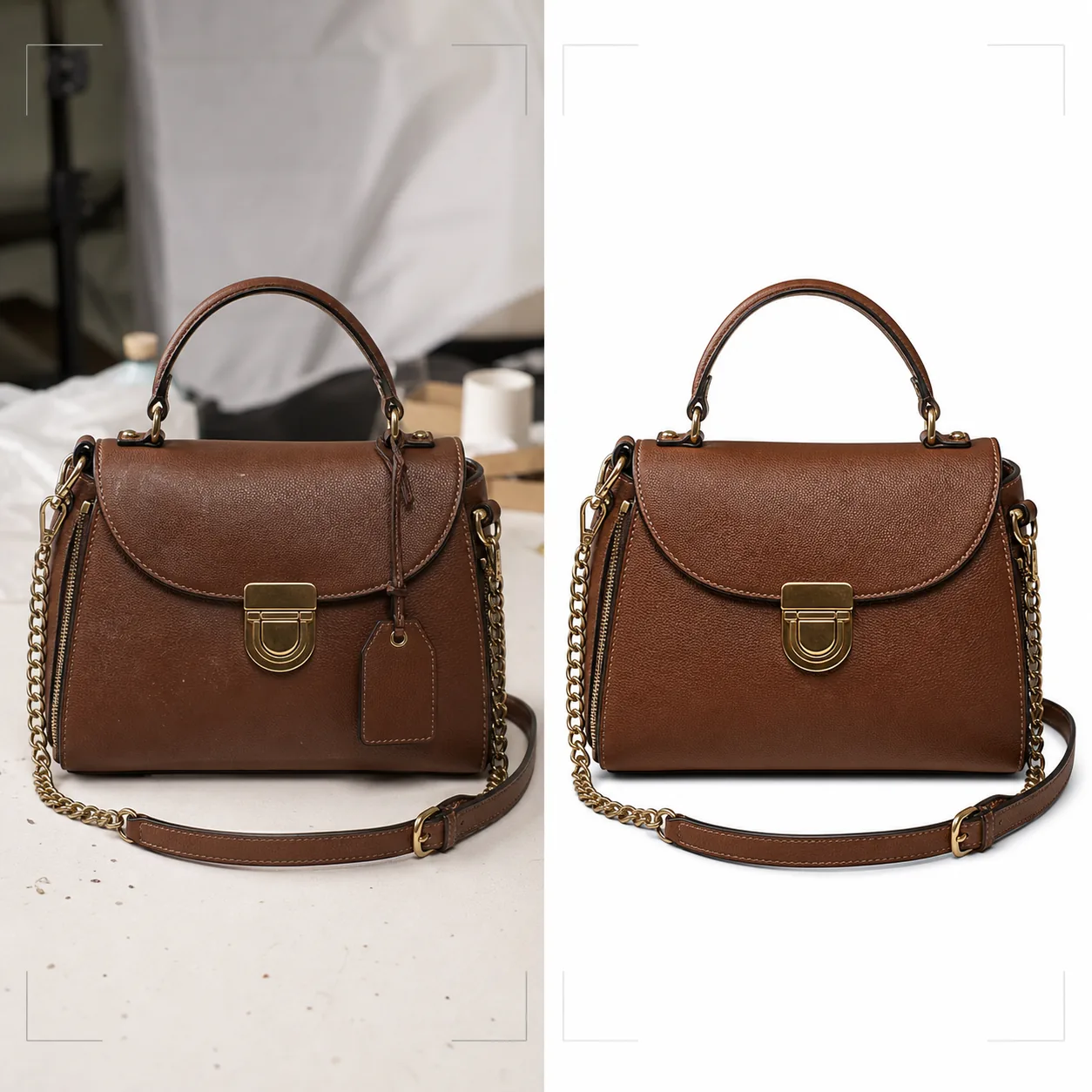
Qué hace esta plantilla
Ofrece el estándar visual que las marcas de bolsos de lujo y de gama media requieren para la venta minorista en línea. Background Eraser aísla el bolso de mesas, superficies de fotografía y desorden del estudio, reemplazando el entorno por blanco puro para cumplir con los marketplaces o por fondos estilizados que combinan con la estética de la marca. Magic Eraser elimina partículas de polvo, huellas dactilares en los herrajes y etiquetas de precio que se pasaron por alto durante la sesión. La mejora con IA resalta la flor del cuero, el tejido de lona o la textura de tela que comunica calidad, mientras que los elementos de herrajes — cremalleras, broches, asas de cadena y placas con logotipo — se enfocan para que los clientes puedan inspeccionar la calidad de los acabados como si tuvieran el bolso en una boutique.
Configuración de la plantilla
| Fondo | Blanco puro, crema o superficie estilizada (mármol, lino, estante de madera) |
| Mejora del cuero | Enfoque de la textura de la flor conservando el brillo natural |
| Detalle de herrajes | Enfocar cremalleras, broches, hebillas y placas de logotipo metálicas |
| Eliminación de polvo y huellas dactilares | Detectar y eliminar automáticamente partículas de superficie y manchas en los herrajes |
| Estilo de sombra | Sombra paralela natural o sombra de reflejo sobre fondo blanco |
| Resolución de salida | 3000×3000px (1:1 para marketplaces) o 2400×3200px (3:4 para sitios de marca) |
Cómo usar esta plantilla
Sube la foto de tu bolso
Sube una foto de producto del bolso — de frente, en ángulo para mostrar profundidad, o en plano cenital con el bolso abierto. Incluye tomas desde varios ángulos para un anuncio completo. La plantilla admite fotos de cámaras de teléfono, montajes de estudio y equipos DSLR.
Limpia el fondo y elimina imperfecciones
Background Eraser separa el bolso de la superficie de fotografía con una detección de bordes que conserva los bordes suaves del cuero, las asas colgantes y los detalles de las cadenas. Magic Eraser elimina las motas de polvo en el cuero, las manchas de huellas dactilares en los herrajes pulidos y cualquier etiqueta de precio o sensor de seguridad aún adherido.
Mejora los materiales y los herrajes
La textura del cuero se enfoca para revelar los patrones de la flor y las costuras. Los elementos de herrajes se mejoran para mayor claridad — los clientes pueden ver si las cremalleras son YKK, si los broches son de latón macizo o chapados, y si las costuras son uniformes y firmes. La corrección de color garantiza que el cuero aparezca en su verdadero tono de tinte.
Exporta para comercio electrónico
Descarga en 3000×3000px para Amazon, eBay y Poshmark, o en proporciones personalizadas para el sitio web de tu marca. La versión con fondo blanco puro cumple los requisitos de imagen de los marketplaces. Las versiones con fondo de estilo de vida funcionan para redes sociales y campañas de correo electrónico.
Consejos profesionales para mejores resultados
- ✓Rellena el bolso con papel de seda antes de fotografiarlo para darle la forma y estructura previstas. Un bolso vacío se desploma y se pliega de maneras que lo hacen parecer menos premium de lo que es en persona.
- ✓Fotografía los primeros planos de los herrajes por separado. Si bien la plantilla mejora los herrajes en las tomas del bolso completo, un primer plano dedicado del broche, el tirador de la cremallera y la placa del logotipo ofrece a los clientes la experiencia de inspección de detalles que tienen en una tienda física.
- ✓Limpia los herrajes con un paño de microfibra antes de fotografiar. La plantilla elimina las huellas dactilares digitalmente, pero las manchas intensas en herrajes pulidos de oro o plata pueden reducir la claridad del acabado metálico subyacente incluso después de la limpieza con IA.
Herramientas
E-commerce workflow
Product photo hub
Use this template with the full ecommerce product photo workflow for marketplace backgrounds, cleanup, compression, resizing, and listing-ready exports.
View ecommerce product photo workflowPreguntas frecuentes
¿Puede esto procesar bolsos de lona o nailon?
+
Sí. La plantilla detecta el tipo de material y ajusta la mejora de la textura en consecuencia. Las texturas del tejido de lona y del nailon ripstop se enfocan de forma diferente a la flor del cuero para resaltar las cualidades características de cada material.
¿Se conservará el detalle del asa de cadena durante la eliminación del fondo?
+
Sí. La detección de bordes está calibrada para detalles metálicos finos como eslabones de cadena, asas finas de cuero y tiradores colgantes de cremallera. Estos elementos se conservan con bordes limpios sobre el nuevo fondo.
¿Puedo agregar una sombra de reflejo sobre fondo blanco?
+
Sí. La plantilla ofrece tanto una sombra paralela natural (como si el bolso estuviera sobre una superficie blanca iluminada desde arriba) como una sombra de reflejo (un degradado en espejo debajo del bolso) de uso común en la fotografía de productos de lujo.
Presenta cada bolso con detalle a nivel boutique
Sube fotos de bolsos y obtén imágenes de producto de calidad de lujo con textura de cuero mejorada, herrajes nítidos y fondos limpios.
Pruébalo gratisRelated templates
More e-commerce templates for your workflow.
Plantilla de fondo blanco puro para fotografías de productos. Amazon, Shopify y configuraciones listas para el mercado para imágenes de productos limpias y profesionales que convierten.
Plantilla de fotografía de anuncio optimizada para Etsy. Convierte fotografías de estilo de vida en fondos blancos limpios a 2000 px, mejora los detalles de los productos hechos a mano y cumple con las pautas de imágenes de Etsy.
Plantilla de fotografía de listado optimizada para eBay. Fondo blanco para imágenes de galería, mejora de la documentación de condiciones y diseños de múltiples ángulos que cumplen con los estándares de imágenes de eBay.
Plantilla de fotografía de joyería profesional para anillos, collares y relojes. Controla los reflejos, mejora el brillo de las piedras preciosas y ofrece imágenes listas para el mercado sobre fondos limpios.
Plantilla de fotografía de muebles profesional para listados de mercado. Elimine el desorden de la habitación, muestre las dimensiones reales y presente piezas sobre fondos limpios o en contextos de habitación con estilo.
Limpie las fotografías planas de la ropa con eliminación de arrugas, limpieza de pelusas, fondos de color blanco puro y colores precisos de la tela. Listo para Shopify, Amazon y tiendas boutique.