
Foto de producto electrónico
Presenta la electrónica de consumo con una nitidez de calidad de sala de exposición. Esta plantilla elimina huellas dactilares y manchas de las pantallas y superficies brillantes, da nitidez a los detalles de puertos y botones, mejora las pantallas para que los elementos de la interfaz sean visibles y genera imágenes de producto limpias listas para listados de marketplace y páginas de marca.
Prueba esta plantilla gratisE-commerce template preview
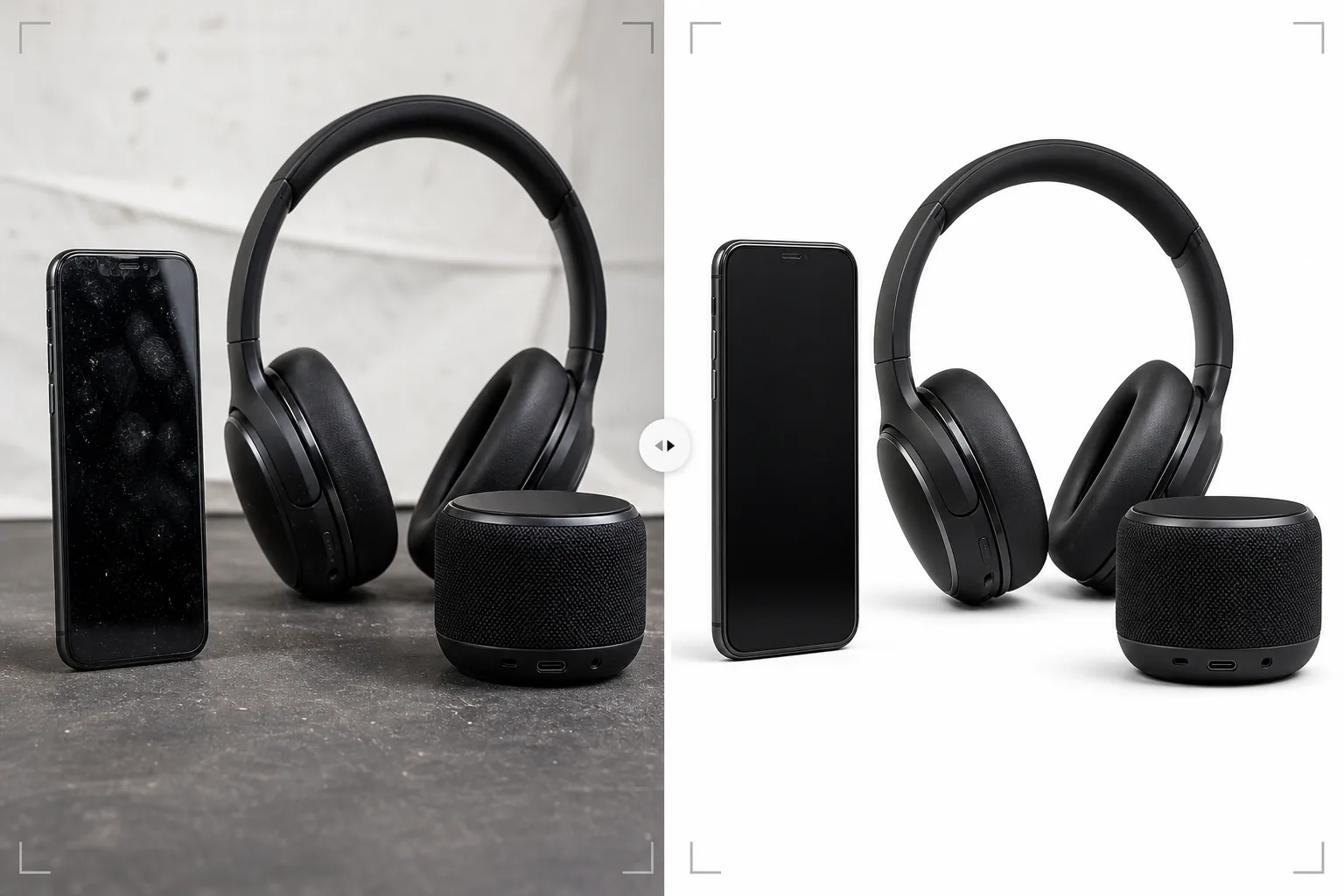
Qué hace esta plantilla
Aborda los desafíos fotográficos específicos de la electrónica de consumo — smartphones, portátiles, tablets, auriculares, altavoces y accesorios — donde las superficies reflectantes, los puertos intrincados y las pantallas requieren un procesamiento especializado. Las pantallas brillantes y las carcasas metálicas acumulan huellas dactilares al instante al manipular el producto, y Magic Eraser las elimina junto con las partículas de polvo y los microarañazos superficiales que aparecen con gran ampliación. AI Enhance da nitidez a detalles finos como el interior de los puertos USB, las texturas de los botones, los patrones de las rejillas de los altavoces y el texto de la marca que los compradores examinan de cerca al evaluar la calidad de fabricación. Background Eraser aísla los productos con bordes limpios alrededor de formas complejas como antenas, puertos y aberturas de cables.
Configuración de la plantilla
| Limpieza de superficie | Eliminar huellas dactilares, polvo y microarañazos de pantallas y carcasa |
| Nitidez de detalles | Mejora de puertos, botones, rejillas de altavoz y texto de marca |
| Visualización de pantalla | Aclarar y dar nitidez a la interfaz en pantalla (o sustituirla por una captura limpia) |
| Fondo | Blanco puro (#FFFFFF) o degradado para un posicionamiento premium |
| Dimensiones de salida | 2500 × 2500 px (zoom de alta resolución para la inspección del comprador) |
| Acabado metálico | Mejorar las texturas del aluminio anodizado, el acero cepillado y el plástico mate |
Cómo usar esta plantilla
Sube tu foto de electrónica
Sube fotos del producto — vistas frontal, trasera, lateral y de detalle de puertos y botones. La plantilla admite smartphones, portátiles, tablets, auriculares, altavoces, smartwatches y accesorios. Incluye al menos un ángulo que muestre la pantalla encendida si el dispositivo tiene una.
Limpieza de superficie y eliminación de huellas
Magic Eraser elimina huellas dactilares, manchas y polvo de pantallas, carcasas metálicas y superficies de plástico brillante. También se eliminan los pequeños arañazos y rozaduras por manipular unidades de muestra. La IA conserva las características de superficie intencionadas, como el grano del metal cepillado y las texturas mate.
Mejora de detalles y de la pantalla
AI Enhance da nitidez a las aberturas de los puertos, los bordes de los botones, los patrones de las rejillas de los altavoces y el texto de la marca. Si el dispositivo tiene pantalla, la visualización se aclara y se afina para que los elementos de la interfaz sean visibles y atractivos. El reflejo de la iluminación del estudio se reduce manteniendo el aspecto activo de la pantalla.
Exporta para marketplace o sitio de marca
Descarga en 2500 × 2500 px para listados de marketplace con zoom completo, o en dimensiones personalizadas para sitios web de marca y materiales de marketing. Las opciones de fondo incluyen blanco puro para marketplaces y degradado o fondos oscuros para un posicionamiento de marca premium.
Consejos profesionales para los mejores resultados
- ✓Usa guantes de algodón al manipular el producto para la fotografía. Las huellas dactilares en la electrónica son el problema de retoque más común y, aunque la plantilla las elimina con eficacia, una foto de origen sin huellas conserva más textura original de la superficie en la imagen final.
- ✓Fotografía las pantallas con una interfaz real en lugar de una pantalla en blanco o apagada. Una pantalla activa muestra a los compradores cómo se ve el dispositivo en uso. La plantilla da nitidez y aclara el contenido mostrado mientras reduce el reflejo de la iluminación del estudio en la superficie de la pantalla.
- ✓Incluye una foto que muestre específicamente la disposición de los puertos — USB, conector de auriculares, ranura de tarjeta, puerto de carga. Estas tomas de detalle están entre las imágenes más vistas en los listados de electrónica, y la plantilla da nitidez al interior de los puertos para mostrar con claridad el detalle del conector.
- ✓Para auriculares y altavoces, incluye un ángulo que muestre con claridad el detalle del altavoz o de la rejilla. La plantilla mejora las texturas de la malla y la rejilla para transmitir la calidad de fabricación y la sofisticación del diseño acústico.
Herramientas
E-commerce workflow
Product photo hub
Use this template with the full ecommerce product photo workflow for marketplace backgrounds, cleanup, compression, resizing, and listing-ready exports.
View ecommerce product photo workflowPreguntas frecuentes
¿Puede con la electrónica negra brillante?
+
Las superficies negras brillantes (como los smartphones en negro piano y los marcos de los portátiles) son difíciles porque lo reflejan todo. La plantilla elimina las huellas dactilares y reduce los reflejos del entorno, pero se mantiene algo de reflejo para transmitir la calidad de la superficie brillante. Para obtener los mejores resultados, fotografía los productos negros brillantes en un entorno controlado con el mínimo de fuentes de reflejo ambientales.
¿Qué pasa con los productos con indicadores LED?
+
Las luces de estado LED, la iluminación RGB de los periféricos y las pantallas se conservan y mejoran. La plantilla reconoce los elementos iluminados y les da nitidez manteniendo su efecto de brillo sobre la superficie del producto.
¿Puedo añadir una captura de pantalla a una pantalla en blanco?
+
La plantilla optimiza las fotos con contenido de pantalla existente, pero no compone nuevas capturas sobre pantallas en blanco. Para la composición con sustitución de pantalla, fotografía el dispositivo con la pantalla encendida y la plantilla mejorará el contenido mostrado.
Electrónica que se ve tan bien en línea como en la mano
Sube fotos del producto y obtén imágenes sin huellas dactilares y con detalles nítidos, listas para listados de marketplace y páginas de producto de marca.
Pruébalo gratisRelated templates
More e-commerce templates for your workflow.
Plantilla de fondo blanco puro para fotografías de productos. Amazon, Shopify y configuraciones listas para el mercado para imágenes de productos limpias y profesionales que convierten.
Plantilla de fotografía de anuncio optimizada para Etsy. Convierte fotografías de estilo de vida en fondos blancos limpios a 2000 px, mejora los detalles de los productos hechos a mano y cumple con las pautas de imágenes de Etsy.
Plantilla de fotografía de listado optimizada para eBay. Fondo blanco para imágenes de galería, mejora de la documentación de condiciones y diseños de múltiples ángulos que cumplen con los estándares de imágenes de eBay.
Plantilla de fotografía de joyería profesional para anillos, collares y relojes. Controla los reflejos, mejora el brillo de las piedras preciosas y ofrece imágenes listas para el mercado sobre fondos limpios.
Plantilla de fotografía de muebles profesional para listados de mercado. Elimine el desorden de la habitación, muestre las dimensiones reales y presente piezas sobre fondos limpios o en contextos de habitación con estilo.
Limpie las fotografías planas de la ropa con eliminación de arrugas, limpieza de pelusas, fondos de color blanco puro y colores precisos de la tela. Listo para Shopify, Amazon y tiendas boutique.