
Foto de estilo de vida para e-commerce
밋밋한 제품 사진을 주방 조리대 위, 거실, 책상 또는 야외 등 실제 상황 속에서 제품을 보여주는 라이프스타일 이미지로 변환하세요. 이 템플릿은 원본 배경을 제거하고 제품을 어울리는 조명과 자연스러운 그림자가 적용된 엄선된 라이프스타일 장면에 배치하여, 값비싼 촬영 없이도 구매 결정을 이끄는 맥락 있는 이미지를 제품 목록에 제공합니다.
이 템플릿 무료로 사용해 보기E-commerce template preview
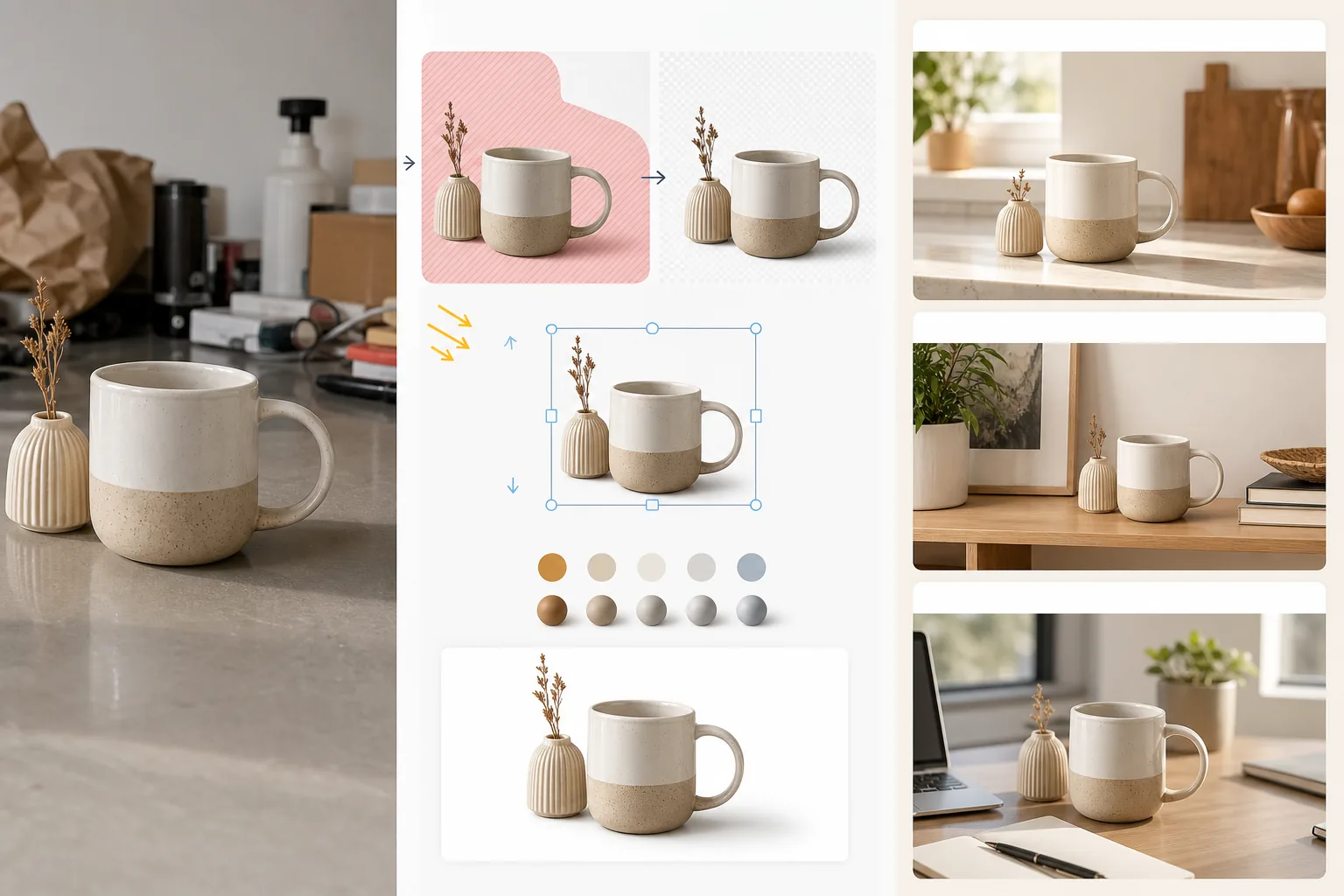
이 템플릿의 기능
표준 흰색 배경 제품 이미지나 일상적인 제품 사진을 고객이 제품을 소유하고 사용하는 모습을 그려볼 수 있게 돕는 라이프스타일 장면으로 변환합니다. Magic Eraser가 원본 배경과 제품 주변의 산만한 요소를 제거합니다. 그런 다음 AI Enhance가 제품을 엄선된 라이프스타일 환경에 배치합니다 — 조리 도구에는 주방 조리대, 홈 데코에는 거실 선반, 전자제품에는 책상 세팅, 정원 용품에는 야외 테라스 — 장면에 맞는 조명 방향과 그림자 렌더링과 함께 말이죠. 제품의 색상과 노출은 환경과 조화를 이루어 합성 이미지가 스타일링된 세팅에서 촬영한 한 장의 사진처럼 보입니다. 이는 순수 흰색 배경이라는 마켓플레이스 요건(기능을 판매)과, 전자상거래 전환 연구가 일관되게 더 높은 장바구니 담기 비율을 이끈다고 보여주는 라이프스타일 맥락(욕구를 판매) 사이의 간극을 메웁니다.
템플릿 설정
| 장면 카테고리 | 주방, 거실, 욕실, 책상/사무실, 야외 또는 플랫레이 표면 |
| 조명 조화 | 제품의 조명 방향과 색온도를 장면에 맞춤 |
| 그림자 렌더링 | 장면 형상에 맞춘 자연스러운 접촉 그림자와 주변 차폐 |
| 제품 크기 | 장면의 가구 및 사물에 대비한 자동 감지 또는 수동 크기 조정 |
| 색상 조화 | 제품의 화이트 밸런스를 조정하여 장면의 주변광에 맞춤 |
| 출력 해상도 | 3000×3000px(1:1 정사각형) 또는 3000×2250px(브랜드 사이트용 4:3) |
이 템플릿 사용 방법
제품 사진 업로드
흰색 스튜디오, 탁자 위, 심지어 주방 조리대 등 어떤 배경에서 촬영한 제품 사진이든 업로드하세요. 원본 배경이 깔끔할수록 제품 분리가 더 잘되지만, 이 템플릿은 어수선한 환경도 처리합니다. 가장자리가 잘리지 않도록 제품 전체를 포함하세요.
라이프스타일 장면 선택
고객이 제품을 어떻게 사용할지에 맞는 장면 카테고리를 선택하세요. AI가 제품 유형과 크기를 바탕으로 해당 카테고리 내 특정 환경을 선택합니다. 첫 번째 제안이 브랜드 미학에 맞지 않으면 다른 대안을 살펴볼 수 있습니다.
제품을 장면에 조화시키기
제품은 맞춰진 조명 방향, 적절한 그림자 렌더링, 색온도 조정과 함께 장면에 합성됩니다. AI는 제품이 표면 위에 떠 있는 것이 아니라 조리대에 놓이고, 선반에 얹히고, 책상에 세워진 것처럼 실제로 존재하는 것처럼 보이도록 보장합니다.
제품 목록 및 마케팅용으로 내보내기
마켓플레이스의 라이프스타일 이미지 슬롯에는 3000×3000px로, 브랜드 웹사이트 제품 페이지에는 4:3으로 다운로드하세요. 흰색 배경 대표 이미지와 함께 사용하세요 — 라이프스타일 사진은 맥락과 욕구를 보여주고, 흰색 배경 이미지는 세부 사항과 사양을 보여줍니다.
최상의 결과를 위한 전문가 팁
- ✓제품은 왼쪽 위에서 빛이 들어오도록 촬영하세요. 대부분의 라이프스타일 장면 환경은 왼쪽 위에서 조명을 받으므로, 처음부터 이 방향을 맞추면 제품과 환경 간 그림자 방향이 일치하는 가장 설득력 있는 합성 이미지가 만들어집니다.
- ✓원본 제품 사진에 바닥 표면을 약간 포함하세요. 제품 바닥과 표면 사이의 접촉 지점은 AI가 제품의 원근감을 이해하고 새로운 장면 표면 위에 설득력 있게 배치하는 데 도움이 됩니다.
- ✓마켓플레이스 목록의 보조 슬롯에는 라이프스타일 이미지를 사용하세요. 마켓플레이스 규정 준수를 위해 메인 이미지는 깔끔한 흰색 배경 대표 이미지로 유지하고, 슬롯 2부터 5까지 라이프스타일 이미지를 사용하여 제품을 맥락 속에서 보여주세요. 이 조합은 전부 흰색이나 전부 라이프스타일 방식을 일관되게 능가합니다.
Herramientas
E-commerce workflow
Product photo hub
Use this template with the full ecommerce product photo workflow for marketplace backgrounds, cleanup, compression, resizing, and listing-ready exports.
View ecommerce product photo workflow자주 묻는 질문
제품이 장면에 붙여넣은 것처럼 보이나요?
+
아니요. 이 템플릿은 제품의 조명 방향, 색온도, 그림자 각도를 장면 환경에 맞춥니다. 제품이 표면에 닿는 접촉 그림자는 장면의 주변광에 어울리는 부드러운 반음영으로 렌더링됩니다. 그 결과 제품이 해당 세팅에서 촬영된 것처럼 보입니다.
제가 직접 만든 맞춤 장면 사진을 사용할 수 있나요?
+
예. 배경 환경으로 직접 만든 라이프스타일 장면 사진을 업로드할 수 있습니다. AI는 기본 제공 장면 라이브러리에서와 마찬가지로 제품의 조명과 색상을 맞춤 장면에 어울리도록 조화시킵니다.
제품 크기가 자동으로 처리되나요?
+
예. AI는 원본 사진에서 제품의 실제 크기를 추정하고 장면 내 가구 및 사물에 대비해 적절하게 크기를 조정합니다. 커피 머그잔은 주방 조리대 위에서 머그잔 크기로 보이며, 갓등 크기가 되지 않습니다. 자동 감지에 수정이 필요하면 크기를 수동으로 조정할 수 있습니다.
Related templates
More e-commerce templates for your workflow.
Plantilla de fondo blanco puro para fotografías de productos. Amazon, Shopify y configuraciones listas para el mercado para imágenes de productos limpias y profesionales que convierten.
Plantilla de fotografía de anuncio optimizada para Etsy. Convierte fotografías de estilo de vida en fondos blancos limpios a 2000 px, mejora los detalles de los productos hechos a mano y cumple con las pautas de imágenes de Etsy.
Plantilla de fotografía de listado optimizada para eBay. Fondo blanco para imágenes de galería, mejora de la documentación de condiciones y diseños de múltiples ángulos que cumplen con los estándares de imágenes de eBay.
Plantilla de fotografía de joyería profesional para anillos, collares y relojes. Controla los reflejos, mejora el brillo de las piedras preciosas y ofrece imágenes listas para el mercado sobre fondos limpios.
Plantilla de fotografía de muebles profesional para listados de mercado. Elimine el desorden de la habitación, muestre las dimensiones reales y presente piezas sobre fondos limpios o en contextos de habitación con estilo.
Limpie las fotografías planas de la ropa con eliminación de arrugas, limpieza de pelusas, fondos de color blanco puro y colores precisos de la tela. Listo para Shopify, Amazon y tiendas boutique.