
Foto de producto cosmético
Muestre los productos de belleza con la precisión de color y la calidad de superficie que exigen los compradores. Esta plantilla define las etiquetas del empaque y el texto de los ingredientes, representa los colores de las muestras con una fidelidad fiel a la pantalla, controla los reflejos en tubos y polveras brillantes y produce fondos limpios según el estándar del sector de la belleza.
Prueba esta plantilla gratisE-commerce template preview
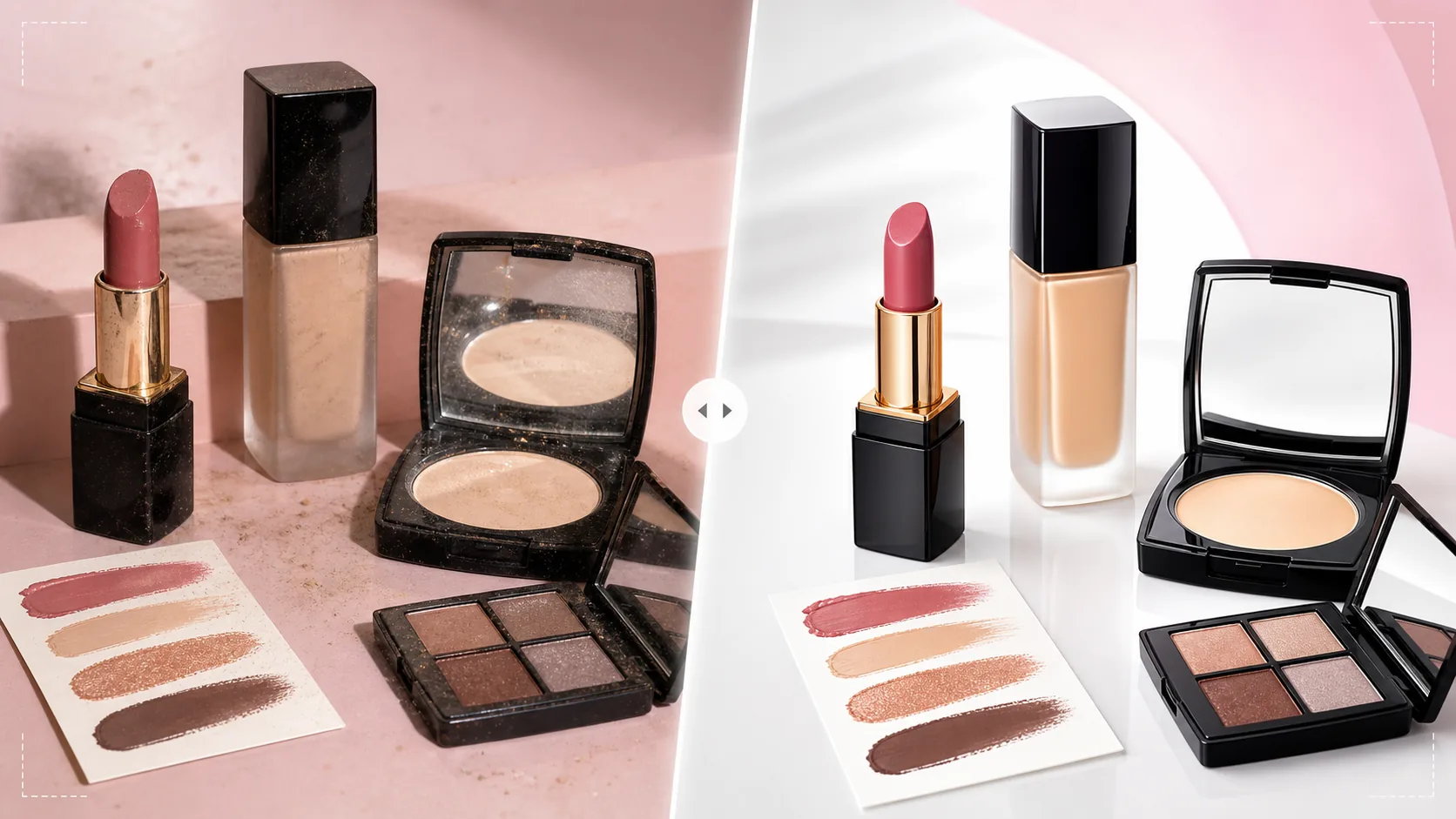
Qué hace esta plantilla
Aborda los desafíos propios de la fotografía de productos cosméticos y de belleza, donde la precisión del color afecta directamente a las decisiones de compra y a las tasas de devolución. Las muestras de base, labial, sombra de ojos y esmalte de uñas deben aparecer en pantalla lo más cerca posible de su color real — esta plantilla aplica una corrección de color calibrada para pantalla que garantiza que lo que ven los compradores en pantalla coincida con lo que llega en el paquete. Background Eraser aísla los productos con bordes precisos alrededor de formas de empaque complejas como tubos de labial curvados, espejos de polvera y frascos cuentagotas. AI Enhance define el texto de las etiquetas, las listas de ingredientes y los nombres de los tonos para que sean legibles incluso en pantallas móviles. Los reflejos de las superficies brillantes se reducen para mostrar el color del producto a través del empaque en lugar de las luces del estudio.
Configuración de la plantilla
| Precisión del color | Calibrado para pantalla sRGB (minimiza la diferencia de color entre pantalla y producto) |
| Definición de etiquetas | Microdefinición de texto y logotipo para la legibilidad en móviles |
| Control de reflejos | Reducir los brillos especulares en tubos y polveras brillantes |
| Fondo | Blanco puro, pastel o textura de mármol (estándar del sector de la belleza) |
| Dimensiones de salida | 2000 × 2000 px (marketplace) o 1200 × 1200 px (redes sociales) |
Cómo usar esta plantilla
Sube tu foto de cosméticos
Sube fotos de productos individuales, sets o tarjetas de muestras. La plantilla admite todos los tipos de empaque — frascos de vidrio, tubos de plástico, polveras, paletas, tarros y dispensadores de bomba. Incluye tanto tomas del producto empacado como tomas del producto abierto que muestren el color real (barras de labial, godets de sombra de ojos, texturas de crema).
Corrección y precisión del color
La plantilla ajusta el balance de blancos a luz de día neutra y aplica una corrección de color calibrada sRGB. Esto es fundamental en cosméticos, donde la precisión del tono determina si los compradores confían en el anuncio. Los colores de las muestras se mejoran para lograr precisión, no intensidad — el objetivo es una representación fiel a la realidad, no la sobresaturación.
Mejora de superficie y etiquetas
Los reflejos de los empaques brillantes se reducen para que los compradores puedan ver el color del producto y la etiqueta a través del material del empaque. El texto de las etiquetas, los nombres de los tonos y las listas de ingredientes se definen para la legibilidad en móviles. Las huellas y el polvo en las superficies del empaque se eliminan automáticamente.
Exporta para anuncios y redes sociales
Descarga en 2000 × 2000 px para anuncios de marketplace con zoom, o en 1200 × 1200 px para publicaciones de productos en Instagram y redes sociales. El perfil de color sRGB garantiza una representación de color uniforme en distintos dispositivos y navegadores.
Consejos profesionales para mejores resultados
- ✓Fotografía los cosméticos con una fuente de luz equilibrada a la luz del día (5500K). Las luces de tungsteno cálidas o LED frías crean dominantes de color que la plantilla corrige, pero partir de una luz equilibrada a la luz del día produce los colores de muestra más precisos en el resultado final.
- ✓Incluye fotos con el empaque cerrado y abierto. Los compradores quieren ver el empaque de la marca y el color real del producto — una barra de labial, una paleta de sombras abierta para mostrar todos los tonos, o un tarro de crema con la tapa quitada que muestre la textura del producto.
- ✓Para las fotos de muestras sobre la piel, fotografía sobre un fondo neutro y asegúrate de que la piel esté limpia y sin crema. La plantilla mejora la visibilidad del color de la muestra manteniendo un tono de piel natural en el fondo, lo que ayuda a los compradores a imaginar el color en su propia piel.
- ✓Limpia todos los empaques con un paño sin pelusa antes de fotografiar. Los empaques de cosméticos acumulan huellas y polvo con facilidad, y aunque la plantilla los elimina, empezar con un empaque limpio conserva más detalle de la superficie original en la imagen procesada.
Herramientas
E-commerce workflow
Product photo hub
Use this template with the full ecommerce product photo workflow for marketplace backgrounds, cleanup, compression, resizing, and listing-ready exports.
View ecommerce product photo workflowPreguntas frecuentes
¿Qué tan precisos son los colores de muestra procesados?
+
La plantilla aplica una corrección de color calibrada sRGB para minimizar la diferencia entre la visualización en pantalla y el producto físico. En un monitor calibrado, las muestras procesadas estarán dentro de un Delta E 3 respecto al color del producto físico — lo suficientemente cerca como para que la mayoría de los observadores las perciban como idénticas.
¿Puede procesar paletas de sombras de ojos con muchos tonos?
+
Sí. Las paletas multitono con 8, 12 o más godets se procesan con precisión de color individual para cada tono. La plantilla define los bordes de los godets y los nombres de los tonos manteniendo la composición general de la paleta.
¿Y los empaques transparentes o esmerilados?
+
Los empaques de vidrio transparente y plástico esmerilado requieren un tratamiento de bordes especial durante la eliminación del fondo. La plantilla conserva la transparencia del empaque sobre el nuevo fondo y, a la vez, garantiza que el producto del interior sea claramente visible.
Vende belleza con imágenes de producto de color fiel
Sube fotos de cosméticos y obtén imágenes de color fiel, con etiquetas nítidas y acabado profesional que generan la confianza del comprador en cada tono.
Pruébalo gratisRelated templates
More e-commerce templates for your workflow.
Plantilla de fondo blanco puro para fotografías de productos. Amazon, Shopify y configuraciones listas para el mercado para imágenes de productos limpias y profesionales que convierten.
Plantilla de fotografía de anuncio optimizada para Etsy. Convierte fotografías de estilo de vida en fondos blancos limpios a 2000 px, mejora los detalles de los productos hechos a mano y cumple con las pautas de imágenes de Etsy.
Plantilla de fotografía de listado optimizada para eBay. Fondo blanco para imágenes de galería, mejora de la documentación de condiciones y diseños de múltiples ángulos que cumplen con los estándares de imágenes de eBay.
Plantilla de fotografía de joyería profesional para anillos, collares y relojes. Controla los reflejos, mejora el brillo de las piedras preciosas y ofrece imágenes listas para el mercado sobre fondos limpios.
Plantilla de fotografía de muebles profesional para listados de mercado. Elimine el desorden de la habitación, muestre las dimensiones reales y presente piezas sobre fondos limpios o en contextos de habitación con estilo.
Limpie las fotografías planas de la ropa con eliminación de arrugas, limpieza de pelusas, fondos de color blanco puro y colores precisos de la tela. Listo para Shopify, Amazon y tiendas boutique.