
Quitar tocones de árboles de las fotos.
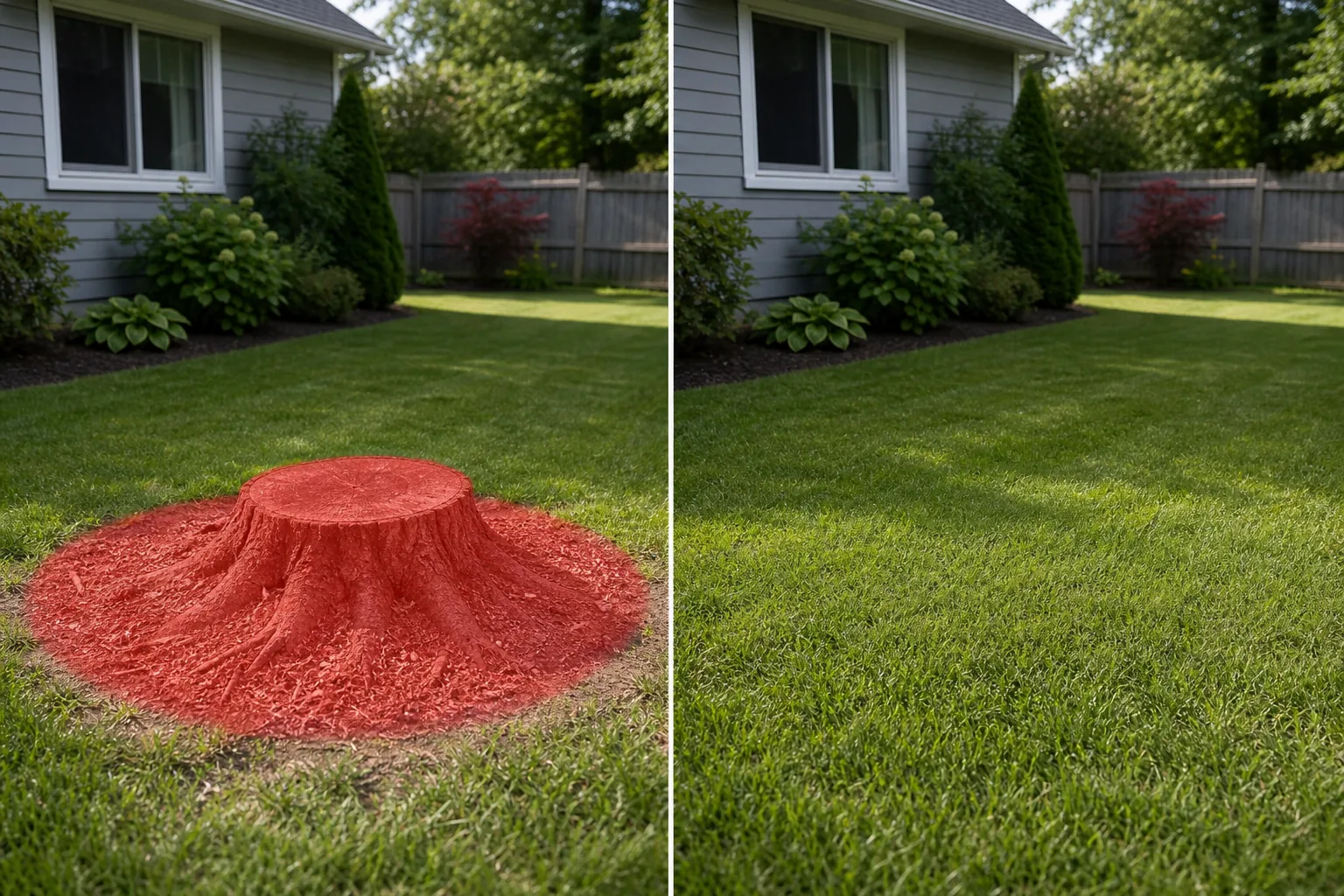
El tocón de un árbol en el patio delantero de la foto de una propiedad les dice a los compradores que un árbol fue removido recientemente y plantea preguntas sobre por qué. Una hilera de tocones cortados en un paisaje de patio trasero rompe la suave línea del césped. Un tocón rodeado de aserrín y astillas de madera en una fotografía de jardín añade una sensación de obra en construcción a lo que debería ser una escena tranquila. Magic Eraser elimina tocones de árboles, troncos cortados a nivel del suelo y restos de trituración de tocones, luego llena el área con césped, mantillo, cobertura del suelo o tierra circundante para que el jardín luzca limpio y continuo.
Última actualización
Por qué los tocones de árboles son la monstruosidad del jardín más común en las fotografías de listados
La remoción de árboles es uno de los eventos de jardinería más frecuentes en el mantenimiento de propiedades residenciales. Los árboles se caen por daños causados por tormentas, enfermedades, intrusión de raíces en los cimientos o líneas de alcantarillado, espacio libre para la construcción o simplemente porque han superado el tamaño del jardín. El árbol en sí se quita en un día, pero el tocón permanece durante semanas, meses o, a veces, años porque el pulido o excavación del tocón es una llamada de servicio separada que los propietarios retrasan. El resultado es un tocón cortado, entre 2 y 18 pulgadas por encima del nivel del suelo, ubicado en medio de un césped que de otro modo se mantendría, rodeado por un anillo de aserrín, astillas de madera y tierra removida. En la fotografía de bienes raíces, el tocón es un lastre: indica la remoción reciente del árbol, lo que genera preguntas al comprador sobre si el árbol estaba enfermo (posibles problemas con el sistema de raíces), si fue removido por daños de tormenta (historial de seguros) o si el carácter del lote ha cambiado fundamentalmente (pérdida de sombra, reducción de privacidad). Incluso cuando el árbol fue eliminado por razones totalmente benignas, el tocón plantea la pregunta. Para los diseñadores de paisajes y fotógrafos de jardines, los tocones interrumpen el flujo visual de los parterres, las áreas de césped y las transiciones de paisajes. Una foto de portafolio de un patio trasero con un tocón visible en el borde del césped socava la estética refinada que muestra el diseñador. Magic Eraser maneja la eliminación del tocón tratándolo como un objeto discreto contra un fondo plano del suelo y llenando el área con la textura de la superficie circundante (césped, mantillo, grava, suelo desnudo o plantas que cubren el suelo) utilizando los márgenes visibles como referencia. La IA iguala la altura, el color y el patrón de corte del césped circundante para producir un relleno que se lee como un patio continuo e ininterrumpido.
Quitar tocones de árboles en tres pasos
- 1
Sube tu foto
Abra Magic Eraser en la web, iOS o Android y cargue el listado de bienes raíces, la foto del portafolio del paisaje, la foto del jardín o la imagen del patio trasero que contiene el tocón del árbol. Se admiten los formatos JPEG, PNG, HEIC y WebP. Tanto los ángulos desde drones como a nivel del suelo funcionan.
- 2
Cepilla el muñón
Pinte todo el tocón desde la superficie de corte superior hasta la línea del suelo, incluido cualquier ensanchamiento de raíz visible en la base. Cepille también el suelo removido alrededor del tocón: el anillo de aserrín, astillas de madera, tierra desnuda o pasto muerto que normalmente rodea un tocón recién cortado. Si deja el anillo perturbado sin cepillar, el muñón desaparecerá, pero quedará un círculo revelador de suelo de diferentes colores. Para los tocones que han sido parcialmente molidos hasta formar un montículo de astillas de madera, cepille todo el montículo.
- 3
Borrar y revisar
Magic Eraser quita el tocón y llena el área con la superficie del suelo circundante: pasto, mantillo, grava o tierra. Verifique el resultado con el zoom máximo para confirmar que la altura del césped y la dirección de corte coinciden con el césped circundante. Si el muñón era grande (más de 24 pulgadas de diámetro) y el área de relleno es proporcionalmente grande, una segunda pasada con un cepillo más pequeño en los bordes suaves tensa la textura. Exporte a resolución completa para su anuncio o cartera.
Lo mejor para
- Fotografías del patio delantero y trasero del listado de bienes raíces donde el tocón de un árbol indica una remoción reciente y plantea preguntas a los compradores
- Portafolios de diseño de paisajes donde los tocones del césped interrumpen la estética pulida de las composiciones de jardines y paisajes.
- Fotografías de patios y jardines en los que los tocones cortados o los restos de molienda añaden una sensación de obra en construcción.
- Tomas aéreas y de drones donde los círculos de tocones son visibles como manchas marrones en un césped que de otro modo sería verde.
- Alquiler de vacaciones (Airbnb/Vrbo) que incluye fotografías en las que los tocones de jardín restan atractivo al espacio habitable al aire libre
- Fotografía de parques, fincas y terrenos institucionales donde los tocones de mantenimiento esperan ser pulidos.
- Fotografías al aire libre del lugar de bodas y eventos donde es necesario quitar visualmente un muñón en el césped o en el área de la ceremonia.
Consejos para eliminar tocones de árboles de aspecto natural
La clave para una retirada convincente del muñón es cepillar la zona alterada alrededor del muñón, no sólo el muñón en sí. Un tocón recién cortado se asienta en un anillo de aserrín, astillas de madera, tierra levantada y pasto muerto que puede extenderse de 1 a 3 pies más allá del diámetro del tronco. Si solo se cepilla el tocón de madera, la IA llena el centro con pasto, pero el anillo circundante de terreno perturbado permanece, y el ojo del espectador lee ese anillo como si "algo estaba aquí". Cepille toda el área perturbada para que la IA pase directamente del césped intacto al área de relleno sin anillo intermedio. En el caso de los tocones viejos que han estado en su lugar durante meses o años, el césped circundante a menudo ha vuelto a crecer de forma natural y solo es necesario cepillar el tocón y cualquier raíz visible. Para los tocones en lechos de mantillo, el relleno es aún más fácil porque el mantillo es una superficie de textura aleatoria sin patrón direccional: la IA la extiende sin problemas. Para tocones en pendientes, la IA sigue el contorno del suelo visible en los bordes de la región de maleza, por lo que el área rellena se inclina correctamente con el terreno. Un error común: si el tocón tenía una sombra, la sombra puede caer sobre el césped más allá de la zona del matorral. Después de borrar el muñón, compruebe si queda una franja de sombra en el césped cercano y cepíllela también en una pasada posterior. Para publicar fotografías, la pauta ética es la misma que para otras limpiezas cosméticas: quitar un muñón de una fotografía es comparable a cortar el césped antes de la sesión: es una presentación, no una tergiversación.
Preguntas frecuentes
- ¿Es gratis quitar tocones de árboles de una foto?
- Sí. El nivel gratuito de Magic Eraser maneja la eliminación de tocones de árboles con límites de uso diario. Premium ($29,99/año) elimina los límites y desbloquea exportaciones de mayor resolución, lo que resulta útil para fotografías de listados de MLS, portafolios de diseño de paisajes y marketing impreso.
- ¿El área rellena coincidirá con el tipo de césped y el patrón de corte de mi césped?
- Sí. La IA utiliza el césped circundante como referencia: coincide con la altura de la hoja, el color, la dirección de corte y la textura para llenar el área donde estaba el tocón. En céspedes bien mantenidos con un patrón de corte constante, el relleno suele ser perfecto. En céspedes irregulares o con césped mixto, la IA combina las variaciones que ve en el área circundante.
- ¿Debo cepillar sólo el tocón o también el suelo removido a su alrededor?
- Cepille también el suelo perturbado. Los tocones recién cortados están rodeados por un anillo de aserrín, astillas de madera y tierra desnuda que se extiende más allá del tronco. Al cepillar sólo el muñón, este anillo queda visible como un círculo revelador. Cepillar toda el área perturbada permite que la IA pase directamente del césped intacto al relleno, produciendo un resultado limpio sin huella residual.
- ¿Puedo eliminar varios muñones de una foto?
- Sí. Cepille cada muñón y su zona alterada antes de tocar Borrar. La IA procesa todas las regiones marcadas en una sola pasada. Para patios con varios tocones a diferentes distancias de la cámara, la IA maneja las diferencias de perspectiva y escala automáticamente.
- ¿Quitar el tocón de un árbol de la foto de un anuncio tergiversa la propiedad?
- Un tocón de árbol es una condición temporal: es un árbol que fue eliminado y un tocón que aún no ha sido molido. Quitarlo de la fotografía es comparable a fotografiar el jardín una vez finalizado el servicio de destoconado. No cambia el tamaño del lote, la estructura ni las características permanentes de la propiedad. Si la remoción del árbol cambió significativamente el carácter de la propiedad (por ejemplo, un árbol de sombra maduro que brindó privacidad o un árbol emblemático), revelar la remoción del árbol en la descripción del listado es una buena práctica, independientemente de la edición de la fotografía.