
Cómo enderezar una foto
Un horizonte ligeramente inclinado en una fotografía de paisaje, un edificio torcido en una fotografía de arquitectura o un producto inclinado sobre una mesa; incluso una inclinación de un grado parece notablemente incorrecta para los espectadores. Magic Eraser detecta y corrige el ángulo automáticamente, luego llena los espacios dejados por la rotación para mantener el fotograma completo.
Last updated
Enderezar foto ahora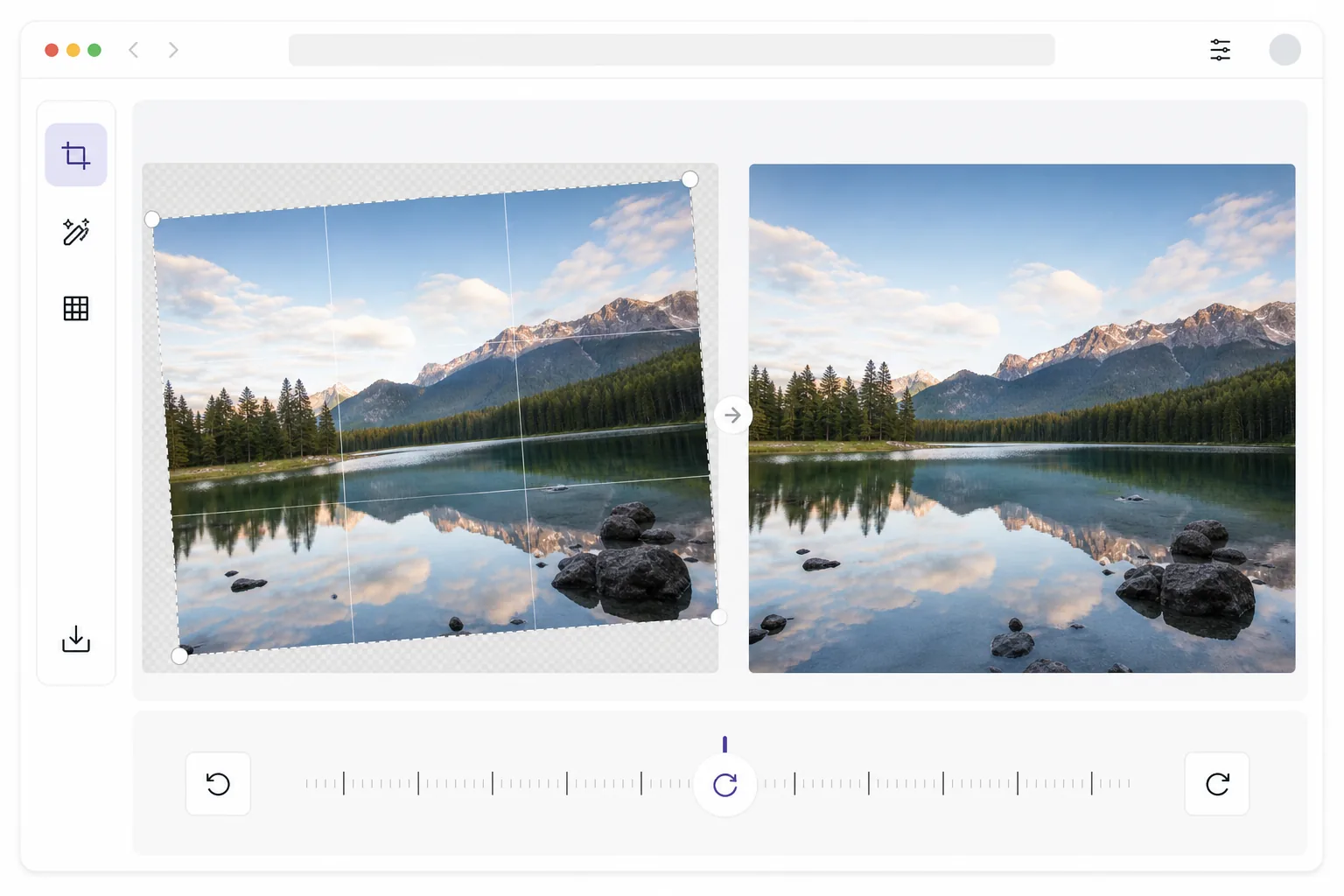
Cómo enderezar una foto
Para enderezar una foto, abre Magic Eraser en la web, iOS o Android, sube la imagen torcida y toca enderezar automáticamente: la IA encuentra la referencia de nivel (el horizonte, el borde de un edificio o la superficie de una mesa) y gira la imagen para alinearla, o puedes ajustar el ángulo exacto con el control deslizante de rotación. Es gratis y sin necesidad de registrarte. La diferencia frente a un editor básico: en lugar de recortar las esquinas triangulares que deja la rotación, la IA las rellena con generación basada en el contenido, así conservas el encuadre completo en sus dimensiones originales. Usa la cuadrícula superpuesta para confirmar la alineación antes de exportar. Los humanos somos notablemente sensibles al nivel: las investigaciones muestran que percibimos inclinaciones tan pequeñas como 0,5 grados contra una referencia horizontal fuerte como un horizonte o el borde de un edificio. Una foto inclinada resulta inquietante porque nuestro sistema visual espera verticales alineadas por la gravedad y horizontales niveladas. El enderezamiento manual en el software de edición implica rotar la imagen, lo que crea espacios triangulares en las esquinas que deben recortarse, perdiendo el contenido de la imagen. Para fotografías donde la composición es ajustada, este recorte puede cortar temas importantes. Las herramientas de nivelación automática en los editores básicos a menudo seleccionan la línea de referencia incorrecta, enderezándola hacia un elemento diagonal en lugar del horizonte real. La IA de Magic Eraser identifica la referencia de nivel correcta (horizonte, arquitectura o gravedad), gira con precisión y utiliza el relleno de IA para reconstruir los espacios de las esquinas para que no se pierda nada.
Before you start
Enderezar una foto en tres pasos
Start with sube la foto. The result preview above and tips below use this guide's existing content; no separate before-and-after proof is assumed.
- 1
Sube la foto
Abra Magic Eraser en la web, iOS o Android y cargue la foto inclinada. La herramienta maneja cualquier tipo de imagen: paisajes con horizontes inclinados, arquitectura con verticales inclinadas, fotografías de productos en superficies inclinadas o instantáneas portátiles con una ligera rotación. Todos los formatos comunes soportados.
- 2
Enderezar automáticamente o ajustar manualmente
Toque el botón de enderezamiento automático para una corrección instantánea detectada por la IA: la IA encuentra la referencia del nivel dominante (horizonte, borde del edificio o superficie de la mesa) y la gira para alinearla. Si prefiere el control manual, utilice el control deslizante de rotación para marcar el ángulo exacto. Una superposición de cuadrícula le ayuda a confirmar visualmente la alineación con las referencias horizontales y verticales de la escena.
- 3
Rellenar esquinas y exportar
Después de la rotación, la IA llena los espacios de las esquinas triangulares con generación consciente del contenido en lugar de recortar. Esto preserva su composición completa sin perder ningún contenido destacado. Revise las esquinas rellenas para una combinación natural y luego exporte a resolución completa. La foto enderezada mantiene sus dimensiones y calidad originales.
Lo mejor para
- Fotografía de paisajes donde un horizonte inclinado arruina una toma que de otro modo sería hermosa
- Fotografía de arquitectura e inmobiliaria donde las líneas verticales deben estar perfectamente derechas.
- Fotografía de productos donde los artículos deben estar nivelados sobre la superficie.
- Instantáneas con teléfonos portátiles tomadas rápidamente sin tiempo para verificar la alineación
Consejos para obtener mejores resultados
La IA funciona mejor cuando hay una referencia de nivel clara en la imagen: una línea del horizonte, el borde de un edificio, la superficie de una mesa o el marco de una ventana. Para fotografías sin una referencia directa obvia (dosel de bosque, texturas abstractas), la IA utiliza una estimación basada en la gravedad, que es precisa pero menos precisa que la detección basada en bordes. Cuando una foto tiene un horizonte inclinado y verticales convergentes (mirando hacia un edificio), primero enderece el horizonte y luego use la corrección de perspectiva para las verticales por separado. Para el procesamiento por lotes de fotografías de bienes raíces, la función de enderezamiento automático mantiene la coherencia en toda la galería de la propiedad. Si la detección automática selecciona la referencia incorrecta (alineándose con una línea de techo diagonal en lugar del horizonte), cambie al modo manual y use la superposición de cuadrícula para alinear con la referencia de nivel real.
Preguntas frecuentes
- ¿El alisado pierde calidad de imagen?
- Se produce una pérdida mínima de calidad durante la rotación porque es necesario volver a muestrear los píxeles. Sin embargo, Magic Eraser utiliza interpolación bicúbica de alta calidad que preserva la nitidez y el relleno de esquinas con IA evita la pérdida de resolución debido al recorte. El resultado es visualmente indistinguible de una fotografía de nivel nativo.
- ¿Puede corregir también la distorsión de la perspectiva?
- El enderezamiento corrige la inclinación rotacional: la cámara se inclina hacia la izquierda o hacia la derecha. Para la distorsión de la perspectiva (verticales convergentes al mirar edificios), use la herramienta de corrección de perspectiva en combinación. Las dos herramientas se complementan para la fotografía de arquitectura.
- ¿El alisado de fotografías es gratuito?
- Sí. El enderezamiento automático y la rotación manual están incluidos en el nivel gratuito de Magic Eraser. Sube tu foto inclinada, corrige el ángulo y exporta el resultado nivelado. Premium agrega enderezamiento por lotes para procesar galerías enteras a la vez.
- ¿Cómo enderezo una foto en Android o iPhone?
- Abre Magic Eraser en cualquier navegador móvil o en la app de iOS o Android, carga la foto torcida desde tu carrete y toca enderezar automáticamente. La IA la nivela directamente en tu teléfono (o arrastra el control deslizante de rotación para un ajuste preciso) y la foto corregida se guarda de nuevo en tu carrete. Funciona igual que la versión de escritorio y, si usas el navegador, no necesitas instalar ninguna app, algo muy práctico para arreglar al instante una toma rápida hecha a mano apenas la captures.
- ¿Al enderezar se recortará mi foto?
- En Magic Eraser, no. Girar una foto siempre deja triángulos vacíos en las esquinas; la mayoría de los editores recortan hacia dentro para ocultarlos, lo que recorta tu composición y amplía ligeramente la imagen. Aquí la IA rellena esas esquinas con contenido que continúa la escena de alrededor, así el encuadre conserva su tamaño original y no se corta nada en los bordes. Sobre un fondo sencillo, como el cielo o una pared, el relleno es imperceptible; en un borde con muchos detalles, amplía para revisarlo antes de exportar.