
La alternativa a Canva creada para la edición de fotos con IA
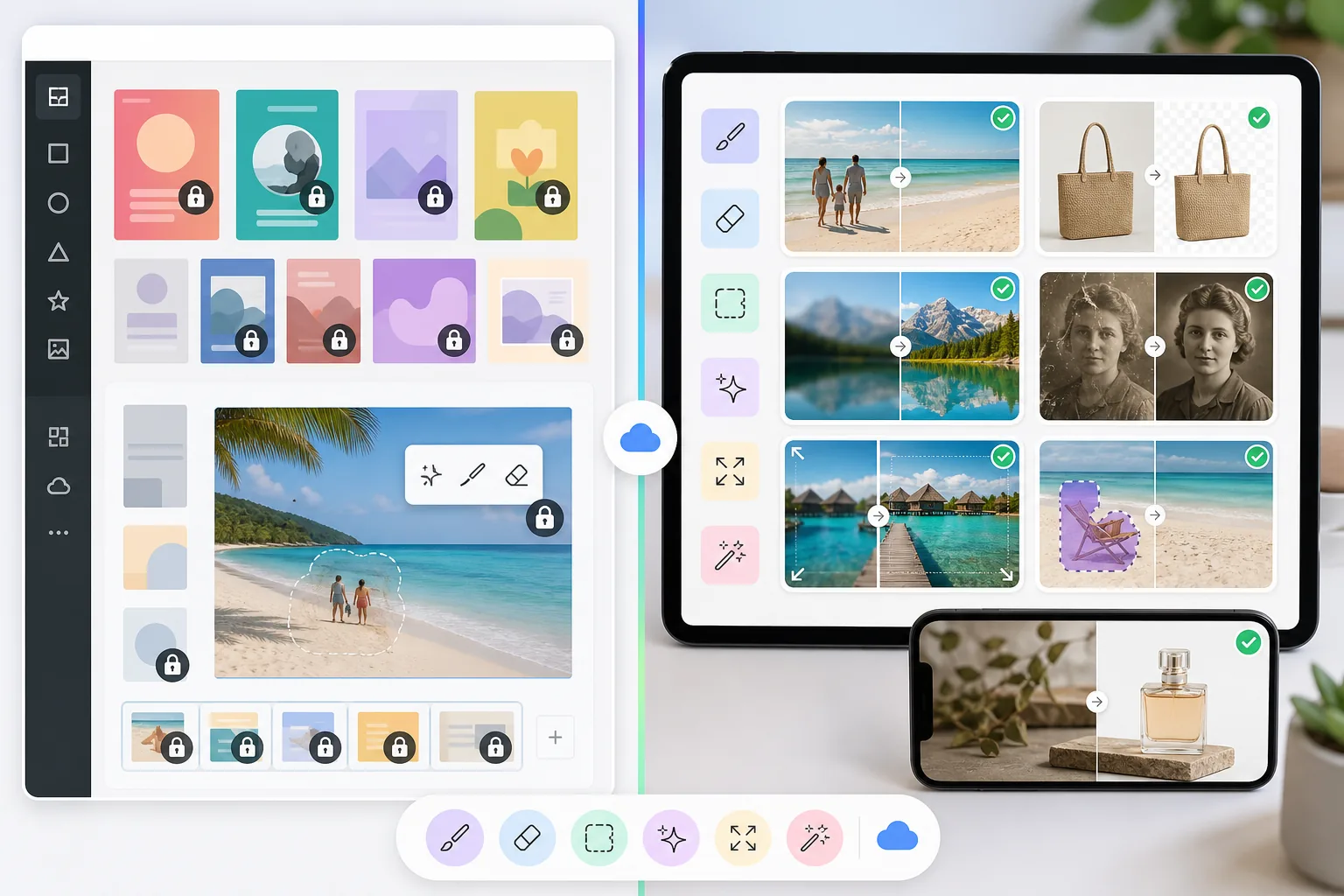
Canva es una plataforma de diseño versátil, pero sus herramientas de edición de fotos son secundarias frente a su enfoque en el diseño. Magic Eraser está diseñado específicamente para la edición de fotos con IA — ofreciendo una mejor eliminación de objetos, eliminación de fondos, mejora de imágenes y relleno generativo para usuarios que necesitan herramientas especializadas de limpieza de fotos.
Last updated
Prueba Magic Eraser gratisComparison rows are editorial summaries from the latest page review, not a guarantee of current pricing, limits, watermark policy, batch support, speed, or platform availability.
Resumen
Magic Eraser es un editor de fotos con IA dedicado, especializado en la eliminación de objetos, la eliminación de fondos, la mejora de imágenes, el relleno generativo, la ampliación de imágenes y la restauración de fotos. Cada herramienta está optimizada para producir ediciones de fotos limpias y profesionales con rapidez.
Canva es una amplia plataforma de diseño en línea para crear presentaciones, gráficos para redes sociales, videos, documentos y materiales de marketing. Incluye funciones básicas de edición de fotos como la eliminación de fondos, pero estas forman parte de un producto más grande centrado en el diseño.
Comparación de funciones
Magic Eraser es un editor de fotos con IA dedicado, especializado en la eliminación de objetos, la eliminación de fondos, la mejora de imágenes, el relleno generativo, la ampliación de imágenes y la restauración de fotos. Cada herramienta está optimizada para producir ediciones de fotos limpias y profesionales con rapidez.
Canva es una amplia plataforma de diseño en línea para crear presentaciones, gráficos para redes sociales, videos, documentos y materiales de marketing. Incluye funciones básicas de edición de fotos como la eliminación de fondos, pero estas forman parte de un producto más grande centrado en el diseño.
| Feature | Magic Eraser | Canva |
|---|---|---|
| Eliminación de objetos | Sí — herramienta de pincel de IA dedicada | Sí — Magic Eraser tool (Pro) |
| Eliminación de fondos | Sí — instantánea, alta precisión | Sí — BG Remover (Pro) |
| Mejora de imágenes con IA | Sí — ampliar, enfocar, reducir ruido | Limitada — ajustes básicos |
| Relleno generativo | Sí — inpainting con IA | Sí — Magic Edit (básico) |
| Restauración de fotos | Sí — repara fotos antiguas o dañadas | No |
| Ampliación de imágenes | Sí — la IA extiende el lienzo de forma natural | No |
| Plantillas de diseño | Sí — plantillas enfocadas | Sí — biblioteca extensa |
| Ideal para | Edición y limpieza de fotos con IA | Diseño gráfico y presentaciones |
Feature rows summarize visible product positioning and should be rechecked against official product pages before purchase, migration, or compliance decisions.
- Last content review May 8, 2026
- Canva source: official product site (https://www.canva.com/)
- Magic Eraser source: https://magiceraser.live/es/product/magic-eraser
- Pricing, feature availability, platform support, and limits can change; recheck official sources before relying on a buying decision.
Por qué elegir Magic Eraser en lugar de Canva para la edición de fotos
IA diseñada específicamente para la edición de fotos
Cada herramienta de Magic Eraser está diseñada y entrenada para tareas de edición de fotos. Mientras que Canva añade funciones de fotos como extras dentro de una plataforma de diseño, los modelos de IA de Magic Eraser están especializados en la eliminación de objetos, la precisión del fondo y la mejora de la calidad de imagen.
Mejores resultados en la eliminación de objetos y la limpieza
La herramienta de eliminación de objetos de Magic Eraser es una fortaleza central del producto, con una IA entrenada específicamente para esta tarea. La función Magic Eraser de Canva es una herramienta secundaria que funciona en casos sencillos pero tiene dificultades con eliminaciones complejas, reflejos y reconstrucciones detalladas.
Capacidades avanzadas que Canva no tiene
Magic Eraser ofrece restauración de fotos para imágenes dañadas, ampliación de imágenes con IA para extender los lienzos de forma natural y un escalado de calidad profesional — funciones que Canva no incluye ni siquiera en su plan Pro.
Complementario a tu flujo de trabajo en Canva
Magic Eraser y Canva funcionan bien juntos. Usa Magic Eraser para limpiar, mejorar y perfeccionar tus fotos, y luego lleva las imágenes pulidas a Canva para tus proyectos de diseño. Aprovecha lo mejor de ambas herramientas.
Herramientas
Preguntas frecuentes
¿Es Magic Eraser un reemplazo de Canva?
+
No exactamente — cumplen propósitos principales diferentes. Canva sobresale en diseño gráfico, presentaciones y materiales de marketing. Magic Eraser sobresale en la edición y limpieza de fotos con IA. Muchos usuarios obtienen los mejores resultados al usar ambas herramientas juntas.
¿Canva tiene eliminación de objetos?
+
Sí, Canva Pro incluye un Magic Eraser tool para la eliminación básica de objetos. Sin embargo, no es tan capaz como una herramienta dedicada. Magic Eraser produce resultados más limpios en eliminaciones complejas, maneja mejor los reflejos y las sombras, y ofrece más control sobre el proceso de edición.
¿Por qué no usar simplemente Canva para todo?
+
Canva es una herramienta de diseño generalista. Cuando necesitas una edición de fotos de alta calidad — eliminar objetos complejos, mejorar la resolución de la imagen, restaurar fotos antiguas o extender imágenes con IA — una herramienta especializada como Magic Eraser ofrece resultados significativamente mejores.
¿Puedo usar Magic Eraser con Canva?
+
Sí. Un flujo de trabajo popular es editar y limpiar las fotos primero en Magic Eraser y luego importar las imágenes pulidas a Canva para diseños de maquetación, añadir texto, marca y otros elementos de diseño.
¿Qué herramienta es más económica para la edición de fotos?
+
Específicamente para la edición de fotos, Magic Eraser ofrece una mejor relación calidad-precio porque cada función está enfocada en la edición de fotos. Canva Pro cuesta más y agrupa la edición de fotos con funciones de diseño que quizás no necesites si tu objetivo principal es la limpieza y mejora de fotos.
¿Necesitas una mejor edición de fotos de la que ofrece Canva?
Prueba Magic Eraser gratis para la eliminación de objetos, la eliminación de fondos, la mejora de imágenes y el relleno generativo con IA. Úsalo junto a Canva o por sí solo para obtener resultados fotográficos profesionales.
Prueba Magic Eraser gratisCasos de uso relacionados
Descubre cómo los profesionales utilizan estas herramientas en flujos de trabajo reales.
Las fotos de anuncios llenas de objetos personales, coches aparcados o material de obra espantan a los compradores. Magic Eraser usa IA para limpiar tus fotos de propiedades al instante — sin necesidad de Photoshop.
Los fondos desordenados y las fotos de producto descuidadas te cuestan ventas todos los días. Magic Eraser te ayuda a crear imágenes de producto profesionales en segundos — sin necesidad de saber Photoshop. Sube la foto, borra las distracciones y publica con confianza.
¿Desconocidos arruinando tus fotos de viaje? ¿Fondos desordenados matando tus selfies? Deja de perder horas en Photoshop. Magic Eraser elimina distracciones, limpia tus fotos y las adapta a cualquier formato — todo en un toque.
Guías relacionadas
Explora más guías y contenido editorial relacionado con este flujo de trabajo.
Descubre cómo la IA está transformando las operaciones, desde la automatización hasta el análisis de datos y experiencias de cliente más personalizadas.
Aprende a usar Magic Eraser para quitar objetos, personas, texto y distracciones de fotos con resultados de IA más limpios.
Aprende a usar un plugin de traducción para Figma y localizar archivos de diseño más rápido sin perder el control del layout.
Otras comparaciones
Descubre cómo Magic Eraser se compara con otras herramientas de edición de fotos.
PhotoRoom se centra en la eliminación de fondos y en plantillas de fotografía de producto. Magic Eraser iguala esas capacidades y añade potentes herramientas de AI para eliminar objetos, mejorar imágenes, relleno generativo y diseño creativo, ofreciéndote más capacidad de edición en web y móvil.
Dos potentes editores de fotos con IA y fortalezas diferentes. Magic Eraser ofrece un conjunto más amplio de herramientas de IA generativa, mientras que Photoroom destaca en fotografía de productos para e-commerce y procesamiento por lotes.
Probamos y comparamos las mejores herramientas de edición de fotos con IA para que no tengas que hacerlo. Desde la eliminación de objetos hasta el reemplazo de fondos, descubre cuál editor ofrece los mejores resultados.
Canva es excelente para disenos y graficos para redes sociales, pero muchos usuarios necesitan una eliminacion de objetos mas rapida, ediciones de fondo mas limpias y herramientas de fotos con IA mas potentes. Esta comparativa muestra donde Magic Eraser encaja mejor para flujos de trabajo centrados en la imagen.
Probamos los principales generadores de fondos con IA en cuanto a calidad de eliminación, opciones de reemplazo, flexibilidad creativa y facilidad de uso. Descubre qué herramienta facilita más eliminar, reemplazar y generar nuevos fondos para tus fotos.
Probamos los principales generadores de retratos con IA en cuanto a calidad, realismo, personalización y valor. Tanto si necesitas retratos para LinkedIn, fotos de equipo o retratos profesionales, descubre qué herramienta ofrece los mejores resultados.