
ترميم الصور القديمة
أعد الحياة إلى صورك القديمة الثمينة. يصلح هذا القالب الأضرار التي تلحقها العقود بالصور المطبوعة — إزالة الخدوش والتجاعيد والبقع، واستعادة اللون من المطبوعات الباهتة، بل وحتى تحويل الأصول البنية الداكنة أو بالأبيض والأسود إلى ألوان كاملة واقعية مع الحفاظ على الطابع المناسب لحقبة الصورة.
جرّب هذا القالب مجانًاRestoration template preview
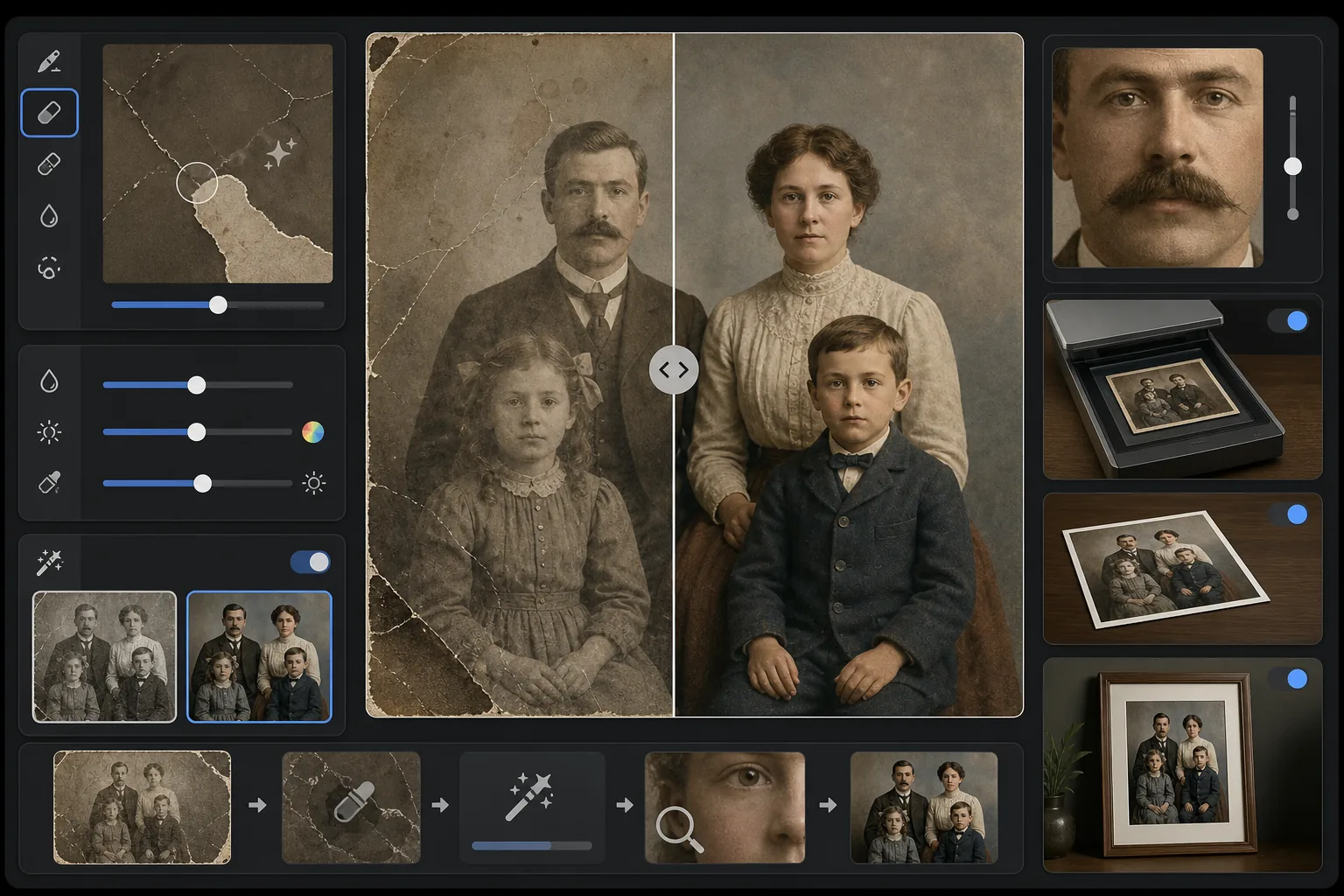
ما الذي يفعله هذا القالب
يصلح الأضرار المادية وآثار التقادم على الصور القديمة الممسوحة ضوئيًا. يزيل Magic Eraser الخدوش والتجاعيد وبقع الماء وبقع العفن والحواف الممزقة من خلال إعادة بناء محتوى الصورة المفقود من السياق المحيط. يستعيد AI Enhance اللون الذي تغيّر أو بهت على مدى عقود، ويزيد حدة التفاصيل التي خفّتها الزمن، ويمكنه تلوين الصور بالأبيض والأسود أو البنية الداكنة بألوان دقيقة تتناسب مع حقبة الصورة الأصلية.
إعدادات القالب
| إصلاح الأضرار | قوي — يزيل الخدوش والتجاعيد والبقع والحواف الممزقة |
| استعادة اللون | طيف كامل — يعيد الأصباغ الباهتة إلى حيويتها الأصلية |
| وضع التلوين | إيقاف أو خفيف أو كامل (للأصول بالأبيض والأسود والبنية الداكنة) |
| استعادة التفاصيل | يعيد بناء الوجوه والتفاصيل الدقيقة التي خفّفها العمر وانخفاض دقة المسح |
| حجم الإخراج | يطابق أبعاد المسح الأصلية مع تكبير اختياري بمقدار 2× |
| الحفاظ على الحقبة | يحتفظ بملمس الحُبيبات وجودة التدرج اللوني المناسبة للحقبة |
كيفية استخدام هذا القالب
امسح الأصل ضوئيًا أو صوّره
امسح الصورة القديمة ضوئيًا بدقة 600 DPI أو أعلى للحصول على أكبر قدر من التفاصيل القابلة للاستعادة. إذا لم يكن المسح متاحًا، فصوّر المطبوعة على سطح مستوٍ في ضوء متساوٍ ومنتشر — تجنّب الفلاش الذي يخلق بقع وهج على المطبوعات اللامعة.
أصلح الأضرار المادية
يحدد Magic Eraser ويزيل الخدوش والتجاعيد وأضرار الماء وبقع العفن وبقايا الشريط اللاصق. يعيد الذكاء الاصطناعي بناء المناطق المفقودة من خلال تحليل محتوى الصورة المحيط — مالئًا الزوايا الممزقة، واصلًا الشقوق عبر الوجوه، ومزيلًا تغيّر لون البقع.
استعد اللون أو أضفه
بالنسبة للمطبوعات الملونة الباهتة، يستعيد AI Enhance لوحة الألوان الأصلية من خلال عكس الطرق المحددة التي تتدهور بها طبقات الصبغة المختلفة بمرور الوقت. بالنسبة للأصول بالأبيض والأسود أو البنية الداكنة، يضيف التلوين الاختياري لونًا واقعيًا بناءً على أدلة سياقية مثل درجات لون البشرة والأوراق والسماء وأنماط الأقمشة.
زِد الحدة وصدّر
تزيد استعادة التفاصيل من حدة ملامح الوجه والنص والتفاصيل الدقيقة التي خفّفتها عقود من التقادم. صدّر بدقة المسح الأصلية أو كبّر إلى 2× للطباعة بأحجام أكبر من الأصل.
نصائح احترافية لأفضل النتائج
- ✓امسح بأعلى دقة يدعمها ماسحك الضوئي — 600 DPI كحد أدنى، ويفضّل 1200 DPI. كلما زادت التفاصيل الملتقطة، زادت المادة المتاحة للذكاء الاصطناعي عند إعادة بناء المناطق التالفة.
- ✓إذا كانت الصورة عالقة في إطار أو ألبوم، فصوّرها في مكانها بدلًا من المخاطرة بتمزيقها — يمكن للقالب إزالة حواف الإطار وتشوهات صفحات الألبوم.
- ✓لتلوين الصور التاريخية، قدّم سياقًا عن الحقبة (العقد) والموقع إن أمكن — تباينت ألوان الملابس والسيارات ومواد البناء بشكل كبير حسب الفترة الزمنية والمنطقة.
- ✓عالج أكثر مناطق الصورة تضررًا أولًا كاختبار قبل تشغيل الترميم الكامل — يتيح لك ذلك التأكد من أن جودة إعادة البناء تلبي توقعاتك.
الأدوات
الأسئلة الشائعة
هل يمكنه إصلاح الصور ذات الأجزاء المفقودة مثل الزوايا الممزقة؟
+
نعم. يعيد الذكاء الاصطناعي بناء المناطق المفقودة باستخدام سياق الصورة المحيطة. بالنسبة للخلفيات مثل السماء والجدران والأوراق، تكون النتائج سلسة. أما بالنسبة للأجزاء المفقودة من الوجوه أو التفاصيل المهمة، فإن إعادة البناء مبهرة لكنها قد تتطلب تعديلًا يدويًا طفيفًا للملامح الحاسمة.
ما مدى دقة تلوين الصور بالأبيض والأسود؟
+
يستخدم التلوين التحليل السياقي لتعيين ألوان واقعية — درجات لون البشرة وأزرق السماء وأخضر الأوراق وألوان الأقمشة الشائعة دقيقة للغاية. أما الألوان المحددة للأشياء التي لا يستطيع الذكاء الاصطناعي تحديدها من السياق (مثل الدرجة الدقيقة لفستان) فستكون معقولة وليست مضمونة الدقة.
هل سيزيل الترميم الطابع القديم للصورة؟
+
لا. يحتفظ إعداد الحفاظ على الحقبة بملمس الحُبيبات وجودة التدرج اللوني المناسبة للحقبة التي تمنح الصور القديمة طابعها. تُزال الأضرار المادية مثل الخدوش والبقع، لكن تُحترم الجودة التصويرية للحقبة الأصلية — فصورة من أربعينيات القرن الماضي لا تزال تبدو كصورة من أربعينيات القرن الماضي، لكن دون أضرار.
أنقذ ذكريات عائلتك
حمّل مسحًا ضوئيًا لأي صورة تالفة أو باهتة أو قديمة وشاهد عقودًا من التآكل تختفي. الخدوش تزول، واللون يُستعاد، والذكريات تُحفظ.
جرّبه مجانًا