
مخطط طابق عقاري
حوّل المخططات الأرضية الممسوحة ضوئيًا أو المصورة إلى رسوم بيانية نظيفة واحترافية مناسبة لقوائم MLS وكتيبات العقارات وتكاملات الجولات الافتراضية. يزيل هذا القالب البقع والظلال والتجاعيد من المخططات الورقية، ويوضّح خطوط الجدران وملاحظات الأبعاد، ويوحّد النمط البصري بحيث يبدو كل مخطط طابق في محفظة قوائمك متسقًا.
جرّب هذا القالب مجانًاReal Estate template preview
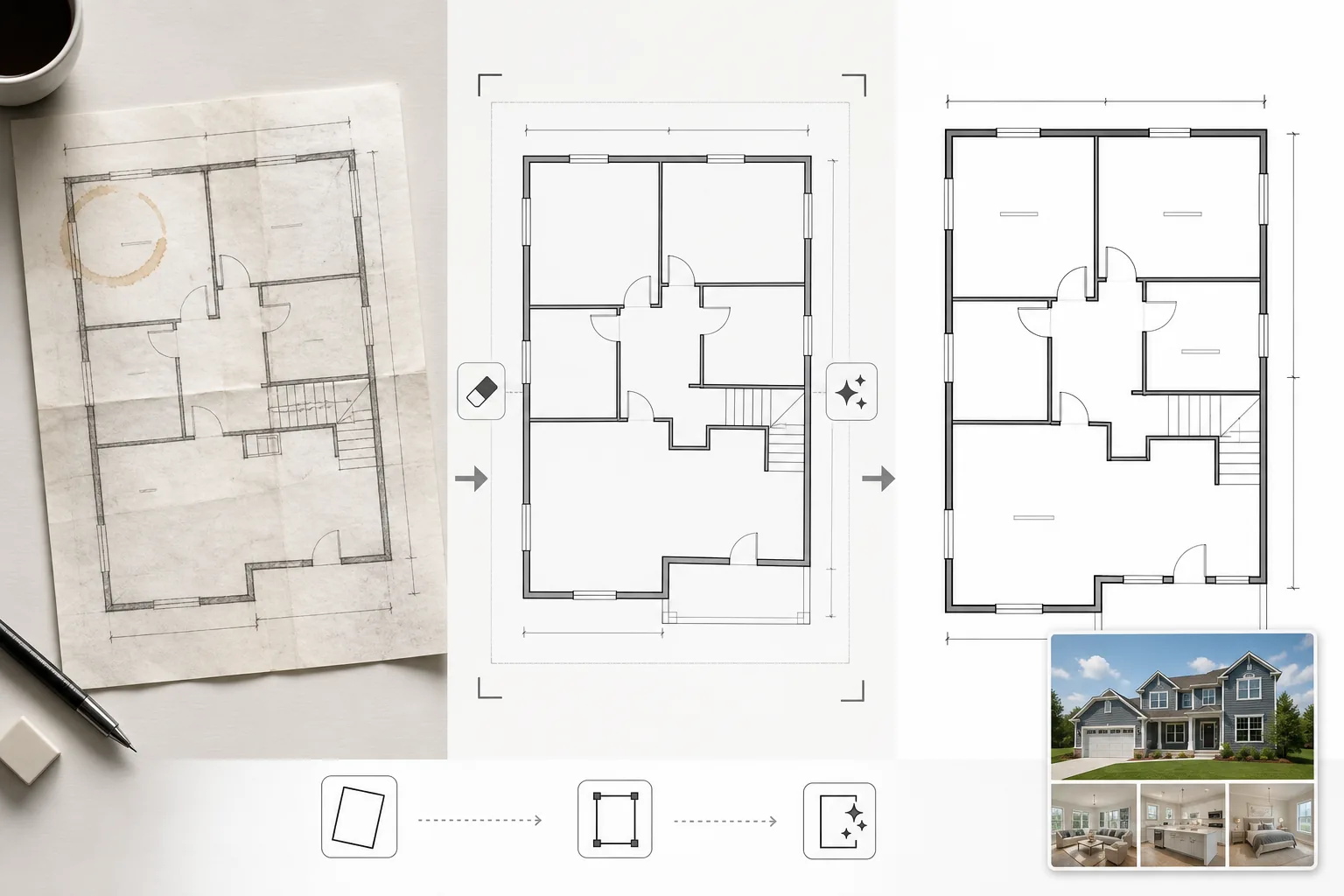
ماذا يفعل هذا القالب
ينظّف صور المخططات الأرضية التي تم تصويرها من مخططات ورقية، أو تصديرها من برامج CAD قديمة، أو مسحها ضوئيًا بجودة منخفضة. يزيل Magic Eraser بقع القهوة وملاحظات القلم الرصاص وتجاعيد الطي وآثار الظلال من صور الهاتف للمخططات الورقية. يوضّح AI Enhance خطوط الجدران وحركات الأبواب ونص الأبعاد بحيث تبقى مقروءة عند تصغيرها للعرض على الويب أو طباعتها في الكتيبات. يتم تصحيح المنظور للمخططات الأرضية المصورة بزاوية بدلاً من مسحها مسطحة. يتم تطبيع لون الخلفية إلى أبيض نظيف، ويتم تعتيم خطوط الجدران إلى سماكة متسقة للحصول على مظهر موحد عبر جميع المخططات في القائمة.
إعدادات القالب
| تنظيف الخلفية | إزالة البقع والتجاعيد والظلال والتطبيع إلى أبيض نظيف |
| تحسين الخطوط | توضيح وتعتيم خطوط الجدران إلى سماكة متسقة |
| وضوح النص | تحسين تسميات الأبعاد وأسماء الغرف وملاحظات القياس |
| تصحيح المنظور | تقويم المخططات المصورة إلى عرض حقيقي من الأعلى |
| دقة الإخراج | 3000×2000px (أفقي) أو مخصص لمطابقة نسبة العرض إلى الارتفاع الأصلية |
كيفية استخدام هذا القالب
ارفع صورة مخطط الطابق الخاص بك
ارفع مخطط طابق ممسوحًا ضوئيًا أو مصورًا أو رقميًا. يتعامل القالب مع المخططات الورقية المصورة بكاميرا الهاتف، والمسح المسطح، وتصديرات PDF، ولقطات الشاشة من برامج الهندسة المعمارية. يتم تصحيح تشوه المنظور من صور الهاتف المائلة تلقائيًا.
أزل العيوب والبقع
يحدد Magic Eraser ويزيل بقع القهوة وعلامات القلم الرصاص وتجاعيد الطي وخطوط الماسح الضوئي وتدرجات الظلال من الإضاءة غير المتساوية. يتم تطبيع الخلفية إلى أبيض نظيف مع الحفاظ على جميع الخطوط والملاحظات المعمارية.
حسّن الخطوط والنص
يوضّح AI Enhance حدود الجدران وأقواس الأبواب ورموز النوافذ ومؤشرات السلالم. يتم تحسين نص الأبعاد وتسميات الغرف لسهولة القراءة. يتم تطبيع سماكات الخطوط بحيث يكون للجدران الخارجية السميكة والفواصل الداخلية الأرفع تسلسل هرمي بصري متسق.
صدّر للقائمة والطباعة
نزّل مخطط الطابق المنظّف بدقة عالية لتحميلات MLS وكتيبات العقارات وطبقات الجولات الافتراضية. يضمن النمط البصري الموحد أن تبدو جميع المخططات الأرضية عبر قوائمك احترافية ومتسقة.
نصائح احترافية لأفضل النتائج
- ✓عند تصوير مخطط طابق ورقي، ضعه على سطح مستوٍ وصوّره مباشرة من الأعلى بإضاءة متساوية. يتعامل تصحيح المنظور مع الزوايا المعتدلة، لكن نقطة بداية شبه عمودية من الأعلى تنتج أوضح نتيجة.
- ✓أزل الملاحظات اللاصقة ومشابك الورق من المخطط قبل تصويره. يمكن للذكاء الاصطناعي محوها، لكن بقايا اللاصق وظلال المشابك تترك أحيانًا علامات خفيفة تتطلب تنظيفًا إضافيًا.
- ✓بالنسبة للعقارات متعددة الطوابق، عالج كل طابق على حدة واستخدم نفس إعدادات التحسين. يضمن هذا تطابق سماكات خطوط الجدران وأحجام النص ودرجات لون الخلفية عبر الطوابق لعرض قائمة متماسك.
الأدوات
أسئلة شائعة
هل يمكن لهذا تحويل رسم تخطيطي تقريبي إلى مخطط طابق احترافي؟
+
ينظّف القالب ويحسّن رسومات المخططات الأرضية الموجودة — وهو لا ينشئ مخططات معمارية من الصفر. يمكن تنظيف وتوضيح رسم تخطيطي تقريبي بجدران وأشكال غرف مرسومة بوضوح، لكن المنحنيات المرسومة يدويًا والخطوط غير المتساوية ستظل ذات طابع يدوي، فقط أنظف.
هل سيتم الحفاظ على نص الأبعاد بدقة؟
+
نعم. يوضّح التحسين تسميات الأبعاد الموجودة دون تغيير الأرقام. إذا كان النص الأصلي ضبابيًا جدًا بحيث لا يمكن قراءته، يحاول الذكاء الاصطناعي استعادة القابلية للقراءة لكنه لا يستطيع ضمان الدقة على النص المتدهور بشدة — تحقق دائمًا من الأبعاد مقابل المستند المصدر.
هل يمكنني إضافة تسميات الغرف بعد المعالجة؟
+
نعم. تسهّل الخلفية البيضاء النظيفة والخطوط الواضحة تراكب تسميات الغرف أو رموز الأثاث أو الترميز اللوني باستخدام أي محرر صور أو برنامج قوائم.
اعرض كل قائمة بمخطط طابق نظيف واحترافي
ارفع مخططات أرضية ممسوحة ضوئيًا أو مصورة واحصل على رسوم بيانية نظيفة وواضحة وجاهزة للقائمة في ثوانٍ.
جرّبه مجانًاRelated templates
More real estate templates for your workflow.
قالب صور عقارات احترافي لقوائم MLS. تحسين يشبه النطاق الديناميكي العالي (HDR)، واستبدال السماء، وإزالة الفوضى، وتصحيح الألوان لصور الممتلكات التي يتم بيعها بشكل أسرع.
حسِّن صور الواجهات الخارجية المعمارية بتصحيح الخطوط الرأسية واستبدال السماء وإزالة السيارات والمشاة وتدريج ألوان الساعة الذهبية لإعلانات العقارات وملفات الأعمال.
قم بتحويل صور Airbnb وصور الإيجار أثناء العطلات من خلال زيادة سطوع الغرفة وإزالة الفوضى وColor correction وإصلاح تشويه العدسة ذات الزاوية الواسعة للحصول على أسعار حجز أعلى.
يمكنك تحسين صور مجموعة التصميم الداخلي من خلال تفتيح الغرفة وإزالة الفوضى وشحذ نسيج المواد وتقديم الألوان الدقيقة للتشطيبات والأقمشة.
يمكنك تحسين التصوير الجوي بطائرة بدون طيار من خلال استبدال السماء وإبراز حدود الملكية وحيوية الألوان Boost وإزالة التشتيت في عمليات مسح العقارات والأراضي.
جهّز الغرف الفارغة افتراضيًا بأثاث وديكور وإضاءة واقعية. ساعد المشترين على تصور مساحات المعيشة دون تكاليف التجهيز الفعلي.