
أداة دوران المنتج 360
أنشئ طرق عرض دوران احترافية للمنتج بزاوية 360 درجة من صور الطاولة الدوارة. يزيل هذا القالب الخلفيات من كل زاوية دوران، ويضمن إضاءة ولونًا متسقين عبر جميع الإطارات، ويزيل الغبار وعيوب السطح، وينتج مجموعة صور موحدة جاهزة لعارضات 360 التفاعلية على صفحات منتجاتك.
جرّب هذا القالب مجانًاE-commerce template preview
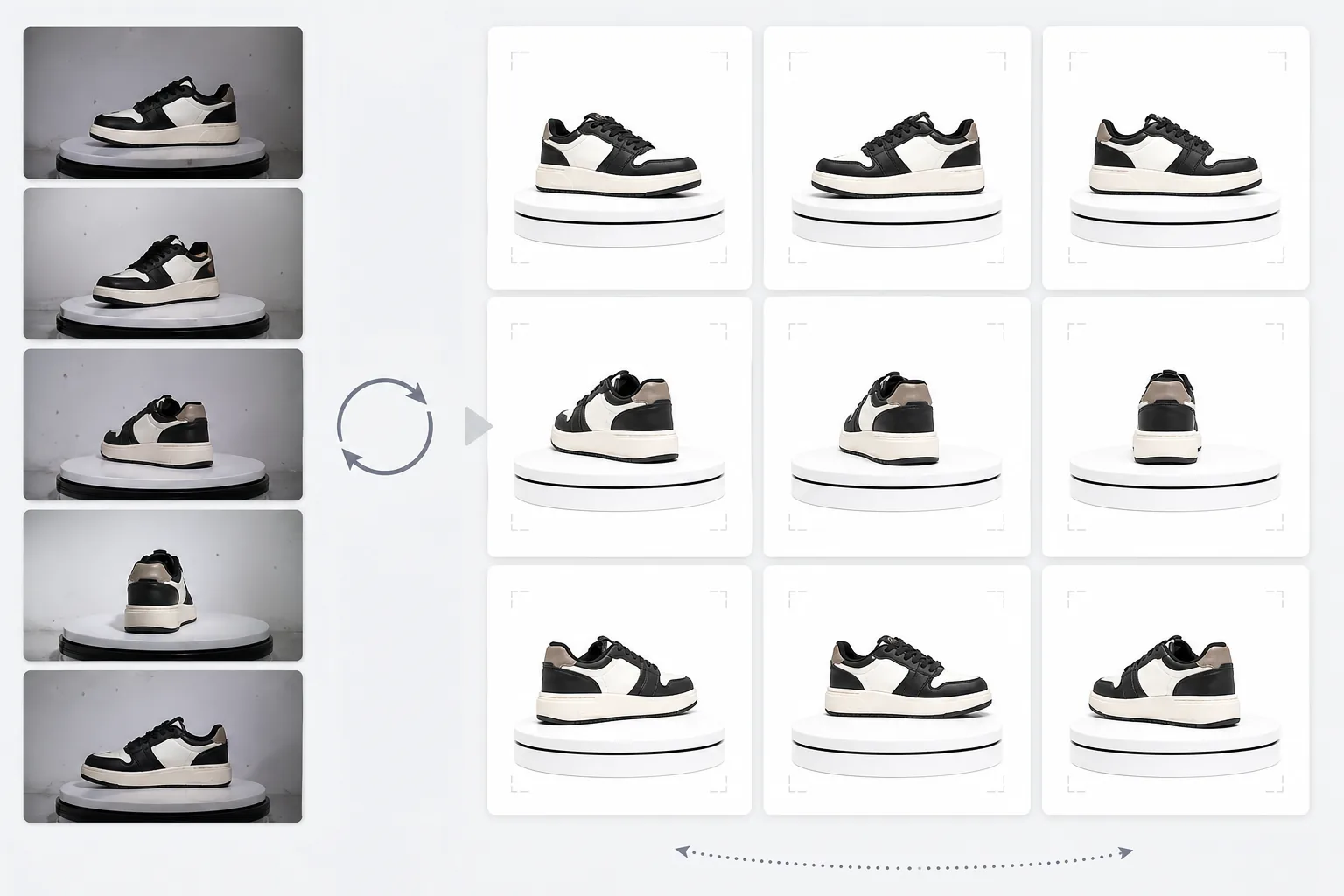
ما الذي يفعله هذا القالب
يعالج صور المنتج المتعددة الزوايا إلى مجموعة متسقة مناسبة لعارضات الدوران التفاعلية بزاوية 360 درجة على مواقع التجارة الإلكترونية. عندما تصوّر منتجًا على طاولة دوارة من 24 أو 36 زاوية، تتراكم التباينات الصغيرة في الخلفية والإضاءة والظل لتخلق تجربة دوران متقطعة وغير احترافية. يستخدم هذا القالب Background Eraser لعزل المنتج من كل زاوية بمعالجة حواف متسقة، ويوحّد الإضاءة ودرجة حرارة اللون عبر جميع الإطارات حتى لا يومض المنتج بين الدرجات الدافئة والباردة أثناء الدوران، ويستخدم Magic Eraser لإزالة الغبار وبصمات الأصابع وعيوب السطح التي تصبح مشتّتة عندما تظهر في إطار دون الآخر.
إعدادات القالب
| الخلفية | أبيض نقي (#FFFFFF) — متسق عبر جميع إطارات الدوران |
| توحيد الإضاءة | اتساق عبر الإطارات (يزيل الوميض بين الزوايا) |
| تنظيف السطح | إزالة الغبار وبصمات الأصابع والانعكاسات لكل إطار |
| توسيط المنتج | توسيط المنتج تلقائيًا في كل إطار للحصول على محور دوران سلس |
| أبعاد الإخراج | 1500 × 1500 px لكل إطار (محسّن لعارضات 360 على الويب) |
| عدد الإطارات | يدعم تسلسلات من 12 أو 24 أو 36 إطارًا |
كيفية استخدام هذا القالب
ارفع صور الطاولة الدوارة الخاصة بك
ارفع المجموعة الكاملة من صور الدوران (12 أو 24 أو 36 إطارًا) الملتقطة على طاولة دوارة بفواصل زمنية متسقة. سمِّ الملفات بالتسلسل (من 001.jpg إلى 036.jpg) حتى يعالجها القالب بترتيب الدوران الصحيح. يتعامل القالب مع الصور من أي خلفية — خلفية بيضاء أو رمادية أو ملونة.
إزالة الخلفية والاتساق
يزيل Background Eraser الخلفية من كل إطار باستخدام إعدادات اكتشاف الحواف نفسها، مما يضمن اتساق مخطط المنتج عبر جميع الزوايا. يتم توسيط المنتج تلقائيًا في كل إطار حتى يبقى محور الدوران ثابتًا ولا يهتز الدوران.
التوحيد عبر الإطارات
تتم معايرة الإضاءة ودرجة حرارة اللون والتعريض الضوئي عبر جميع الإطارات. وهذا يزيل التذبذبات الدقيقة في السطوع واللون التي تحدث عندما لا تكون إضاءة الطاولة الدوارة متساوية تمامًا من كل زاوية. يتم تنظيف عيوب السطح المرئية في بعض الزوايا من أجل الاتساق.
تصدير تسلسل الإطارات
نزّل تسلسل الإطارات الكامل بدقة 1500 × 1500 px لكل إطار بتنسيق JPEG. تُرقَّم الملفات بالتسلسل وتكون جاهزة للاستيراد المباشر إلى إضافات عارض 360 مثل Magic 360 أو Sirv أو Webrotate 360. تم تحسين الحجم الإجمالي للملفات للتحميل السريع على الويب.
نصائح احترافية للحصول على أفضل النتائج
- ✓استخدم طاولة دوارة يدوية بعلامات درجات بدلاً من الدوران اليدوي الحر. تنتج الفواصل المتسقة بمقدار 10 درجات (36 إطارًا) أكثر دوران سلاسة. يمكن للقالب التعامل مع التباينات الطفيفة في الدوران، لكن التباعد المتساوي ينتج نتيجة أكثر سلاسة بشكل ملحوظ.
- ✓ثبّت الكاميرا على حامل ثلاثي القوائم واستخدم إعدادات التعريض اليدوي لجميع الإطارات. يتسبب التعريض التلقائي في ضبط الكاميرا للسطوع بشكل مختلف عند كل زاوية، مما يخلق تأثير الوميض الذي يجب على القالب تصحيحه لاحقًا. تمنح الإعدادات اليدوية القالب نقطة انطلاق أنظف.
- ✓نظّف منتجك جيدًا قبل التصوير — يكون الغبار وبصمات الأصابع أكثر وضوحًا وتشتيتًا في دوران 360 منها في صورة ثابتة واحدة لأنها تظهر وتختفي مع دوران المنتج. يزيل القالب هذه العيوب، لكن البدء بسطح نظيف ينتج نتائج أفضل.
E-commerce workflow
Product photo hub
Use this template with the full ecommerce product photo workflow for marketplace backgrounds, cleanup, compression, resizing, and listing-ready exports.
View ecommerce product photo workflowالأسئلة الشائعة
كم عدد الإطارات التي أحتاجها؟
+
تنتج 36 إطارًا (فواصل 10 درجات) أكثر دوران سلاسة لمعظم المنتجات. 24 إطارًا (فواصل 15 درجة) مقبولة للمنتجات بدون تفاصيل دقيقة. 12 إطارًا (فواصل 30 درجة) هو الحد الأدنى للدوران القابل للتمييز لكنه سيبدو متقطعًا للمنتجات التفصيلية مثل الساعات أو الإلكترونيات.
هل يمكنني معالجة الإطارات من مقطع فيديو؟
+
نعم، إذا استخرجت الإطارات من فيديو طاولة دوارة بفواصل متساوية. صدّر الإطارات بأعلى دقة متاحة وتأكد من التوزيع الزاوي المتساوي حول كامل 360 درجة. قد تكون إطارات الفيديو أقل جودة من الصور الثابتة المخصصة بسبب ضبابية الحركة وضغط الفيديو.
ما إضافات عارض 360 المتوافقة؟
+
إخراج JPEG المتسلسل متوافق مع جميع حلول عارض 360 الرئيسية بما في ذلك Magic 360 و Sirv 360 و Webrotate 360 و jQuery Reel والتطبيقات المخصصة. تجعل الأبعاد المتسقة واصطلاح التسمية عملية الاستيراد بسيطة.
امنح المتسوقين عرض المنتج بزاوية 360 الذي يتوقعونه
ارفع صور الطاولة الدوارة واحصل على تسلسل إطارات متسق ونظيف جاهز لعارضات الدوران 360 التفاعلية على صفحات منتجاتك.
جرّبه مجانًاRelated templates
More e-commerce templates for your workflow.
قالب خلفية بيضاء نقية لصور المنتج. إعدادات Amazon وShopify والسوق الجاهزة للحصول على صور منتجات نظيفة واحترافية قابلة للتحويل.
قالب صور القائمة المُحسّن لـ Etsy. يحول لقطات نمط الحياة إلى خلفيات بيضاء نظيفة بدقة 2000 بكسل، ويعزز تفاصيل المنتج المصنوع يدويًا، ويتوافق مع إرشادات الصور الخاصة بـ Etsy.
قالب صور القائمة المحسن لموقع eBay. خلفية بيضاء لصور المعرض وتحسين وثائق الحالة والتخطيطات متعددة الزوايا التي تلبي معايير الصور الخاصة بـ eBay.
قالب تصوير مجوهرات احترافي للخواتم والقلائد والساعات. يتحكم في الانعكاسات ويعزز بريق الأحجار الكريمة ويقدم صورًا جاهزة للسوق على خلفيات نظيفة.
قالب صور أثاث احترافي لقوائم السوق. قم بإزالة فوضى الغرفة وإظهار الأبعاد الحقيقية وتقديم القطع على خلفيات نظيفة أو في سياقات غرف مصممة.
قم بتنظيف الصور المسطحة للملابس مع إزالة التجاعيد وتنظيف الوبر والخلفيات البيضاء النقية ولون القماش الدقيق. جاهز لمتاجر Shopify وAmazon ومتاجر البوتيك.