
تصميم لوحة القائمة
أنشئ رسومات احترافية للوحة القائمة من صور طعامك الخاصة. يعزل هذا القالب كل طبق على حدة عن إعدادات الطاولة والخلفيات المزدحمة، ويوحّد المظهر عبر جميع العناصر للحصول على قائمة متناسقة، ويصدّر صورًا جاهزة للتخطيط ومُحسَّنة للوحات القوائم الرقمية والقوائم المطبوعة وقوائم منصات التوصيل مثل DoorDash وUber Eats وGrubhub.
جرّب هذا القالب مجانًاFood template preview
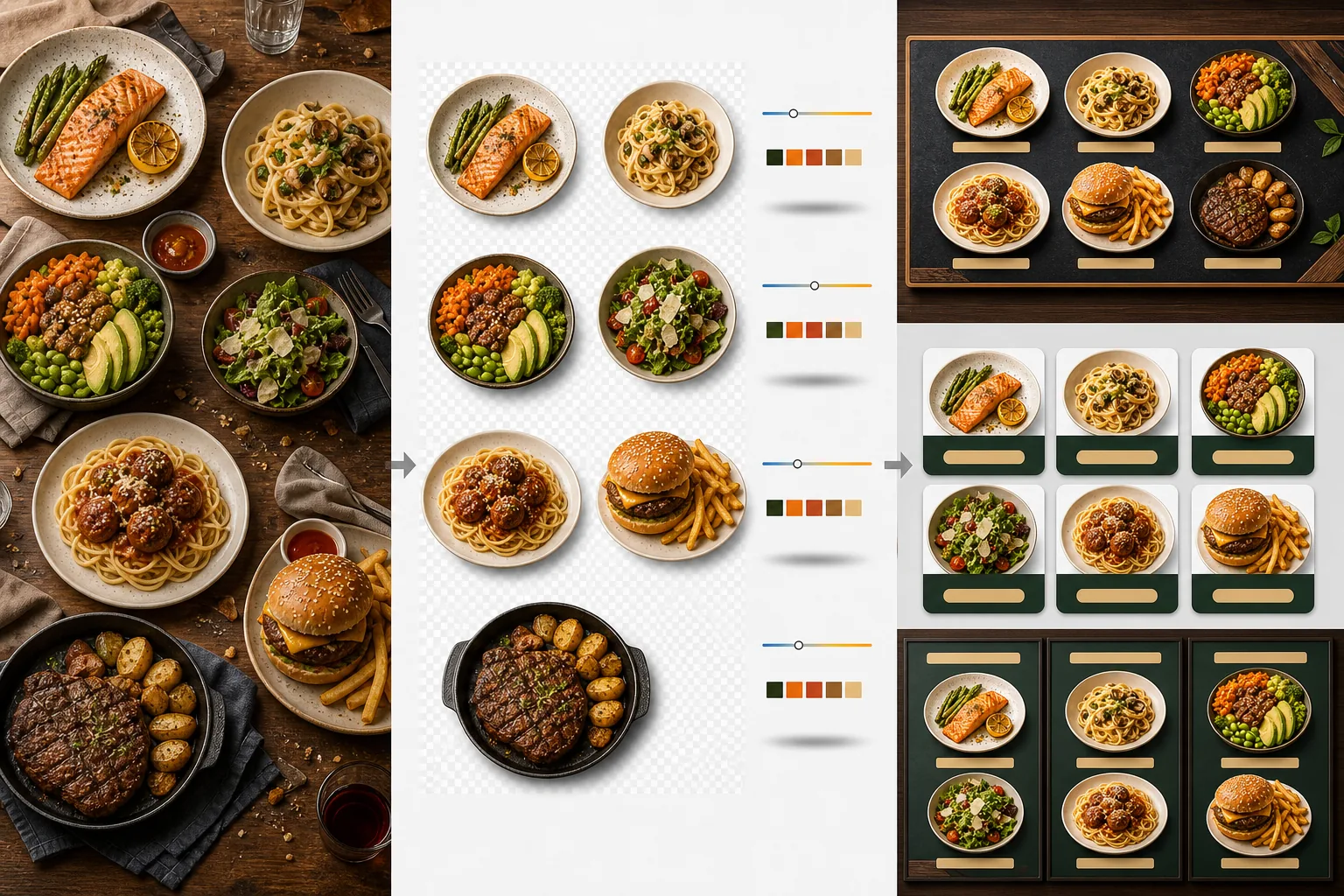
ما الذي يفعله هذا القالب
يحوّل صور الطعام غير المتسقة الملتقطة في أوقات مختلفة وإضاءة مختلفة وعلى طاولات مختلفة إلى مجموعة موحدة من الصور الجاهزة للقائمة. يعزل Background Eraser كل طبق — صحن أو وعاء أو عبوة — عن إعداد الطاولة الأصلي ويستبدل الخلفية بلون أو نسيج متسق يتناسب مع هوية مطعمك. تُوحَّد درجة حرارة اللون عبر جميع العناصر بحيث تبدو الصور الملتقطة تحت ضوء التنغستن الدافئ ولوحات LED الباردة وضوء النافذة الطبيعي متسقة جميعها. تُعزَّز ألوان الطعام لتبدو شهية دون أن تتجاوز إلى منطقة غير واقعية — فالخضرة نابضة بالحياة، واللحوم دافئة وعصيرية، والصلصات لامعة. والنتيجة مجموعة من الصور تعمل كنظام قائمة بصري موحد بدلاً من مجموعة عشوائية من صور الهاتف.
إعدادات القالب
| الخلفية | لون سادة (متوافق مع العلامة التجارية)، نسيج خشبي، حجر أردوازي، أو شفاف |
| توحيد درجة حرارة اللون | مطابقة جميع العناصر مع توازن أبيض ضوء النهار 5000K |
| تعزيز لون الطعام | تعزيز يفتح الشهية (بروتينات دافئة، خضرة نابضة بالحياة، صلصات لامعة) |
| نمط الظل | ظل مُسقَط خفيف لإضافة عمق على الخلفيات السادة |
| أحجام الإخراج | 1200×1200px (منصات التوصيل)، 800×600px (لوحات القوائم الرقمية)، مخصص |
كيفية استخدام هذا القالب
ارفع صور الطعام
ارفع صورًا لكل عنصر من عناصر القائمة. تعمل صور الهاتف الملتقطة أثناء الخدمة، وجلسات تصوير الطعام الاحترافية، وصور قوائم منصات التوصيل جميعها. يعالج القالب كل طبق على حدة للحصول على نتائج متسقة عبر قائمتك بأكملها.
اعزل الأطباق عن الخلفيات
يفصل Background Eraser كل طبق عن طاولته أو مفرش الطاولة أو سطح الكاونتر. يتتبع كشف الحواف حافة الصحن أو حافة الوعاء أو حدود العبوة بدقة. تُحفَظ الزينة والإضافات التي تمتد خارج حافة الصحن — غصن من البقدونس، رشة من الصلصة.
وحّد اللون والنمط
تُوحَّد درجة حرارة اللون بحيث تظهر جميع الأطباق تحت الإضاءة المتسقة نفسها. تُعزَّز ألوان الطعام لجذب الشهية. تُضاف ظلال خفيفة أسفل كل طبق لمظهر راسخ وثلاثي الأبعاد على الخلفية الجديدة.
صدّر للقوائم والمنصات
نزّل بدقة 1200×1200px لقوائم DoorDash وUber Eats وGrubhub. صدّر بدقة 800×600px للوحات القوائم الرقمية وشاشات التلفزيون. تتوفر صادرات PNG شفافة لمصممي الجرافيك الذين ينشئون قوائم مطبوعة ولافتات مخصصة.
نصائح احترافية لأفضل النتائج
- ✓صوّر الأطباق من الأعلى مباشرة (تصوير مسطّح) أو بزاوية 45 درجة. تنتج هاتان الزاويتان أنظف إزالة للخلفية لأن حدود الصحن مرئية بالكامل ويستطيع الذكاء الاصطناعي فصل الطبق عن الطاولة بدقة.
- ✓امسح حافة الصحن لتنظيفها قبل التصوير. تصبح آثار الصلصة وفتات الطعام على حافة الصحن جزءًا من الصورة المعزولة وتبدو غير مرتبة على الخلفية الجديدة النظيفة.
- ✓عالج جميع عناصر القائمة في دفعة واحدة بالإعدادات نفسها. الاتساق عبر كل صورة طبق هو ما يجعل القائمة تبدو احترافية — درجات حرارة الألوان ودرجات الخلفية غير المتطابقة تجعل حتى أروع طعام يبدو هاويًا.
الأدوات
أسئلة شائعة
هل يمكنني استخدام هذا للمشروبات؟
+
نعم. تُعزَل الأكواب والفناجين والزجاجات والكوكتيلات بالدقة نفسها كالأطباق المُقدَّمة. تحافظ المشروبات الشفافة مثل الماء والنبيذ والكوكتيلات الصافية على شفافيتها على الخلفية الجديدة.
هل سيبدو الطعام مُحسَّنًا بشكل اصطناعي؟
+
تُعايَر تحسينات الألوان لجعل الطعام يبدو في أفضل حالاته الشهية دون أن يتجاوز إلى منطقة غير واقعية. فكّر في الأمر كالفرق بين طعام مُصوَّر تحت ضوء فلوري قاسٍ وطعام مُصوَّر في ضوء النهار الطبيعي — يجعل القالب كل طبق يبدو وكأنه التُقط في ظروف مثالية.
هل يعمل هذا مع صور قوائم منصات التوصيل؟
+
نعم. يلبي الإخراج المربع 1200×1200px متطلبات الصور لـ DoorDash وUber Eats وGrubhub وPostmates. تحصل المطاعم التي لديها صور قوائم ذات مظهر احترافي على منصات التوصيل باستمرار على معدلات طلب أعلى من تلك التي تستخدم لقطات هاتف غير معالَجة.
أنشئ قائمة تجعل كل طبق يبدو لا يُقاوَم
ارفع صور الطعام واحصل على صور قائمة متسقة وشهية جاهزة للوحات الرقمية والقوائم المطبوعة ومنصات التوصيل.
جرّبه مجانًاRelated templates
More food templates for your workflow.
أنشئ صورًا شهية لقائمة توصيل الطعام مع تعزيز حيوية الألوان والخلفيات النظيفة وتأثيرات البخار والنضارة والأبعاد المحسنة للنظام الأساسي.
قم بتحسين صور الوصفات لكتب الطبخ ومدونات الطعام من خلال تحسين جودة الطباعة ودقة ألوان المكونات وتنظيف المشهد المصمم والإخراج عالي الدقة.