
تحسين صورة التخرج
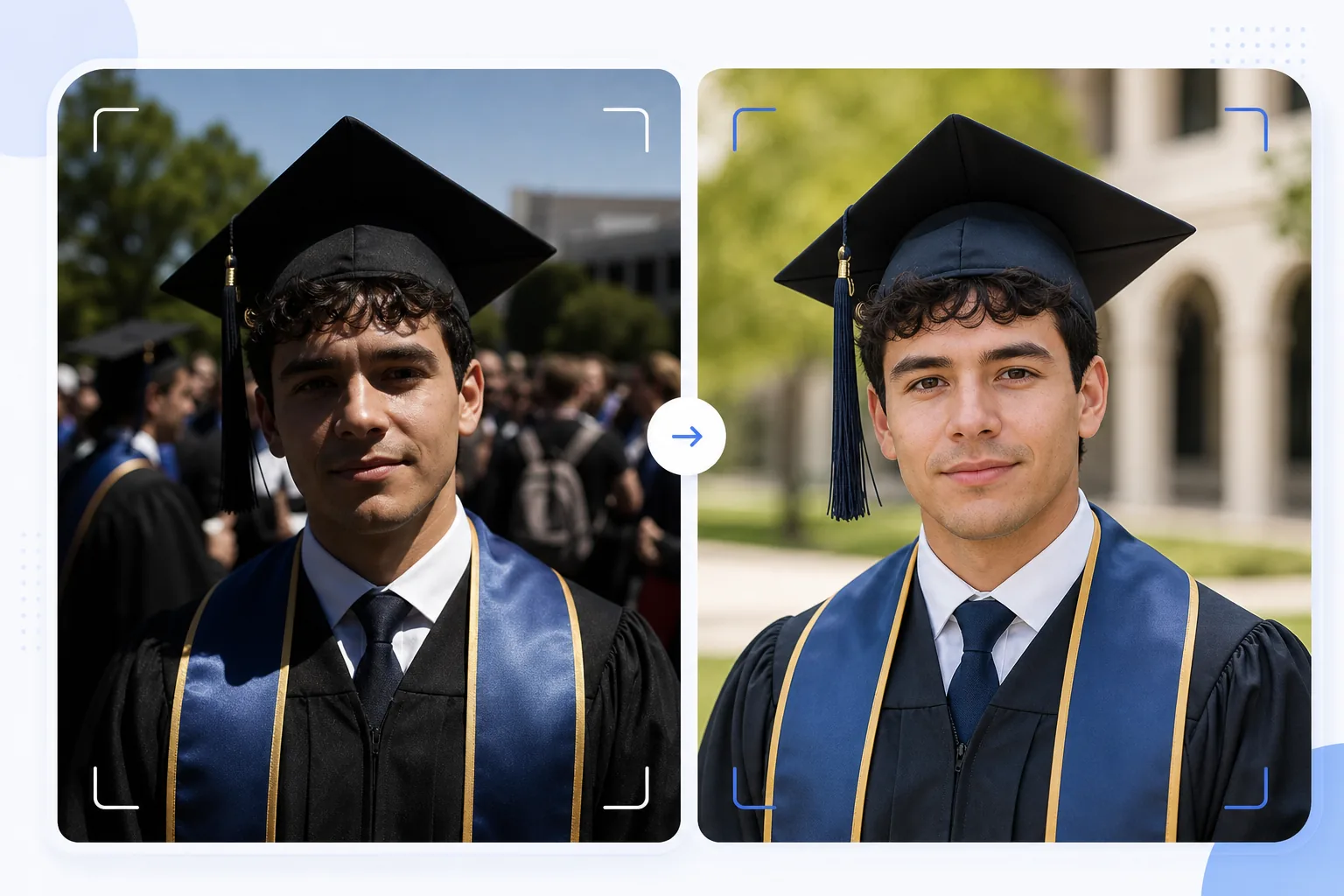
حوّل اللقطات العفوية للتخرج إلى صور بورتريه تستحق التأطير. يصحّح هذا القالب الإضاءة الخارجية القاسية الشائعة في حفلات التخرج، ويزيل المتطفّلين على الصورة وفوضى الحشود خلف الخريج، ويعزّز ألوان القبعة والعباءة، ويزيد حدّة الصورة للطباعة بأحجام كبيرة لتعليقها على الجدران ووضعها على رفوف المدفأة.
جرّب هذا القالب مجانًاPersonal template preview
ماذا يفعل هذا القالب
يحوّل اللقطات السريعة في يوم التخرج إلى صور بورتريه أنيقة تصلح للتأطير وبطاقات الإعلان والمشاركة على وسائل التواصل الاجتماعي. تُلتقط حفلات التخرج في ظروف صعبة — فشمس منتصف النهار القاسية تخلق ظلالًا تشبه الهالات تحت حافة القبعة، والخلفيات المزدحمة فوضوية، وتبدو ألوان العباءات باهتة تحت أشعة الشمس المباشرة. يصحّح AI Enhance التعريض لملء الظلال تحت القبعة، ويستعيد الألوان الغنية للعباءات والأوشحة، ويزيد حدّة تفاصيل الوجه التي تصبح ناعمة في اللقطات المتسرّعة وسط الحشود. يزيل Magic Eraser المتطفّلين على الصورة وأفراد الحشد الظاهرين خلف الخريج واللافتات المشتّتة وغيرها من فوضى الحفل لعزل الخريج أمام خلفية أنظف.
إعدادات القالب
| استعادة الظلال | ملء الظلال تحت القبعة (يُفتّح الوجه دون حرق المناطق الساطعة) |
| تعزيز لون العباءة | استعادة لون القماش للعباءات السوداء والكحلية والقرمزية والذهبية |
| تنعيم البشرة | تقليل خفيف للعيوب مع الحفاظ على ملمس البشرة الطبيعي |
| تنظيف الخلفية | إزالة المتطفّلين على الصورة وأفراد الحشد خلف الخريج |
| دقة الإخراج | 5000px للحافة الطويلة (جاهز للطباعة بدقة 300 DPI حتى 16×12 بوصة) |
| زيادة الحدّة | زيادة حدّة محسّنة للبورتريه (تفاصيل الوجه + ملمس قماش العباءة) |
كيفية استخدام هذا القالب
ارفع صورة تخرجك
ارفع أي صورة لحفل التخرج — بورتريه بوضعية، أو لقطة أثناء عبور المسرح، أو رمي القبعة، أو لحظة احتفال عفوية. يتعامل القالب مع الصور الملتقطة بالهواتف الذكية وكاميرات DSLR في أي ظرف إضاءة، من شمس الخارج الساطعة إلى القاعات الداخلية الخافتة الإضاءة.
صحّح الإضاءة واللون
يصحّح AI Enhance الظلال القاسية التي تلقيها القبعة المربّعة، والتي عادةً ما تُعتّم عيني الخريج والجزء العلوي من الوجه. تُستعاد ألوان العباءة والوشاح إلى درجاتها الغنية الحقيقية — تستعيد العباءات السوداء عمقها بدلًا من أن تبدو رمادية داكنة، وتُظهر أوشحة الشرف كامل تشبّع ألوانها.
أزل المشتّتات
يزيل Magic Eraser أفراد الحشد والخريجين الآخرين والكراسي القابلة للطي واللافتات الظاهرة خلف الشخص. يعيد الذكاء الاصطناعي بناء الخلفية بنسخة نظيفة من المكان — العشب أو واجهة المبنى أو الستارة — لينشئ تكوينًا أشبه بالبورتريه من مشهد مزدحم.
صدّر للطباعة والمشاركة
نزّل بحافة طويلة 5000px للطباعات المؤطّرة حتى 16×12 بوصة بدقة 300 DPI، أو بدقة 2000px لوسائل التواصل الاجتماعي والإعلانات الرقمية. تُضبط مساحة اللون على sRGB للعرض على الشاشة أو Adobe RGB للطباعة الاحترافية.
نصائح احترافية لأفضل النتائج
- ✓إذا أمكنك التخطيط مسبقًا، فالتقط البورتريه الرسمي مباشرةً بعد الحفل في منطقة مظلّلة بدلًا من الشمس المباشرة. يزيل الظل الظلال القاسية للقبعة، وهي أصعب مشكلة في التصحيح. يمكن للقالب تصحيح ظلال الشمس، لكن الظل ينتج أكثر النتائج طبيعية.
- ✓التقط بورتريه تقليديًا بوضعية ولحظة احتفال عفوية (احتضان العائلة، رمي القبعة). يحسّن القالب كلا الأسلوبين، ووجود نسخة أنيقة من كل منهما يمنحك خيارات بين الطباعات المؤطّرة ومنشورات وسائل التواصل الاجتماعي.
- ✓في الصور الجماعية مع العائلة، ضع الخريج متقدّمًا قليلًا عن المجموعة. يخلق هذا فصلًا طبيعيًا في العمق يساعد Magic Eraser على عزل مشتّتات الخلفية وإزالتها دون التأثير على أفراد العائلة.
الأدوات
أسئلة شائعة
هل يمكن لهذا إصلاح صور التخرج الضبابية؟
+
يمكن لـ AI Enhance زيادة حدّة الصور ذات النعومة الخفيفة الناتجة عن اهتزاز يد بسيط أو خطأ طفيف في التركيز التلقائي. لكن الصور الضبابية بشدة بسبب ضبابية الحركة القوية (مثل لقطة أثناء عبور المسرح ملتقطة من بعيد) لا يمكن استعادتها بالكامل — فالقالب يعزّز التفاصيل لكنه لا يستطيع خلق حدّة لم تُلتقط أصلًا.
ماذا عن صور الحفل الداخلية؟
+
تُصحّح صور التخرج الداخلية ذات إضاءة القاعة (أصفر دافئ أو فلورسنت مختلط) من حيث درجة حرارة اللون. يضبط القالب توازن الأبيض لتبدو درجات البشرة طبيعية وتظهر ألوان العباءات حقيقية. يُقلّل تشويش الإضاءة المنخفضة الناتج عن إعدادات ISO العالية مع الحفاظ على تفاصيل الوجه.
هل يمكنني إزالة الخلفية بالكامل؟
+
نعم. يمكنك استخدام تنظيف الخلفية لإزالة جميع عناصر الخلفية واستبدالها بلون خالص أو تدرّج لوني للحصول على مظهر بورتريه استوديو. ينجح هذا جيدًا عندما تكون خلفية الحفل الأصلية مزدحمة جدًا بحيث يصعب الإزالة الانتقائية.
صور بورتريه للتخرج تستحق التأطير من لقطات الحفل
ارفع صور يوم تخرجك واحصل على صور بورتريه محسّنة وجاهزة للطباعة بخلفيات نظيفة وألوان زاهية للقبعة والعباءة.
جرّبه مجانًاRelated templates
More personal templates for your workflow.
قم بإنشاء صور هوية متوافقة للتأشيرات ورخص القيادة والهويات الوطنية مع لون الخلفية المناسب وحجم الرأس ومتطلبات تعبيرات الوجه.
قم بتحسين صور الحفلات والمناسبات من خلال تقليل الضوضاء في الإضاءة المنخفضة، وإضاءة المسرح تصحيح الألوان، وإزالة تشتيت انتباه الحشود، واستعادة التفاصيل من لقطات الأماكن المظلمة.
قم بإنشاء صور جميلة لبطاقات إعلان حديثي الولادة بخلفيات ناعمة، وتدرج ألوان لطيف، وإزالة فوضى المستشفى، وأبعاد جاهزة للطباعة لإرسالها بالبريد.
قم بإعداد الصور العائلية والصور الشخصية لبطاقات التهنئة بالعطلات بخلفيات احتفالية ودرجات ألوان دافئة وتأثيرات ثلجية وأبعاد البطاقة القياسية للطباعة.
يمكنك استعادة الصور التذكارية وتحسينها من خلال التنقيح اللطيف وتبسيط الخلفية وتدرج الألوان المحترم الدافئ والأبعاد الجاهزة للطباعة للخدمات.
قم بتحويل صور الحيوانات الأليفة الخاصة بالمأوى والإنقاذ من خلال استبدال الخلفية وتصحيح الإضاءة وتحسين تفاصيل الفراء لمساعدة الحيوانات في العثور على منازل بشكل أسرع.