
تحسين ابتسامة الأسنان
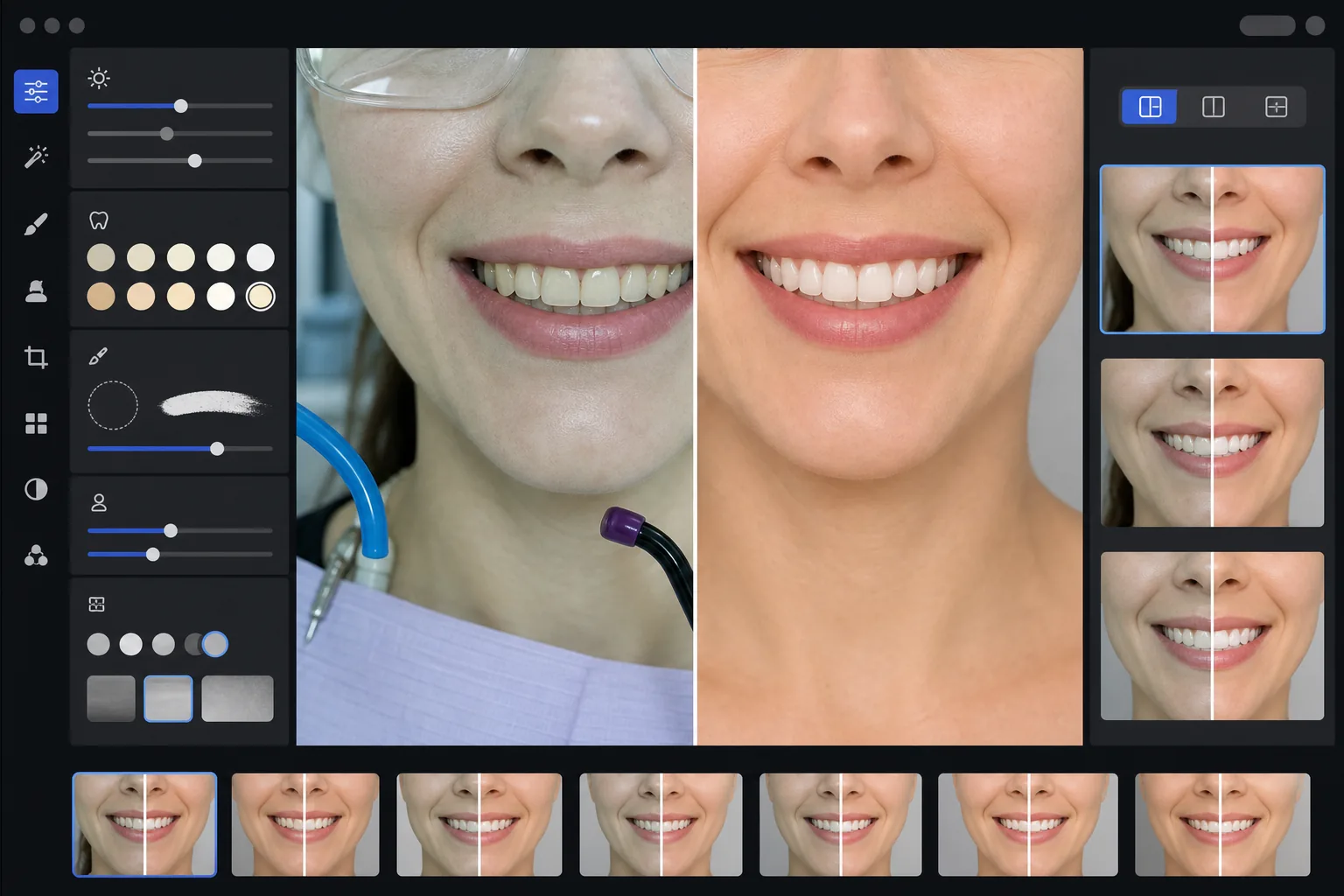
أنشئ صور تسويق أسنان احترافية قبل وبعد تعرض عمل عيادتك. يطبق هذا القالب تبييضًا للأسنان يبدو طبيعيًا، ويزيل فوضى الخلفية السريرية، ويوحّد خلفيات صور المرضى، ويوازن الإضاءة العلوية القاسية الشائعة في صور غرفة العلاج.
جرّب هذا القالب مجانًاProfessional template preview
ما يفعله هذا القالب
يحوّل صور الأسنان السريرية إلى صور تسويقية مصقولة لمواقع العيادات ووسائل التواصل الاجتماعي ومواد تثقيف المرضى. يصحّح AI Enhance الدرجة اللونية الخضراء البيضاء غير الجذابة لإضاءة غرفة علاج الأسنان ويطبّق تبييضًا خفيفًا للأسنان يبدو طبيعيًا — مع تفتيح الأسنان بمقدار 2-3 درجات دون جعلها تبدو اصطناعية. يزيل Magic Eraser العناصر السريرية في الخلفية مثل خراطيم الشفط ومصابيح التصليب وعلامات ورق اللدغة على الشفاه ونظارات الحماية. تُوحَّد خلفيات صور المرضى إلى خلفية نظيفة ومتسقة عبر معرض الحالات بالكامل.
إعدادات القالب
| تبييض الأسنان | تفتيح طبيعي من +2 إلى +3 درجات (يحافظ على الشفافية وملمس المينا) |
| تصحيح الإضاءة | موازنة ضوء النهار لغرفة علاج الأسنان (تزيل الدرجة السريرية الخضراء البيضاء) |
| الخلفية | خلفية رمادية أو بيضاء محايدة ومتسقة مع تظليل ناعم للحواف |
| لون البشرة | تصحيح الدفء حول الفم (يقلل الشحوب الناتج عن إضاءة الأسنان) |
| لون الشفاه | استعادة طبيعية للتشبع (يعاكس الإضاءة السريرية الباهتة) |
كيفية استخدام هذا القالب
ارفع الصور السريرية
ارفع لقطات مقرّبة للابتسامة، أو صورًا للوجه قبل وبعد، أو صورًا داخل الفم التُقطت في غرفة العلاج لديك. يعمل القالب مع الصور الملتقطة بكاميرات الأسنان المتخصصة، وكاميرات DSLR المزودة بفلاش حلقي، وصور الهواتف الذكية الملتقطة تحت أضواء غرفة العلاج.
صحّح الإضاءة السريرية
يحيّد AI Enhance الدرجة اللونية الخضراء البيضاء من مصابيح وحدة الأسنان العلوية، ويضفي دفئًا على درجات لون البشرة حول الفم، ويستعيد لون الشفاه الطبيعي. يُفتَّح لون الأسنان بدقة لإظهار النتيجة في أفضل صورها مع البقاء واقعيًا وصادقًا.
نظّف الخلفيات والمشتتات
يزيل Magic Eraser الخراطيم المرئية وأطراف مصابيح التصليب ومشابك المرايل وبقع ورق اللدغة على الشفاه والمعدات السريرية في الخلفية. تُستبدل الخلفية بخلفية محايدة متسقة تتطابق عبر جميع أزواج صور قبل وبعد لديك.
صدّر للاستخدام التسويقي
نزّل صورًا محسّنة فردية أو صورًا مركبة قبل وبعد جنبًا إلى جنب. تُحدَّد أبعاد المخرجات لمعارض المواقع ومنشورات Instagram و Google Business Profile وكتيبات المرضى المطبوعة بدقة مناسبة للطباعة بحجم 8x10 بوصة.
نصائح احترافية لأفضل النتائج
- ✓بالنسبة لأزواج قبل وبعد، صوّر كلتا الصورتين قبل العلاج وبعده من الزاوية والمسافة وموضع الإضاءة نفسها. يمكن للقالب تصحيح اختلافات التعريض الضوئي بين الاثنتين، لكن مطابقة زاوية الكاميرا الأصلية تنتج أكثر المقارنات إقناعًا.
- ✓تبييض الأسنان متحفظ عن قصد — فهو يفتّح بمقدار 2-3 درجات vita بدلًا من جعل الأسنان بيضاء كالورق. يبدو هذا أكثر طبيعية ومصداقية للمرضى المحتملين. إذا كانت نتيجتك السريرية الفعلية مذهلة، فإن الصورة الصادقة مع تحسين خفيف أكثر إقناعًا من صورة مفرطة المعالجة.
- ✓استخدم مبعد الخد للقطات الابتسامة داخل الفم للحصول على أكمل رؤية للعمل السني. يتعامل القالب مع المظهر السريري الطفيف للصور المدعومة بالمبعد عن طريق إضفاء الدفء على درجات لون البشرة والاقتصاص للتركيز على منطقة الابتسامة.
- ✓عالج معرض الحالات بأكمله دفعة واحدة لضمان اتساق لون الخلفية والسطوع والدفء عبر جميع أزواج قبل وبعد. الإضاءة غير المتطابقة بين الحالات على موقعك تقوّض الانطباع الاحترافي.
الأدوات
أسئلة شائعة
هل يُعتبر هذا إعلانًا مضللًا لطب الأسنان؟
+
يقتصر تحسين التبييض على 2-3 درجات vita ويحافظ على الشفافية الطبيعية وملمس سطح المينا. يقع هذا بشكل جيد ضمن ما تؤثر فيه إضاءة التصوير الاحترافية وموازنة الأبيض بشكل طبيعي. لا يغيّر القالب شكل الأسنان أو محاذاتها أو محيط اللثة — بل يصحّح فقط تأثيرات الألوان غير الجذابة للإضاءة السريرية التي تجعل النتائج تبدو أسوأ في الصور مما هي عليه على أرض الواقع.
هل يمكن لهذا إنشاء صور مركبة قبل وبعد جنبًا إلى جنب؟
+
نعم. يمكن للقالب إخراج صور محسّنة فردية أو إنشاء صورة مركبة جنبًا إلى جنب مع فاصل في المنتصف وخلفية متسقة وعلامات قبل/بعد. تتلقى كلتا الصورتين في الزوج المعالجة نفسها للخلفية بحيث تكون المقارنة نظيفة واحترافية بصريًا.
هل يعمل هذا مع صور الكاميرا داخل الفم؟
+
نعم. عادةً ما تتميز صور الكاميرا داخل الفم بإضاءة قاسية ومباشرة جدًا تبيّض ملمس السطح. يستعيد القالب تفاصيل المينا، ويصحّح الدرجة البيضاء الشديدة، ويضبط التباين لإظهار تشريح السن بشكل طبيعي. النتيجة أكثر تفصيلًا وتبدو أكثر طبيعية من اللقطة الخام داخل الفم.
اعرض عملك السني بصور تسويقية احترافية
ارفع الصور السريرية واحصل على صور قبل وبعد محسّنة بشكل طبيعي ومنسّقة باتساق، جاهزة لموقعك ووسائل التواصل الاجتماعي وكتيبات المرضى.
جرّبه مجانًاRelated templates
More professional templates for your workflow.
قالب احترافي لصورة LinkedIn. خلفية نظيفة، وتحسين البشرة الطبيعية، والمظهر المصقول الذي يحصل على عدد مرات مشاهدة للملف الشخصي أكبر بمقدار 14 مرة.
قم بإنشاء صور جواز سفر وتأشيرة متوافقة في المنزل. خلفية بيضاء، ونسبة حجم الرأس الصحيحة، ومعيار الولايات المتحدة 2 × 2 بوصة، وإخراج 600 نقطة في البوصة يلبي متطلبات وزارة الخارجية.
قالب تصوير احترافي للممثلين والعارضات. يمكنك تلبية معايير مديري اختيار الممثلين بمخرجات جاهزة للطباعة مقاس 8 × 10 وتنقيح طبيعي وخلفيات نظيفة لتقديمات الوكالة.