
شريط تمرير قبل وبعد
أظهر تأثير عملك بصور مقارنة قبل وبعد متراصفة تمامًا. ينشئ هذا القالب أزواجًا جاهزة للعرض التوضيحي تحافظ على ثبات التأطير وتوازن الإضاءة والأبعاد — مثالي لملفات الأعمال ودراسات الحالة والدليل الاجتماعي وتسويق المنتجات حيث يروي التحول البصري القصة.
جرّب هذا القالب مجانًاMarketing template preview
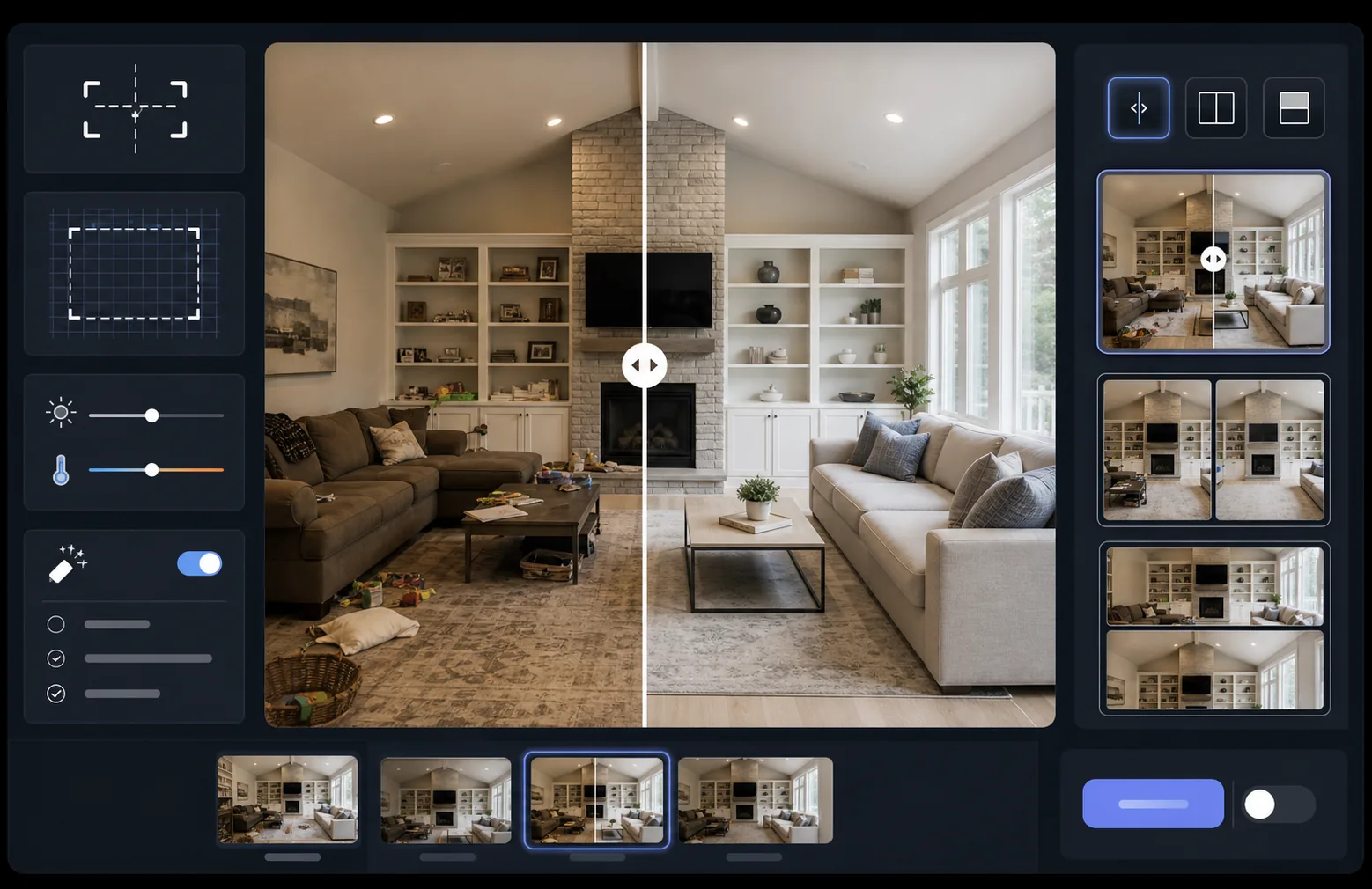
ماذا يفعل هذا القالب
يعالج صورتين — صورة قبل وصورة بعد — ليحولهما إلى زوج مقارنة متراصف تمامًا جاهز لأدوات شريط التمرير أو التخطيطات جنبًا إلى جنب أو الكشف المتحرك. يقوم AI Enhance بتوحيد التعريض وتوازن اللون الأبيض بين الإطارين بحيث يكون التحول واضحًا تمامًا دون أن تشوش اختلافات الإضاءة المقارنة. يمكن لـ Magic Eraser تنظيف عناصر التشتيت العرضية في أي من الإطارين والتي ليست جزءًا من التحول المقصود.
إعدادات القالب
| التخطيط | زوج جاهز لشريط التمرير، أو جنبًا إلى جنب، أو مكدس عموديًا (قابل للتحديد) |
| حجم الإخراج | 1600×1200px لكل إطار (أبعاد متطابقة) |
| المحاذاة | تسجيل تلقائي — يطابق المنظور والتأطير بين اللقطات |
| توحيد الإضاءة | يوازن التعريض وتوازن اللون الأبيض عبر الزوج بأكمله |
| تراكب التسميات | تسميات 'Before' / 'After' اختيارية بموضع قابل للتخصيص |
| الحدود | فاصل رمادي محايد بسماكة 1px أو حافة سلسة (قابل للتحديد) |
كيفية استخدام هذا القالب
ارفع صورة "قبل" الخاصة بك
ارفع الصورة الأصلية غير المعدّلة التي تُظهر الحالة الأولية. قد تكون غرفة قبل التجديد، أو منتجًا قبل التحسين، أو بشرة قبل العلاج، أو أي تحول بصري ترغب في عرضه.
ارفع صورة "بعد" الخاصة بك
ارفع صورة النتيجة التي تُظهر التحول المكتمل. حاول التصوير من نفس الزاوية والمسافة كما في لقطة "قبل". سيقوم القالب بمحاذاة الاختلافات الطفيفة في التأطير والمنظور تلقائيًا.
وحّد وحاذِ
يسجّل القالب الصورتين تلقائيًا بحيث تتراصف العناصر المتقابلة بكسلًا ببكسل. يتم توحيد التعريض وتوازن اللون الأبيض بحيث لا تُشتت اختلافات الإضاءة بين جلسات التصوير الانتباه عن التحول الفعلي.
صدّر المقارنة
اختر تنسيق الإخراج الخاص بك — زوج متطابق لأداة شريط التمرير، أو تركيب جنبًا إلى جنب لوسائل التواصل الاجتماعي، أو تكديس عمودي للتسويق عبر البريد الإلكتروني. أضف تسميات Before/After اختيارية وصدّر بدقة محسّنة للويب أو بجودة الطباعة.
نصائح احترافية للحصول على أفضل النتائج
- ✓صوّر "قبل" و"بعد" من نفس الموضع تمامًا إن أمكن — ضع علامة على مكان الحامل الثلاثي أو قف في المكان نفسه. كلما قلّت حاجة الذكاء الاصطناعي إلى تصحيح المحاذاة، كانت المقارنة أكثر وضوحًا.
- ✓استخدم نفس الطول البؤري لكلتا اللقطتين لتجنب اختلافات تشوه المنظور التي تجعل المقارنات المتراصفة تبدو غير متطابقة بشكل طفيف.
- ✓أزل التغييرات غير ذات الصلة بين "قبل" و"بعد" باستخدام Magic Eraser — إذا تحركت نبتة أو ظهر جسم جديد، فامحه ليركز المشاهدون على التحول المقصود.
- ✓بالنسبة لتضمينات شريط التمرير على الويب، صدّر كلتا الصورتين بأبعاد متطابقة واستخدم تنسيق PNG دون فقدان لمنع تشوهات الضغط على طول خط فاصل شريط التمرير.
الأدوات
الأسئلة الشائعة
ماذا لو تم التقاط صور "قبل" و"بعد" من زوايا مختلفة قليلًا؟
+
يتعامل نظام التسجيل التلقائي مع الاختلافات المعتدلة في زاوية الكاميرا والمسافة والتأطير. فهو يحدد النقاط المرجعية المتقابلة في كلتا الصورتين ويحولها لتتطابق. للحصول على أفضل النتائج، ينبغي أن يكون فرق الزاوية أقل من 15 درجة.
هل يمكنني استخدام هذا للصور المصغرة للفيديو التي تُظهر التحولات؟
+
نعم. مخرج التركيب جنبًا إلى جنب مثالي للصور المصغرة لفيديوهات YouTube ووسائل التواصل الاجتماعي. يوصل تخطيط الشاشة المنقسمة مع التسميات قصة تحول على الفور تدفع إلى النقر.
هل يغيّر توحيد الإضاءة النتائج الفعلية المعروضة؟
+
لا. يقوم توحيد الإضاءة فقط بضبط التعريض العام وتوازن اللون الأبيض بحيث يبدو الإطاران وكأنهما التُقطا في الظروف نفسها. أما التحول الفعلي — التغييرات في الموضوع — فيُحفظ تمامًا كما تم تصويره.
اعرض نتائجك جنبًا إلى جنب
ارفع صور "قبل" و"بعد" واحصل على صورة مقارنة متراصفة تمامًا ومعروضة باحترافية في ثوانٍ. دع التحول يتحدث عن نفسه.
جرّبه مجانًا