
كيفية إضافة خلفية بيضاء للصورة
تتطلب أمازون خلفيات بيضاء نقية لقوائم المنتجات. تتطلب مكاتب الجوازات خلفيات بيضاء أو فاتحة لصور الهوية. الخلفيات البيضاء النظيفة تجعل الصور تبدو احترافية. Magic Eraser يزيل أي خلفية ويستبدلها باللون الأبيض النظيف في ثوانٍ.
Last updated
أضف خلفية بيضاء الآن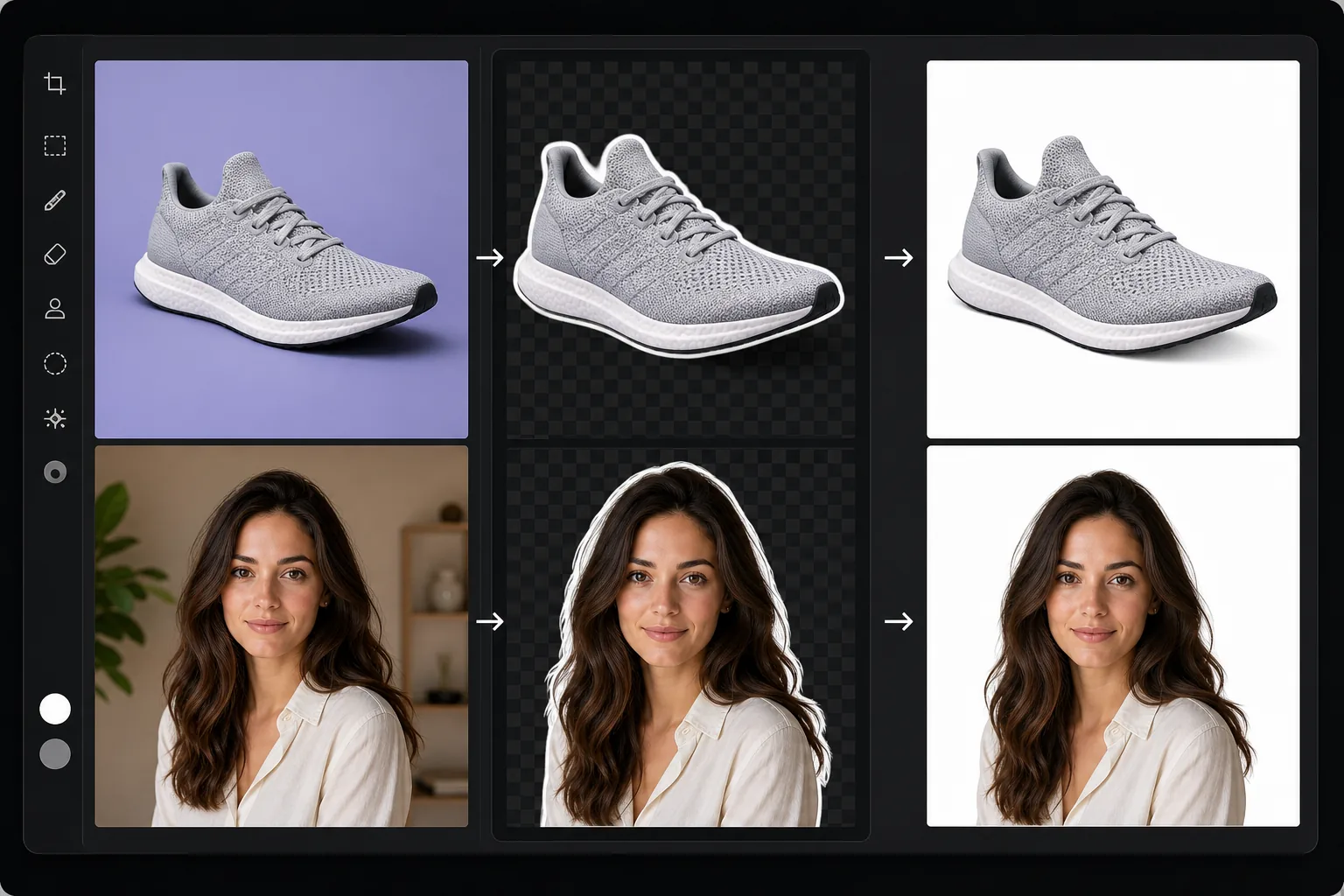
لماذا الخلفيات البيضاء مطلوبة عبر الصناعات
لإضافة خلفية بيضاء إلى صورة، افتح Magic Eraser على الويب أو iOS أو Android، وارفع صورتك، ودع الذكاء الاصطناعي يزيل الخلفية الحالية، ثم اختر الأبيض الخالص كبديل — وبعدها نزّل الصورة. مجاني تمامًا وبدون تسجيل. يقتطع الذكاء الاصطناعي العنصر الرئيسي (بما في ذلك الشعر والحواف الدقيقة) ويضعه على خلفية بيضاء نظيفة، وهو بالضبط ما يطلبه أمازون ومكاتب الجوازات وصور البورتريه الاحترافية. وإذا كنت قد تحتاج لاحقًا إلى خلفية مختلفة، فصدّر صورة PNG شفافة بدلًا من ذلك وأضف الأبيض فقط عندما تحتاجه. تفرض منصات التجارة الإلكترونية خلفيات بيضاء لقوائم المنتجات - تتطلب أمازون اللون الأبيض النقي (RGB 255,255,255)، وتوصي eBay باللون الأبيض أو الرمادي الفاتح، وتبدو سمات Shopify أفضل مع الخلفيات البيضاء المتسقة عبر الكتالوج. تتطلب صور جواز السفر والتأشيرات في معظم البلدان خلفيات بيضاء أو فاتحة جدًا. تستخدم الصور الاحترافية لمواقع الشركات وLinkedIn وأدلة الشركة خلفيات بيضاء للحصول على مظهر نظيف ومتسق. يعني إنشاء خلفية بيضاء يدويًا إخفاء الموضوع بعناية وتدرج الحواف وضمان عدم ظهور أي بقايا من الخلفية - وهو أمر صعب بشكل خاص حول الشعر والأشياء الشفافة والتفاصيل الدقيقة. يتعامل الذكاء الاصطناعي الخاص بـ Magic Eraser مع الإخفاء تلقائيًا ويضع الموضوع على خلفية بيضاء نظيفة مع انتقالات حافة طبيعية.
Before you start
أضف خلفية بيضاء في ثلاث خطوات
Start with قم بتحميل الصورة. The result preview above and tips below use this guide's existing content; no separate before-and-after proof is assumed.
- 1
قم بتحميل الصورة
افتح Magic Eraser على الويب أو iOS أو Android. قم بتحميل صورة المنتج أو صورة الرأس أو الصورة التي تحتاج إلى خلفية بيضاء. تعمل أي خلفية أصلية - ملونة، ومزدحمة، وخارجية، واستوديو. دعم JPEG، PNG، HEIC، وWebP.
- 2
قم بإزالة الخلفية
حدد إزالة الخلفية. يكتشف الذكاء الاصطناعي الهدف الرئيسي ويزيل كل شيء خلفه. بالنسبة لصور المنتج، يحافظ الذكاء الاصطناعي على الظل الطبيعي للمنتج إذا رغبت في ذلك. بالنسبة إلى لقطات الرأس، يتعامل الذكاء الاصطناعي مع حواف الشعر بدقة - بدون هالات بيضاء أو حدود متقطعة.
- 3
تعيين خلفية بيضاء والتصدير
اختر اللون الأبيض النقي كلون للخلفية. الموضوع موجود الآن على خلفية بيضاء نظيفة وجاهزة لقوائم Amazon أو متطلبات جواز السفر أو الاستخدام المهني. تحقق من الحواف عند التكبير الكامل للحصول على انتقالات واضحة، خاصة حول الشعر وتفاصيل المنتج الدقيقة. قم بالتصدير بتنسيق JPEG للخلفيات البيضاء أو PNG للشفافية.
الأفضل ل
- تتطلب قوائم منتجات أمازون والتجارة الإلكترونية خلفيات بيضاء نقية وفقًا لإرشادات السوق
- تتطلب صور جواز السفر والتأشيرة والهوية خلفيات بيضاء أو فاتحة وفقًا للمواصفات الحكومية
- صور احترافية لمواقع الشركات وأدلة الشركات وملفات تعريف LinkedIn
- التصوير الفوتوغرافي للكتالوج حيث تُنشئ الخلفيات البيضاء المتسقة عرضًا تقديميًا موحدًا للمنتج
- قوائم eBay وEtsy وShopify حيث تعمل الخلفيات البيضاء على تحسين معدلات النقر إلى الظهور
نصائح للحصول على أفضل النتائج
بالنسبة لصور منتجات أمازون، يجب أن يكون الناتج أبيض نقيًا (RGB 255,255,255) بدون ظل أو تدرج مرئي. يُنتج خيار الخلفية البيضاء لـ Magic Eraser هذا بشكل افتراضي. بالنسبة لصور جواز السفر، تحقق من المتطلبات الخاصة ببلدك - بعضها يتطلب ظلًا معينًا من اللون الأبيض أو الرمادي الفاتح، والبعض الآخر يحدد أن الموضوع يجب أن يملأ نسبة معينة من الإطار. بالنسبة لصور المنتج ذات الظلال الطبيعية، قرر ما إذا كنت تريد الاحتفاظ بها أو إزالتها - تفضل أمازون عدم وجود ظل، في حين أن موقع التجارة الإلكترونية الخاص بك قد يبدو أفضل مع ظل طبيعي خفيف يرتكز على المنتج. بالنسبة إلى صور الرأس، تعد الخلفية البيضاء النقية معيارًا للاستخدام في الشركات، في حين أن اللون الأبيض الفاتح قليلاً (الرمادي الفاتح) يخلق مظهرًا أكثر نعومة وأكثر ودودًا. تتوفر معالجة الدفعات بخلفية بيضاء لمعالجة كتالوجات المنتجات بأكملها بكفاءة.
الأسئلة المتداولة
- هل الخلفية البيضاء بيضاء نقية لأمازون؟
- نعم. ينتج خيار الخلفية البيضاء لـ Magic Eraser اللون الأبيض النقي (RGB 255,255,255)، مما يلبي متطلبات الصورة الرئيسية لأمازون. يتم عزل الموضوع بشكل نظيف مع عدم وجود بقايا في الخلفية أو تهديب الألوان.
- هل يتعامل مع حواف الشعر بشكل جيد؟
- نعم. يعد الشعر على خلفية بيضاء أحد أصعب تحديات الإخفاء. يحافظ الذكاء الاصطناعي على خصلات الشعر الفردية ويخلق حواف نظيفة بدون الهالات البيضاء أو الخطوط العريضة المتقطعة الشائعة في القواطع اليدوية.
- هل يمكنني معالجة المنتجات دفعة واحدة على خلفية بيضاء؟
- نعم. قم بتحميل صور متعددة للمنتج وقم بتطبيق إزالة الخلفية البيضاء على الدفعة بأكملها. يعد هذا مثاليًا لبائعي التجارة الإلكترونية الذين يضيفون العشرات من المنتجات في وقت واحد.
- هل اضافة خلفية بيضاء مجانية؟
- نعم. تتوفر إزالة الخلفية واستبدال الخلفية البيضاء في الطبقة المجانية مع حدود الاستخدام اليومي. يزيل Premium القيود المفروضة على سير عمل التجارة الإلكترونية كبيرة الحجم.
- هل أستخدم الأبيض الخالص، أم الأبيض المائل للبياض، أم صورة PNG شفافة؟
- يعتمد ذلك على المكان الذي ستذهب إليه الصورة. استخدم الأبيض الخالص (RGB 255,255,255) لصور أمازون الرئيسية ومعظم الأسواق التي تشترطه، ولصور الجوازات حيث يُحدَّد الأبيض. قد يبدو الأبيض المائل للبياض أو الرمادي الفاتح أفضل على موقع إلكتروني حيث يندمج العنصر المقتطَع بالأبيض الخالص مع الصفحة فيفقد حوافه — موقع eBay مثلًا يسمح بالرمادي الفاتح. اختر صورة PNG شفافة عندما تريد وضع العنصر فوق خلفيات مختلفة لاحقًا أو دمجه في تصميم؛ ويمكنك دائمًا تثبيته على خلفية بيضاء بعد ذلك. وعند الشك بشأن منصة معينة، اتبع قاعدة الخلفية المنصوص عليها في تلك المنصة.