
تحرير الصور التي توقف التمرير
طبّق تقنيات بصرية تجعل صورك تبرز في خلاصات التواصل الاجتماعي المزدحمة.
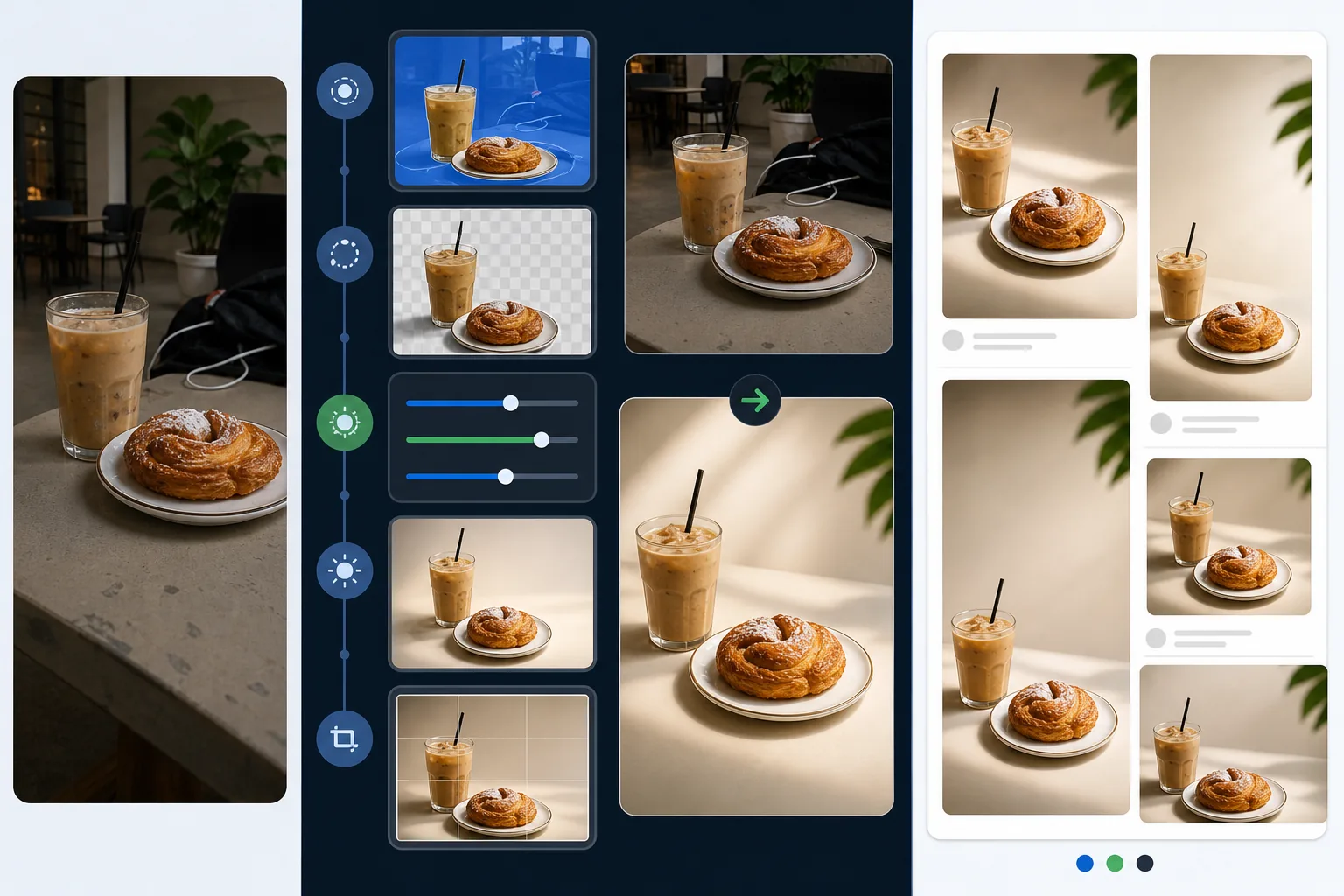
Lesson context before the long read
Review the result preview above, then scan the learning objectives below before reading the full lesson. Updated 2026-05-17.
Example visual uses an existing public asset: /content-images/attention-grabbing-social-edits-academy.webp.
Learning Objectives
- 1زيادة التباين البصري والتشبّع لجذب الانتباه في خلاصة مزدحمة
- 2إزالة عناصر الخلفية المشتتة حتى يهيمن الموضوع على الإطار
- 3إضافة مساحة سلبية مقصودة لتراكب النصوص دون ازدحام التكوين
تعديلات سريعة ترتقي بأي منشور اجتماعي
تتمرر خلاصات وسائل التواصل الاجتماعي بسرعة، ولديك أقل من ثانية واحدة لجذب انتباه المشاهد. تتفوّق الصور عالية التباين ذات الألوان النابضة بالحياة لكن الطبيعية المظهر باستمرار على الصور المسطحة وناقصة التعريض في مقاييس التفاعل. زِد التباين بنسبة 10-20% وادفع التشبّع قليلًا فوق المستوى المحايد لجعل الألوان تبرز دون أن تبدو اصطناعية. تجنّب المعالجة المفرطة التي تخلق مظهرًا فاقعًا يربطه الجمهور المتطور بالمحتوى منخفض الجودة. الهدف أن تبدو نابضة ومقصودة، لا مُفلترة إلى حد اللاواقعية.
إزالة مشتتات الخلفية للحصول على خلاصات نظيفة
التكوين النظيف غير المزدحم هو أسرع طريقة لجعل الموضوع يبرز. استخدم Magic Eraser لإزالة مشتتات الخلفية مثل المارة أو صناديق القمامة أو شعارات العلامات التجارية التي لا تملكها أو أي عنصر ينافس موضوعك على الانتباه. حتى الإزالات الصغيرة لها تأثير غير متناسب: إزالة لافتة خروج حمراء زاهية خلف موضوع بورتريه تزيل مغناطيسًا لونيًا كان يجذب عين المشاهد بعيدًا. دقّق في كل صورة بحثًا عن مشتتات الخلفية قبل النشر، حتى لو بدا الموضوع نفسه رائعًا.
اللون والإضاءة للمحتوى الذي يوقف التمرير
المساحة السلبية هي المنطقة الفارغة أو قليلة التفاصيل في الصورة التي تمنح عين المشاهد مجالًا للراحة. توفّر المساحة السلبية الاستراتيجية أيضًا منطقة طبيعية لتراكب النصوص أو الوسوم أو أزرار الحث على الإجراء دون تغطية الموضوع. عند التحرير، كوّن أو اقتصص بحيث يكون ثلث إلى نصف الإطار منطقة نظيفة قليلة التفاصيل مثل السماء أو خلفية ضبابية أو سطح صلب. تجعل هذه التقنية صورك أكثر تنوعًا لأن الصورة الأساسية نفسها يمكن أن تدعم معالجات نصية مختلفة لمنصات أو حملات مختلفة.
Key Takeaways
- ✓تعزيزات التباين والتشبّع المعتدلة تجعل الصور تبرز دون أن تبدو مفرطة التحرير
- ✓أزِل حتى مشتتات الخلفية الصغيرة التي تنافس الموضوع على الانتباه
- ✓المساحة السلبية المقصودة تخلق مجالًا لتراكب النصوص وتحسّن التوازن التكويني