
تحرير صور البورتريه الجماعية بكفاءة
أتقن سير عمل موفر للوقت لتنقيح الصور الجماعية بأشخاص متعددين، مع تدريج لوني متسق وإزالة المشتتات.
Lesson context before the long read
Review the result preview above, then scan the learning objectives below before reading the full lesson. Updated 2026-05-17.
Example visual uses an existing public asset: /content-images/portrait-group-editing-academy.webp.
Learning Objectives
- 1تطوير سير عمل فعال لتنقيح الصور التي تضم ثلاثة أشخاص أو أكثر
- 2استخدام اكتشاف الوجوه بالذكاء الاصطناعي لتطبيق تعديلات متسقة ولكن مناسبة لكل فرد عبر مجموعة
- 3إزالة الأشخاص أو الكائنات غير المرغوب فيها من اللقطات الجماعية مع الحفاظ على المشهد الطبيعي
إدارة أشخاص متعددين في إطار واحد
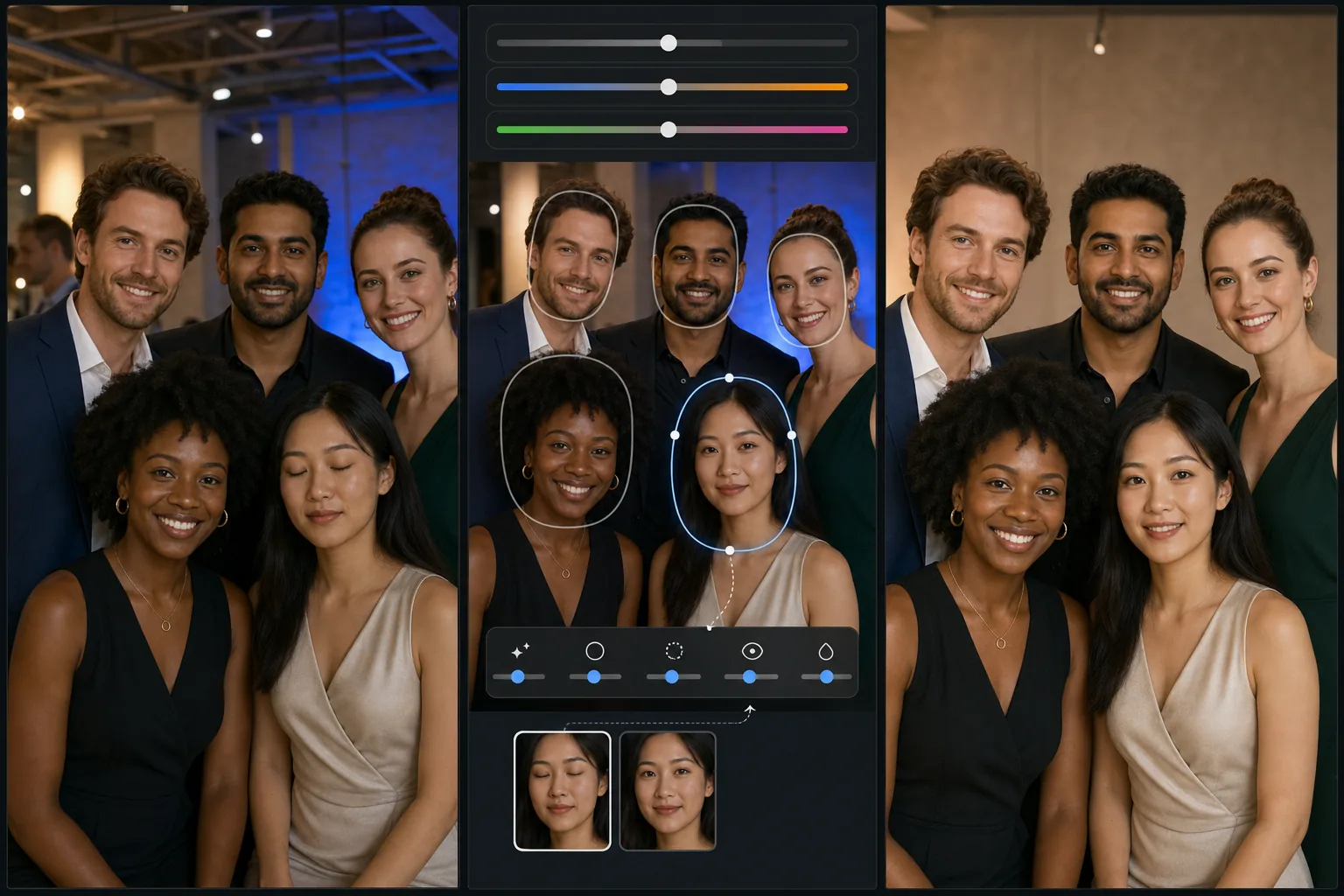
تطرح صور البورتريه الجماعية تحديات فريدة تتضاعف مع كل شخص إضافي في الإطار. هناك دائمًا من يرمش بعينيه، وقد يكون لشخص آخر تعبير غير لائق، ويمكن أن تبدو درجات البشرة مختلفة بشكل كبير في ظل الإضاءة المختلطة. يبدأ سير العمل الفعال بالتعديلات الشاملة أولاً: صحّح التعريض العام وتوازن الأبيض والتدريج اللوني قبل لمس أي وجوه فردية. هذا يؤسس خط أساس متسقًا بحيث تكون تعديلاتك لكل شخص تحسينات لا إصلاحات شاملة.
تنقيح متسق عبر المجموعة
يحدد اكتشاف الوجوه بالذكاء الاصطناعي في Magic Eraser كل شخص في المجموعة ويتيح لك تطبيق إعدادات تنقيح مسبقة على جميع الوجوه في وقت واحد مع السماح بتعديلات فردية. على سبيل المثال، يمكنك تطبيق تمريرة تنعيم خفيفة للبشرة على الجميع، ثم رفعها قليلاً على الشخص الواقف في ضوء الشمس المباشر الذي تكون مسامه أكثر وضوحًا. ويُعد تبديل الوجوه بين اللقطات الملتقطة بتتابع سريع تقنية قوية أخرى: إذا رمش أحدهم في أفضل وضعية جماعية، يمكنك إدراج وجهه من إطار آخر كانت عيناه فيه مفتوحتين وتعبيره طبيعيًا.
إزالة المشتتات بين الأشخاص
تُعد إزالة شخص غير مرغوب فيه من لقطة جماعية من أكثر الطلبات شيوعًا لصور العائلة والمناسبات. يمكن لأداة الممحاة بالذكاء الاصطناعي إزالة شخص وملء الخلفية بذكاء وأي أشخاص محجوبين جزئيًا خلفه. للحصول على أفضل النتائج، ابدأ بإزالة الشخص الأبعد عن المجموعة الرئيسية أولاً، إذ تكون للأشخاص على الحواف خلفيات أبسط لإعادة بنائها. وإذا كنت تزيل شخصًا من وسط المجموعة، فقد تحتاج إلى إجراء تعديلات طفيفة على المسافات بين الأشخاص المتبقين حتى يظل التكوين متوازنًا وطبيعي المظهر.
Key Takeaways
- ✓ابدأ بتصحيحات التعريض واللون الشاملة قبل إجراء تعديلات التنقيح لكل شخص
- ✓استخدم اكتشاف الوجوه بالذكاء الاصطناعي للتنقيح الدُفعي مع ضبط دقيق فردي لكل شخص
- ✓عند إزالة الأشخاص من اللقطات الجماعية، اعمل من الحواف نحو الداخل للحصول على أنظف النتائج