
استبدال العناصر بمحتوى مولَّد بالذكاء الاصطناعي
استبدل العناصر غير المرغوبة ببدائل مولَّدة بالذكاء الاصطناعي تطابق إضاءة المشهد ومنظوره وأسلوبه البصري.
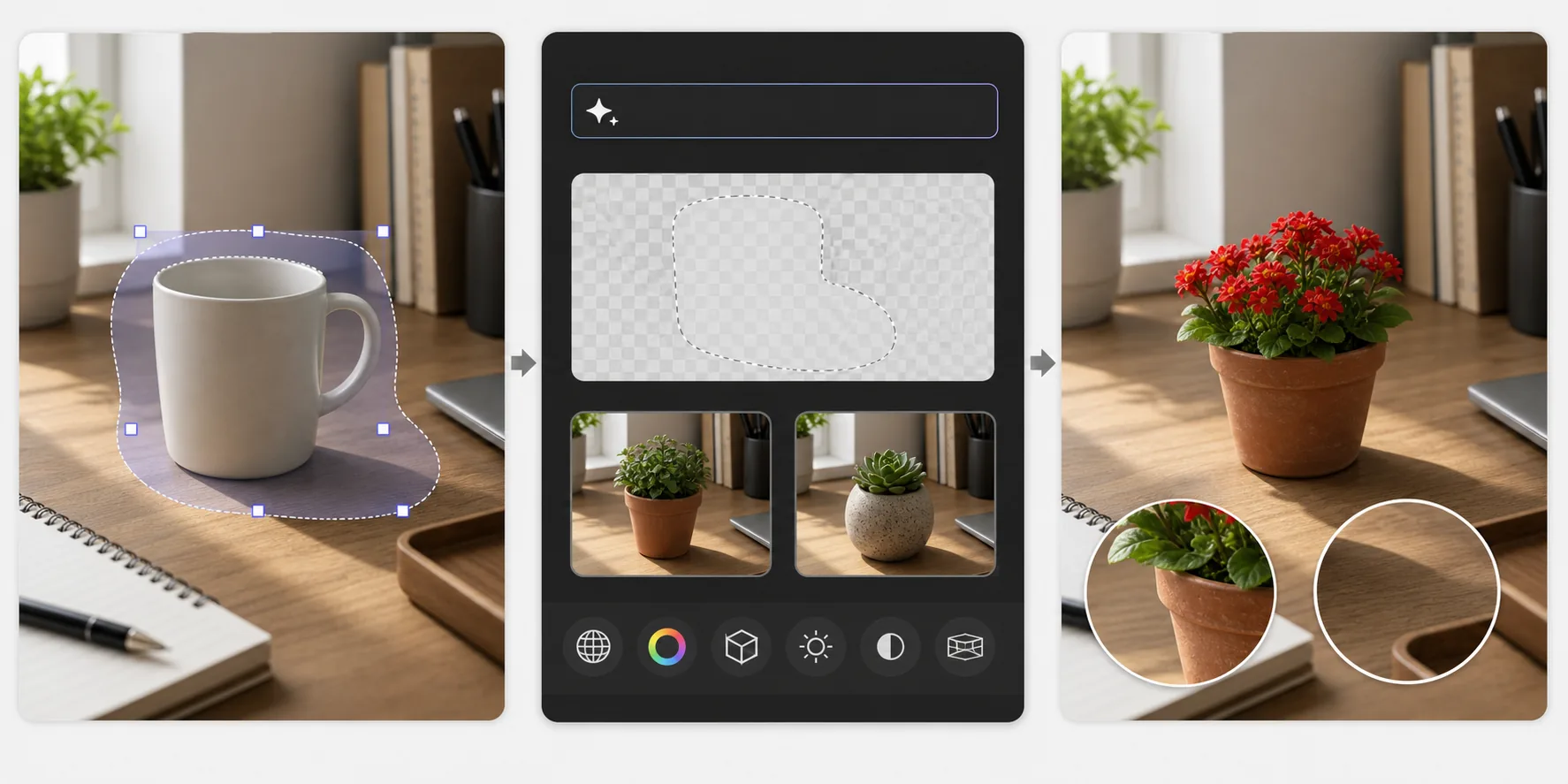
Lesson context before the long read
Review the result preview above, then scan the learning objectives below before reading the full lesson. Updated 2026-05-17.
Example visual uses an existing public asset: /content-images/generative-fill-replacing-objects-academy.webp.
Learning Objectives
- 1إنشاء تحديدات دقيقة حول العناصر المراد استبدالها للحصول على نتائج تعبئة توليدية نظيفة
- 2كتابة موجِّهات نصية فعّالة توجّه الذكاء الاصطناعي لتوليد محتوى بديل مناسب للسياق
- 3تقييم البدائل المولَّدة وتحسينها لضمان اتساق الإضاءة والظل والمنظور
استبدال العناصر مقابل إزالتها
يتجاوز استبدال العناصر الإزالة البسيطة عبر توليد بديل محدد محل العنصر الأصلي. فبدلًا من ملء منطقة محددة بالخلفية، توجّه الذكاء الاصطناعي لتوليد عنصر جديد يندمج بشكل طبيعي في المشهد. على سبيل المثال، يمكنك استبدال كوب قهوة عادي على مكتب بنبتة في أصيص، أو تبديل سماء غائمة بغروب درامي، أو تغيير لون وأسلوب قطعة أثاث. ويتعامل النموذج مع مطابقة المنظور واتجاه الإضاءة وتوليد الظل تلقائيًا بناءً على إشارات من المشهد المحيط.
كتابة موجِّهات استبدال فعّالة
تؤثر جودة تحديدك مباشرة على جودة الاستبدال. حدّد أكبر قليلًا من العنصر نفسه لتمنح النموذج مساحة لتوليد حواف وظلال طبيعية. فإذا حدّدت بإحكام شديد، فقد يكون للبديل حواف حادة أو مناطق ظل مفقودة. استخدم أداة التحديد بالحبل أو الفرشاة للأشكال غير المنتظمة والتحديد المستطيل للعناصر ذات الحدود الهندسية النظيفة. وللعناصر التي تلقي ظلالًا مرئية، أدرج الظل في تحديدك ليتمكن النموذج من توليد ظل جديد مناسب للعنصر البديل.
مراجعة المحتوى المولَّد وتحسينه
كتابة موجِّهات فعّالة مهارة تتحسن بالممارسة. كن محددًا بشأن ما تريد مع ترك مجال للنموذج للتعامل مع التفاصيل الأسلوبية. فبدلًا من الموجِّه بكلمة «زهرة» فقط، جرّب «أصيص طيني صغير بزهور إبرة الراعي الحمراء، ضوء طبيعي من اليسار». أدرج معلومات عن المادة واللون والحجم بالنسبة إلى المشهد واتجاه الإضاءة. وبعد التوليد، قارن النتيجة بالمشهد المحيط: تحقق من أن الضوء يقع على العنصر المولَّد من الاتجاه نفسه كباقي العناصر، وأن مقياس المنظور صحيح، وأن أنسجة السطح متسقة مع الجودة البصرية لبقية الصورة.
Key Takeaways
- ✓حدّد أكبر قليلًا من العنصر وأدرج الظلال لتوليد حواف وظلال طبيعية
- ✓اكتب موجِّهات محددة تصف المادة واللون والمقياس واتجاه الإضاءة للحصول على أفضل النتائج
- ✓تأكد من أن البدائل المولَّدة تطابق اتجاه إضاءة المشهد ومنظوره وجودة النسيج