
التحرير الدفعي للكتالوجات الكبيرة
وسّع نطاق تحرير صور منتجاتك إلى مئات أو آلاف وحدات التخزين باستخدام خطوط أنابيب دفعية آلية.
Lesson context before the long read
Review the result preview above, then scan the learning objectives below before reading the full lesson. Updated 2026-05-17.
Example visual uses an existing public asset: /content-images/batch-product-editing-academy.webp.
Learning Objectives
- 1بناء خط أنابيب دفعي قابل لإعادة الاستخدام بخطوات إزالة الخلفية والتحسين والتصدير
- 2تطبيق اصطلاحات تسمية ومجلدات خاصة بكل وحدة تخزين للرفع المجمّع إلى الأسواق
- 3تعيين عتبات جودة تميّز تلقائيًا الصور التي تحتاج إلى مراجعة يدوية
توسيع التحرير من منتج واحد إلى مئات المنتجات
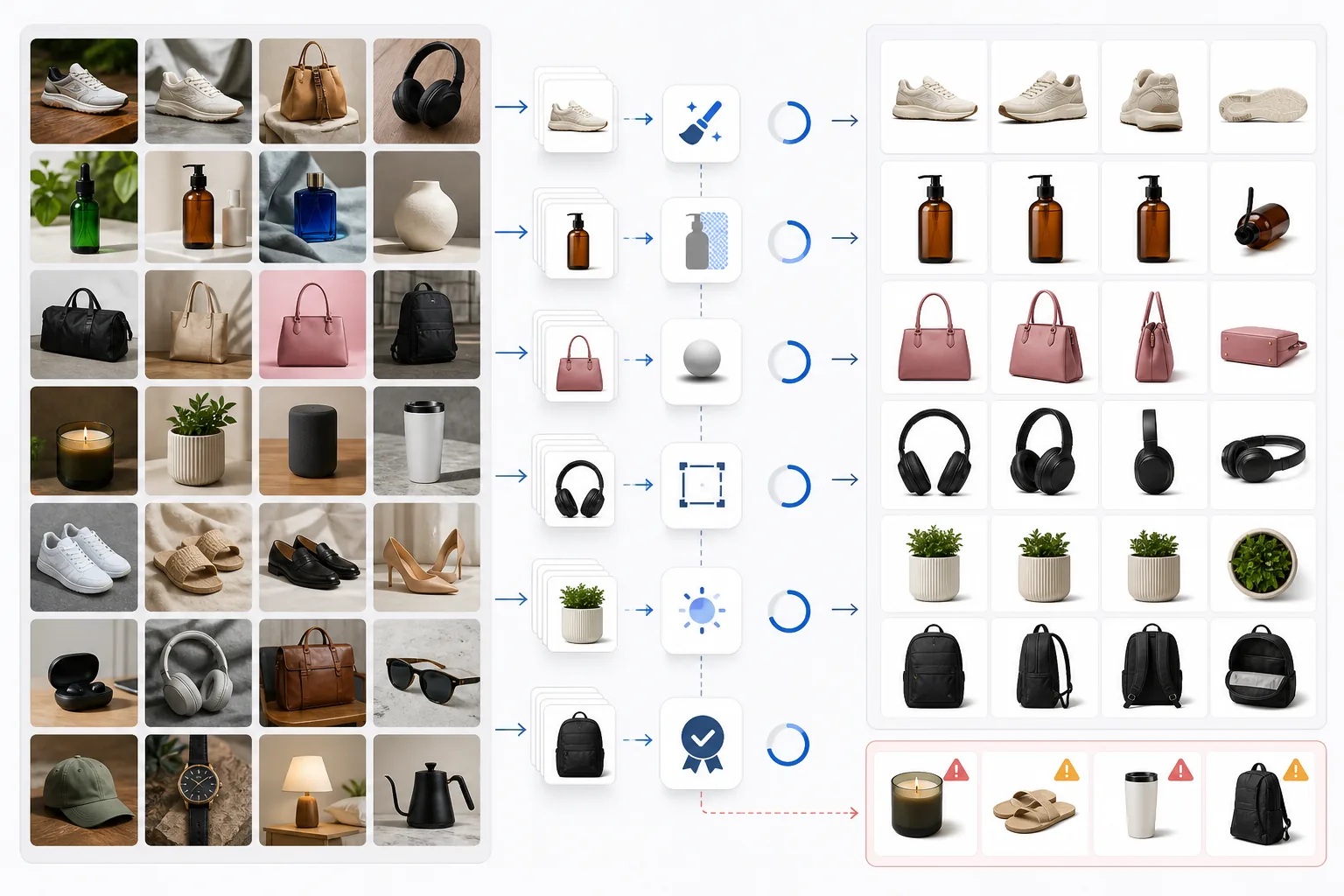
لا يمكن تحرير الكتالوجات الكبيرة التي تضم مئات أو آلاف وحدات التخزين صورة واحدة في كل مرة. يتيح لك خط الأنابيب الدفعي في Magic Eraser ربط خطوات معالجة متعددة معًا: إزالة الخلفية، والتحسين التلقائي، وإضافة الظل، وتغيير الحجم، وتحويل الصيغة، كلها تُنفَّذ بالتتابع على كل صورة في مجلد. حدّد خط الأنابيب مرة واحدة، ثم وجّهه إلى أي مجلد من صور المنتجات الخام. يمكن ضبط كل خطوة على حدة، فقد تستخدم صقلًا قويًا لعناصر صغيرة مثل المجوهرات لكن صقلًا أخف للأثاث حيث يكون القوام مرئيًا بالفعل.
الحفاظ على الاتساق عبر الكتالوج
إن تنظيم ملفات الإخراج بشكل صحيح لا يقل أهمية عن تحريرها. تتطلب معظم الأسواق اصطلاحات تسمية ملفات محددة مرتبطة بمعرّفات وحدة التخزين أو ASIN. اضبط التصدير الدفعي لإعادة تسمية كل ملف وفقًا لقالب التسمية الخاص بك، مثل SKU_main.jpg للصورة الأساسية وSKU_alt1.jpg حتى SKU_alt8.jpg للصور الثانوية. اضبط بنية مجلد الإخراج لتعكس صيغة الرفع المجمّع في سوقك بحيث يمكنك سحب المجلد بأكمله وإفلاته دون إعادة تنظيم إضافية.
أتمتة تعديلات المنتجات المتكررة
تمنع فحوصات الجودة الآلية الصور السيئة من الوصول إلى قوائمك المباشرة. عيّن عتبة دقة دنيا، وتسامحًا في بياض الخلفية (على سبيل المثال، اشتراط أن تكون قيمة بكسل الخلفية المتوسطة أعلى من 252 من 255)، ودرجة حدة للحواف. تُنقل الصور التي تقل عن أي عتبة إلى قائمة انتظار للمراجعة بينما تنتقل الصور الناجحة مباشرة إلى مجلد التصدير. تحافظ هذه البوابة الآلية على جودة كتالوج متسقة حتى عند معالجة آلاف الصور طوال الليل دون إشراف بشري.
Key Takeaways
- ✓اربط الإزالة والتحسين والظل وتغيير الحجم والتصدير في خط أنابيب واحد قابل لإعادة الاستخدام
- ✓أتمت تسمية الملفات حسب وحدة التخزين وبنية المجلد لمطابقة صيغ الرفع المجمّع في الأسواق
- ✓تعزل عتبات الجودة تلقائيًا الصور دون المستوى للمراجعة اليدوية